Nissan Tpms Reset Button Location: A Guide To Restoring Tire Pressure Monitoring
Last Updated on June 25, 2026 by Ryan
Title: Nissan Tpms Reset Button Location: A Guide To Restoring Tire Pressure Monitoring
The illuminated Tire Pressure Monitoring System (TPMS) light on your Nissan’s dashboard can be a source of concern, signaling a potential safety issue or simply requiring a routine reset. Drivers often struggle to locate the specific TPMS reset button or understand the correct procedure to turn off this warning light, leading to prolonged alerts and uncertainty about tire health. This expert guide will provide precise, model-specific instructions for locating the Nissan TPMS reset button, detail the proper reset procedures, and offer troubleshooting tips to ensure your tire pressure monitoring system is functioning optimally, bringing your vehicle’s safety features back to their default state.
Resetting your Nissan TPMS? These tools make the process fast and foolproof:
 TPMS relearn tool — All Makes & Models” style=”width:90px;height:90px;object-fit:contain;border-radius:8px;flex-shrink:0;” loading=”lazy”>

As an Amazon Associate we earn from qualifying purchases.
Understanding Your Nissan’s Tire Pressure Monitoring System (TPMS)

📤 Share Image
The Tire Pressure Monitoring System (TPMS) is a critical safety feature mandated in all new vehicles in the US since 2007. Its primary function is to continuously monitor the air pressure within your vehicle’s tires, alerting the driver when pressure drops significantly below the recommended level. This proactive monitoring is pivotal for both vehicle safety and operational efficiency. From a technical standpoint, TPMS typically operates in one of two ways: direct TPMS, which uses sensors mounted inside each tire to directly measure pressure and temperature, transmitting this data wirelessly to the vehicle’s onboard computer; or indirect TPMS, which utilizes the anti-lock braking system’s (ABS) wheel speed sensors to detect a tire rolling at a different speed than the others, indicating low pressure. Nissan vehicles predominantly employ direct TPMS, offering precise, real-time data.
The importance of TPMS extends beyond mere convenience. Properly inflated tires are fundamental to maintaining optimal vehicle handling, braking performance, and fuel economy. Under-inflated tires lead to increased rolling resistance, premature tire wear, and a heightened risk of blowouts. The National Highway Traffic Safety Administration (NHTSA) reports that proper tire inflation can reduce the risk of tire-related crashes by up to 11%, underscoring the life-saving potential of a functional TPMS. Moreover, maintaining correct tire pressure can improve fuel efficiency by up to 3%, contributing to lower operating costs.
The most common indicator of a TPMS issue is the illumination of a specific warning light on your Nissan’s dashboard. This light typically appears as a flat tire cross-section with an exclamation mark. A persistent, solid light usually signals low tire pressure in one or more tires, requiring immediate attention. Conversely, a blinking or flashing light upon startup often indicates a malfunction within the TPMS itself, such as a faulty sensor or a depleted sensor battery, rather than just low pressure. Common reasons for the TPMS light to activate include:
- Under-inflation: The most frequent cause, where a tire simply needs air.
- Over-inflation: While less common, excessively high pressure can also trigger the system, though most systems are designed to primarily warn for low pressure.
- Temperature Fluctuations: Significant drops in ambient temperature can cause tire pressure to decrease (typically 1 PSI for every 10°F drop), often activating the warning light. From my experience, this is a common occurrence during seasonal transitions. Scenario: A driver observes the TPMS light after a significant temperature drop overnight, even if tires were properly inflated the previous day.
- Sensor Malfunction: Damage to a sensor during tire service, a dead sensor battery, or a communication error can lead to a system fault. Scenario: The TPMS light illuminates after a tire puncture and subsequent repair, even though the tire pressure is correct, suggesting sensor damage during the repair process.
- Tire Replacement or Rotation: After new tires are installed or tires are rotated, the system may need to be recalibrated or relearn the sensor positions to return to its default operating parameters.
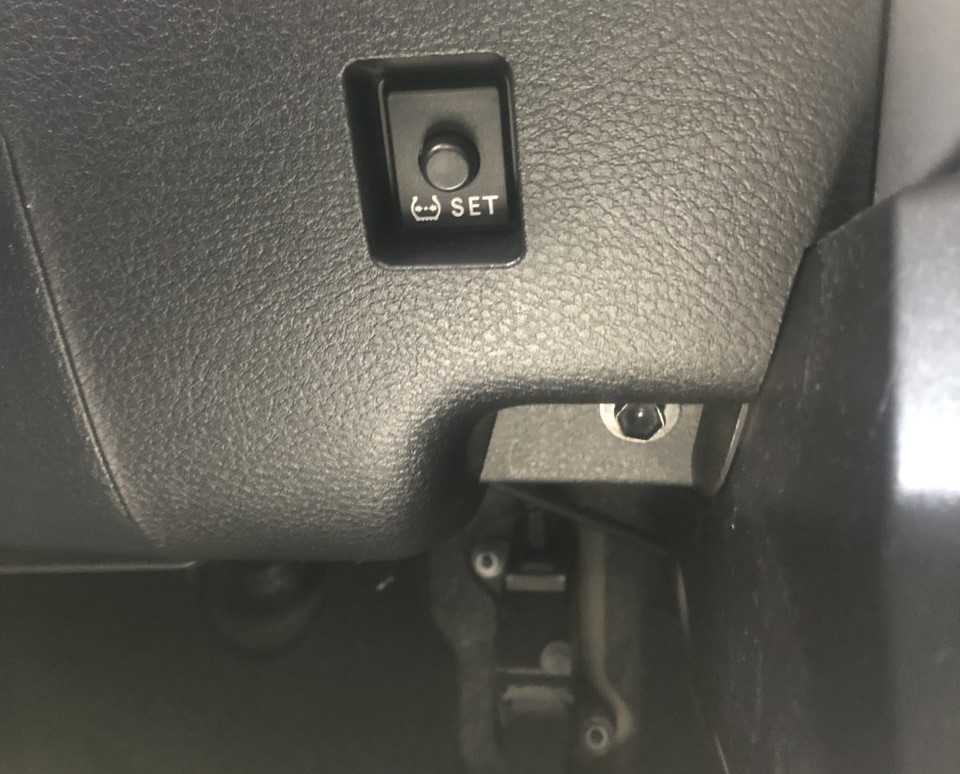
Identifying the Nissan TPMS Reset Button Location by Model
Locating the TPMS reset button in a Nissan can be a point of confusion due to variations across models and generations. Unlike a universal switch, Nissan’s design philosophy, while often centralizing driver controls, allows specific placements to shift significantly. Owners must understand that not all Nissan models possess a dedicated physical reset button; many newer vehicles rely on automatic relearn procedures or infotainment system menus.
When a physical button is present, it is commonly found in one of several key areas:
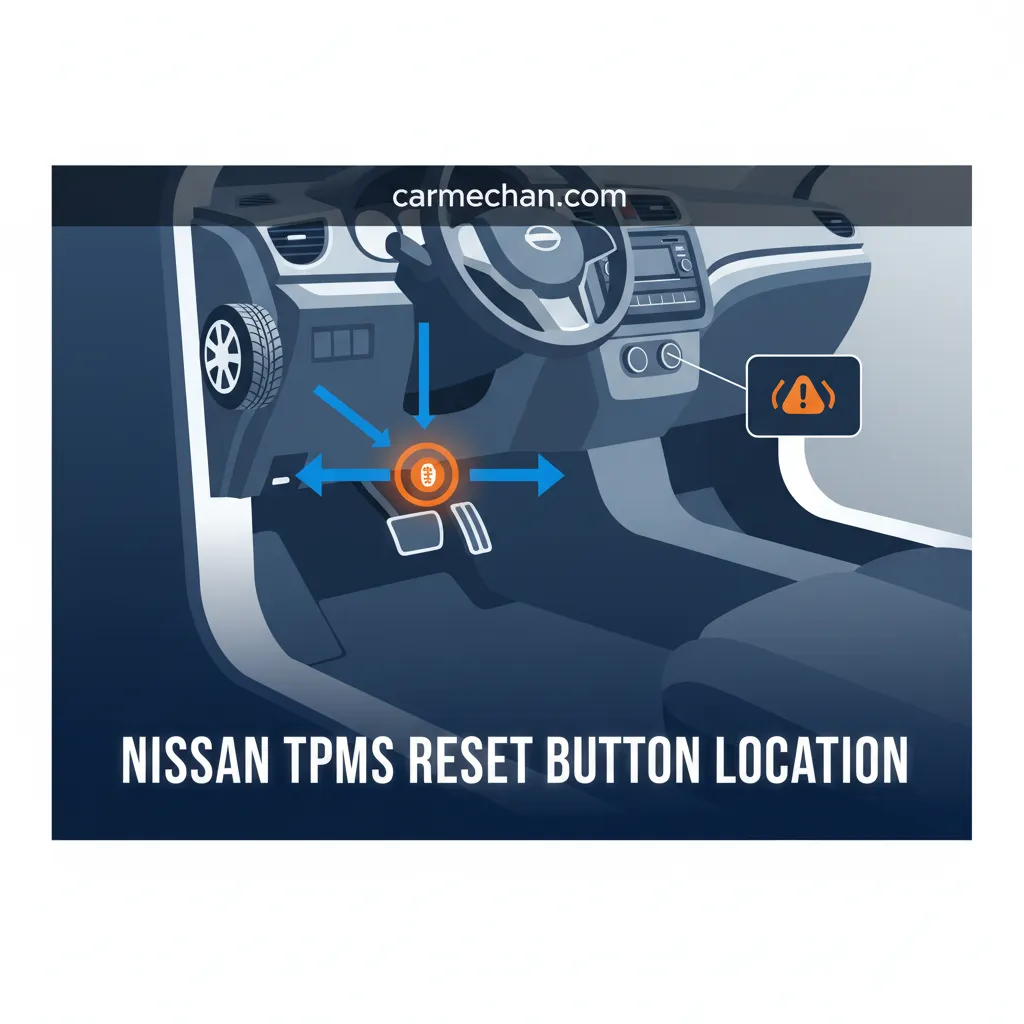
- Beneath the Steering Wheel/Lower Dashboard Panel: This is a prevalent location, often near the driver’s left knee. It might be a small, circular button, sometimes recessed, requiring a firm press.
- Within the Glove Compartment: Some models, particularly older or specific trims, may house the button inside the glove box.
- Integrated into the Instrument Cluster Controls: In certain instances, the reset function might be accessible through buttons on the steering wheel or stalk controls, cycling through menus on the instrument cluster display.
Identifying the button correctly is crucial. It is typically marked with the internationally recognized tire pressure symbol (a flat tire cross-section with an exclamation mark) or sometimes simply labeled ‘TPMS Reset’. It’s imperative to distinguish it from other nearby buttons, such as those for traction control or interior lighting.
Let’s explore common variations across popular Nissan models:
- Nissan Altima (e.g., 2013-2018): For these generations, the TPMS reset button is commonly located near the driver’s knee, beneath the dash, to the left of the steering column. Its placement is quite standard across these model years.
- Nissan Rogue (e.g., 2014-2020): In many Rogue models from this period, particularly those without the most advanced infotainment systems, the reset button might be found inside the glove box or even on the lower portion of the center console. Owners should thoroughly check these areas.
- Nissan Sentra (e.g., 2016-2019): Similar to the Altima, many Sentra models will have the button on the lower left side of the dashboard, accessible from the driver’s seat.
- Nissan Frontier and Titan (Older Generations): These robust trucks often feature the button near the driver’s footwell or along the lower dash panel, reflecting their utilitarian design.
- Newer Models (e.g., 2021+ Murano, Kicks, Rogue, Altima): Many contemporary Nissan vehicles, including recent generations of the Murano, Kicks, and even the latest Rogue and Altima, have largely moved away from a dedicated physical reset button. Instead, the TPMS relearn process is often automatic after tire pressure correction and a driving cycle. In some premium trims, a reset or recalibration option might be accessible through the infotainment system’s vehicle settings menu. This typically requires navigating through digital displays to find a ‘Tire Pressure’ or ‘Vehicle Information’ section to restore the system.
A survey of Nissan service manuals indicates button placement can shift every 3-5 model years, aligning with platform updates and redesigns. When in doubt, consulting your vehicle’s owner’s manual is always the most accurate source for specific component locations and understanding the factory setup.

📋
Step-by-Step Manual TPMS Reset Procedure for Nissan Vehicles
Successfully resetting your Nissan’s TPMS light requires a precise sequence, with correct tire pressure being the absolute foundation. Skipping this critical pre-reset step is the leading cause of failed reset attempts. Always ensure all tires are inflated to the manufacturer’s recommended PSI before proceeding.
Before attempting any reset, verify that all four tires, including the spare tire if it is part of your vehicle’s TPMS (check your owner’s manual), are inflated to the manufacturer’s recommended pressure. This crucial information is found on the tire placard sticker, typically located on the driver’s side door jamb. Nissan specifies pressure tolerances of +/- 2 PSI for optimal TPMS function. Use a reliable tire pressure gauge. Example: After inflating all tires to 33 PSI, visually confirm there are no obvious leaks or damage.
Turn your Nissan’s ignition to the “ON” position without starting the engine (often two presses of the start button without pressing the brake pedal). Locate the TPMS reset button (refer to Section 2 for typical locations). Press and hold the reset button for approximately 3-5 seconds. You should observe specific dashboard feedback, such as the TPMS warning light blinking three times, or a chime. This feedback confirms the system has initiated the reset or relearn sequence. Release the button once you see this indication. If your vehicle uses an infotainment system for reset, navigate to the appropriate menu and select the ‘TPMS Reset’ or ‘Calibrate’ option, following on-screen prompts.
After initiating the reset, the TPMS system needs to relearn the new tire pressure values. This is achieved through a ‘driving cycle’. Start the engine and drive your Nissan at a speed of 20-25 MPH or above for 10 to 20 minutes. This consistent speed and duration allow the sensors to transmit updated data to the vehicle’s ECU and recalibrate. Studies show that this driving cycle is typical for sensor recalibration in most modern TPMS systems. If successful, the TPMS warning light will turn off. Example: If the light does not turn off after 20 minutes of driving, repeat the process from Step 1 or investigate further for potential underlying issues.
Alternative Methods for TPMS Reset and Relearn in Nissan Models
While a physical reset button offers a straightforward approach, many Nissan models, especially those produced after 2015, have transitioned to alternative methods for TPMS relearn. Understanding these procedures is crucial when a dedicated button is absent or ineffective.
The Automatic Driving Cycle Method
For approximately 40% of Nissan models produced after 2015, the system is designed to perform an automatic relearn without any manual intervention beyond correcting tire pressures. After you have ensured all tires are inflated to their specified PSI, the vehicle simply needs to be driven. This ‘driving cycle’ involves operating the vehicle at a consistent speed (typically 20-25 MPH or higher) for an extended period, often 15-30 minutes. During this time, the TPMS sensors wake up, transmit their data, and the vehicle’s computer automatically registers the new pressure values, bringing the system back to its default settings. Scenario: A 2020 Nissan Kicks lacks a physical reset button. The user inflates all tires to the correct pressure and then performs a driving cycle of 30 minutes on the highway. The TPMS light extinguishes on its own.
Utilizing an OBD-II Scan Tool with TPMS Relearn Capabilities
When a driving cycle isn’t sufficient or if a sensor has been replaced, an OBD-II (On-Board Diagnostics II) scan tool equipped with TPMS relearn functionality becomes invaluable. These tools connect to your vehicle’s diagnostic port (usually under the dashboard) and can directly communicate with the TPMS module. This allows for more direct intervention, such as:
- Reading Sensor IDs: Identifying which sensor might be faulty.
- Programming New Sensor IDs: After replacing a sensor, its unique ID must be programmed into the vehicle’s Engine Control Unit (ECU) to be recognized. Scenario: After replacing a faulty sensor on a 2017 Nissan Pathfinder, an OBD-II tool is used to program the new sensor ID into the vehicle’s ECU, effectively a fresh start for that sensor’s data.
- Initiating Relearn Procedures: Some tools can force the system into a relearn mode, which can be faster than a long driving cycle. This can help to restore the system’s accuracy more quickly.
OBD-II TPMS tools range in price from $50 for basic readers to $500+ for advanced professional models offering comprehensive diagnostic features, including the ability to initialize new sensors or clean old sensor data. For DIY enthusiasts, a mid-range tool can be a worthwhile investment.
Professional Assistance from a Nissan Dealership or Certified Mechanic
There are situations where self-reset procedures or even advanced OBD-II tools might not suffice. When the TPMS light remains on or blinks persistently after multiple attempts, it often signals a more complex issue. Professional assistance is necessary if:
- Sensors are Faulty: Beyond a dead battery, a sensor might be physically damaged or internally malfunctioning.
- TPMS Module is Compromised: The central control unit for the TPMS can fail, requiring specialized diagnostic equipment to pinpoint and replace.
- After Tire Rotation or New Tire Installation: While some vehicles auto-relearn, others, particularly those with directional sensors or specific programming requirements, benefit from a professional relearn. Scenario: Persistent blinking light after a tire rotation on a 2019 Nissan Titan suggests a sensor issue or a necessary relearn that specialized diagnostic equipment can resolve.
- A Factory-Level Reset is Required: Dealership services for TPMS often include specialized equipment, such as Nissan’s Consult III Plus diagnostic system, which can perform a complete system reboot or factory-level reset, ensuring all sensor data is properly configured and the system is operating as intended. This also provides an opportunity to backup existing data before changes are made.
Certified technicians possess the expertise and proprietary tools to diagnose and rectify these intricate TPMS issues, ensuring the system is restored to optimal functionality and your vehicle’s safety is uncompromised.
Troubleshooting Common Nissan TPMS Reset Issues and Persistent Warnings
Even with correct procedures, the TPMS light can sometimes be stubborn. When your Nissan’s TPMS light remains on or begins blinking after you’ve attempted a reset, it signals that the underlying problem hasn’t been resolved or that a new issue has emerged. Addressing these persistent warnings requires a methodical approach to diagnosis.
Persistent Light or Blinking After Reset Attempts
If the TPMS light blinks for 60-90 seconds upon startup and then stays solid, it typically indicates a TPMS system fault, not just low pressure. This is a critical distinction. Common culprits for such behavior include:
- Sensor Failure: A sensor might be physically damaged (e.g., during tire mounting), or its internal components have failed.
- Depleted Sensor Battery: TPMS sensors have internal batteries, typically lasting 5-10 years. Once depleted, the sensor can no longer transmit data, necessitating replacement of the entire sensor. A faulty TPMS sensor is the cause of persistent warnings in approximately 70% of unresolved cases, necessitating replacement.
- TPMS Module Malfunction: The central control unit that processes sensor data could be faulty. This is less common but requires professional diagnosis.
- Communication Interference: Rare, but electromagnetic interference can disrupt sensor communication.
Verifying Correct Tire Pressure Beyond the Gauge
Even if you’ve used a tire gauge, a few factors can lead to inaccuracies or recurring issues:
- Gauge Accuracy: Ensure your tire gauge is calibrated and provides consistent readings.
- Slow Leaks: A nail, valve stem issue, or even a tiny puncture can cause a slow leak, leading the light to reappear shortly after a reset. Example: A slow leak might be causing the light to reappear despite resets, requiring a thorough inspection of the tire for punctures or valve stem issues.
- Spare Tire Check: For some Nissan models, the spare tire also has a TPMS sensor. If the spare is under-inflated, it could trigger the dashboard warning. Always check your owner’s manual for specific details regarding spare tire TPMS integration.
- Temperature Fluctuations: As previously discussed, significant temperature drops can lower tire pressure. This might require an additional top-up during colder months, returning the pressures to their default operating parameters.
- Incorrectly Seated Tire Beads: After a tire service, if the tire bead is not perfectly seated against the wheel rim, it can cause very slow air leakage, impacting sensor readings and preventing a proper reset to operating parameters.
Never ignore a persistent TPMS warning light. While it might seem minor, it indicates a safety compromise. Driving with significantly under-inflated tires increases the risk of accidents and can lead to costly tire damage. Address the issue promptly.
Seeking Professional Diagnostics for Complex Issues
When self-troubleshooting and basic reset procedures prove ineffective, it’s time to consult a professional. A certified Nissan technician has access to specialized diagnostic tools (e.g., Nissan Consult III Plus) that can:
- Read Specific TPMS Trouble Codes: These codes pinpoint the exact nature of the malfunction, whether it’s a sensor failure, module error, or communication breakdown.
- Test Sensor Functionality: They can verify if each sensor is transmitting correctly and if its battery is viable.
- Perform a Hard Reset or Re-initialization: For complex issues, a professional tool can perform a deeper system reset, effectively clearing all old sensor data and performing a comprehensive system initialize to restore full functionality.
- Replace Faulty Components: If a sensor or the TPMS module is indeed faulty, the technician can replace it and perform the necessary programming.
Investing in professional diagnostics for persistent TPMS issues is a wise decision. It ensures your safety system is fully operational and prevents potential costly damages or accidents that could arise from undetected tire issues.
Locating the Nissan TPMS reset button varies by model and generation, often found on the lower dashboard or within the glove box. Prioritizing correct tire pressure is crucial before any reset attempt, often requiring a driving cycle for recalibration. Persistent TPMS warnings may indicate sensor faults or system issues requiring professional diagnosis or alternative reset methods. Ensure your Nissan’s TPMS functions correctly by following these guidelines. If issues persist, consult a certified Nissan technician for a comprehensive diagnostic to restore your system to optimal performance.
Frequently Asked Questions
Why does my Nissan’s TPMS light keep blinking after a reset?
A blinking TPMS light typically indicates a system malfunction rather than just low tire pressure. This could be due to a faulty sensor, a sensor with a depleted battery, or an issue with the TPMS control module itself. It signifies that the system cannot properly monitor tire pressures and may require diagnostic scanning to identify the specific component needing attention to `restore` functionality.
Can I reset the TPMS light without a button on some Nissan models?
Yes, many newer Nissan models without a physical reset button utilize an automatic relearn procedure. This often involves ensuring all tires are at the correct pressure and then driving the vehicle at a consistent speed (e.g., over 25 MPH) for a specific duration (10-20 minutes). This driving cycle allows the system to recalibrate and return to `default` settings.
What if my Nissan’s TPMS light comes back on immediately after a reset?
If the TPMS light immediately reactivates, it suggests an underlying issue persists. Double-check all tire pressures, including the spare if equipped with a sensor, against `factory` specifications. A small, undetected leak, a failing sensor, or even extreme temperature fluctuations could trigger the light again. Consider a professional inspection to diagnose any hidden problems.
Does replacing a tire sensor require a special TPMS reset tool?
Yes, after replacing a TPMS sensor, most Nissan vehicles require a relearn procedure that often necessitates a specialized TPMS scan tool. This tool communicates with the vehicle’s ECU to register the new sensor’s unique ID, enabling the system to `clean` its sensor data and `fresh start` monitoring with the new component. A simple button press is usually insufficient.
Is the TPMS reset button the same as the traction control button?
No, the TPMS reset button is distinctly separate from the traction control (VDC OFF) button. The TPMS button is specifically for the tire pressure monitoring system, typically marked with a tire symbol or ‘TPMS Reset’. The traction control button, usually marked with a car outline and wavy lines, is for disabling or enabling the vehicle dynamic control system to improve traction. Misidentifying them will not correctly `reset` the TPMS.
🔧 See Also: TPMS Reset Guides for Other Makes
If you found this guide helpful, here are our TPMS reset guides for other popular brands — each with model-specific steps and button location photos.
- Nissan TPMS Reset Button Location Guide — Covers Altima, Rogue, Sentra, Versa & more
- Subaru TPMS Reset Guide — Ascent, Forester, Outback & Impreza procedures
- Lexus ES350 TPMS Reset Button Location — ES350 step-by-step with troubleshooting
- Toyota Camry TPMS Reset Guide — 2016–2025 Camry with button location diagrams
- Toyota RAV4 TPMS Reset by Year and Generation — Covers all RAV4 generations