Toyota Camry TPMS Reset Button Location: Step-by-Step 2026
Last Updated on May 21, 2026 by Ryan
The toyota camry tpms reset button location changes depending on your model year — and Toyota never made this obvious. On Camrys built before 2013, there is a physical button tucked under the steering column or beside the glove box. On 2013–2017 models, some trims have it hidden near the glove box while others have no button at all. On 2018 and newer Camrys, the reset happens entirely through a menu on your instrument cluster. This guide tells you exactly where to look for your specific year, so you are not hunting around the cabin for something that may not exist.
Where Is the TPMS Reset Button on Older Camrys (2007 to 2012)


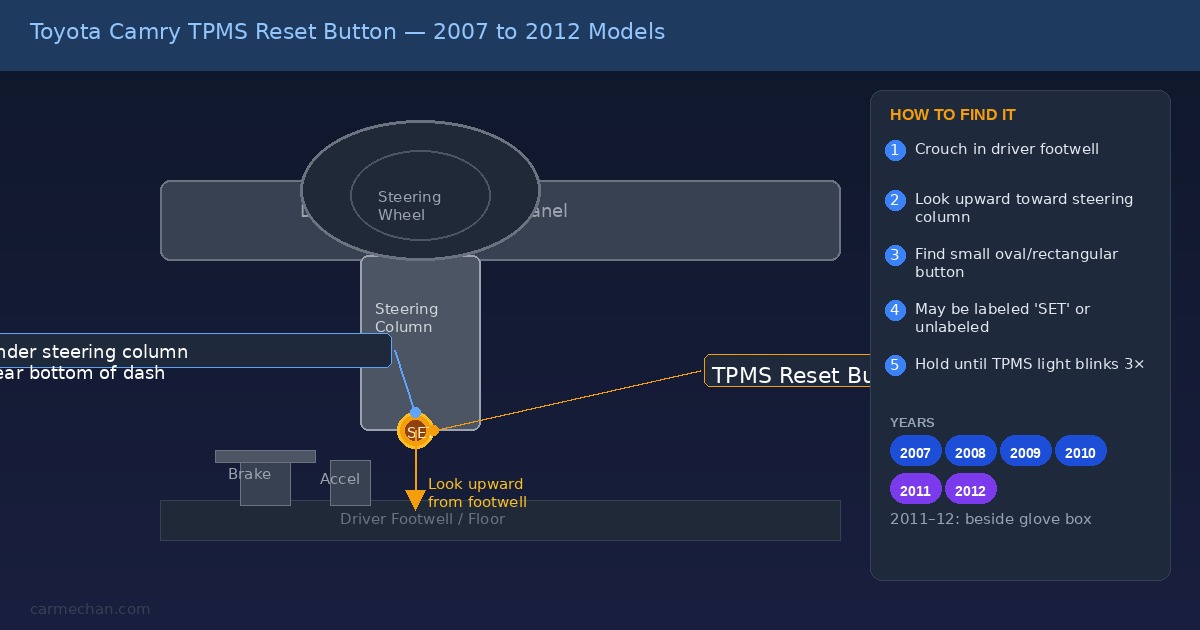
On Camrys from 2007 through 2012, Toyota used a physical TPMS reset button. The exact spot varies slightly by year and trim, but it is always in one of two places.
For most 2007–2010 Camrys, the button is located far under the steering column — not on the dash face, but at the very bottom of the dash assembly near the brake and clutch pedal area. The easiest way to find it is to crouch down by the driver’s footwell and look upward toward the steering column. You will find a small oval or rectangular button, sometimes labeled “SET” or left unlabeled.
For 2011–2012 Camrys, the button moved slightly. Open the glove box fully, then look to the left side of the glove box — not inside it, but along the left edge of the glove box surround when the door is open. There is a small recessed button hidden under a lip of plastic trim. You may need a flashlight to spot it clearly.
How to Use the Button Once You Find It
- Inflate all four tires to the correct PSI (check the sticker on your driver’s door jamb — typically 33–35 PSI for a Camry)
- Turn the ignition to the ON position without starting the engine (press the Start button once without pressing the brake pedal)
- Press and hold the TPMS reset button until the TPMS warning light blinks slowly three times
- Release the button, then turn the ignition off
- Start the engine and drive for a few minutes — the light should extinguish within 20 minutes of driving
This same general process applies to the Lexus ES350 TPMS reset, since the ES350 shares the same Toyota platform and button behavior from this era.
What Happens When There Is No Button on 2013 to 2017 Camrys


This is where most Camry owners get confused. On 2013–2015 Camrys, particularly the LE trim, Toyota removed the physical TPMS reset button on many configurations. You are not missing it — it genuinely is not there.
Some 2013–2015 XLE and SE trims do have the button. If your Camry has it, open the glove box fully and look to the left — you will see a recessed rectangular slot, sometimes with a small flip-up piece of plastic covering it. The button is behind that cover.
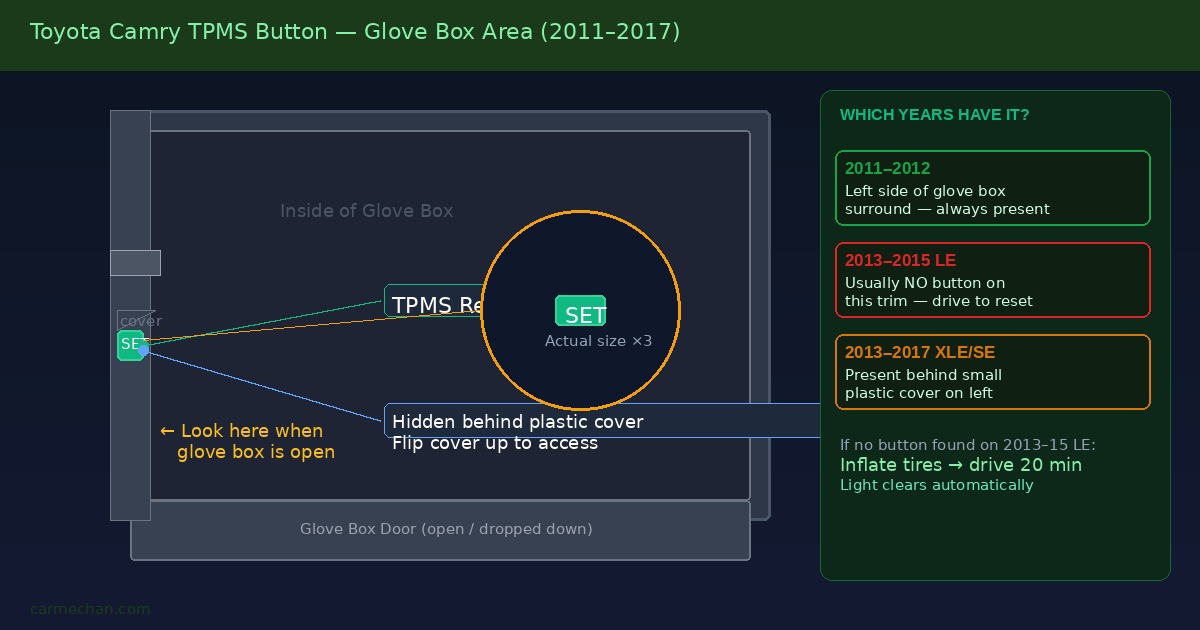
If your 2013–2017 Camry has no button at all, the reset process is simpler than you might think. Inflate all tires to the correct pressure, then drive normally. The direct TPMS system reads pressure from sensors in each wheel automatically. After driving at highway speed for roughly 10–20 minutes, the system recalibrates and the warning light goes off on its own. No button press required.
This is the same no-button behavior found on the Nissan TPMS reset guide for certain Nissan trims that also removed the physical switch in this generation.
When the Light Will Not Go Off on 2013 to 2017 Models
If you have inflated the tires correctly and driven for 20 minutes and the light is still on, one of the TPMS sensors may be faulty or its battery may be dead. Each wheel sensor has a battery life of approximately 5–10 years. A dead sensor requires replacement — inflating the tire will not resolve it.
You can confirm a bad sensor by having the system scanned with a TPMS diagnostic tool at any tire shop or Toyota dealership. The scan takes under five minutes and tells you exactly which wheel has the problem.
How to Reset TPMS on 2018 and Newer Camrys


Starting with the 2018 Camry redesign, Toyota eliminated the physical reset button entirely and moved the TPMS reset function into the instrument cluster menu system. There is no button to find on these models.
Here is the exact menu path using your steering wheel controls:
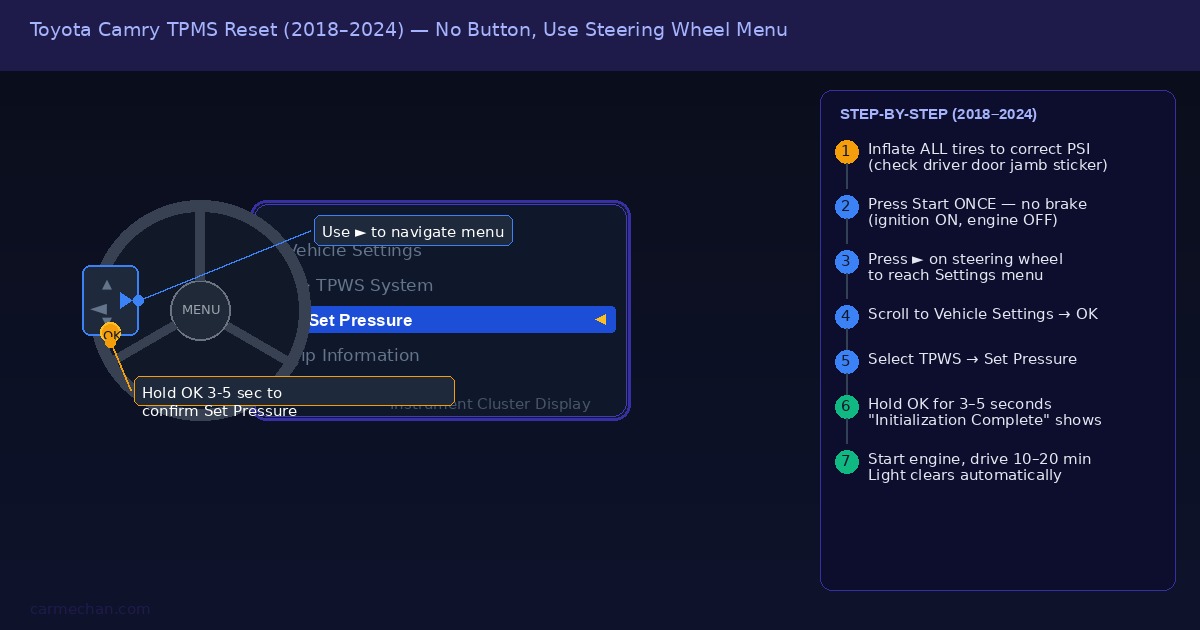
- Inflate all tires to the correct PSI (found on the door jamb sticker)
- Press the Start button once without pressing the brake — ignition ON, engine OFF
- Use the right arrow button on your steering wheel to navigate to the Settings menu in the instrument cluster display
- Scroll down to Vehicle Settings and press OK
- Select TPWS (Tire Pressure Warning System)
- Highlight Set Pressure and press and hold OK for 3–5 seconds
- The display will show “Initialization Complete” when done
- Start the engine and drive — the TPMS light will clear within a few minutes
This menu-based reset is similar to how the Toyota RAV4 TPMS reset works on the same generation of Toyota vehicles — same menus, same steps.
Step-by-Step Reset Instructions for Each Generation
Use this table to go directly to the right method for your year:
| Camry Year Range | Button Location | Reset Method |
|---|---|---|
| 2007–2010 | Under steering column, near pedals | Hold button until light blinks 3x |
| 2011–2012 | Left side of glove box surround when open | Hold button until light blinks 3x |
| 2013–2015 (LE trim) | No button | Inflate tires correctly, drive 20 min |
| 2013–2017 (XLE/SE trim) | Left of glove box, under plastic cover | Hold button until light blinks 3x |
| 2018–2024 | No button — use steering wheel menu | Settings → Vehicle Settings → TPWS → Set Pressure |
If you are not sure of your exact trim level, check the sticker on the driver’s door jamb — it lists the model, trim, and build date.
Why Your TPMS Light Stays On After Reset
Incorrect tire pressure. The most common cause. Toyota recommends checking cold tire pressure — meaning the car has been parked for at least three hours. Tire pressure rises when the car has been driven, which gives a false high reading. Check pressure when cold and compare to the door jamb sticker.
A faulty or dead sensor. Each wheel has an individual sensor with a battery that lasts 5–10 years. If one sensor’s battery is dead, the system triggers a warning that no amount of inflating or button-pressing will clear. A scan at any shop tells you which sensor is the problem.
Spare tire pressure. On some Camry generations, the spare tire also has a TPMS sensor. If the spare is low or its sensor is dead, it can trigger the warning light. Inflate the spare to 60 PSI (standard for a compact spare) and see if the light clears.
After a wheel swap or tire rotation. If you recently had new tires installed or had a rotation done, the shop may need to re-register the sensor IDs to your car’s TPMS module using a scan tool. This is different from a standard reset — it requires programming equipment. The Nissan Rogue TPMS guide covers this same sensor registration issue for comparison.
Similar issues come up with other brands — the Kia Telluride TPMS reset and the 2018 Subaru Outback TPMS reset both require sensor re-registration after tire swaps.
5 Quick Answers About Camry TPMS Reset
Does every Toyota Camry have a TPMS reset button?
No. Camrys built from 2007 to 2012 and some 2013–2017 trims have a physical button. The 2013–2015 LE trim and all 2018+ models do not. On 2018+ cars, the reset is done through the instrument cluster menu using steering wheel controls.
What does the TPMS light look like on a Camry?
It is a yellow horseshoe-shaped symbol with an exclamation mark inside, sitting at the bottom of the horseshoe. When the light comes on steady, a tire is low. When it flashes for about 60–90 seconds then stays on, there is a sensor fault rather than a pressure issue.
Can I reset the TPMS without inflating the tires first?
No. The reset registers the current tire pressures as the new baseline. If you reset with low tires, the system will accept the low pressure as correct and the light may go off temporarily — but the warning will return as soon as the system detects the deviation. Always inflate to the correct PSI before resetting.
How long does it take for the TPMS light to go off after reset?
On models with a reset button, the light should blink three times immediately during the reset procedure, then go out within a few minutes of driving. On buttonless models (2013–2015 LE, 2018+), it typically clears within 10–20 minutes of normal driving at various speeds.
Does disconnecting the battery reset the TPMS on a Camry?
It temporarily clears stored codes but does not properly reset the TPMS baseline pressure. The light will likely return after driving. Use the correct reset method for your model year — battery disconnection is not a reliable fix for TPMS issues.
Finding the toyota camry tpms reset button location comes down entirely to your model year. Pre-2013 Camrys have a physical button under the steering column or beside the glove box. Models from 2013 to 2017 vary by trim — some have it, some do not. The 2018 and newer Camry replaced the button with a steering wheel menu entirely. Inflate to the correct PSI for your vehicle, follow the right reset method for your year, and the TPMS light should clear within one short drive. If it does not, a sensor scan is the next step — not another reset attempt.
🔧 See Also: TPMS Reset Guides for Other Makes
If you found this guide helpful, here are our TPMS reset guides for other popular brands — each with model-specific steps and button location photos.
- Nissan TPMS Reset Button Location Guide — Covers Altima, Rogue, Sentra, Versa & more
- Subaru TPMS Reset Guide — Ascent, Forester, Outback & Impreza procedures
- Lexus ES350 TPMS Reset Button Location — ES350 step-by-step with troubleshooting
- Toyota Camry TPMS Reset Guide — 2016–2025 Camry with button location diagrams
- Toyota RAV4 TPMS Reset by Year and Generation — Covers all RAV4 generations