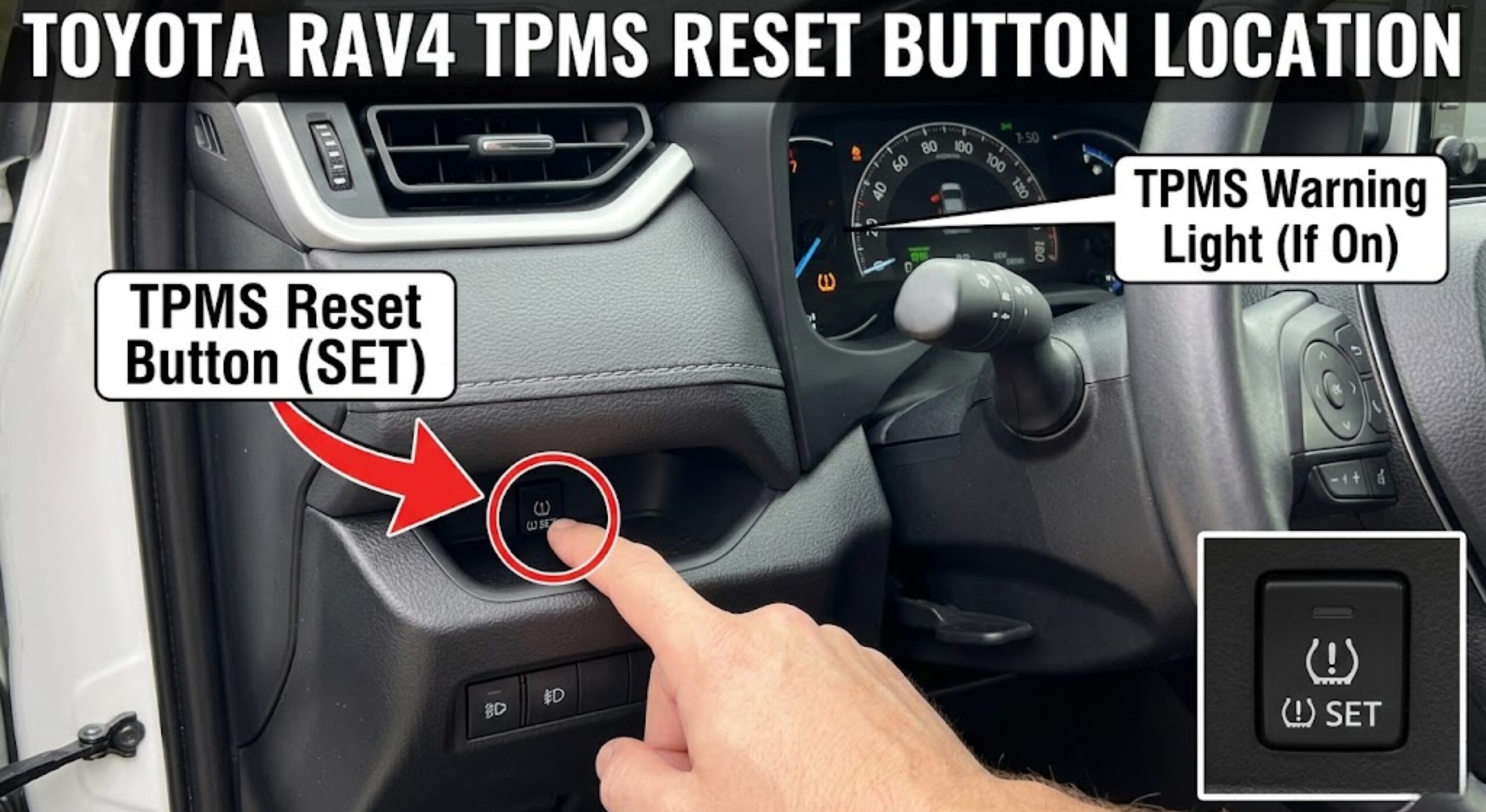
Toyota RAV4 TPMS Reset Button Location by Year and Generation
Last Updated on June 25, 2026 by Ryan
The Toyota RAV4 TPMS reset button location depends entirely on which generation you have — and one generation has no physical button at all. Most RAV4 owners searching for this button are looking in the wrong place, or on the wrong generation entirely.
Affiliate disclosure: We may earn a commission when you buy through links on this page, at no extra cost to you. Our recommendations are based on the comparison criteria and research explained below.
This guide maps the correct reset method to your exact RAV4 year, so you follow only the steps that apply to your vehicle. Find your year in the sections below, skip everything else, and you’ll have that light off in under 10 minutes.
Why Your RAV4 TPMS Reset Method Depends on the Year


Toyota did not use the same TPMS system across all RAV4 generations. The 4th generation (2013–2018) ships with a small physical reset button hidden behind the lower dashboard. The 5th generation (2019–2024) removed that button entirely and replaced it with a menu-based initialization process. The 3rd generation (2006–2012) uses a direct TPMS system with in-wheel sensors, but has no dedicated reset button — the system resets differently.
This is why generic TPMS guides fail RAV4 owners. A method that works perfectly on a 2016 model does nothing on a 2021. Toyota eliminated the physical button starting with the 2019 RAV4 in favor of a menu-based reset system.
Before running any reset, confirm which generation you have. The fastest way: check the driver’s door jamb sticker — the model year is printed there. Your VIN’s 10th character also identifies the model year (A = 2010, D = 2013, J = 2018, K = 2019, and so on).
Three Variables That Determine Your Reset Method



Three things determine which reset method applies to your RAV4.
- Your model year (generation). This is the primary branch. 2013–2018 = physical button. 2019–2024 = dashboard menu. 2006–2012 = direct sensors, no dedicated reset button.
- Tire pressure is correctly set before you start. The most common tire pressure for a Toyota RAV4 is between 30 and 35 PSI for all four tires. Check the sticker on your driver’s door jamb — it shows the exact recommended PSI for your specific model. Never start a reset with tires at the wrong pressure; the system will not clear even if you follow every step correctly.
- Don’t forget the spare. Multiple RAV4 owners have spent hours troubleshooting a TPMS light only to find the spare tire was the problem. Check all five tires, including the spare, before starting the reset procedure.
Once you know your generation, go directly to that section below.
How To Reset TPMS on a 4th Gen RAV4 2013 to 2018


If your RAV4 is a 2013 to 2018 model, you have a physical TPMS reset button — but it is notoriously difficult to find.
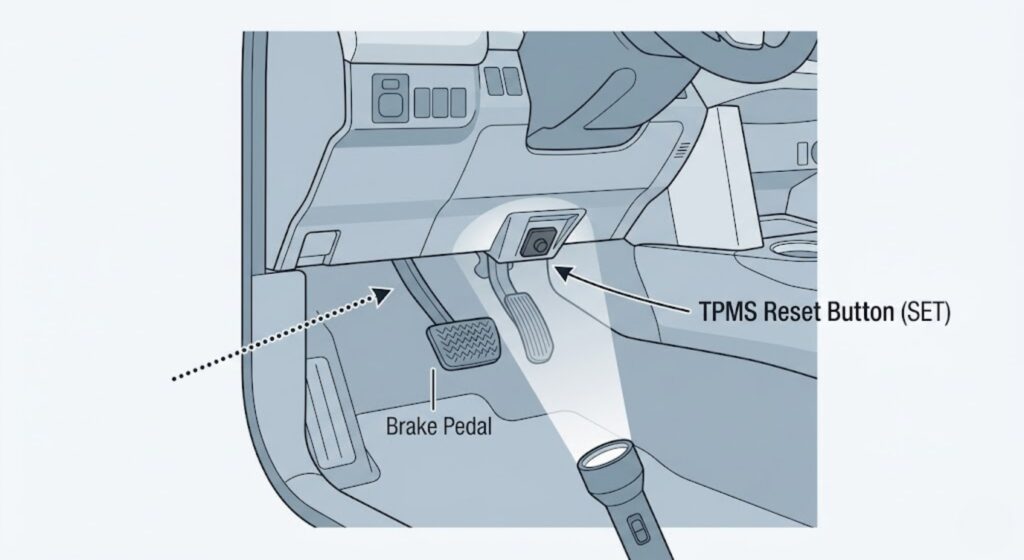
Where Is the TPMS Reset Button on a 4th Gen RAV4?
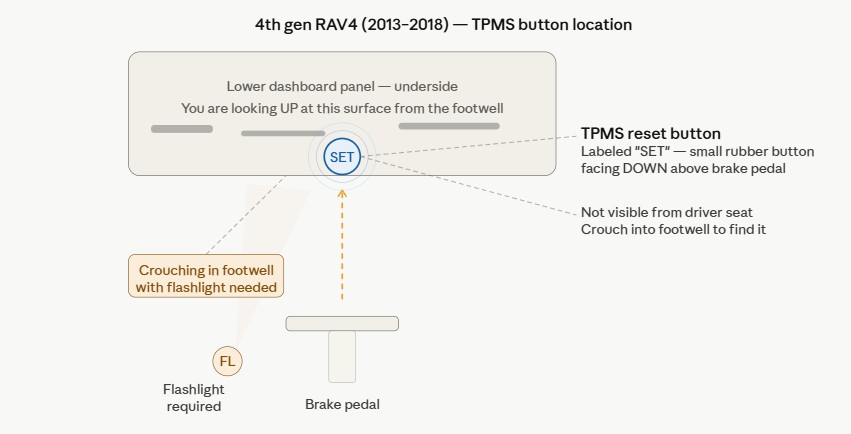
The button is not where the owner’s manual diagram makes it appear. The TPMS reset button is behind the lower instrument panel, up underneath, pretty much directly above the brake pedal. You will likely need to crouch down in the footwell with a flashlight and look up toward the underside of the dashboard above the brake pedal to spot it. You need to have your head down by the brake pedal to see it — it’s really hard to find just by feeling around.
The button is small, rubber, and typically labeled “SET” or with a tire pressure icon. It is not accessible by reaching from the driver’s seat — you have to physically look for it from below.
Step-by-Step Reset Procedure
- Inflate all four tires (and the spare) to the recommended PSI shown on your door jamb sticker.
- Park the vehicle. Turn the ignition to the ON position without starting the engine. On push-button models, press the Engine Start/Stop button twice without pressing the brake.
- Crouch into the footwell and locate the TPMS reset button above the brake pedal.
- Press and hold the button until the TPMS warning light on the dashboard blinks three times — this usually takes around 3 to 5 seconds.
- Release the button.
- Start the engine and drive at 25 mph or above. Start the car and wait 20 minutes for the sensor to refresh. The warning light will go off on its own once the sensors confirm correct pressure.
If the light blinks three times when you hold the button, the reset registered correctly. If it does not blink, the button was not held long enough — try again, and hold for a full 5 seconds before releasing.
How To Reset TPMS on a 5th Gen RAV4 2019 to 2024
If your RAV4 is a 2019 or newer model, there is no physical TPMS reset button. Searching for one will only waste your time.

Why the 5th Gen RAV4 Has No Physical Button
Toyota redesigned the TPMS initialization process for the 5th generation. The reset is handled entirely through the vehicle’s information display using the steering wheel buttons.
5th gen RAV4 (2019–2024) TPMS reset — four-step dashboard menu path with no
physical button
Ignition ON
Press Engine Start/Stop twice, no brake. Engine stays off.
Gear icon
Use ◄► buttons to reach the Gear icon on the info display.
Vehicle settings
Use ▲▼ to highlight Vehicle Settings. Press and hold OK.
TPWS — initialize
TPWS is pre-highlighted. Press and hold OK to confirm.
yet. Inflate all four tires first, then return to this menu.
How To Use the Dashboard Menu Reset
- Inflate all tires to the correct PSI shown on the driver’s door jamb sticker.
- Park the vehicle. Press the Engine Start/Stop button twice without pressing the brake (ignition ON, engine off).
- Use the navigation buttons to go to the Gear icon on the info display, then use the up/down buttons to toggle to “Vehicle Settings” and press and hold OK/Enter until another menu appears. “TPWS” should already be highlighted — press and hold OK/Enter again.
- Follow the on-screen prompt to initialize the tire pressure warning system.
- Start the engine and drive normally. The system recalibrates while driving and the light clears after approximately 20 minutes at speeds above 25 mph.
If the TPWS option appears greyed out in the menu, your tire pressure is not at the correct level yet. Adjust all tires to the door jamb PSI first, then return to the menu.
The RAV4 Hybrid and RAV4 Prime (2019+) follow the same menu-based process. The menu path and initialization steps are identical across gas and hybrid 5th gen models.
How To Reset TPMS on a 3rd Gen RAV4 2006 to 2012

The 2006 to 2012 RAV4 uses a direct TPMS system with pressure sensors built into the valve stems of each wheel. The 2006 to 2012 RAV4s don’t have a TPMS reset button. There is no button and no menu option — the system resets on its own once pressure is corrected.
Here is the correct process for 3rd gen owners:
- Inflate all four tires (and the spare) to the PSI shown on the driver’s door jamb sticker.
- Start the vehicle and drive normally.
- Drive for at least 10 minutes at speeds above 16 mph to complete the relearn process. The sensors will detect the correct pressure during driving and the light will go off automatically.
If you only corrected one or two tires, check all five again — including the spare. A single underinflated tire will keep the light on even when the others are correct.
If the light stays on after 20 minutes of driving at correct pressure, the issue is not pressure — it is likely a sensor fault. Move to the edge cases section below.
When the TPMS Light Stays On After the Reset
If the TPMS light stays on after following the steps above, one of four things is happening.
RAV4 TPMS warning light guide — solid light means low tire pressure you can
fix yourself, flashing light means sensor system fault requiring a mechanic
Solid light
Stays on continuously. This is a pressure warning — one or more tires are
below threshold.
- Tire pressure is too low
- Spare tire underinflated
- Cold weather dropped pressure
- Reset not completed correctly
Flashing then solid
Blinks ~60 sec at startup then stays on. This is a system malfunction —
not a pressure issue.
- Sensor battery dead (5–10 yr life)
- Sensor lost communication
- Unregistered after tire swap
- Sensor physically damaged

- Tire pressure is still incorrect. This is the most common cause. Recheck all five tires with a gauge — not just by eye. Tires lose about 1 PSI per 10°F drop in temperature, so a seasonal change may have dropped pressure below threshold even if tires looked fine.
- The reset procedure did not complete. On 4th gen models, the button must blink three times — not one, not two. On 5th gen models, the menu confirmation must appear on screen. If either step was missed, the system was not initialized. Repeat the procedure from the start.
- A TPMS sensor battery has died. A flashing TPMS light that stays on solid after about a minute indicates a malfunction in the TPMS system itself — most often caused by a dead sensor battery or a damaged sensor. TPMS sensor batteries typically last 5 to 10 years. If your RAV4 is over seven years old and the light flashes at startup then stays solid, this is the likely cause.
- Sensors lost registration after a tire rotation or swap. When tires are rotated on 4th gen models, the system may need time to relearn which sensor is in which position. Drive for 20 minutes after rotation before assuming the system has a fault.
RAV4 TPMS Reset Method by Year at a Glance
Use this table to confirm your reset method before you start.
RAV4 TPMS reset method by generation — showing which years have a physical
button, its location, the reset method, and how long the light takes to clear
| Generation | Physical button? | Button location | Reset method | Light clears after |
|---|---|---|---|---|
|
3rd gen 2006–2012 |
No button | N/A | Inflate tires to correct PSI. Drive — system resets automatically. | 10–20 min at 16+ mph |
|
4th gen 2013–2018 |
Yes | Above brake pedal — underside of lower dash. Flashlight required. | Ignition ON (engine off). Hold button until light blinks 3×. Release. | ~20 min at 25+ mph |
|
5th gen 2019–2024 |
No button | N/A — menu only | Ignition ON → Gear icon → Vehicle Settings → TPWS → Initialize. | ~20 min at 25+ mph |
driver’s door jamb sticker — not the tire sidewall — for the correct PSI.
| RAV4 Year | Generation | Physical Button | Button Location | Reset Method | Light Clears After |
|---|---|---|---|---|---|
| 2006–2012 | 3rd Gen | No | N/A | Drive at 16+ mph | 10–20 min driving |
| 2013–2018 | 4th Gen | Yes | Above brake pedal, underside of dash | Hold button 3 blinks | 20 min driving at 25+ mph |
| 2019–2024 | 5th Gen | No | N/A | Dashboard menu: Gear icon → Vehicle Settings → TPWS | 20 min driving at 25+ mph |
When To See a Mechanic for RAV4 TPMS Problems
Some TPMS problems cannot be fixed with a reset. These four signals mean you need a mechanic.
- The light returns within 24 hours of a successful reset. The reset worked, but a sensor is faulty or there is a slow leak. A reset is not a repair — it only clears the warning, not the underlying cause.
- One specific tire always triggers the warning. If the same corner keeps triggering the light regardless of correct pressure, that individual sensor has likely failed. A mechanic can read the sensor’s fault code using an OBD-II scanner with TPMS diagnostic capability to identify the exact sensor ID.
- The TPMS light flashes at startup and stays solid. This is the malfunction indicator pattern — not a low-pressure warning. It means the TPMS computer has detected a system fault. This pattern requires a mechanic with a scan tool.
- The menu option is greyed out or unresponsive on a 5th gen model after correct inflation. This can indicate a sensor communication fault that the menu reset cannot resolve.
What a mechanic does in these cases: reads individual sensor IDs with a TPMS-specific tool, identifies which sensor is no longer transmitting, and either reprograms or replaces it. Replacement cost for a single RAV4 TPMS sensor typically runs $50 to $150 per sensor including labor, depending on your location and whether you use OEM or quality aftermarket parts.
Frequently Asked Questions
Where is the TPMS reset button on a Toyota RAV4?
It depends on your generation. On 2013–2018 RAV4s, the button is located above the brake pedal on the underside of the lower dashboard — you need a flashlight to find it. On 2019 and newer RAV4s, there is no physical button. The reset is done through the vehicle settings menu on the info display.
Why does my RAV4 have no TPMS reset button?
Toyota removed the physical reset button starting with the 5th-generation RAV4 in 2019. The newer direct TPMS system uses a menu-based initialization process instead, accessed through the Gear icon in the vehicle information display.
How long does it take for the RAV4 TPMS light to go off after a reset?
After a successful reset, the TPMS light typically clears after 20 minutes of driving at 25 mph or above. If the light is still on after 30 minutes of driving at the correct pressure, the reset may not have completed or a sensor fault exists.
Can I reset RAV4 TPMS without driving?
On 4th-gen RAV4s (2013–2018), you can complete the button reset with the engine off and ignition on. However, the warning light will only clear after the vehicle is driven, confirming the sensors are reading correct pressure. The drive step cannot be skipped.
What does it mean if the RAV4 TPMS light flashes instead of staying solid?
A flashing TPMS light on a RAV4 signals a system malfunction — not simply low pressure. This means one or more sensors may have failed or lost communication with the vehicle’s computer. Inflating tires will not fix this. A mechanic with an OBD-II scanner needs to read the specific sensor fault code.
Conclusion
The Toyota RAV4 TPMS reset button location and procedure differ by generation — and knowing which one you have is the only thing that matters. The 2013–2018 RAV4 has a physical button hidden above the brake pedal. The 2019–2024 RAV4 uses a dashboard menu. The 2006–2012 RAV4 needs no reset at all — just correct tire pressure and a short drive.
Check the summary table above, confirm your generation, and follow only those steps. If the warning light returns after a successful reset, that is a sensor issue — not a pressure issue. A reset clears the warning. It does not fix a failing sensor.
For persistent TPMS faults or a light that keeps returning, have a mechanic read the individual sensor codes before replacing anything. Guessing which sensor failed wastes both time and money.
🔧 See Also: TPMS Reset Guides for Other Makes
If you found this guide helpful, here are our TPMS reset guides for other popular brands — each with model-specific steps and button location photos.
- Nissan TPMS Reset Button Location Guide — Covers Altima, Rogue, Sentra, Versa & more
- Subaru TPMS Reset Guide — Ascent, Forester, Outback & Impreza procedures
- Lexus ES350 TPMS Reset Button Location — ES350 step-by-step with troubleshooting
- Toyota Camry TPMS Reset Guide — 2016–2025 Camry with button location diagrams
- Toyota RAV4 TPMS Reset by Year and Generation — Covers all RAV4 generations