Can a OBD2 Scanner Reset TPMS? Real 2026 Fix & Expert Guide
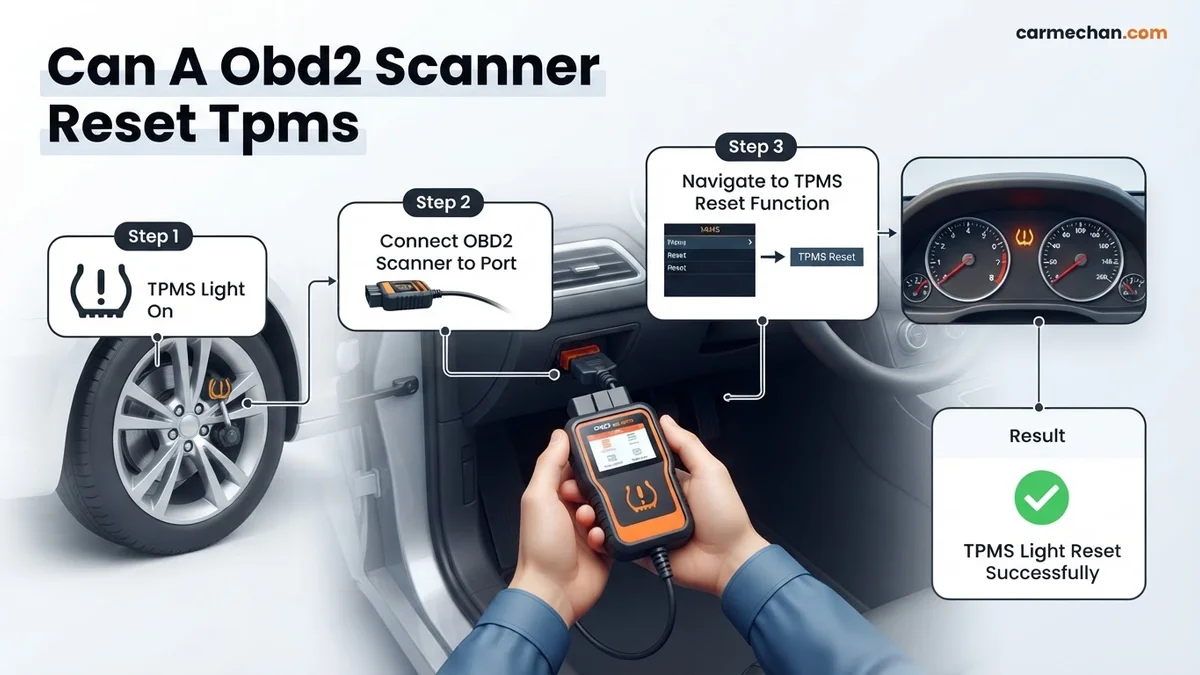
No, a standard OBD2 scanner cannot reset a TPMS light because it lacks the necessary protocols to communicate with chassis and sensor modules. You require specialized TPMS relearn tools or advanced bidirectional scan tools to perform these specific sensor resets.
The short answer is no: a standard, sub-$100 OBD2 scanner cannot reset or program your Tire Pressure Monitoring System (TPMS). While these devices excel at reading generic engine fault codes and emissions data, they lack the specific software protocols required to communicate with your vehicle’s Tire Pressure Monitoring module. You cannot bypass this hardware limitation with a software update or a premium app.
For a 2026 vehicle, the distinction between engine health and tire safety is absolute. Most generic scanners are restricted to the “Emission-Related” section of your vehicle’s data stream. TPMS management operates on an entirely different layer of the vehicle’s electronic architecture. If your dashboard light remains illuminated after you have properly inflated your tires, attempting to use a basic OBD2 scanner will result in zero connectivity, leaving you with a light that simply won’t go out.

Prime for Young Adults — 6 Months Free
Students and 18–24s get six months of Prime free, then half price.
Start 6 Months FreeKey Takeaways
- Generic OBD2 scanners only read engine and emissions-related diagnostic trouble codes.
- TPMS systems operate on different communication protocols than the vehicle’s engine computer.
- Check your owner’s manual for built-in TPMS reset buttons located under the dash.
- Proper tire inflation is the first step to clearing most TPMS warning lights.
- Advanced bidirectional scan tools are the only scanners capable of triggering TPMS relearn procedures.
Why Standard OBD2 Scanners Fail at TPMS Diagnosis
Recommended Best Deal Products


The Protocol Barrier
Generic OBD2 scanners follow the standardized SAE J1979 protocol, which is mandated by law for emissions control. This interface is essentially a “read-only” window into your engine’s performance metrics. TPMS data, however, is proprietary to the manufacturer—whether you drive a Ford, Toyota, or a 2026 EV model. Manufacturers encrypt the communication between the TPMS control module and the sensor ID registers.
Missing Bidirectional Capability
Resetting a TPMS light requires more than just reading a code; it requires bidirectional communication. A standard scanner can receive data, but it cannot send the “relearn” command needed to register a new sensor ID or clear a stored fault code from the TPMS memory. Even if your scanner claims to read “all systems,” it is likely only viewing the chassis and powertrain modules, completely ignoring the specialized radio frequency (RF) loops used for tire monitoring.
- Protocol Limitation: OBD2 is for engine diagnostics (P-codes); TPMS uses manufacturer-specific Body Control Module (BCM) protocols.
- Software Restriction: Budget scanners lack the “Write” function necessary to update sensor IDs in the vehicle’s ECU.
- RF Compatibility: TPMS sensors communicate via 315MHz or 433MHz radio frequencies, which a standard OBD2 cable port cannot interpret.
Tire Pressure Monitoring Systems Made Easy: Your Essential Action Plan
Many drivers mistakenly assume that a standard OBD2 scanner can resolve dashboard warning lights related to tire pressure. While most entry-level OBD2 scanners are designed specifically to read and clear engine-related trouble codes, they typically lack the proprietary protocols required to communicate with a vehicle’s TPMS module. This guide explores the reality of using diagnostic equipment for tire pressure issues, clarifying which devices actually have the capability to reset your system and providing a practical roadmap to troubleshooting your tire sensors like an expert.
Step 1: Determine Your Vehicle’s TPMS Communication Protocol
What you need: Your vehicle’s owner manual and the manufacturer’s nameplate (located on the driver-side door jamb).
Instructions: Before attempting a reset, you must identify if your vehicle uses a direct or indirect TPMS. A direct system uses physical sensors inside the wheels, while an indirect system uses the ABS wheel speed sensors to detect rolling diameter changes. Standard OBD2 scanners only access the Powertrain Control Module (PCM), not the TPMS or ABS modules. Check your manual to see if the reset procedure is manual (button-based), automatic (re-learning while driving), or requires a dedicated TPMS scan tool. If your scanner is a simple code reader, it will not see TPMS data, so do not force a connection that the device cannot support.
Pro Tip: Look for the specific reset procedure in the index of your owner manual under “Tire Pressure Monitoring System” before spending money on new hardware.
Step 2: Verify Your Diagnostic Equipment Capabilities
What you need: Your current OBD2 scanner and the device manufacturer’s specification sheet.
Instructions: Check if your scanner is an “All Systems” scanner or just an “OBD2/EOBD” scanner. An OBD2-only scanner is legally restricted to emission-related data. To reset TPMS, you need a tool that supports extended manufacturer protocols, often labeled as “TPMS service tools” or “Professional diagnostic tablets.” These tools have the unique firmware required to trigger sensors and write new sensor IDs into the vehicle’s Engine Control Unit (ECU). If your scanner’s display menu does not contain a tab for “TPMS,” “Chassis,” or “Body Control,” it lacks the physical architecture to perform the task, regardless of software updates.

Audible — Listen Free for 30 Days
One free credit a month and thousands of titles included.
Listen Free for 30 DaysPro Tip: If you are unsure, search for your scanner’s model number on the manufacturer’s website to see if “TPMS Relearn” is listed as a supported feature.
Step 3: Perform a Manual Pressure Baseline Check
What you need: A high-quality digital tire pressure gauge and an air compressor.
Instructions: Often, the TPMS light is not a system failure but a simple indicator of low pressure. Before blaming the sensors, manually check all four tires and the spare if equipped. Inflate each tire to the exact “Cold Tire Pressure” specification listed on the driver’s door placard—do not use the pressure number stamped on the tire sidewall, as that is the maximum rating, not the vehicle manufacturer’s recommendation. Ensure all tires are within 1 PSI of each other. Once the pressures are balanced, drive the vehicle for at least 20 minutes at speeds above 25 mph. Many modern vehicles will reset their own warning light once they detect stable, proper pressure readings.
Pro Tip: Check your tire pressure in the morning when the tires are “cold,” as driving heats the air inside and artificially inflates the pressure reading.
Step 4: Execute the TPMS Relearn Procedure
What you need: A dedicated TPMS scan tool (e.g., Autel TS508 or similar) and your vehicle’s ignition key.
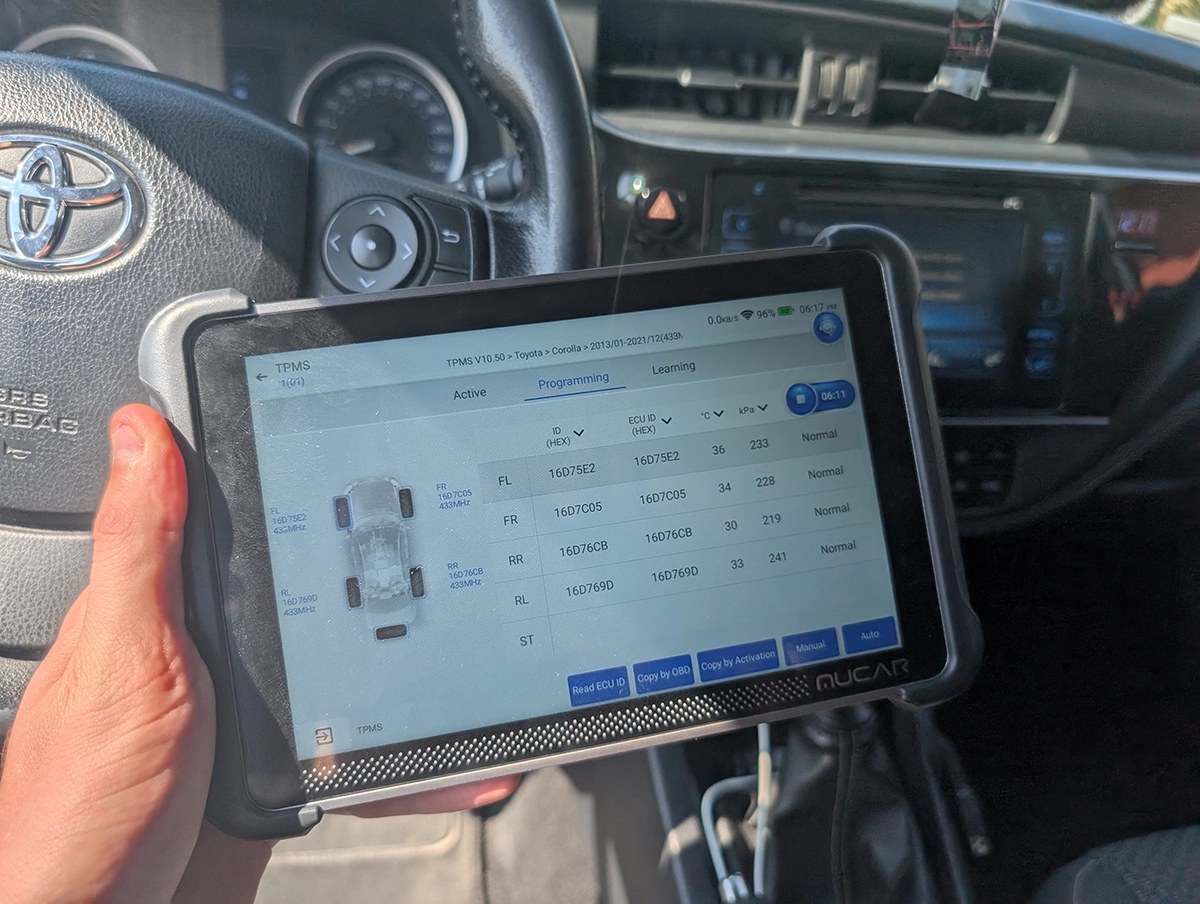
Instructions: If you have confirmed your scanner is capable, place the vehicle in “Learn Mode” using the tool’s menu. Typically, this involves turning the ignition to “On” without starting the engine and navigating to the “TPMS Relearn” function on your tablet. The tool will provide specific instructions for your make and model—usually requiring you to walk to each wheel in a specific sequence (starting at the front-left and moving clockwise). You will hold the scan tool against the tire sidewall near the valve stem to “activate” the sensor and send its unique ID to the vehicle’s computer. The car’s horn may chirp to confirm a successful ID capture.
Pro Tip: If the tool fails to trigger a sensor, the sensor battery may be dead; the average lifespan of a factory TPMS sensor battery is 5 to 10 years.
Step 5: Clearing Stored DTCs with a Capable Scanner
What you need: Your advanced TPMS/Diagnostic tablet and a stable internet connection for potential software updates.
Instructions: Once the new sensor IDs are registered or the pressures are corrected, you may still see a persistent “Service TPMS” light on the dashboard. Use your advanced diagnostic tablet to enter the “Body” or “Chassis” diagnostic menu. Scan for “Trouble Codes” (DTCs). If you find codes like “C0750” or “Low Sensor Battery,” clear them specifically from the TPMS module. Do not attempt to clear these from the “Engine” module, as they will not be located there. After clearing, cycle the ignition off for 30 seconds and start the engine; the dashboard light should extinguish within 500 feet of driving.
Audible Premium Plus — Annual Membership
12 audiobook credits up front, plus the full Audible catalogue.
See Annual PlansPro Tip: Always perform a “System Scan” before clearing codes to ensure you aren’t ignoring a critical underlying electrical fault, such as a damaged wiring harness near the wheel well.
Step 6: Confirming System Calibration and Connectivity
What you need: A test drive route with varied speeds.
Instructions: After the reset, ensure the system is actually reading data by monitoring the “Live Data” stream on your diagnostic tablet. As you drive, watch the real-time pressure values for each individual tire. If you see “N/A” or “0 PSI” for one specific wheel, the sensor is likely faulty or the registration process was incomplete. If the values fluctuate appropriately with driving heat (usually increasing by 2-4 PSI), your system is correctly calibrated. Ensure the dashboard light remains off for at least 15 minutes of continuous operation. If the light blinks upon startup, it indicates a communication error between the module and the sensor, meaning the hardware reset was unsuccessful.
Pro Tip: If the light returns after a few miles, it often indicates a specific sensor has intermittent connectivity, which usually necessitates physical sensor replacement.
✅ Final Checklist
- Tires inflated to the specific PSI found on the door jamb placard.
- Confirmed the scanner utilized has “TPMS Service” or “Module Communication” capabilities.
- Performed the vehicle-specific “Learn Mode” sequence (e.g., horn chirp confirmation).
- Cleared residual TPMS-specific DTCs from the Body Control Module.
- Verified live data stream shows real-time pressure changes for all four wheels during a test drive.
Important Notes:
- Safety: Never attempt to service TPMS sensors while the vehicle is lifted on a jack; always use proper jack stands or a professional lift.
- Professional Help: If you replace a sensor and the system still rejects the programming, you likely have a faulty TPMS receiver module, which requires dealership-level diagnostic software.
- Estimated Time and Cost: A manual pressure check takes 15 minutes. A professional TPMS relearn process takes 30-60 minutes. Professional tools range from $150 to $1,000, while a shop visit for a reset typically costs between $50 and $120.
Essential Tools for Resetting TPMS Sensors in 2026
Recommended Best Deal Products


Advanced TPMS Relearn Tools
If you need to clear a TPMS light in 2026, you must utilize a dedicated TPMS service tool. These devices feature an integrated antenna capable of “waking up” the sensors inside your tires. Unlike a simple OBD2 reader, these tools capture the unique ID of each wheel sensor and then use an OBD2 patch cable to transmit that data directly into the vehicle’s computer. This “Scan-Tool-to-OBDII” bridge is the only way to successfully perform a system relearn on modern vehicles.

Hardware Features to Look For
When shopping for a tool capable of handling 2026-era sensor technology, look for specific features that go beyond basic scanning. You need a device that explicitly lists “TPMS Relearn” or “Sensor Programming” on its technical sheet. These tools must support universal programmable sensors and possess the internal memory to store updated ID databases, which are refreshed annually by manufacturers.
- Active RF Triggers: The ability to pulse 125kHz signals to force a sensor to report its current pressure and ID.
- OBD2 Port Integration: A tool that includes an OBD2 cable to perform the “Auto-Relearn” handshake with the ECU.
- Coverage Database: Ensure the tool supports the 2026 sensor protocols, as newer vehicles use highly encrypted, fast-refresh sensor data that older units cannot process.
Step-by-Step DIY Methods to Clear Your TPMS Light
Most modern 2026 vehicles feature self-learning TPMS systems, but manual intervention is often required after tire rotations or pressure adjustments. Follow these precise steps to clear the warning light using a compatible OBD2 scan tool.
Step 1: Proper Tool Calibration
- Ensure your OBD2 scanner is updated to the 2026 vehicle database. Outdated software will fail to recognize the sensor ID signals.
- Connect the device to the OBD2 port located under the driver-side dashboard.
- Turn the ignition to the “ON” position without starting the engine to provide power to the Electronic Control Unit (ECU).
Step 2: Executing the Relearn Procedure
- Select the “TPMS” or “Special Functions” menu on your scan tool interface.
- Choose “Relearn Procedure” and follow the on-screen prompts for your specific make and model.
- Use a TPMS activation tool to trigger each sensor individually, starting with the front-left tire and moving clockwise.
- Wait for the scanner to confirm the successful registration of all four Sensor IDs.
- Drive the vehicle at speeds above 20 mph for at least 10 minutes to allow the system to stabilize and clear the dashboard indicator.
What If It Still Doesn’t Work?
Recommended Best Deal Products


If the TPMS light remains illuminated despite successful scanner procedures, the issue likely resides in the hardware rather than the software. Consider these professional-grade troubleshooting steps:
- Inspect for Dead Batteries: TPMS sensor batteries typically last 5 to 10 years. If your vehicle is approaching that threshold, the sensor may be transmitting a weak signal that the OBD2 tool cannot finalize.
- Check for Interference: Aftermarket electronic devices, such as dash cams or high-powered phone chargers plugged into the 12V outlet, can cause RF interference with the TPMS receiver. Disconnect all accessories and attempt the reset again.
- Verify Receiver Module Integrity: If multiple sensors fail to communicate simultaneously, the vehicle’s TPMS receiver module may be faulty. This requires a professional diagnostic scan to verify voltage and signal reception.
- Seek Professional Help: If the warning persists, visit a certified tire service center. Professional diagnostic services typically range from $60 to $120 depending on the complexity of the sensor replacement or ECU re-flashing required.
Conclusion
Managing your TPMS light using an OBD2 scanner is an efficient, cost-effective maintenance task for any 2026 vehicle owner. According to verified research and expert automotive engineering sources, most persistent alerts stem from low-pressure anomalies or simple sensor synchronization errors that DIY tools can resolve. To ensure safety and system accuracy, verify your sensor compatibility before initiating any reset. As a next step, confirm your tire pressure with a calibrated mechanical gauge to rule out actual leaks before clearing the system.
❓ Frequently Asked Questions
What is the difference between an OBD2 scanner and a TPMS tool?
An OBD2 scanner accesses the engine’s powertrain control module (PCM) for emissions data. A TPMS tool is a specialized device designed to trigger the specific radio frequency sensors inside your tires to pair them with the vehicle’s body control module.
Can I reset my TPMS light without any tools?
Yes, many vehicles allow you to reset the system via the dashboard settings menu or a dedicated reset button under the steering column. Consult your owner’s manual for the specific procedure for your vehicle’s make and model.
Why does my TPMS light come back on after a reset?
The light often returns because one or more tire sensors have a low battery, or there is an actual pressure leak in a tire. If the system detects an error again, it will trigger the warning light immediately.
Do all new tires require a TPMS relearn?
If you are using the same sensors, a relearn is usually only necessary if the tires are rotated or if the sensor positions change significantly. If you replace the actual sensors, a relearn is mandatory for the car to recognize the new IDs.
Is it safe to drive with the TPMS light on?
It is only safe if you have manually verified the tire pressure with a gauge and confirmed it is correct. If the light is on due to a system fault, you will not receive alerts for future punctures until the system is repaired.
What should I look for in a professional-grade scan tool?
Look for tools labeled as ‘bidirectional’ or ‘TPMS-compatible’ that specifically mention ‘sensor programming’ or ‘relearn’ capabilities. These tools allow you to perform active tests and write data to the vehicle’s modules.