Reset Honda Civic Tire Pressure Light: Step-By-Step Guide For Tpms Calibration
Last Updated on May 5, 2026 by Ryan
Reset Honda Civic Tire Pressure Light: Step-By-Step Guide For Tpms Calibration
The illuminated Tire Pressure Monitoring System (TPMS) light on your Honda Civic dashboard often signals more than just a minor alert; it’s a critical indicator for vehicle safety and performance. Experiencing this warning can be perplexing, especially if tire pressures appear normal. Understanding its root cause, whether due to actual low pressure, temperature fluctuations, or a system recalibration need, is paramount for maintaining optimal driving conditions and avoiding undue wear. This authoritative guide will provide Honda Civic owners with a precise, professional methodology to accurately diagnose the TPMS light’s trigger, perform the necessary reset procedures across various model generations, and implement best practices to prevent future occurrences, ensuring your vehicle’s systems are always operating at default efficiency.
Honda Civic tire pressure light on? These tools reset it correctly every time:


As an Amazon Associate we earn from qualifying purchases.
Understanding Your Honda Civic’s Tire Pressure Monitoring System (TPMS)



📤 Share Image
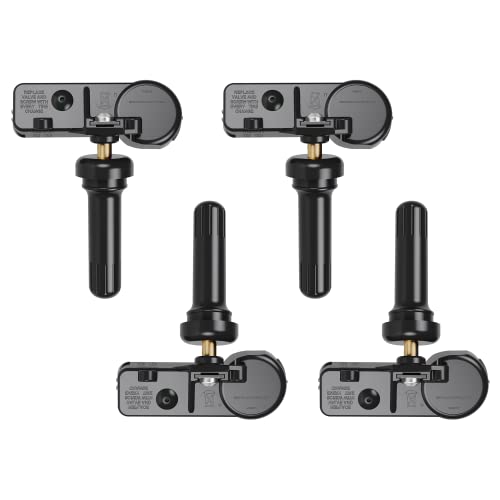
The Tire Pressure Monitoring System (TPMS) in your Honda Civic is a crucial safety feature designed to alert you to significant drops in tire pressure. Its implementation became mandatory for all new vehicles in the U.S. by 2007, a direct result of the NHTSA TREAD Act, underscoring its importance in automotive safety. Unlike some vehicles that utilize a Direct TPMS with individual sensors inside each tire, Honda Civics primarily employ an Indirect TPMS. This system ingeniously leverages the Anti-lock Braking System (ABS) wheel speed sensors to monitor tire rotation speed. When a tire is underinflated, its diameter subtly decreases, causing it to rotate slightly faster than its properly inflated counterparts. The indirect TPMS detects this rotational speed discrepancy, signaling a potential issue. For instance, a 5 PSI drop in one tire can cause a measurable rotational speed difference, triggering the warning.
Beyond actual low pressure, several factors can trigger the TPMS light. Significant temperature fluctuations, such as a sudden cold snap, can naturally cause tire pressures to decrease, typically by approximately 1 PSI for every 10°F drop in ambient temperature. Recent tire service, including tire rotations or replacements, often necessitates a system recalibration to provide a fresh start for the monitoring, as the previous baseline is no longer valid. The light may also illuminate if the system simply needs to be initialized after a battery disconnect or similar electrical work, prompting it to re-learn the optimal tire circumference. Honda Civic models are particularly adept at measuring these subtle changes, ensuring that the system can accurately signal a ‘soft’ tire before it becomes a hazard.
An illuminated TPMS light is not merely an inconvenience; it carries significant safety implications. Underinflated tires can severely impact vehicle handling, particularly during emergency maneuvers, and extend braking distances. They also contribute to accelerated and uneven tire wear, dramatically shortening tire longevity, and lead to reduced fuel efficiency. Addressing the warning promptly is essential to restore optimal driving conditions and ensure your vehicle adheres to its design parameters. Ignoring it can compromise your safety and lead to costly repairs or premature tire replacement.
Initial Diagnostics: Essential Checks Before Performing a TPMS Reset


Before attempting to reset your Honda Civic’s TPMS light, a thorough diagnostic check is imperative. This ensures you’re addressing the root cause of the alert, not just masking a symptom. The objective is to identify and resolve any underlying tire pressure discrepancies or damage that would otherwise lead to the light reappearing shortly after a reset.
Accurately Checking Tire Pressures
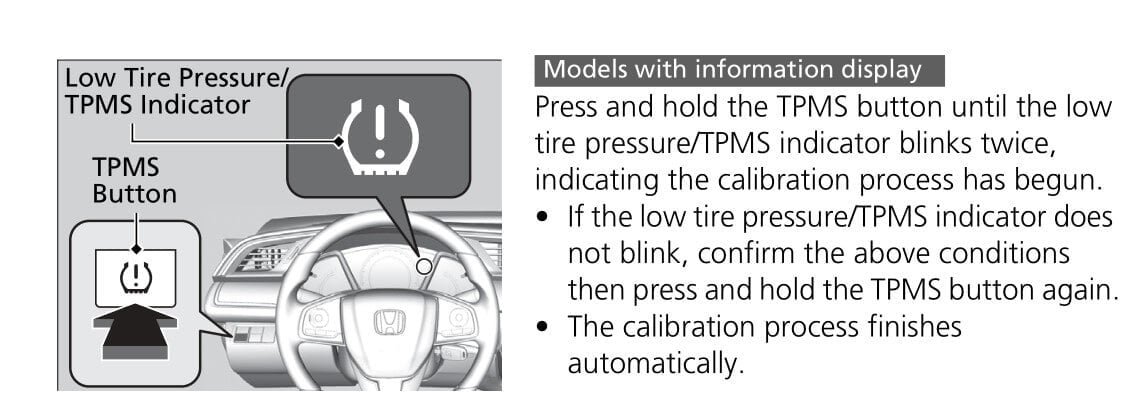
The first step involves meticulously checking the air pressure in all four tires. Crucially, tires must be ‘cold’, meaning the vehicle has not been driven for at least three hours, or for more than a mile at low speed. Driving heats the air inside the tires, artificially inflating the pressure reading. Utilize a reliable tire gauge – a high-quality digital gauge often provides more precise readings than a traditional stick gauge. Always check the spare tire as well, if your Civic model includes one, as some systems (though less common for Civic’s indirect TPMS) may consider it. The average optimal tire pressure for most Honda Civic models ranges from 30-35 PSI, but this varies by specific year and trim.
- Locate the recommended tire pressure specifications on the driver’s side door jamb sticker or within your vehicle’s owner’s manual. These OEM specifications are paramount for proper vehicle dynamics and TPMS functionality.
- Inflate all tires precisely to these recommended PSI levels. Over- or under-inflation can both lead to issues, even if the TPMS light is off.
Visual Inspection for Damage
While checking pressure, conduct a comprehensive visual inspection of each tire. Look for:
- Punctures or embedded objects: Nails, screws, or other debris.
- Sidewall bulges or cracks: Indicators of internal tire damage.
- Excessive or uneven wear patterns: Suggestive of alignment issues or improper inflation over time.
- Valve stem integrity: Ensure valve stems are not cracked, bent, or leaking.
Any identified damage will require professional repair or tire replacement prior to a TPMS reset, as a recalibration won’t resolve a physical air leak.
Considering Environmental Factors
Environmental factors play a significant role. A scenario where pressure drops from 35 PSI to 30 PSI overnight due to a significant temperature change is a common occurrence. This isn’t a leak, but a natural contraction of air. Adjust pressures accordingly, ensuring the system can establish a new, accurate baseline when you initialize the monitoring process. Neglecting these initial checks often leads to frustration when the TPMS light persistently reappears, indicating a lack of a true fresh start for the system. Remember, underinflated tires can reduce fuel efficiency by 0.2% for every 1 PSI drop below recommended levels, highlighting the importance of precise inflation for economy as well as safety.
Always verify tire pressures when the tires are cold. Driving even a short distance generates heat, causing internal air pressure to rise and providing an inaccurate reading. For a truly accurate gauge of your tire’s pressure, let your Civic sit for at least three hours before checking.

Step-by-Step TPMS Reset Procedures for Honda Civic Generations

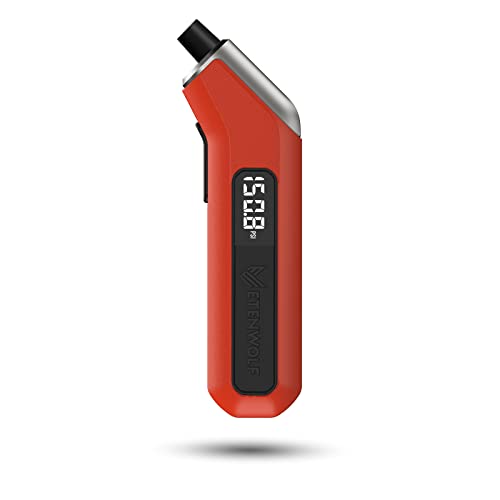

Once you’ve meticulously checked and adjusted all tire pressures to the manufacturer’s specifications, you are ready to perform the TPMS reset. The calibration process varies slightly depending on your Honda Civic’s generation, as the interface for initiating the reset has evolved. The goal is to provide a clean slate for the indirect TPMS to learn the new, correct tire rotational speeds, effectively performing a factory reset of its internal memory. Calibration can take up to 20-30 minutes of continuous driving for the system to accurately restore new sensor data.
📋
Step-by-Step Guide
Ensure all tires are inflated to the recommended PSI (found on the driver’s side door jamb). Turn the ignition ON, but do not start the engine. Confirm the TPMS warning light is illuminated.
The method to initiate the TPMS calibration differs based on your Civic’s model year:
For 8th Generation Honda Civic (2006-2011) and Similar Models:
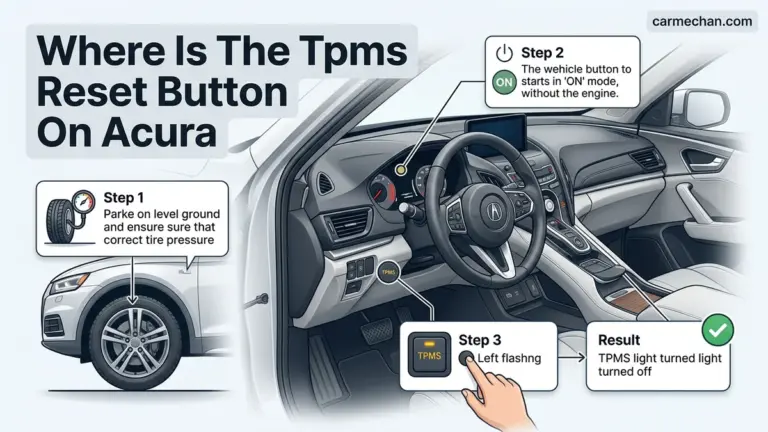
- Locate the physical TPMS reset button. This button is commonly found below the steering wheel, inside the glove box, or near the fuse box.
- With the ignition ON, press and hold this button until the TPMS indicator light flashes twice, then release. This signals the system to reboot and begin a fresh start.
For 9th Generation Honda Civic (2012-2015):
- Navigate the i-MID display (intelligent Multi-Information Display) using the controls on your steering wheel.
- Go to ‘Customize Settings’, then select ‘TPMS Calibration’.
- Choose ‘Calibrate’ or ‘Initialize’ to restore the system to its default monitoring state. The system will usually confirm with a message or a flashing light.
For 10th Generation (2016-2021) and 11th Generation (2022+) Honda Civic:
- Access the Driver Information Interface (DII) or the main infotainment touchscreen.
- Navigate to ‘Home’ → ‘Settings’ → ‘Vehicle’ → ‘TPMS Calibration’.
- Select ‘Calibrate’ or ‘Initialize’. You may need to press and hold a virtual button on the screen until the TPMS indicator light blinks twice or a chime confirms the reset initiation.
After initiating the reset, you must drive your Honda Civic. The system needs to ‘learn’ the new pressures and establish a fresh baseline. Drive for approximately 20-30 minutes at speeds above 30 mph on a relatively straight road. During this period, the TPMS system monitors the rotational speeds of your tires to determine their new, correct circumference. The TPMS light should extinguish once the calibration is successfully completed, indicating the system has been properly initialized and is monitoring correctly. Incorrectly inflated tires during calibration can lead to persistent issues, requiring another reset.
Advanced Troubleshooting: When the TPMS Light Remains On or Flashes
While the step-by-step reset procedures address most common TPMS alerts, there are instances where the light persists or exhibits a different behavior, indicating a more complex underlying issue. This requires a deeper diagnostic approach beyond simply checking pressures and performing a calibration.
Flashing TPMS Light: A System Malfunction
If your TPMS light flashes for a period (e.g., 60-90 seconds) immediately after starting the vehicle, and then remains solid, this is a distinct signal. It indicates a system malfunction rather than merely low tire pressure. This scenario often points to a problem within the TPMS itself, such as a faulty sensor (less common in indirect TPMS Civics, but possible if a sensor related to ABS or the overall system fails), or a system error that prevents it from monitoring tire pressures effectively. A dead sensor battery is typically associated with direct TPMS, but a fault within the indirect system’s components could mimic this behavior.
Component Failure: TPMS Control Unit or Wiring
Though less common, components like the TPMS control unit or its associated wiring can fail. These electronic failures prevent the system from accurately interpreting wheel speed data or communicating correctly with the vehicle’s onboard computer. For example, if the light comes on immediately after a tire rotation, even with correct pressure, it might suggest a communication issue or a component struggling to re-initialize its data. Such issues cannot be resolved with a simple reset and require specialized diagnostic tools to identify the fault codes and restore default settings to the affected components.
Utilizing an OBD-II Scanner for Specific Codes
For persistent or flashing lights, an OBD-II scanner capable of reading TPMS-specific codes is invaluable. Generic scanners might only read powertrain codes, but advanced models can access chassis and body control modules where TPMS data resides. Error codes such as C1290 (sensor malfunction), C1860, or C1865 can precisely pinpoint the nature of the problem, allowing for targeted troubleshooting and repair. This moves beyond basic checks and provides a definitive answer to why the system cannot maintain a clean operating profile.
If, after following all diagnostic and reset procedures, the TPMS light continues to flash or remain illuminated, it is imperative to seek professional Honda service. A certified technician has access to specialized diagnostic equipment (e.g., Honda HDS system) that can accurately identify deeper system faults, such as issues with the ABS module or the TPMS control unit. Attempting to force a reset on a malfunctioning system can lead to further complications. Professional intervention ensures proper component repair or replacement to fully restore functionality.
While TPMS sensor batteries in direct systems typically last 5-10 years, the indirect system’s components are generally more robust. However, if a component replacement is needed to restore default settings, the average cost for a single TPMS sensor replacement (if your Civic has an aftermarket direct system or a hybrid setup, or if an ABS sensor is at fault) can range from $50-$150, plus labor, to fully restore functionality. Identifying the correct issue with specialized tools prevents unnecessary repairs.
Maintaining Optimal Tire Health and Preventing Future TPMS Alerts
Proactive tire maintenance is the most effective strategy for preventing recurring TPMS warnings and ensuring the long-term safety and performance of your Honda Civic. By adhering to best practices, you not only keep the TPMS light off but also extend the life of your tires and optimize vehicle dynamics.
Monthly Pressure Checks
Regularly checking tire pressures (monthly, when cold) is your first line of defense against TPMS warnings. This allows you to catch minor pressure drops before they trigger the light and helps maintain a clean, accurate operating profile for your indirect TPMS.
Routine Maintenance
Adhere to Honda’s recommended tire rotation schedule (e.g., every 5,000-7,500 miles) and alignment checks. Proper rotation promotes even wear across all tires, which is crucial for the indirect TPMS to function optimally and detect discrepancies effectively.
Correct Tire Selection
When replacing tires, always choose those that match OEM specifications (size, speed rating, load index). Incorrect tires can throw off the indirect TPMS system, impacting its ability to accurately monitor tire circumference and rotational speeds.
Beyond scheduled maintenance, your driving habits significantly influence tire health. Avoiding potholes, curbing, and aggressive driving can preserve tire integrity and prevent premature pressure loss or damage (e.g., driving over sharp debris causing a slow leak). Proper tire maintenance can extend tire life by up to 20-30%. Moreover, studies indicate that roughly 30% of vehicles on the road have at least one underinflated tire, contributing to premature tire failure and increased accident risk. By embracing these preventative measures, you ensure your Honda Civic’s TPMS system maintains a reliable default state, free from unnecessary alerts, and always ready to provide a fresh start for every journey.
Key Statistics for Tire Health
By The Numbers
Optimal Honda Civic Tire Pressure
Pressure Drop per Temperature Change
Increased Tire Life with Maintenance
Vehicles with Underinflated Tires
This proactive approach not only helps you avoid the nuisance of a warning light but also contributes significantly to your vehicle’s overall safety, performance, and operational cost efficiency.
The Honda Civic’s TPMS is a vital safety system requiring prompt attention when illuminated. Resetting the TPMS light involves accurate tire pressure checks and specific calibration steps dependent on your Civic’s generation to restore its default state. Proactive tire maintenance, including regular pressure monitoring and inspections, is key to preventing recurring TPMS alerts and extending tire life. Ensure your safety and vehicle’s integrity by regularly checking your tire pressures and performing routine maintenance. Should the TPMS light persist after following these comprehensive reset procedures, consult a certified Honda service technician to diagnose underlying system faults effectively and restore proper functionality, providing a complete fresh start for your vehicle’s safety systems.
Frequently Asked Questions
Why does my Honda Civic TPMS light come on even after I’ve added air?
The TPMS light may persist for several reasons even after adjusting pressure. The system requires time to re-learn new pressures, often necessitating a reset procedure to calibrate to the updated values. Temperature fluctuations can also cause the light to reappear if significant changes occur after inflation. Additionally, a faulty sensor or a system error might prevent the light from turning off, indicating a need for professional diagnostics to restore default operation.
Is there a separate reset button for the Honda Civic TPMS?
For some older Honda Civic generations (e.g., 8th generation, 2006-2011), a physical TPMS reset button can be found, often located under the dashboard near the steering column or inside the glove box. Newer models (e.g., 9th generation onwards) integrate the reset function into the vehicle’s infotainment system or Driver Information Interface (DII), accessible via steering wheel controls, making it a digital calibration process rather than a physical button press to restore the system.
How often should I check my Honda Civic’s tire pressure?
To maintain optimal safety, fuel efficiency, and tire longevity, it is recommended to check your Honda Civic’s tire pressure at least once a month, and always before long trips. Pressure should be checked when tires are ‘cold,’ meaning they haven’t been driven for at least three hours. Fluctuations in ambient temperature significantly affect tire pressure, making regular checks crucial to prevent under-inflation and the activation of the TPMS light, ensuring a fresh start for tire monitoring.
Can a new set of tires cause the TPMS light to come on?
Yes, installing a new set of tires can frequently trigger the TPMS light on your Honda Civic. This typically occurs because the new tires might have different initial pressures, or the system simply needs to recalibrate to the new rotational characteristics. After new tire installation, it’s standard procedure to check and adjust pressures to the recommended specifications and then perform a TPMS reset to allow the system to learn the new ‘default’ parameters and clear the warning.
What if my TPMS light flashes before staying solid?
If your Honda Civic’s TPMS light flashes for a period (e.g., 60-90 seconds) upon starting the vehicle before staying continuously illuminated, this usually indicates a malfunction within the TPMS system itself, rather than just low tire pressure. This could signify a faulty sensor, a dying sensor battery, or a system communication error. In such cases, a professional diagnostic scan is recommended to pinpoint the exact issue and restore the system to its proper working order.