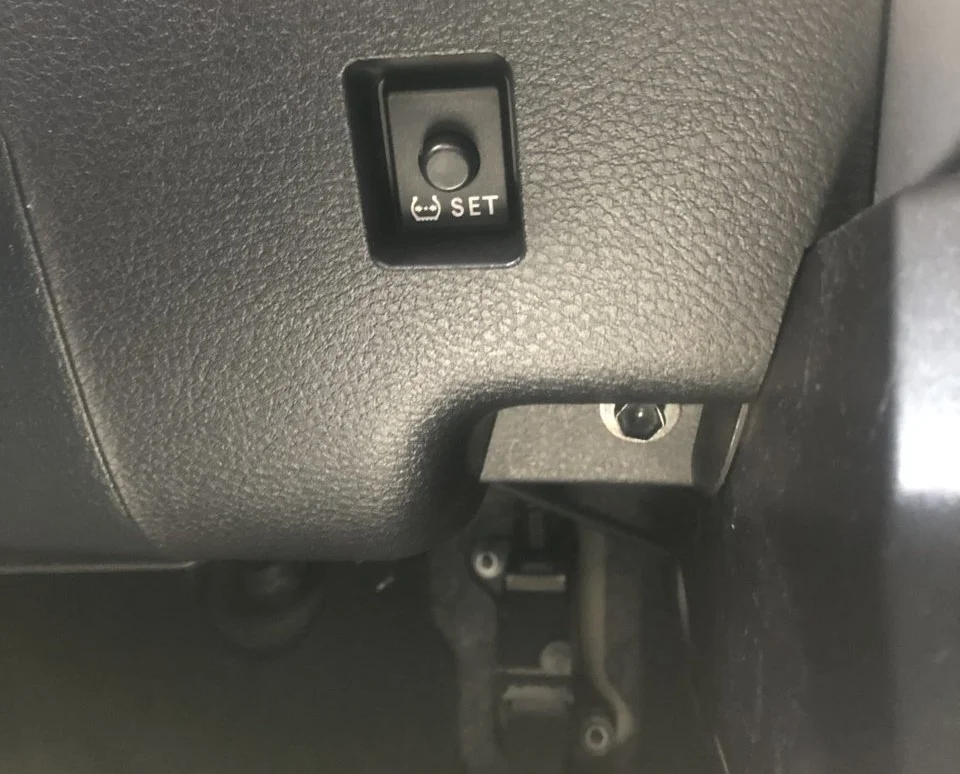
Nissan Rogue TPMS Reset Button Location & Systems Guide
Last Updated on September 1, 2026 by Ryan
📋 Table of Contents
- 🎯 Key Takeaways
- Evolution of the Nissan Rogue Tire Pressure Monitoring System
- Your Complete DIY Guide to Nissan Rogue TPMS Management
- Physical Buttons vs. Digital Menu Interfaces in Newer Models
- Common Reasons for TPMS Warning Lights Beyond Low Pressure
- The Role of External Factors on TPMS Sensor Accuracy
- Conclusion: Maintaining Your Nissan Rogue TPMS
- 💬 Quick Questions & Answers
- ❓ Frequently Asked Questions


Most modern Nissan Rogue models do not have a physical TPMS reset button and instead utilize the dashboard settings menu or auto-relearn technology. Understanding your specific model year’s interface is essential for clearing the low tire pressure warning light correctly.
Resetting your Nissan Rogue TPMS? These tools handle it in minutes:
 TPMS relearn tool — All Makes & Models” style=”width:90px;height:90px;object-fit:contain;border-radius:8px;flex-shrink:0;” loading=”lazy”>

As an Amazon Associate we earn from qualifying purchases.
🎯 Key Takeaways
- Most newer Rogues use digital menus instead of physical reset buttons.
- Check the driver-side door jamb for the correct PSI specifications.
- The TPMS light may blink if a sensor battery is failing.
- Correct tire pressure is the primary way to trigger a reset.
- Extreme temperature changes often trigger false low-pressure alerts.
Have you ever started your Nissan Rogue on a cold morning only to see that glowing yellow horseshoe icon? That little symbol is your Tire Pressure Monitoring System (TPMS) alert. It is one of the most common dashboard lights you will encounter. While it can be annoying, it is actually a vital safety feature designed to protect you from blowouts and poor fuel economy.
Finding the reset button or menu can feel like a scavenger hunt. Every few years, Nissan changes how drivers interact with their vehicles. Whether you drive an older classic Rogue or a brand-new model, knowing how to manage this system is essential. In this guide, we will explore the different ways Nissan has hidden these controls over the years so you can get back to driving with confidence.
Evolution of the Nissan Rogue Tire Pressure Monitoring System
The Nissan Rogue has been a staple on American roads for over fifteen years. During that time, the technology under the hood has changed dramatically. Early models featured a very basic TPMS setup. These systems were largely reactive. They only alerted you after the pressure dropped significantly. In those days, you often wouldn’t know which tire was the culprit until you checked all four manually with a handheld gauge.

From Basic Warnings to Real-Time Data
As the Rogue evolved, so did its internal “brain.” Modern versions of this crossover are much more sophisticated than their predecessors. Today, your Rogue does not just warn you of a flat tire. It provides real-time, specific pressure readings for every individual wheel on your dashboard. This shift has made driving much safer and more convenient for owners who want to stay ahead of maintenance.
- First Generation (2008-2013): These models used a basic low-pressure indicator. It was a simple light that didn’t provide specific tire data.
- Second Generation (2014-2020): Nissan introduced the individual tire pressure display. This allowed drivers to see exactly which corner of the car needed air.
- Third Generation (2021-Present): The newest models feature advanced integration with the “Easy-Fill Tire Alert” system. This uses the car’s horn and lights to guide you while you add air.
This technological evolution means that “resetting” the system looks very different depending on your car’s age. Newer models rely heavily on software and digital menus. Older models rely more on physical hardware or specific driving patterns. Knowing which era your Rogue belongs to is the first step in mastering its maintenance and keeping those dashboard lights at bay.
It is also worth noting that external factors have changed how these systems react. Modern TPMS sensors are more sensitive to temperature fluctuations. A quick drop in temperature can trigger a light even if your tires are technically healthy. Understanding this helps you realize that the light isn’t always a sign of a puncture; often, it is just physics at work.
Your Complete DIY Guide to Nissan Rogue TPMS Management
The Tire Pressure Monitoring System (TPMS) in your Nissan Rogue is a vital safety feature designed to alert you when your tire pressure drops to a dangerous level. However, many owners find themselves frustrated when the warning light remains illuminated even after they have filled their tires with air. Unlike some older vehicles that feature a physical “reset” button hidden under the steering column, the Nissan Rogue utilizes a digital interface or an automated relearn process depending on its production year. This guide provides a comprehensive walkthrough on how to locate the digital reset functions, navigate the dashboard menus, and ensure your sensors are communicating correctly with the vehicle’s computer. Following these steps ensures your safety on the road and prevents unnecessary wear on your tires.
Step 1: Verification of Tire Pressure Specifications
What you need: A high-quality digital tire pressure gauge and the “Tire and Loading Information” placard located on the driver-side B-pillar (visible when the door is open).
Instructions: Before attempting to find a reset button or menu, you must ensure that all four tires are inflated to the exact manufacturer’s specification. Do not rely on the maximum pressure listed on the tire sidewall; instead, look at the sticker on the inside of your driver’s door frame. Most Nissan Rogues require approximately 33 to 35 PSI depending on the wheel size. Use your gauge to check each tire while they are “cold” (meaning the car has been parked for at least three hours). If the pressure is off by even 1 or 2 PSI, the system may refuse to reset. Ensure the spare tire is also checked if your specific model includes a sensor in the fifth wheel, though this is rare for the Rogue series.
Pro Tip: Temperature fluctuations can cause your TPMS light to trigger. For every 10-degree drop in ambient temperature, your tires can lose about 1 PSI. Always check pressure in the morning before driving for the most accurate reading.
Step 2: Accessing the Advanced Drive-Assist Display
What you need: Your Nissan Intelligent Key and a seated position in the driver’s seat.
Instructions: Since the Nissan Rogue (particularly models from 2014 to the present) does not have a physical push-button for the TPMS, you must interface with the Advanced Drive-Assist Display (ADAD). Start the engine or set the ignition to the “ON” position without starting the motor (press the start button twice without your foot on the brake). Look at the small LCD screen located between your speedometer and tachometer. You will use the directional arrows and the “OK” button located on the left side of your steering wheel to navigate this menu. This interface acts as your “digital reset button” and is the gateway to all vehicle calibration settings.
Pro Tip: If your steering wheel controls feel unresponsive, ensure the vehicle is in “Park.” Many Nissan safety menus are locked out while the vehicle is in motion to prevent driver distraction.
Step 3: Navigating to the Maintenance and TPMS Settings
What you need: Steering wheel arrow buttons (Left/Right/Up/Down).
Instructions: Use the left or right arrow buttons on the steering wheel to scroll through the main menu icons on the dashboard display. You are looking for the “Settings” icon, which usually resembles a gear or a small wrench. Once “Settings” is highlighted, press the “OK” button. Within the Settings menu, scroll down using the down arrow until you find “Maintenance” or “Tire Pressure.” On newer Rogue models, you might see a direct “TPMS Setting” option. Select this by pressing “OK.” This menu is where the vehicle stores its calibration data and where the manual “reset” command is hidden from the main driving view.
Pro Tip: If you find yourself lost in the sub-menus, press the “Back” button (usually marked with a U-turn arrow) on the steering wheel to return to the previous screen rather than turning the car off and starting over.
Step 4: Executing the Calibration Reset Command
What you need: No tools required; just the steering wheel interface.
Instructions: Once you are inside the “Tire Pressure” or “TPMS” sub-menu, you will likely see an option that says “Calibrate” or “Reset.” Highlight this option and press and hold the “OK” button. The screen should display a message such as “Resetting…” or “Calibration Started.” On some Rogue models, this step simply refreshes the digital readout to match the current pressure. If your model doesn’t show a “Reset” option, it means your vehicle utilizes the “Auto-Learn” method, which requires the vehicle to be driven to register the change. In this case, simply verifying the pressure on the screen matches your gauge is the digital equivalent of a reset.
Pro Tip: If the screen displays “Error” or “Unavailable,” it often indicates that one of the TPMS sensors has a dead battery or is malfunctioning, preventing the computer from completing the reset sequence.
Step 5: The Dynamic Relearning Drive
What you need: An open road where you can maintain a steady speed of at least 25 MPH.


Instructions: After performing the digital reset in the menu, the Nissan Rogue requires a “relearning” period. This is because the TPMS sensors in the wheels are centrifugal; they only “wake up” and transmit data to the car’s Engine Control Unit (ECU) when the wheels are spinning. Drive the vehicle at a steady speed of 25 MPH (40 km/h) or higher for approximately 10 to 15 minutes. Avoid stop-and-go traffic if possible, as the system needs a consistent signal to pair the sensors with their respective wheel positions. During this drive, the TPMS light should blink and then disappear once the ECU confirms the pressures are within the safe threshold.
Pro Tip: If the light begins to flash for 60 seconds and then stays solid, this is the specific Nissan diagnostic code for a system malfunction rather than just low pressure.
Step 6: Performing a Manual Key-Cycle Reset (For Older Models)
What you need: The ignition key (or push-button).
Instructions: If you are driving an older Rogue (pre-2013) that lacks the advanced screen, or if the digital menu reset fails, you can attempt a “Hard Reset” via the ignition. Turn the ignition to the “ON” position (do not start the engine). Locate the small trip odometer reset pin on the instrument cluster. On some older versions, holding this pin while cycling the ignition from “OFF” to “ON” three times can trigger a TPMS lamp test. While this doesn’t recalibrate the sensors, it forces the ECU to ping all four sensors for an immediate status update. If the light remains on after this, the vehicle requires an OBDII scan tool to clear the persistent “Low Pressure” code stored in the history.
Pro Tip: For 1st-generation Rogues, if the light won’t go out, double-check the pressure in the spare tire, as some early trim levels included a sensor there that would trigger the dash light if it went flat.
✅ Final Checklist
- All four tires (and the spare, if applicable) are inflated to the PSI listed on the driver-side door jamb.
- The “Reset” or “Calibrate” command was selected within the dashboard Settings menu.
- The vehicle was driven for at least 10 minutes at speeds exceeding 25 MPH.
- The TPMS warning light on the instrument cluster has turned off completely.
- The digital readout on the dashboard matches the manual gauge readings taken earlier.
Important Notes:
- Safety: Never attempt to navigate the dashboard menus while driving in heavy traffic. Always perform the menu navigation while parked.
- When to Seek Professional Help: If the TPMS light flashes for one minute every time you start the car, a sensor battery has likely failed (usually after 5-7 years). A tire shop will need to replace the physical sensor inside the wheel.
- Estimated Time and Cost: The reset process takes about 15 minutes and costs $0 if done manually. If a sensor is dead, professional replacement typically costs between $50 and $150 per wheel including parts and labor.
Physical Buttons vs. Digital Menu Interfaces in Newer Models
One of the biggest frustrations for Rogue owners is finding the actual reset control. If you switch from an older car to a newer one, you might feel a bit lost. In the past, car manufacturers loved physical buttons. You could reach out and press a dedicated switch to clear a code or reset a light. Those days are largely over for the Nissan Rogue, as the brand has moved toward a more “cockpit” style of digital integration.
The Shift to Steering Wheel Controls
In modern Rogue models, Nissan moved most functions to the steering wheel. This design is intended to keep your eyes on the road and your hands on the wheel. You generally will not find a hidden button tucked away under the steering column anymore. Instead, you will navigate through a digital menu on your instrument cluster. This area is often called the Advanced Drive-Assist Display.
- The “Knee” Area: On the earliest Rogue models, you might find a physical button near your left knee. It is often located near the traction control or trunk release buttons.
- The Steering Wheel: For Rogues built after 2014, look for the arrow keys and the “OK” button on the left side of your steering wheel. This is your primary navigation tool.
- The Infotainment Screen: In some specific trim levels, certain maintenance settings might even live within the central touch display in the middle of your dashboard.
Understanding this shift is vital for your sanity. Many drivers spend minutes searching for a physical button that simply does not exist on their model year. Your Rogue is now more like a smartphone on wheels. You interact with it through menus and settings rather than physical toggle switches. This makes the interior look cleaner and more modern, but it requires a small learning curve for the driver.
The transition to digital menus also means the car can give you more feedback. Instead of just a “reset” light, the screen might tell you that the system is “relearning” the pressures as you drive. This digital feedback loop reduces the guesswork involved in car care. However, it also means you need to be comfortable using the scrolling wheels and buttons located right under your thumbs while you sit in the driver’s seat.
Keep in mind that the location of these controls can vary slightly based on your specific trim level. A Rogue S might have a slightly different menu layout than a Rogue Platinum. Regardless of the trim, the logic remains the same: Nissan wants the controls to be within your natural reach. Once you find the correct menu path, it becomes second nature, much like changing the radio station or setting your cruise control.
Common Reasons for TPMS Warning Lights Beyond Low Pressure
It is a common frustration for Nissan Rogue owners: you have filled your tires to the exact PSI listed on the door jamb, yet that stubborn horseshoe-shaped light remains illuminated on your dashboard. While low air pressure is the most frequent culprit, the TPMS in your Rogue is a sophisticated electronic network that can be triggered by several other internal factors. Understanding these can save you a frantic trip to the mechanic when a simple air top-up doesn’t do the trick.
Sensor Battery Depletion and Aging
Each wheel sensor in your Nissan Rogue relies on a small, internal lithium-ion battery. These batteries are designed to last anywhere from 5 to 10 years, depending on driving habits and environmental conditions. Because these batteries are sealed within the sensor unit, they cannot be replaced individually. When the battery begins to fail, the signal sent to the Rogue’s central computer becomes weak or intermittent, often causing the TPMS light to flash for 60 to 90 seconds upon startup before staying solid. If your Rogue is approaching its seventh or eighth birthday, aging batteries are a primary suspect.
Mechanical Damage and Signal Loss
The sensors are mounted on the inside of the wheel, integrated with the tire valve stem. This positioning makes them vulnerable to various forms of physical trauma. Common issues include:
- Inexperienced Tire Service: If a technician isn’t careful when breaking the bead of a tire during a replacement, the tire iron can easily snap the sensor.
- Corrosion: Road salt and moisture can cause the aluminum valve stems on older Rogue models to corrode and crack, leading to slow leaks or sensor failure.
- Road Hazards: Hitting a deep pothole or a curb with significant force can jar the internal electronics of the sensor, even if the tire itself remains intact.
The Role of External Factors on TPMS Sensor Accuracy
Sometimes, the TPMS light in your Nissan Rogue isn’t telling you there is a “problem,” but rather reacting to the laws of physics or the environment around you. Your Rogue’s sensors are sensitive instruments, and they can be influenced by variables that have nothing to do with a puncture or a mechanical failure.
Temperature Fluctuations and Seasonal Changes
Have you ever noticed the TPMS light turning on during the first truly cold morning of autumn, only to see it disappear after twenty minutes of driving? This is due to the relationship between temperature and pressure. For every 10-degree drop in ambient temperature, your tire pressure can drop by approximately 1 PSI. In a Nissan Rogue, where the threshold for the warning light is relatively tight, a cold snap can contract the air inside the tire enough to trigger the sensor. As you drive, the friction between the rubber and the road generates heat, expanding the air and potentially causing the light to turn off on its own.
Electronic Interference and Aftermarket Additions
The TPMS sensors communicate with your Rogue’s Body Control Module (BCM) via radio frequencies. While this is usually a seamless process, certain external electronic devices can “pollute” the airwaves and block the signal. This is a frequent cause of “ghost” warnings where the system indicates a fault despite perfect tire pressure.
- Charging Devices: Poorly shielded 12V USB chargers or dash cams plugged into the accessory port can sometimes emit electromagnetic interference that disrupts the TPMS receiver.
- Window Tint: Certain metallic-based window tints can act as a shield, making it harder for the sensors’ radio signals to reach the internal computer.
- Non-OEM Sensors: If you have recently replaced a sensor with a cheap, generic version, it may not communicate at the exact frequency or interval required by Nissan’s proprietary system.
Conclusion: Maintaining Your Nissan Rogue TPMS
Navigating the nuances of your Nissan Rogue’s TPMS doesn’t have to be a headache. While the system is designed to keep you safe, it is important to remember that it is an assistive tool rather than a complete replacement for manual maintenance. By understanding that factors like battery age, extreme cold, and even electronic interference can trigger a warning, you can approach that dashboard light with a sense of calm and clarity.
Moving forward, make it a habit to check your tire pressure manually with a high-quality gauge at least once a month. This ensures you are always ahead of the sensors. If your TPMS light continues to flash or refuses to clear after proper inflation, consider visiting a certified Nissan technician to scan for specific sensor fault codes. Stay proactive with your tire health, and your Rogue will reward you with a smoother, safer ride for miles to come!
💬 Quick Questions & Answers
Is there a physical TPMS button on 2021+ Rogues?
No, these models utilize the steering wheel controls to navigate the driver information display settings.
Where is the button on older Nissan Rogues?
On select older models, look to the lower left of the steering column near the hood release.
Will the light turn off on its own?
Yes, once tires are inflated to the correct PSI, the system usually resets after driving for several minutes.
Can cold weather trigger the TPMS light?

![[2026 Upgrade] Windshield Sun Shade Umbrella for Mazda CX-5/Nissan Rogue 2008-2026 Windshield…](https://m.media-amazon.com/images/I/41ncmmsNUxL._SS500_.jpg)
Yes, cold temperatures cause air to compress, lowering PSI enough to activate the sensor.
What does a flashing TPMS light mean?
A flashing light typically indicates a malfunction with a sensor rather than just low pressure.
❓ Frequently Asked Questions
Why can’t I find a physical reset button in my 2018 Nissan Rogue?
Most 2018 Rogue trims transitioned to a software-based reset within the instrument cluster menu. You must use the Settings and TPMS Setting options on your dash screen rather than searching for a physical button.
Does the Nissan Rogue have a TPMS reset button under the glove box?
No, Nissan rarely places the reset switch in the glove box area, a location more common in Toyota or Honda vehicles. For the Rogue, controls are almost always on the steering wheel or the dash left of the steering wheel.
How does the Easy-Fill Tire Alert system differ from the reset button?
The Easy-Fill system is a convenience feature that honks the horn when the correct pressure is reached during inflation. It works independently of a reset button to ensure you reach the factory-recommended PSI accurately.
Can a dead sensor battery cause the TPMS light to stay on?
Yes, TPMS sensors have internal batteries that typically last 5 to 10 years; once they die, the sensor cannot transmit data. In this case, no amount of resetting or inflating will clear the dashboard warning light.
What should I do if the light remains on after inflating all four tires?
First, ensure the spare tire doesn’t have a sensor, then drive the vehicle at speeds above 25 mph for at least 10 minutes. If the light persists, a professional diagnostic tool may be required to recalibrate the system.
Are aftermarket TPMS sensors compatible with the Rogue’s reset system?
Most high-quality aftermarket sensors are compatible, but they may require a specific OBD-II programming tool to sync with the car’s computer. The standard dash reset might not recognize a new, unprogrammed sensor.