How To Change Battery In Nissan Key Fob Expert 2026
Last Updated on September 1, 2026 by Albert Duke
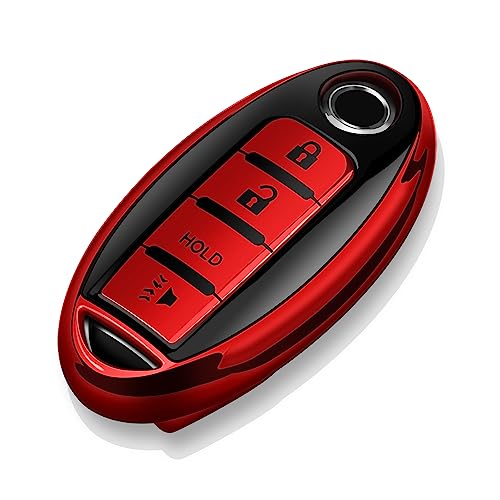


Changing your Nissan key fob battery is a straightforward DIY task that can save you time and money. Most Nissan key fobs use a CR2032 battery and can be opened with a small flat-head screwdriver, allowing you to quickly replace the old battery with a new one and restore full functionality.
Learning how to change the battery in your Nissan key fob is a simple skill that can save you an unexpected trip to the dealership and a significant expense. Our comprehensive guide walks you through the entire process, empowering you to handle this common maintenance task yourself. You can restore full functionality to your key fob quickly and efficiently.
This DIY approach means avoiding service center wait times and unnecessary costs. We will provide clear, concise instructions. First, we will help you confirm that a dead battery is indeed the culprit and ensure you have everything needed before you begin.
Key Takeaways
- CR2032 battery powers most Nissan key fobs.
- Small flat-head screwdriver often opens the fob.
- Carefully pry open, replace, and reassemble.
- Troubleshooting steps resolve common issues.
- Save money with this simple DIY repair.
How to Confirm Your Nissan Key Fob Battery Is Dead

Before attempting any repairs, confirming that your Nissan key fob battery is actually dead is the crucial first step. Ignoring initial signs can lead to unexpected issues. Identifying the problem early saves time and effort.
Recognize Warning Signs
Several indicators suggest your key fob battery is running low. You might notice a reduced operating range, meaning you need to be closer to your vehicle for it to respond. Intermittent functionality is another common sign, where the fob works some of the time but not consistently. The push-button start might become unreliable, or you may even see a low battery warning light on your Nissan’s dashboard, signaling it is time for a change.
Test Battery Life
A quick test involves trying the fob multiple times from different distances. If it struggles to lock or unlock the doors, or if the push-button start takes several attempts, the battery is likely weak. For a more definitive check, some automotive stores can test your key fob’s signal strength.
Identify Battery Type
Most modern Nissan key fobs, including those for the 2026 models, utilize a CR2032 lithium coin cell battery. However, some older models or specific fob designs might use a CR2025. You can typically confirm the correct battery type by checking your owner’s manual. Alternatively, carefully open the fob and inspect the existing battery for its printed model number.
Assemble Essential Tools
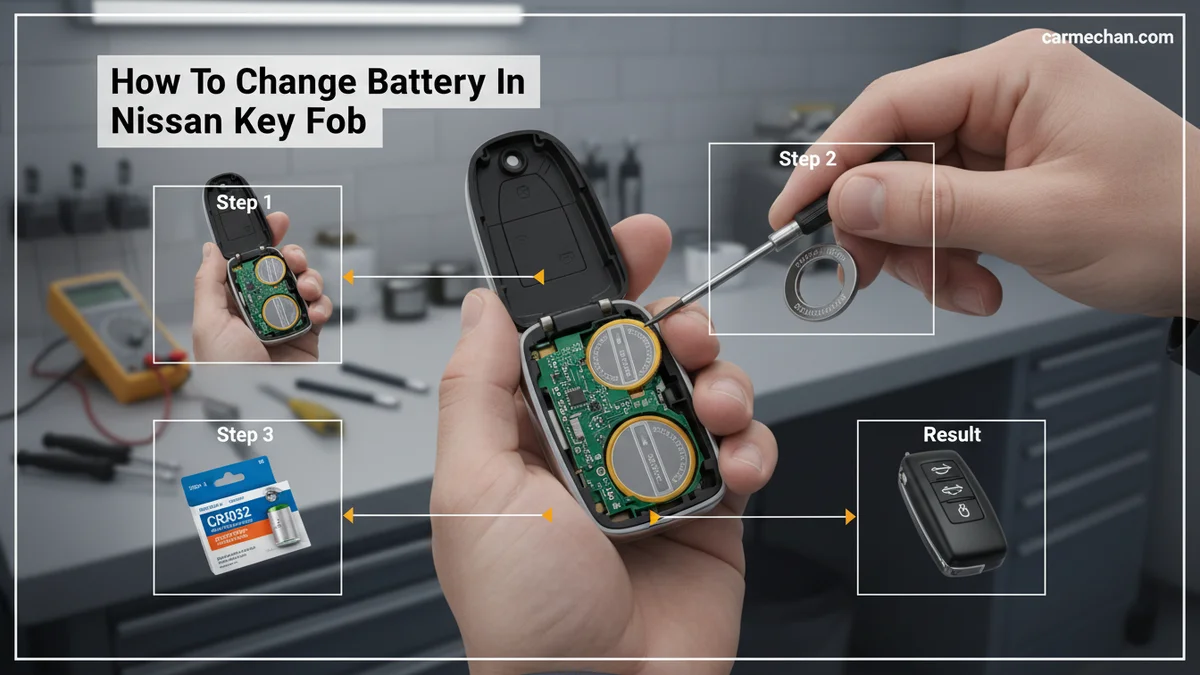
Changing your key fob battery requires minimal tools. You will need a small flat-head screwdriver or a plastic pry tool to gently open the fob casing. A new CR2032 (or CR2025) battery is also essential. Having these items ready ensures a smooth and damage-free replacement process.
Now that you know what to look for and have your supplies ready, let us walk through the actual replacement process with confidence and ease.
How to Replace Nissan Key Fob Battery in 6 Simple Steps
Replacing your Nissan key fob battery is a surprisingly simple DIY task that we can complete quickly by following these six straightforward steps. This process typically takes only a few minutes. You can easily restore your key fob’s functionality.
Locate Emergency Key
Begin by locating the emergency mechanical key within your key fob. Most Nissan intelligent keys have a small release button or tab on the side. Press this button and pull out the metal key. This step is crucial for accessing the battery compartment.
Gently Open Fob
With the emergency key removed, you will see a small slot or notch, often where the metal key was housed. Insert your small flat-head screwdriver or plastic pry tool into this slot. Twist the tool gently to carefully separate the two halves of the key fob casing. Apply steady pressure to avoid breaking any plastic tabs. You should hear a slight click as it opens.
Carefully Remove Old
Once the fob is open, you will see the circuit board and the coin cell battery. Note the orientation of the battery (which side is facing up). Use the small screwdriver to carefully pry out the old battery. Avoid touching the circuit board components directly. Discard the old battery responsibly.
Insert New Battery
Take your new CR2032 (or CR2025) battery. Insert it into the battery slot, ensuring the positive (+) side faces up, matching the orientation of the old battery. Press down gently until it clicks securely into place. Incorrect polarity will prevent the fob from working.
Securely Close Fob
Align the two halves of the key fob casing. Press them together firmly until you hear a satisfying click, indicating they are securely sealed. Make sure there are no gaps. Reinsert the emergency mechanical key back into its slot until it locks into position. This protects the internal components.
Test Key Fob


Finally, test your newly battery-powered key fob. Approach your Nissan and try to lock and unlock the doors. Confirm the remote start or push-button start functions as expected. If all functions work, your replacement was successful.
While the general steps are similar across models, certain Nissan key fob designs might require a slightly different approach or battery, which we will explore next.
Which Nissan Key Fob Designs Need Specific Care

Nissan manufactures several types of key fobs, and understanding their subtle design differences can prevent damage during battery replacement. Most follow the general steps, but some nuances exist. Knowing these specifics ensures a smoother process.
Intelligent Key Fobs
Nissan Intelligent Key fobs are common in many modern Nissan vehicles. These fobs often feature a sleek design with buttons on the surface and a hidden emergency key. They typically use a CR2032 battery. The primary difference often lies in the emergency key removal process and where the prying slot is located. Always ensure the emergency key is fully out before attempting to pry open the main casing. Some designs may have a very subtle notch near the key ring loop.
Standard Remote Fobs
Older or more basic Nissan models might use a standard remote fob. These often have a more rectangular shape and may not include an integrated emergency key. They might use a CR2025 battery, though CR2032 is still prevalent. The opening mechanism might involve prying a seam along the edge of the entire fob rather than a specific slot. Always look for a natural seam or a designated opening point.
Model Specific Notes
Certain popular Nissan models share similar fob designs, but it is always best to double-check your specific model’s owner’s manual. For instance, the Nissan Rogue key fob battery replacement process is often identical to the general steps outlined. Nissan Altima key fob battery changes and Nissan Versa key fob battery procedures also usually follow the CR2032 replacement guide. Even the Nissan Kicks key fob, while compact, typically uses the same battery and opening method. If your fob looks different, a quick search for “your Nissan model key fob battery replacement” can yield specific visual guides.
Even after following all steps carefully, sometimes your Nissan key fob might still not function as expected; let’s troubleshoot those common post-replacement issues.
Why Is Your Nissan Key Fob Still Not Working
It can be frustrating if your Nissan key fob still isn’t working after changing the battery, but several common issues can be easily resolved. Do not panic if it doesn’t work immediately. Most problems have straightforward solutions.
Check Battery Correctness
First, verify that you installed the correct battery type. As of 2026, most Nissan fobs use a CR2032, but ensure it is not a CR2025 if your model specifies it. Confirm the battery is inserted with the correct polarity, typically positive (+) side facing up. An upside-down battery will prevent any power delivery. This is the most frequent error.
Inspect Contact Points
Open the fob again and visually inspect the metal contact points that touch the battery. They should be clean and slightly springy. If they appear flat or corroded, gently bend them slightly to ensure good contact with the new battery. Any debris or corrosion can impede electrical flow. A small amount of rubbing alcohol on a cotton swab can clean these contacts.
Re-Pair Key Fob
In most modern Nissan key fobs, simply changing the battery does not require reprogramming or re-pairing. The internal memory retains its settings. However, if your car’s main battery was also recently disconnected, or if the fob remains completely unresponsive, a re-synchronization might be necessary. Consult your Nissan owner’s manual for model-specific re-pairing instructions. This process is usually very quick.
Common User Errors
Double-check that the fob is fully and securely closed. A slight gap can prevent proper contact or damage the internal components. Ensure you did not accidentally damage any internal components or the circuit board during the prying process. Excessive force is never advisable. Handle sensitive electronics with care.
When to Seek Help
If, after troubleshooting these common issues, your Nissan key fob is still not working, it may indicate a more significant problem. The fob itself might be damaged, or there could be an issue with your vehicle’s receiver. In such cases, it is best to contact a certified Nissan service center. They have diagnostic tools to identify and resolve complex electronic problems.
Successfully changing your Nissan key fob battery is a small but significant victory, saving you both time and money.
Frequently Asked Questions About Nissan Key Fob Battery Replacement
What Battery Type Does a Nissan Key Fob Typically Use?
Most Nissan key fobs, especially those from recent years, primarily use a CR2032 lithium coin cell battery. However, some older or specific models might require a CR2025. We recommend checking your owner’s manual or visually inspecting the existing battery for its specific type before purchasing a replacement.
Do I Need to Reprogram My Nissan Key Fob After Changing the Battery?

Generally, no, you do not need to reprogram your Nissan key fob after simply changing the battery. The fob retains its programming even without power. If your vehicle battery has also been disconnected, or if the fob remains unresponsive after a new battery, refer to your owner’s manual for potential re-synchronization steps.
How Can I Open My Nissan Key Fob Without Damaging It?
To open your Nissan key fob without damage, first remove the emergency mechanical key if present. Then, use a small flat-head screwdriver or a plastic pry tool. Insert it gently into the small notch often located near the key ring, and carefully twist or pry to separate the two halves. Avoid excessive force.
What Are the Signs That My Nissan Key Fob Battery Is Dying?
Common signs of a dying Nissan key fob battery include a reduced range, meaning you need to be closer to your car for it to respond. You might also experience intermittent functionality, where the fob works sometimes but not others, or a complete failure to lock or unlock the vehicle.
Where Can I Find the Correct Replacement Battery for My Nissan Key Fob?
You can find the correct replacement battery, typically a CR2032, at most electronics stores, supermarkets, drugstores, and online retailers. We advise checking the existing battery in your key fob or your car’s owner’s manual to confirm the exact battery model number before making your purchase.
Empower Your Drive a Final Word
Changing the battery in your Nissan key fob is a straightforward, budget-friendly task that puts control back in your hands. By understanding the common signs of a dying battery, having the correct CR2032 or CR2025 type on hand, and following our clear steps, you can avoid unnecessary dealership visits. This simple DIY repair saves you time, money, and hassle. We encourage you to undertake this small maintenance job with confidence. Keep your Nissan key fob functioning reliably for years to come.