How to Use Cruise Control Hyundai Step-by-Step Guide 2026
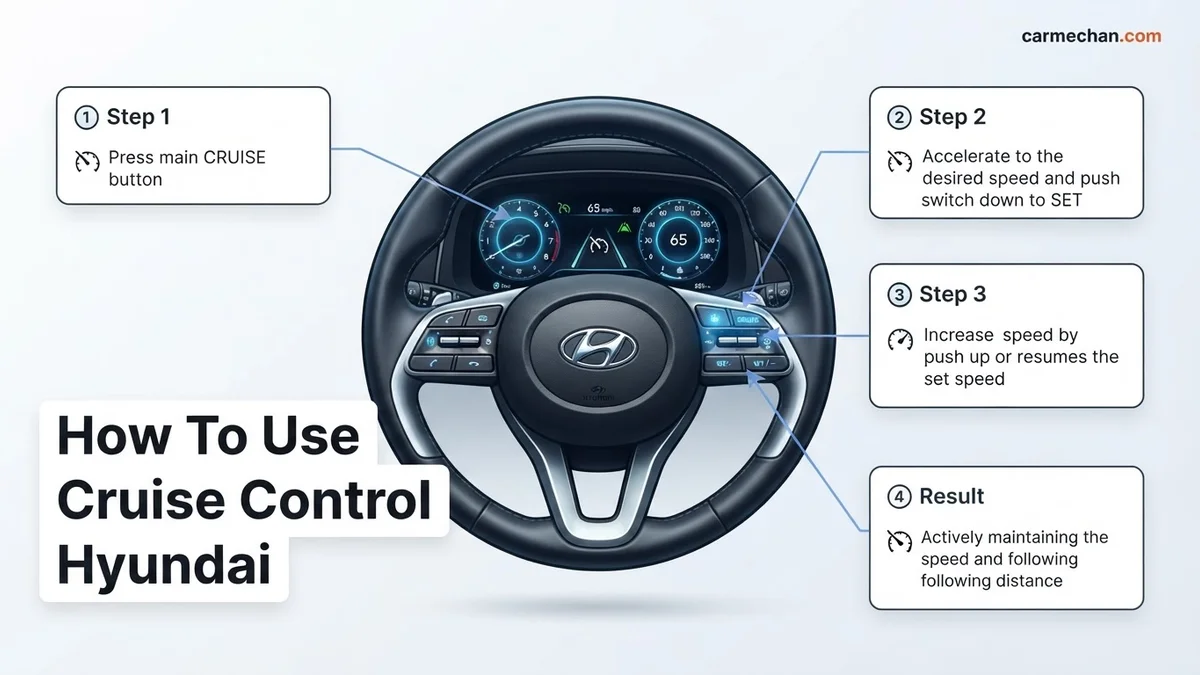
To activate cruise control, press the ‘CRUISE’ button on your steering wheel until the indicator light appears on your instrument cluster. Once at your desired speed, press the ‘SET-‘ button to lock in your pace and maintain a consistent speed automatically.

To use cruise control in your 2026 Hyundai, you primarily interact with the right-hand side of your steering wheel. Activating the system requires a two-step process: pressing the main cruise control button to put the system into standby mode, followed by selecting your target speed once you reach your desired pace.
Mastering these controls reduces driver fatigue during long commutes on open highways. By maintaining a constant speed without pedal input, you not only improve your comfort but can also help optimize fuel efficiency across varying road conditions. The following steps will ensure you operate your vehicle’s technology safely and effectively.
Key Takeaways
- Ensure the cruise indicator light is illuminated on your dashboard before setting your speed.
- Always use the ‘CANCEL’ button or tap the brake pedal to deactivate the system immediately.
- Adjust your speed incrementally using the + or – toggles on the steering wheel controls.
- Only utilize cruise control on dry, clear highways to maintain optimal vehicle safety.
- The system will automatically disengage if the brake pedal is depressed or engine speed drops.
Identifying Hyundai Cruise Control Buttons and Indicators
Navigating the Steering Wheel Controls
Modern 2026 Hyundai models utilize a standardized layout on the steering wheel, typically located on the right spoke. You will see several distinct icons that handle your speed management:
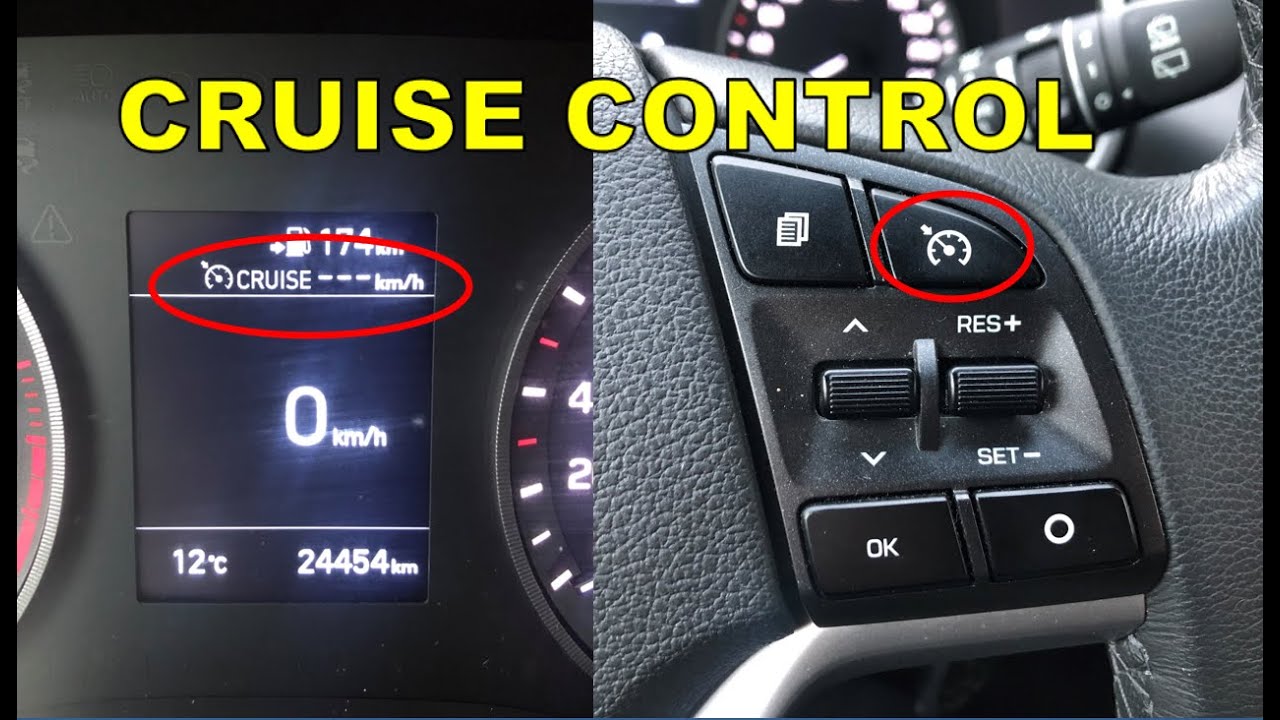
- CRUISE/Vehicle Icon: The main power button that toggles the system between standby and off.
- RES +: Increases your speed by 1 mph or resumes your previously set speed.
- SET -: Locks in your current speed or decreases it by 1 mph.
- CANCEL: Disengages the system while keeping the power on.
- Distance Button (On models with Smart Cruise Control): Adjusts the gap between you and the car ahead.
Reading Your Dashboard Indicators
Your instrument cluster provides visual feedback to confirm the system status. In 2026 models, color coding is critical for safety awareness:
- White CRUISE Light: Indicates the system is powered on but not currently controlling your speed (standby mode).
- Green SET Light: Appears once you have locked in a speed, indicating the vehicle is actively maintaining your pace.
- Distance Bars: If you are using Smart Cruise Control, the cluster will display horizontal bars representing your chosen following distance.
Effortless Cruising: Your Hyundai Cruise Control Action Plan
Navigating the open road with ease and comfort is a dream for many drivers. Hyundai’s cruise control system is designed to make highway driving less fatiguing and more fuel-efficient. This guide will walk you through the essential steps to safely and effectively engage, adjust, and disengage your Hyundai’s cruise control, ensuring a smooth and enjoyable journey every time. Understanding these functions is key to maximizing your driving experience and safety.
Step 1: Locating and Understanding Your Cruise Control Buttons
What you need: Your Hyundai vehicle, and a clear understanding of your steering wheel’s layout.
Instructions: Most Hyundai vehicles place the cruise control buttons conveniently on the right-hand side of the steering wheel. Look for buttons typically labeled with the word “CRUISE” or featuring a speedometer icon. You’ll usually find a main ON/OFF button, and then buttons for SET, RES (Resume), and usually +/- or Up/Down arrows for adjusting speed. Familiarize yourself with the exact placement and function of each button on your specific model before you begin driving. Some models might have a separate stalk extending from the steering column.
Pro Tip: Before you even start the engine, spend a minute with the car turned on (in park) to press each button and observe any dashboard indicator lights. This visual confirmation will help you understand which button activates the system and how the indicator changes.
Step 2: Activating the Cruise Control System
What you need: Your Hyundai vehicle, traveling at a speed above 25 mph (or as specified by your owner’s manual), and a clear, safe stretch of highway or road without frequent stops.
Instructions: To activate cruise control, you must first be traveling at a speed of at least 25 mph (check your owner’s manual for the exact minimum speed for your model, as it can vary). Press the main ON/OFF button to engage the system. You should see an indicator light illuminate on your dashboard, typically displaying “CRUISE” or the speedometer icon. This signifies that the cruise control system is now active and ready to accept a set speed. Do not attempt to activate cruise control in heavy traffic, winding roads, or slippery conditions.
Pro Tip: Ensure the “CRUISE” indicator light is clearly visible and illuminated before proceeding to the next step. If it doesn’t light up, double-check that you’ve met the minimum speed requirement and pressed the correct ON button.
Step 3: Setting Your Desired Speed
What you need: The cruise control system activated and your vehicle traveling at a stable speed above 25 mph.
Instructions: Once the system is active, accelerate to your desired cruising speed. This speed should be safe and legal for the road conditions. Once you are at your target speed, press the “SET” button. This will lock in your current speed. The “CRUISE” indicator light on the dashboard may change color or display the set speed, depending on your Hyundai model. For example, it might turn green or show “CRUISE SET.” This confirms that the system is now maintaining your chosen speed automatically.
Pro Tip: Avoid setting your speed too close to the speed limit, especially if you anticipate needing to accelerate quickly. It’s better to set it a few miles per hour below the limit for a comfortable buffer. Many systems allow you to “set” by pushing down on the button or pulling it towards you.
Step 4: Adjusting Your Set Speed
What you need: Cruise control engaged and maintaining a set speed.
Instructions: To increase or decrease your set speed without disengaging cruise control, use the +/- or Up/Down arrow buttons. Pressing the “+” or “Up” button will typically increase your speed by 1 mph increments, while pressing the “-” or “Down” button will decrease it by 1 mph. For larger adjustments, you might be able to hold the button down, and the speed will increase or decrease more rapidly until you release it. Again, observe the dashboard indicator to confirm the new set speed.
Pro Tip: Many drivers find it more efficient to make small, frequent adjustments rather than large jumps. This allows the system to smoothly manage the engine power and maintain consistent speed, often leading to better fuel economy.
Step 5: Resuming or Accelerating with Cruise Control
What you need: Cruise control disengaged temporarily (e.g., by braking) and a desire to return to your previously set speed or accelerate past it.
Instructions: If you have temporarily disengaged cruise control by pressing the brake pedal, or if you’ve manually accelerated past your set speed, you can use the “RES” (Resume) button to return to your previously programmed speed. Pressing “RES” will cause your vehicle to accelerate back up to the last speed that was set. If you are already traveling faster than your set speed, pressing “RES” will not have an immediate effect until your speed drops below the set point.
Pro Tip: Remember that “RES” will bring you back to the last set speed. If you want to go faster than your last set speed, you’ll need to manually accelerate and then press “SET” again at your new desired speed.
Step 6: Disengaging Cruise Control Safely
What you need: To be in a situation where you need to control your vehicle’s speed manually.
Instructions: There are three primary ways to disengage cruise control. The most immediate is by lightly pressing the brake pedal; this will disengage the system and your vehicle will begin to slow down. Alternatively, you can press the ON/OFF button, which will turn the entire system off, requiring you to reactivate it from scratch later. Finally, you can simply press the clutch pedal (in manual transmission vehicles) or shift to neutral, which will also disengage cruise control. The “CRUISE” indicator light on your dashboard will turn off.
Pro Tip: Always be prepared to brake manually. Cruise control does not react to traffic in front of you; it will maintain your set speed until you intervene. Practicing these disengagement methods in a safe environment is crucial.
Step 7: Utilizing Adaptive Cruise Control (If Equipped)
What you need: A Hyundai model equipped with Adaptive Cruise Control (ACC) and a clear understanding of its specific operation (refer to your owner’s manual).
Instructions: If your Hyundai features Adaptive Cruise Control, it goes beyond standard cruise control by using sensors to detect vehicles ahead. You’ll typically set your desired speed and a following distance (often indicated by bars or dots on your dashboard display). ACC will automatically adjust your speed to maintain that set distance from the vehicle in front. If the car ahead brakes, yours will too. If it accelerates or moves out of your lane, your car will resume your set speed. Look for buttons on your steering wheel that might have a car icon with radiating lines.
Pro Tip: ACC is a driver assistance system, not a self-driving feature. Always remain attentive and ready to take over control. Do not rely solely on ACC in adverse weather conditions or when road markings are unclear, as sensor performance can be compromised.
✅ Final Checklist
- The “CRUISE” indicator light on the dashboard illuminates when the system is active.
- You can successfully set and maintain a speed above 25 mph.
- The speed can be adjusted up or down using the designated buttons.
- The “RES” button correctly resumes the last set speed after braking.
- Braking or pressing the ON/OFF button reliably disengages cruise control.
Important Notes:
- Safety: Never use cruise control in heavy traffic, on winding or slippery roads, or in areas with frequent traffic stops or sharp curves. Always maintain a safe following distance and be prepared to take manual control at any moment.
- When to seek professional help: If your cruise control system does not engage, disengages unexpectedly, or behaves erratically, have it inspected by a qualified Hyundai technician.
- Estimated time and cost range: Learning to use cruise control takes about 15-30 minutes of familiarization and practice. There is no direct cost involved in using the feature itself, assuming it’s functioning correctly as part of your vehicle’s standard equipment.
Step-by-Step Guide to Activating and Setting Your Speed
How to Engage Cruise Control
Follow these steps to transition from manual driving to automated speed maintenance:

- Power On: Press the CRUISE button on your steering wheel. A white cruise indicator will appear on your dashboard.
- Accelerate: Drive your vehicle until you reach your desired travel speed.
- Lock In: Press the SET – button. Release the accelerator pedal slowly; the vehicle will now maintain that speed automatically.
- Verify: Observe the dashboard for the green SET light, which confirms the system has taken control.
Adjusting Speed While Driving
Once the system is active, you can fine-tune your speed without touching the gas pedal:
- To Increase: Tap the RES + button to increment your speed by 1 mph per press. Holding the button down will typically increase speed in 5 mph intervals.
- To Decrease: Tap the SET – button to reduce your speed by 1 mph per press.
- Immediate Cancellation: Press the CANCEL button or lightly tap your brake pedal. This immediately drops the system out of cruise mode, though the white CRUISE light will remain, indicating it is ready to be resumed at any time.
How to Adjust or Cancel Hyundai Cruise Control Settings
Once your speed is locked, you may need to modify your pace or exit the system entirely. For 2026 Hyundai models equipped with Smart Cruise Control (SCC), adjustments are handled directly via the steering wheel-mounted toggle switches.
Adjusting Your Speed
- To increase your cruising speed, push the toggle switch upward toward the “+” sign. Each click typically adjusts your speed by 1 mph or 5 mph, depending on your system configuration.
- To decrease your speed, push the toggle switch downward toward the “-” sign.
- In heavy traffic, use the distance button on your steering wheel to adjust the gap between your Hyundai and the vehicle ahead. Most 2026 models offer four distinct distance levels, which the vehicle maintains by modulating acceleration and braking automatically.
Canceling or Resuming
- To temporarily suspend the system without erasing your memory, press the “CANCEL” button or lightly tap the brake pedal. The indicator light on the instrument cluster will turn white, signaling the system is in standby mode.
- To resume your previous speed, simply toggle the switch to “RES.” Your Hyundai will accelerate smoothly to regain the last set speed, provided the vehicle is traveling above the minimum threshold (typically 20 mph for standard models).
Safety Protocols and When to Avoid Cruise Control
While Hyundai’s 2026 driver-assistance technologies are advanced, they are not a replacement for human vigilance. According to safety data from the National Highway Traffic Safety Administration (NHTSA), cruise control should never be used in conditions where tire-to-road friction is compromised.
When to Disable the System
- Adverse Weather: Never use cruise control during rain, snow, or icy conditions. Hydroplaning is significantly more dangerous when the vehicle is attempting to maintain a constant speed via automated throttle control.
- Winding or Steep Terrain: Sharp curves and steep gradients can confuse standard cruise control systems. When the system detects a loss of speed on a steep hill, it may aggressively downshift or accelerate, potentially causing a loss of traction.
- High-Density Traffic: While Smart Cruise Control is designed for traffic, human intervention is necessary in stop-and-go conditions exceeding three seconds of complete stillness. If the vehicle ahead moves, you may need to tap the accelerator to re-engage the system.
What If It Still Doesn’t Work?
If your cruise control refuses to engage or disengages unexpectedly, follow these troubleshooting steps to identify the root cause:
- Check the Brake Light Switch: If your brake lights are stuck in the “on” position due to a faulty switch, the cruise control system will disable itself as a safety precaution.
- Inspect Radar Sensors: For Smart Cruise Control, ensure the front grille radar sensor is clean. Debris, heavy mud, or snow buildup can block the sensor, causing a “System Check” error on the dashboard.
- Check Fuse Panels: Consult your 2026 owner’s manual to identify the cruise control fuse. A blown fuse is a simple, low-cost fix that often resolves non-responsive steering wheel buttons.
- Seek Professional Help: If the warning light remains illuminated after these checks, a professional diagnostic scan is required. Technicians use OBD-II scanners to identify faults in the steering wheel clock spring or electronic control unit. Professional diagnostics typically cost between $120 and $250, depending on the complexity of the fault.
Conclusion
Mastering your Hyundai’s cruise control enhances fuel efficiency and reduces fatigue on long highway stretches. According to verified research from the Insurance Institute for Highway Safety (IIHS), properly utilizing driver-assistance features can significantly mitigate human-error-related accidents. Ensure your sensors remain clean and avoid usage in inclement weather for optimal performance. As a next step, verify your system’s specific range limits in your 2026 owner’s manual to ensure full familiarity with your vehicle’s unique automated capabilities.
❓ Frequently Asked Questions
Why won’t my Hyundai cruise control activate?
Cruise control will not engage if you are driving below a specific minimum speed, typically 20-25 mph. Ensure you are at highway speeds and that there are no active fault indicators on your dashboard.
Does my Hyundai have Smart Cruise Control?
Many modern Hyundai models feature Smart Cruise Control, which uses sensors to maintain distance from the vehicle ahead. Check your steering wheel for a button featuring a car icon and horizontal lines to toggle distance settings.
Is it safe to use cruise control in the rain?
No, you should never use cruise control in wet, snowy, or icy conditions. Hydroplaning while the system is active can cause the car to accelerate suddenly, leading to a loss of vehicle control.
How do I resume my previous speed?
After canceling, press the RES+ toggle on your steering wheel to return the vehicle to the last saved speed automatically.
Does the cruise control system use the brakes?
On most standard systems, it only controls the throttle. However, Smart Cruise Control systems may apply the brakes automatically to maintain a safe distance from traffic ahead.
What is the difference between CANCEL and turning the system off?
The CANCEL button disengages the speed control but keeps the system in standby mode for quick resumption. Turning the system off with the main cruise button clears the memory and shuts off the dashboard indicator.