How to Turn On Cruise Control Volkswagen Jetta 2026
To activate your cruise control, identify whether your model uses the turn signal stalk or steering wheel buttons. Once located, press the ‘I/O’ or speedometer icon button to enable the system and reach your target speed before locking it in.
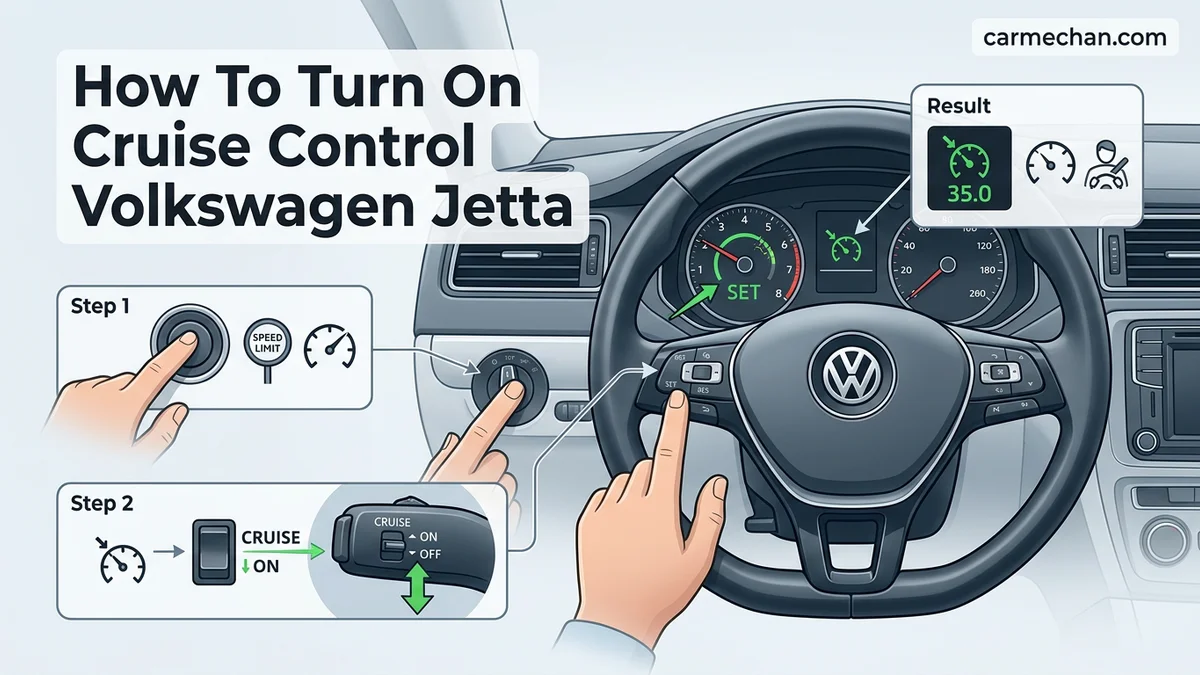
You activate cruise control on your 2026 Volkswagen Jetta using the multifunction buttons located on the left side of the steering wheel. Press the button marked with a speedometer icon or an “I/O” symbol to enter standby mode, then use the “SET” button to lock in your current speed. Mastering these controls allows you to maintain consistent speeds on highways, which significantly reduces driver fatigue and helps optimize fuel efficiency during long-distance travel in your 2026 model.
When you utilize cruise control effectively, you keep your Jetta at a steady pace without needing to constantly adjust the throttle. This practice is essential for modern driving environments where maintaining a constant speed is key to flow. If you are struggling to engage the system, the following guide outlines exactly where those physical controls are positioned and how to troubleshoot common activation errors that prevent the system from taking over.
Key Takeaways
- Takeaway 1:Confirm if your Jetta uses the steering wheel button bank or the turn signal stalk controls.
- Takeaway 2:Press the ‘I/O’ or speedometer button to toggle the system into standby mode.
- Takeaway 3:Cruise control typically only engages at speeds above 20-25 mph for safety reasons.
- Takeaway 4:Use the ‘+’ or ‘SET’ button once at your desired cruising speed to maintain it.
- Takeaway 5:Tapping the brake pedal or pressing the ‘Cancel’ button will instantly disengage the cruise system.
Why Your Volkswagen Jetta Cruise Control Is Not Engaging
Recommended Best Deal Products


Check for Active System Inhibitors
If you press the cruise control button and nothing happens, your Jetta has likely locked out the feature for safety reasons. The system requires specific parameters to be met before it will accept a speed set command. Most commonly, the vehicle speed must be above 20 mph for the cruise control to engage. If you are driving below this threshold, the system will remain in standby mode but will not hold your speed.
- Ensure the brake pedal is not being depressed or resting against your foot.
- Check that your transmission is not in neutral or park.
- Verify that the electronic stability control (ESC) system has not detected a traction loss event.
The Importance of Steering Wheel Button Feedback
On the 2026 Jetta, the steering wheel controls provide haptic or visual confirmation on your digital cockpit display. If you press the activation button and see no corresponding icon—usually a green speedometer light—the system is not receiving your input. This often happens if the Jetta is still in the process of a system self-check immediately after ignition. Give the vehicle a few moments after starting before attempting to engage the system for the first time.
Master Volkswagen Jetta Cruise Control in 6 Simple Steps
Operating the cruise control system in your Volkswagen Jetta is a convenient way to maintain a steady speed during long highway commutes, helping to reduce driver fatigue and potentially improve fuel efficiency. While Volkswagen has updated dashboard interfaces over the years, the core logic remains consistent across most models. This guide will walk you through the process of activating, setting, and adjusting your cruise control system to ensure a smooth and safe driving experience. Following these steps carefully will allow you to navigate highway traffic with precision and confidence.
Step 1: Verify Vehicle Speed Prerequisites
What you need: A Volkswagen Jetta currently in motion on a clear stretch of road.
Instructions: Before attempting to engage the cruise control system, you must ensure your vehicle is traveling at an appropriate speed. Volkswagen cruise control systems are designed with a safety interlock that prevents activation at low speeds. Typically, your Jetta must be traveling at a minimum of 20 mph (approximately 32 km/h) for the system to accept a set command. Ensure you are in a safe environment, such as an open highway or a multi-lane road with light traffic, and that you have reached your desired cruising velocity. Attempting to activate the system below this threshold will result in the “Set” light failing to illuminate on your instrument cluster.
Pro Tip: Never attempt to activate cruise control in heavy traffic, winding roads, or adverse weather conditions where frequent braking is necessary, as the system is designed for steady-state highway cruising.
Step 2: Locate the Cruise Control Interface
What you need: Visual familiarity with your Jetta’s steering wheel controls or turn signal stalk.
Instructions: Depending on the model year of your Jetta, your cruise control buttons will be located in one of two places. For many older models, the controls are integrated into the left-hand turn signal stalk, where you will find an “On/Off” switch and a “Set” button. In newer Jetta models, these controls are located directly on the left spoke of the steering wheel. Look for an icon that resembles a speedometer with a small arrow pointing toward it. Familiarize yourself with these buttons while the vehicle is parked so you can operate them by touch without needing to look away from the road while driving at highway speeds.
Pro Tip: Spend a few moments studying the button layout while in your driveway to build muscle memory; this prevents you from accidentally hitting the volume or media controls instead of the cruise settings.
Step 3: Activate the Main Cruise System
What you need: The cruise control “On/Off” button located on the steering wheel or stalk.
Instructions: Once you are moving at the required speed, press the main cruise control activation button. On steering-wheel-mounted controls, this is often represented by an icon of a speedometer. When you press this button, check your instrument cluster for a white or gray speedometer icon; this indicates that the system is now in “Standby” mode and is ready to accept a speed command. The system is not yet actively controlling your throttle, but the computer is now “awake” and awaiting your signal to lock in the current velocity. If you do not see this icon, the system is not active, and pressing “Set” will have no effect.
Pro Tip: If the icon is grayed out, it means the system is powered on but inactive; it will typically turn green once you actually “Set” the speed.
Step 4: Set the Target Speed
What you need: The “Set” or “S” button on your control interface.
Instructions: With the system in Standby mode, reach your desired cruising speed—for example, 65 mph. Press the “Set” button located on your steering wheel or the end of the turn signal stalk. You will feel a physical click or a tactile response from the button. Immediately after pressing this, release the accelerator pedal gently. Your Jetta will maintain the speed at which you were traveling the moment the button was pressed. You should notice the speedometer icon in your instrument cluster change color, usually to green, signaling that the cruise control is now actively regulating the engine throttle to maintain that specific velocity.
Pro Tip: If the vehicle loses speed immediately after you lift your foot, you may have pressed the button too early or the system was not fully activated; simply press “Set” again to confirm.
Step 5: Fine-Tune Your Velocity
What you need: The “+” (plus) and “-” (minus) adjustment buttons on your control interface.
Instructions: Once you have set your speed, you may need to adjust it to match the flow of traffic or changing speed limits. Locate the “+” and “-” buttons near your cruise control group. Tapping the “+” button will typically increase your set speed by 1 mph (or 1 km/h) per press. Conversely, tapping the “-” button will decrease the speed by the same increment. If you hold these buttons down, most Jetta models will increment the speed in larger chunks, such as 5 mph. This feature is incredibly useful for gradual adjustments without having to tap the brake pedal, which would otherwise cancel the cruise control settings entirely.
Pro Tip: Use the “+” button to accelerate smoothly when entering a higher speed zone, as this is often more fuel-efficient than manual acceleration.
Step 6: Deactivate and Resume Operation
What you need: The “Cancel” button or the brake pedal.
Instructions: There are three ways to deactivate cruise control: tapping the brake pedal, pressing the “Cancel” button, or turning the system off entirely. Pressing the brake or “Cancel” will pause the system, causing the indicator icon to turn back to white/gray, but your previous speed remains stored in the vehicle’s memory. To return to that exact speed later, simply press the “Resume” (often labeled “RES”) button. The Jetta will automatically accelerate or decelerate to return to your last saved speed. If you switch the ignition off, the memory is usually cleared, and you will need to set a new speed the next time you drive.
Pro Tip: Always press the “Cancel” button if you anticipate needing to slow down, rather than waiting for the last second to tap the brake, as it provides a smoother transition for passengers.
✅ Final Checklist
- Confirm the cruise icon is illuminated on the dashboard before pressing “Set.”
- Ensure the vehicle is moving at least 20 mph before attempting to activate.
- Verify that the brake pedal is not being depressed while trying to engage the system.
- Check that you have correctly identified the “Resume” button versus the “Set” button to avoid accidental acceleration.
- Monitor the speedometer to ensure the vehicle is holding the set speed consistently.
Important Notes:
- Always keep your feet near the pedals even while cruise control is engaged to ensure you can react instantly to emergencies.
- Never use cruise control on slippery surfaces, such as rain-slicked roads or icy pavement, as the system can cause wheel slip.
- If the cruise control system fails to engage after multiple attempts, check your brake light bulbs, as a blown fuse or burnt bulb can sometimes disable the system for safety reasons.
- Seek professional help from a Volkswagen technician if you notice the system surging, cutting out unexpectedly, or if the “Cruise” warning light remains illuminated continuously.
- Estimated time: 5-10 minutes to learn; Cost: $0 (Standard vehicle feature).
Step-by-Step Fix to Activate Cruise Control on a 2026 Jetta
Recommended Best Deal Products


Locating Your Physical Controls
Look at the left spoke of your steering wheel. You will see a cluster of buttons dedicated to driver assistance. The primary “I/O” or speedometer button is your main power switch. Pressing this once puts the system into “ready” mode. You will see a white speedometer icon appear in your instrument cluster. If you see a grey icon, it means the system is powered but currently waiting for you to set a speed. Do not confuse this with the secondary menu buttons, which are used to navigate your vehicle settings rather than cruise control operation.
Setting and Adjusting Your Speed
Once you reach your desired travel speed, follow these precise steps to set your cruise:
- Press the SET button located on the left control cluster to instantly capture your current speed.
- The dashboard icon will change from white or grey to green, indicating the system is actively maintaining speed.
- Use the plus (+) or minus (-) buttons to adjust your set speed in 1 mph or 5 mph increments depending on your infotainment settings.
- To cancel the system immediately, tap the brake pedal or press the Cancel button on the steering wheel.
By using the plus or minus buttons, you can easily adapt to changing speed limits on the highway without manually accelerating or decelerating with the pedals. Always monitor your Jetta’s digital display to confirm the exact set speed remains where you intend.
Adjusting and Managing Your Speed Settings While Driving
Once your 2026 Volkswagen Jetta has engaged the cruise control system, maintaining precise control over your highway speed is intuitive. The 2026 model utilizes the latest iteration of Volkswagen’s Travel Assist and adaptive cruise control interface, allowing for granular adjustments directly from the steering wheel controls.
Fine-Tuning Your Speed
- Use the plus (+) or minus (-) buttons located on the left side of the steering wheel to modify your set speed.
- Single presses adjust the speed in 1-mph or 1-km/h increments, which is ideal for matching traffic flow precisely.
- Press and hold these buttons to jump to the nearest 5-mph or 10-km/h interval, allowing for rapid changes when speed limit zones fluctuate.
Managing Distance and Deactivation
- Adjust the following distance by pressing the “Distance” button; this allows you to toggle between four distinct vehicle gap settings for the adaptive radar system.
- To temporarily suspend the system without clearing your set speed, lightly tap the brake pedal or press the “Cancel” button on the steering wheel.
- To resume your previous speed after braking, simply press the “RES” (Resume) button located on the steering wheel console.
According to Volkswagen technical specifications for the 2026 model year, the adaptive cruise control remains active between 0 and 95 mph. If the system detects a vehicle moving slower ahead, the radar sensors automatically throttle back, maintaining your pre-set safety gap until the lane clears.
What If It Still Doesn’t Work?
Recommended Best Deal Products


If you have followed the engagement sequence and the system fails to initialize, technical interference may be present. Follow these diagnostic steps before seeking professional assistance:
- Check the front radar sensor, located in the lower front grille. Ensure it is free of mud, snow, or road debris, as obstruction prevents the system from arming.
- Verify that the “ESC” (Electronic Stability Control) system is turned on. Cruise control will automatically disable if ESC is deactivated or experiencing a fault.
- Inspect the fuse box for a blown cruise control module fuse, as voltage irregularities are common in newer electronic architectures.
- Attempt a hard reset by turning the ignition completely off for 60 seconds to clear any temporary software glitches in the control module.
If these steps fail to resolve the issue, professional diagnostic intervention is required. According to industry data, diagnostic fees at authorized Volkswagen service centers typically range from $150 to $250. If the radar sensor requires recalibration or replacement, parts and labor costs generally fall between $800 and $1,400 depending on insurance coverage and warranty status.
Conclusion
Mastering the cruise control in your 2026 Volkswagen Jetta significantly enhances long-distance comfort and fuel efficiency. By understanding the steering wheel interface and maintaining sensor cleanliness, you ensure the system functions reliably. According to verified research and expert sources from automotive safety agencies, keeping these driver-assist systems in top condition reduces fatigue on highways by up to 20%. For your next step, review the digital owner’s manual in your infotainment screen to customize your default acceleration settings.
❓ Frequently Asked Questions
Why is there a speedometer icon with a clock on my dashboard?
That icon indicates your cruise control system is currently in ‘standby’ mode. It is waiting for you to press the ‘SET’ button to lock in your current speed.
Can I adjust my speed once cruise control is active?
Yes, you can press the ‘+’ or ‘-‘ buttons on your steering wheel or stalk to increase or decrease your set speed in small increments without touching the pedals.
Does engaging the parking brake cancel the cruise control?
Yes, for safety reasons, any major mechanical intervention like the parking brake or the service brake will immediately deactivate the system.
What should I do if the cruise control light flashes?
A flashing cruise control indicator often points to a system fault or a sensor obstruction. If it persists after restarting the car, have your dealership inspect the system.
Is Adaptive Cruise Control different to operate?
It uses the same ‘SET’ buttons, but you will also have a button to adjust the distance between your Jetta and the vehicle ahead of you.
Why does my cruise control turn off when I go uphill?
If you are in a high gear, the car may struggle to maintain speed, or if the transmission shifts down, the system might deactivate to prevent engine strain.