2021 Toyota Corolla Oil Light Reset: A Maintenance Guide
Last Updated on September 1, 2026 by Ryan
📋 Table of Contents
- 🎯 Key Takeaways
- Understanding the Maintenance Required System
- 2021 Toyota Corolla Maintenance Reset Made Easy: Your Essential Action Plan
- The Importance of Timely Oil Changes for Corollas
- Factors Affecting Oil Life and Notification Timing
- Maintenance vs. Warning Lights: Key Differences
- Conclusion
- 💬 Quick Questions & Answers
- ❓ Frequently Asked Questions
Resetting the 2021 Toyota Corolla oil light is a vital post-maintenance task that ensures your vehicle’s computer accurately tracks the next service interval. Neglecting this maintenance reminder can lead to missed oil changes and potential engine damage over time.
🎯 Key Takeaways


- Takeaway 1:Always change the oil before resetting the maintenance light.
- Takeaway 2:Resetting the light clears the ‘Maintenance Required’ dashboard notification.
- Takeaway 3:The process utilizes the steering wheel controls and multi-information display.
- Takeaway 4:Regular resets help maintain an accurate digital service history.
- Takeaway 5:Consult your owner’s manual if the light persists after resetting.
Have you ever been driving your 2021 Toyota Corolla and suddenly noticed a persistent light on your dashboard? That “Maintenance Required” message can feel a bit stressful if you are not sure what it means. It is actually your car’s way of talking to you and keeping you safe on the road. It is a helpful nudge rather than a scary warning sign.
Staying on top of your car’s needs is the best way to ensure it lasts for many years. Since the Corolla is known for its legendary reliability, understanding how to manage its alerts is a vital part of ownership. Let’s dive into what that light actually represents and why you should pay close attention to its timing. Understanding your car helps you drive with much more confidence.
Understanding the Maintenance Required System


Your 2021 Toyota Corolla is a very smart machine. It uses an internal computer to track exactly how far you have driven since your last service. This system is designed to take the guesswork out of vehicle ownership. Instead of checking your odometer every single day, you can rely on your dashboard to give you a friendly reminder. This system ensures that you never miss a vital check-up for your engine.

Maintenance Light vs. Check Engine Light
It is very important to distinguish between the “Maintenance Required” light and the “Check Engine” light. These two icons serve very different purposes. The maintenance light is a simple timer-based reminder. It usually appears every 5,000 miles to tell you it is time for a look under the hood. On the other hand, the check engine light indicates a potential mechanical fault or sensor issue. One is for routine care, while the other is for unexpected repairs. Knowing the difference can save you a lot of unnecessary worry.
What the System Monitors
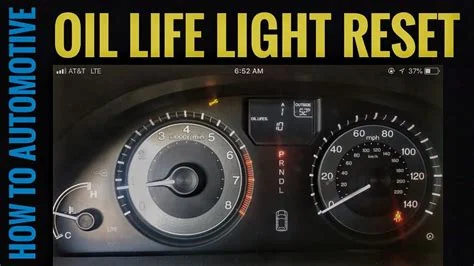
The system primarily focuses on mileage intervals. While many people call it the “oil light,” it covers more than just lubrication. It serves as a general alarm for several important tasks. When this light turns on, your car is usually asking for a few specific things to be checked by a professional. These tasks keep your car running like new for a long time.
- Tire rotations: Keeping your tread even for better grip and safety.
- Fluid inspections: Ensuring your coolant and brake fluids are at safe levels.
- Filter checks: Making sure your engine can breathe clean air through a fresh filter.
- Brake Pad checks: Ensuring your stopping power remains consistent and reliable.
- Visual Inspections: Checking for leaks or worn-out belts under the hood.
2021 Toyota Corolla Maintenance Reset Made Easy: Your Essential Action Plan


The 2021 Toyota Corolla is a marvel of modern engineering, but even the most reliable cars require routine care to stay on the road. When your dashboard displays the “Maintenance Required” light, it is a signal that your vehicle has reached a specific mileage interval—usually 5,000 miles—triggering a reminder for an oil change and tire rotation. While performing the oil change is the physical part of the job, resetting the internal computer is the digital final step. This guide provides a comprehensive walkthrough to help you clear that light manually, ensuring your vehicle’s service tracking stays accurate and your dashboard remains clutter-free.
Step 1: Prepare Your Environment and Vehicle
What you need: A parked vehicle on a level surface, your key fob (for push-button start) or the physical key, and a clear view of the instrument cluster.
Instructions: Before attempting to interact with the vehicle’s computer system, ensure the car is in “Park” (P) and the parking brake is engaged for safety. You do not need to have the engine running to perform this reset; in fact, it is often easier to do with the engine off to avoid any vibrations or mechanical distractions. If you have a push-button start, press the “Engine Start/Stop” button twice without your foot on the brake. This puts the car into “IG-ON” mode, which powers the electronics and the Multi-Information Display (MID) without cranking the engine. If you have a traditional key, turn it to the second position (labeled “ON”).
Pro Tip: Ensure your battery is in good health before doing this. If you spend too much time navigating the menus with the engine off and the headlights or climate control on, you could inadvertently drain the battery, though this process usually takes less than two minutes.
Step 2: Locate the Steering Wheel Controls
What you need: Familiarity with the left-hand side of your steering wheel.
Instructions: The 2021 Toyota Corolla utilizes a specific set of directional pads located on the left spoke of the steering wheel to navigate the dashboard menus. You will see an “OK” button in the center, surrounded by four arrows (Up, Down, Left, Right). There is also a “Back” button (indicated by a curved arrow) located just above or beside the directional pad. Take a moment to feel these buttons; you will be using the Left and Right arrows to move between top-level menu categories and the Up and Down arrows to scroll through sub-settings. The “OK” button acts as your primary selection tool.
Pro Tip: If your screen is currently displaying a warning message like “Door Ajar” or “Low Fuel,” press the Back button once to clear that overlay before you begin navigating the menu system.
Step 3: Navigate to the Settings Menu
What you need: The Multi-Information Display (MID) active in the center of your gauge cluster.
Instructions: Look at the digital screen in the middle of your gauges. You will likely see your digital speedometer or fuel economy data. Using the Right or Left arrow buttons on the steering wheel, scroll through the icons at the top or bottom of the screen. You are looking for the “Gear” icon, which represents the “Settings” menu. On the 2021 Corolla, this is typically the last icon on the far right of the carousel. As you scroll, the screen will change to show different data sets like Lane Departure alerts or Trip Info. Stop once the Gear icon is highlighted.
Pro Tip: Avoid scrolling too fast. The Corolla’s computer has a slight lag between button presses, and overshooting the Gear icon will require you to cycle through all the menus again to get back to the start.
Step 4: Access the Vehicle Settings Sub-Menu
What you need: The Settings (Gear) menu active on your display.
Instructions: Once you are on the Gear icon page, you will see a list of various customizable options like “LTA” (Lane Tracing Assist) or “PCS” (Pre-Collision System). Use the Down arrow to scroll through this list until you find the option labeled “Vehicle Settings.” It might be hidden near the bottom of the visible list, so keep scrolling until it appears. Once “Vehicle Settings” is highlighted, you must press and HOLD the “OK” button for about two to three seconds. Simply clicking it once won’t open this specific sub-menu; the long press is a safety feature to prevent accidental changes to vehicle configurations.
Pro Tip: If the screen doesn’t change after a long press, release the button and try holding it again firmly. Sometimes the steering wheel buttons can be sensitive to the angle of your thumb.
Step 5: Select the Maintenance Reset Option
What you need: The “Vehicle Settings” menu displayed on the screen.
Instructions: Inside the Vehicle Settings menu, you will typically see two main options: “TPMS” (Tire Pressure Monitoring System) and “Scheduled Maintenance” or “Oil Maintenance.” Depending on your specific trim level and software version, you may see one or both. For an oil light reset, scroll down using the Down arrow until “Scheduled Maintenance” is highlighted. This is the setting that controls the “Maintenance Required” light that appears every 5,000 miles. Once it is highlighted, press the “OK” button (a standard quick press this time) to enter the reset screen.
Pro Tip: If you recently rotated your tires but didn’t change the oil, you might want to reset the TPMS here as well, but for the oil light specifically, “Scheduled Maintenance” is the correct path.
Step 6: Confirm the Data Reset
What you need: The “Reset Data?” prompt on the screen.
Instructions: After selecting Scheduled Maintenance, the screen will ask you a confirmation question: “Reset Data?” It will provide two options: “Yes” and “No.” By default, “No” is usually highlighted to prevent errors. Use the Up arrow to move the selection to “Yes,” then press the “OK” button. The screen should then briefly display a message saying “Reset Complete” or showing a progress bar that fills up. This action tells the car’s Engine Control Unit (ECU) that the service has been performed and to start the 5,000-mile countdown over again from zero.
Pro Tip: Do not turn off the car while the “Resetting…” message is on the screen. Interrupting the write process to the car’s memory can occasionally cause the light to persist or the system to glitch.
Step 7: Verify the Successful Reset
What you need: To exit the menu and restart the car.
Instructions: Once the “Reset Complete” message disappears, press the “Back” button on your steering wheel multiple times until you are back at the main info screen (the one showing your speedometer or range). Now, turn the vehicle completely off. To verify the reset was successful, start the engine as you normally would (foot on the brake, press the Start button). Watch the instrument cluster carefully during the startup sequence. The “Maintenance Required” or “Oil Maintenance Required” message should no longer appear. If the screen stays clear of maintenance warnings, you have successfully completed the process.
Pro Tip: If the light remains, it is usually because the “OK” button wasn’t held long enough in Step 4 or the “Yes” confirmation wasn’t registered. Simply repeat the process from Step 1.
✅ Final Checklist
- Verification: Ensure the “Maintenance Required” text is absent from the MID upon engine startup.
- Verification: Check that the Gear icon menu is no longer showing a notification badge.
- Verification: Confirm that your physical maintenance sticker on the windshield matches the 5,000-mile increment now stored in the car.
- Verification: Ensure no other warning lights (like the Check Engine Light) were accidentally triggered during the navigation.
Important Notes:
- Safety first: Never attempt to reset the maintenance light while the vehicle is in motion. This requires your full attention on the dashboard and steering wheel controls.
- Professional Help: If you reset the light but the “Check Engine” light (shaped like an engine) remains on, this is not a maintenance reminder; it is a diagnostic code. You should take the car to a mechanic or use an OBD-II scanner to identify the fault.
- Estimated Time and Cost: This DIY procedure takes approximately 2 to 5 minutes and costs $0. Professional dealerships may charge a small fee if they have to do it for you, though it is usually included in the price of an oil change.
The Importance of Timely Oil Changes for Corollas
The 2021 Corolla uses sophisticated engine technology to achieve great fuel economy. To keep those parts moving smoothly, high-quality oil is a must. If you ignore that light, the old oil begins to break down and lose its thickness. This creates friction, which can lead to heat and unnecessary wear on your engine’s internal components. Regular oil changes are the cheapest insurance policy you can buy for your vehicle.
Boosting Fuel Economy and Performance
Fresh oil reduces the workload on your engine. When your engine does not have to fight against “sludge” or dirty oil, it runs much more efficiently. This means you will see better gas mileage and a smoother idle. A clean engine is a happy engine, and it translates directly to savings at the pump for you. You will also notice that the car feels more responsive when you step on the gas pedal. Keeping the oil fresh ensures that every part of the motor moves with very little resistance.
Protecting Your Corolla’s Resale Value
Corollas are famous for holding their value better than almost any other car. One of the first things a buyer or dealership looks at is the service history. By responding to the maintenance light promptly, you are building a record of excellent care. This helps you avoid major mechanical failures that could ruin the car’s worth. Taking care of the oil now prevents massive headaches later.
- Preventing Engine Sludge: Avoiding thick deposits that can ruin a motor’s internal passages.
- Reducing Overheating: Keeping temperatures low by reducing metal-on-metal friction.
- Avoiding Costly Repairs: A simple oil change is much cheaper than replacing an entire engine.
- Maintaining Your Warranty: Staying up to date with service protects your factory coverage.
- Environmental Impact: Clean engines produce fewer emissions and run much cleaner.
Factors Affecting Oil Life and Notification Timing
While your 2021 Toyota Corolla is designed for maximum efficiency, the timing of that “Maintenance Required” message isn’t always a “one size fits all” scenario. Toyota generally recommends a 10,000-mile interval when using high-quality 0W-20 synthetic oil, but your specific environment and driving style play a massive role in how quickly that oil breaks down.
Driving Habits and Severe Conditions
Your engine oil works significantly harder depending on how you use the vehicle. If your daily commute consists of short trips under five miles, your engine rarely reaches its optimal operating temperature. This prevents moisture from evaporating out of the system, which can lead to oil sludge. Other “Severe Service” factors that might lead you to service your vehicle sooner include:
- Frequent Idling: Spending long periods in heavy stop-and-go traffic or using the car for delivery services.
- Extreme Temperatures: Consistently driving in areas with sustained temperatures above 90°F or well below freezing.
- Dusty Environments: Driving on dirt roads or in areas with high construction debris, which can tax the oil filter.
- Heavy Loads: Regularly carrying a full cabin of passengers or heavy trunk cargo through mountainous terrain.
The Role of Synthetic Oil and Additives
The 2021 Corolla relies on synthetic oil because it contains advanced additives that resist thermal breakdown better than conventional oil. However, these additives eventually deplete. If you find yourself driving in the “Severe” conditions mentioned above, many master technicians suggest performing your oil change and reset every 5,000 miles instead of 10,000. This ensures that the engine internals remain lubricated and free from the friction that causes long-term wear.
Maintenance vs. Warning Lights: Key Differences
It is vital for every Corolla owner to distinguish between a routine maintenance reminder and a genuine mechanical emergency. While the reset procedure clears the digital “nudge” from your dashboard, it does not fix underlying mechanical issues. Understanding the iconography on your dash can save you from a costly engine replacement.
The “Maintenance Required” Message
The message you see on your multi-information display is essentially a mileage-based timer. It is important to remember that the car does not actually “sense” the chemical quality of your oil. It is simply counting the miles since the last time the system was cleared. If you reset this light without actually changing the oil, you are bypassing a critical safety net. Over time, old oil loses its viscosity, which can lead to increased engine noise and reduced fuel economy.
The Red Oil Pressure Warning Light
If you ever see a red oil canister icon illuminate on your dashboard, this is NOT a maintenance reminder. This is a critical warning indicating a drop in oil pressure or a dangerously low oil level. Unlike the maintenance light, this requires immediate action to avoid catastrophic engine failure. If this light appears, you should:
- Pull Over Safely: Stop the vehicle as soon as it is safe and turn off the engine immediately.
- Check the Dipstick: Verify if the oil level is below the minimum line; low levels often trigger this light during hard braking or turns.
- Look for Leaks: Inspect the ground underneath the engine for fresh puddles or check the exhaust for thick blue smoke.
Never attempt to “reset” a red warning light through the settings menu. These lights signal a physical, mechanical problem that software cannot resolve. Always address the physical oil level before addressing the dashboard electronics.
Conclusion
Understanding the 2021 Toyota Corolla oil light reset is about more than just clearing a message off your screen; it is about taking ownership of your vehicle’s longevity. By recognizing that this light is a mileage-based reminder rather than a real-time sensor, you can make more informed decisions about your service intervals. Whether you stick to the 10,000-mile standard or opt for more frequent changes due to heavy city driving, consistency is the key to a healthy engine.
As a next step, take a moment to check your owner’s manual for the specific “Severe Service” definitions to see where your driving habits fall. Additionally, make it a habit to check your oil level manually with the dipstick at least once a month. Staying proactive ensures your Corolla remains the reliable, fuel-efficient partner it was built to be. Happy driving!
💬 Quick Questions & Answers
Why does the oil light turn on?
It triggers every 5,000 miles to remind you that scheduled maintenance, like oil changes and tire rotations, is due.
Does resetting the light change the oil?
No, resetting only clears the electronic reminder and does not replace physical engine maintenance.
Can I reset the light while driving?
No, for safety and to access the necessary menus, the vehicle must be parked with the ignition on.
Is the oil light the same as the check engine light?
No, the maintenance light is for service intervals, while the check engine light indicates a mechanical or sensor fault.
What if the light comes back on immediately?
This usually means the reset process wasn’t completed correctly or there is a secondary system error requiring professional diagnosis.
❓ Frequently Asked Questions
What is the recommended oil change interval for a 2021 Toyota Corolla?
Toyota generally recommends changing the oil every 10,000 miles when using synthetic oil, or every 5,000 miles for special driving conditions. However, the maintenance light triggers every 5,000 miles for tire rotations and fluid checks.
Will skipping the maintenance reset affect my vehicle’s warranty?
While the reset itself isn’t the issue, failing to perform the required maintenance documented by that light could potentially void parts of your warranty. It is best to keep digital or physical receipts of all services performed.
What type of oil does the 2021 Toyota Corolla require?
Most 2021 Corolla models require SAE 0W-20 synthetic oil to ensure optimal fuel efficiency and engine protection. Always verify the specific viscosity requirements on your oil fill cap or in the owner’s manual.
Can I customize the maintenance intervals in the Toyota settings?
The 2021 Corolla allows for some customization of maintenance reminders through the infotainment or cluster display settings. However, it is highly recommended to stick to the factory-preset intervals for the best engine longevity.
Why is it important to distinguish between the oil light and the low oil pressure light?
The maintenance light is a scheduled reminder, whereas the low oil pressure light (the red oil can icon) indicates a critical loss of oil pressure. If the red light appears, you must pull over and stop the engine immediately to prevent total failure.
Does the hybrid 2021 Corolla follow the same maintenance schedule?
Yes, the hybrid Corolla generally follows a similar 5,000-mile interval for multi-point inspections and a 10,000-mile interval for oil changes. The software-driven reset process is identical to the standard gasoline models.