2019 Nissan Altima Key System Error: Causes & Repairs
Last Updated on September 1, 2026 by Ryan
📋 Table of Contents
- 🎯 Key Takeaways
- Common Causes of Key System Malfunctions in Altimas
- The Ultimate 2019 Nissan Altima Key System Error Walkthrough
- Comparing Key Fob Issues vs. Vehicle Hardware Failures
- Professional Diagnostic Costs and Repair Estimates
- Expert Tips for Preventing Future Key System Errors
- Conclusion: Navigating Your Nissan Altima Key System Error
- 💬 Quick Questions & Answers
- ❓ Frequently Asked Questions
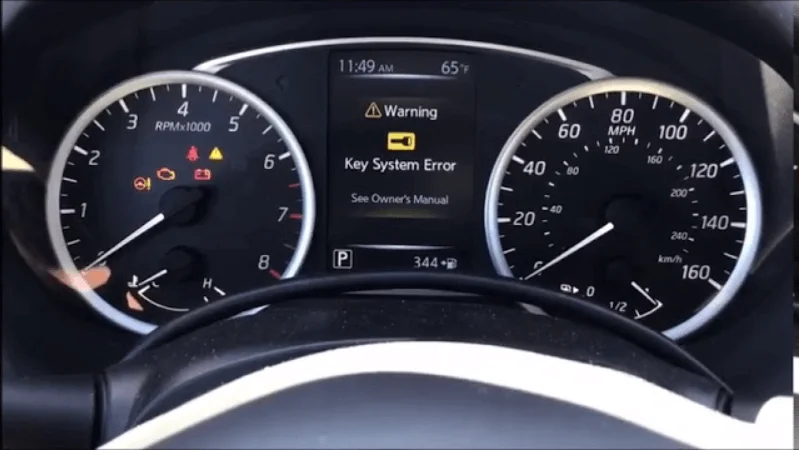
The Key System Error message in a 2019 Nissan Altima typically indicates a communication failure between the vehicle and the Intelligent Key. Most issues stem from low battery voltage in the fob or a malfunctioning brake light switch, though technical software glitches can also trigger the warning.
🎯 Key Takeaways


- Takeaway 1:Check the key fob battery first as it is the most common failure point.
- Takeaway 2:Inspect the brake light switch for physical damage or electrical connectivity issues.
- Takeaway 3:Keep the key fob away from electronic devices that cause signal interference.
- Takeaway 4:Consult Nissan Technical Service Bulletins for potential software update requirements.
- Takeaway 5:Verify the vehicle’s 12V battery health to ensure stable electronic system power.
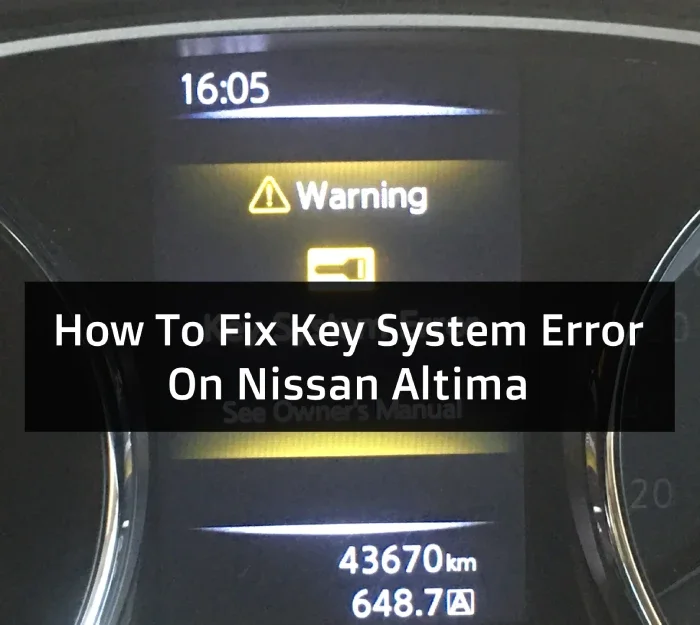
Have you ever sat in your 2019 Nissan Altima, pressed the start button, and saw a “Key System Error” message pop up? It is a frustrating moment that can ruin your morning commute or leave you stranded in a parking lot. This warning light means your car and your smart key are having a serious communication breakdown.
Understanding this error is crucial for every Altima owner because it helps you stay mobile. It also helps you decide if you need a quick five-dollar battery swap or a more expensive trip to the dealership. Let’s dive into why your car is giving you the cold shoulder and what those dashboard lights actually mean for your vehicle’s health.
Common Causes of Key System Malfunctions in Altimas


When your Altima displays a key system error, it is usually trying to tell you that the wireless handshake has failed. This handshake happens every time you try to unlock the doors or start the engine. If the signal is weak, messy, or missing entirely, the computer triggers a safety lockout to prevent theft.
Weak Power Sources and Battery Issues
The most frequent culprit for this error is a simple lack of power. Your key fob relies on a small button-cell battery to broadcast its unique ID code to the car. When this battery starts to die, the signal becomes inconsistent. You might notice that the car only starts if you hold the fob directly against the start button. Similarly, a weak 12-volt car battery can cause the vehicle’s receiving sensors to malfunction, leading to the same frustrating error message on your screen.
Environmental and Electronic Interference
Sometimes the problem isn’t broken hardware, but a “noisy” environment. Your Altima uses radio frequencies to talk to the key. Other electronic devices can drown out this conversation. If you keep your keys next to your smartphone or a laptop, the signal might get blocked. Even parking near large power lines or cell towers can sometimes trigger a temporary key system error.
- Low Fob Battery: The most common cause of intermittent signal loss.
- Vehicle Battery Voltage: Low voltage in the main car battery disrupts the internal computer.
- RF Interference: Nearby electronics or magnetic fields blocking the signal.
- Internal Damage: Dropping your keys can break the small solder joints inside the fob.
The Ultimate 2019 Nissan Altima Key System Error Walkthrough


Encountering the “Key System Error” on your 2019 Nissan Altima can be a frustrating experience, often occurring at the most inconvenient times. This warning message typically indicates a communication failure between your Intelligent Key (iKey) and the vehicle’s Body Control Module (BCM). While it may seem like a major electronic failure, it is frequently caused by simple issues like a weak battery or signal interference. Following this guide will help you systematically diagnose the root cause, apply DIY fixes, and understand when it is time to involve a professional technician.
Step 1: Identify and Verify the Specific Error Message
What you need: Your eyes and the vehicle’s primary key fob.
Instructions: Sit in the driver’s seat and attempt to start the car. Observe the 7-inch Advanced Drive-Assist Display located in the center of the instrument cluster. Note if the message says “Key System Error” or “No Key Detected.” While they seem similar, a “Key System Error” usually points to a software or hardware malfunction within the security system, whereas “No Key Detected” often implies a dead battery or interference. Also, check if the security indicator light (a small car icon with a key inside) is flashing or staying solid. Documenting these specific behaviors will be crucial if you eventually need to provide information to a mechanic.
Pro Tip: If the error appears only intermittently, try to notice if it happens near specific locations, like high-voltage power lines or radio towers, which can disrupt the RFID signal.
Step 2: Replace the Key Fob Battery (CR2032)
What you need: A new CR2032 3V lithium battery and a small flat-head screwdriver wrapped in a thin cloth.
Instructions: This is the most common resolution. First, slide the release knob on the back of the fob to remove the mechanical emergency key. Insert the tip of the screwdriver into the small notch at the seam of the fob casing. Gently twist to pop the two halves apart. Take note of the battery’s orientation (positive side down in most 2019 Altima fobs). Remove the old battery and wait 30 seconds to allow the internal capacitor to discharge. Insert the new CR2032 battery, snap the casing back together, and reinsert the mechanical key. Attempt to start the vehicle again to see if the error has cleared.
Pro Tip: Avoid touching the flat surfaces of the new battery with your bare fingers; skin oils can cause corrosion and reduce the lifespan of the battery.
Step 3: Test the 12V Vehicle Battery Voltage
What you need: A digital multimeter and a 10mm wrench.
Instructions: Modern Nissans are extremely sensitive to voltage fluctuations. If your car’s 12V battery is weak, the BCM may throw a “Key System Error” because it cannot properly power the internal antennae. Open the hood and set your multimeter to DC volts. Place the red probe on the positive terminal and the black probe on the negative terminal. A healthy battery should read between 12.4V and 12.7V when the engine is off. If the reading is below 12.2V, your battery is undercharged or failing. Use the 10mm wrench to ensure the terminals are tight and free of white/blue corrosion. If corrosion is present, clean it with a mixture of baking soda and water.
Pro Tip: If your battery is more than three years old, it may have enough “surface charge” to show 12V but lack the “cold cranking amps” (CCA) to satisfy the key system’s electronic handshake.
Step 4: Execute the Induction Start Bypass
What you need: Your key fob (even if the battery is dead).
Instructions: If the error persists and the car won’t start, the 2019 Altima has a built-in “fail-safe” method. Ensure the transmission is in Park and your foot is firmly on the brake pedal. Instead of pressing the Start/Stop button with your finger, hold the key fob directly against the button. You should see the button light up or hear a chime. While holding the fob against the button, push the button in. This uses a passive RFID chip inside the fob (similar to a tap-to-pay credit card) that doesn’t require fob battery power. If the car starts using this method, the problem is almost certainly a weak fob battery or a faulty internal antenna in the fob.
Pro Tip: Do not just hold the key near the button; the back of the key fob must physically touch the Start/Stop button for the induction coil to energize the chip.
Step 5: Inspect for Electronic Interference (EMI)
What you need: Removal of all third-party electronic devices.
Instructions: The 2019 Altima’s keyless system operates on a frequency that can be jammed by other devices. Unplug all USB chargers from the accessory ports, remove any “plug-and-play” insurance tracking dongles from the OBD-II port, and move your smartphone away from the key fob. Aftermarket LED light bulbs installed in the interior or headlights are also notorious for emitting electromagnetic interference that confuses the BCM. Ensure there are no other key fobs (for other vehicles) on the same keychain. Once these items are removed, exit the vehicle, lock it with the physical key, wait two minutes, unlock it, and try a fresh start.
Pro Tip: Cheap “dash cams” or wireless charging pads are frequent culprits of “Key System Errors” because they lack proper shielding against radio frequency interference.
Step 6: Verify the Brake Light Switch Functionality
What you need: An assistant or a reflective surface (like a garage door).
Instructions: The Nissan push-to-start system requires a signal from the brake pedal switch before it will initiate the key verification process. If the switch is faulty, the car may display a “Key System Error” because the expected sequence of events is interrupted. Have someone stand behind the car while you press the brake pedal. If the brake lights do not illuminate, the car doesn’t “know” you are trying to start it. Look under the dashboard near the top of the brake pedal arm. There is a small plastic plunger switch. Ensure it is plugged in and that the plastic “stopper” on the pedal arm hasn’t fallen off or broken.
Pro Tip: If the brake lights work but the car won’t start, try pumping the brake pedal several times to build pressure; sometimes a “stiff” pedal prevents the switch from fully engaging.
Step 7: Perform a Hard Reset of the BCM
What you need: A 10mm wrench and 15 minutes of time.
Instructions: Sometimes the vehicle’s computer logic gets “stuck” in an error loop. To reset the Body Control Module, turn the ignition completely off. Use your 10mm wrench to disconnect the negative (black) battery terminal. Once disconnected, wait at least 10 to 15 minutes. This allows the capacitors in the ECU and BCM to fully drain, clearing any temporary software glitches. Reconnect the terminal and tighten it securely. You may need to reset your clock and radio presets afterward. Attempt to start the car. This often clears “ghost” error codes that prevent the key system from functioning correctly.
Pro Tip: While the battery is disconnected, touch the negative cable to the positive cable (while the negative is still off the battery!) for a few seconds to speed up the capacitor discharge. Never touch the actual battery terminals together.
Step 8: Inspect the Steering Column Lock (ESCL)
What you need: A small rubber mallet or a firm grip.
Instructions: A known issue with Nissan vehicles involves the Electric Steering Column Lock (ESCL). If the steering wheel is locked in a way that puts tension on the locking bolt, the motor might not be able to retract it, causing a “Key System Error.” Try jiggling the steering wheel back and forth vigorously while pressing the Start/Stop button. If the wheel feels completely frozen, it might be the ESCL module failing. In some emergency cases, a light tap on the plastic steering column shroud with a rubber mallet can jar a stuck lock motor loose, allowing the car to recognize the key and start.
Pro Tip: If this step fixes your problem, the ESCL is likely failing and should be replaced or bypassed soon, as it will eventually leave you stranded.
✅ Final Checklist
- Key fob battery is confirmed new (CR2032) and installed with correct polarity.
- Vehicle 12V battery tests at 12.4V or higher and terminals are corrosion-free.
- No electronic interference (phones, chargers, or other keys) is near the fob.
- Brake lights illuminate when the pedal is depressed during the start attempt.
- The “Induction Start” (fob touching the button) has been attempted to bypass signal issues.
Important Notes:
- Safety: Never attempt to work on the vehicle’s electrical system if you smell sulfur (rotten eggs) or see a bloated battery, as this indicates a dangerous overcharging situation.
- Seek Professional Help: If the error persists after all DIY steps, the issue may be a faulty BCM or a failed iKey antenna inside the dashboard, which requires a Nissan Consult-III diagnostic tool to program.
- Estimated Time: 15–45 minutes for DIY diagnosis.
- Estimated Cost: $5 – $10 (battery) to $150 (vehicle battery) for DIY; $300 – $800 if a module requires dealership replacement.
Comparing Key Fob Issues vs. Vehicle Hardware Failures
It is important to determine if the problem is in your pocket or under the hood. Knowing the difference can save you a lot of money on diagnostic fees. If the issue is the fob, it is a simple fix. However, if the car’s internal hardware has failed, you will likely need professional tools to get back on the road.
Identifying Fob-Specific Problems
If you have a spare key, use it to test the system immediately. When the second key works perfectly, you know the problem is isolated to the first fob. Fob issues often show up as a “Key Not Detected” message before they turn into a full “Key System Error.” Look for signs of physical wear, such as buttons that feel mushy or a casing that is cracked. These are clear indicators that the handheld unit is the source of your stress.
Recognizing Vehicle-Side Failures
If neither of your keys can start the car, the issue likely lies within the vehicle’s hardware. The 2019 Altima uses several antennas hidden in the cabin and trunk to “look” for the key. If one of these antennas fails, the car becomes blind to your presence. Additionally, the Body Control Module (BCM) acts as the brain for the security system. If this module has a software glitch or a blown fuse, it won’t matter how fresh your key batteries are; the car simply won’t respond.
- Spare Key Test: If both keys fail, the vehicle’s receiving antenna is likely broken.
- Dashboard Warning Behavior: A blinking “Key” icon often points to a battery issue, while a steady “Error” message points to hardware.
- Door Handle Buttons: If the doors unlock via the handle button but the car won’t start, the interior antenna is probably at fault.
- Physical Damage: Check for any recent windshield replacements or dashboard work that might have unplugged a sensor.
Professional Diagnostic Costs and Repair Estimates
When the “Key System Error” message won’t disappear after a simple battery swap, it is time to consider professional intervention. Understanding the potential financial commitment helps you budget effectively and ensures you aren’t caught off guard at the service desk. Most 2019 Nissan Altima owners find that costs can vary significantly depending on whether the issue is a simple software glitch or a hardware failure within the Body Control Module (BCM).
Breaking Down the Repair Bill
A professional technician will typically start with a diagnostic fee to scan the vehicle’s computer for specific error codes. This initial check usually runs between $100 and $150, though many dealerships will waive this fee if you agree to have the subsequent repairs performed at their facility. Here is a general breakdown of what you might expect to pay for common resolutions:
- Key Fob Replacement and Programming: If the fob itself has failed or the internal chip is damaged, a new OEM Nissan key usually costs between $200 and $400, including the programming labor.
- Door Handle Request Switch: If the error is caused by a short in the exterior handle button, repairs typically range from $150 to $300.
- BCM or Electronic Steering Column Lock (ESCL): These are the “heavy hitters.” If the communication module itself is faulty, repairs can exceed $600 to $1,000, as these parts require intensive labor and specialized coding to sync with your VIN.
- Wiring Harness Repairs: If rodents or moisture have damaged the antenna wiring, costs are often hourly based on the time it takes to locate the break.
Expert Tips for Preventing Future Key System Errors
Prevention is always more affordable than a last-minute tow to the dealership. The Intelligent Key system in the 2019 Altima is sensitive to environmental factors and electronic “noise.” By establishing a few simple habits, you can significantly reduce the likelihood of seeing that dreaded warning light on your dashboard during a morning commute.
Maintaining Your Intelligent Key System
Most system errors are cumulative, meaning small stresses eventually lead to a total communication failure. Keeping the hardware in peak condition is your first line of defense. Consider these proactive strategies to keep your Altima’s tech running smoothly:
- Annual Battery Rotation: Don’t wait for the “Low Key Battery” warning. Replace your CR2032 coin cell battery every 12 to 18 months. High-quality lithium batteries from reputable brands like Duracell or Energizer provide more consistent voltage than generic alternatives.
- Avoid Electronic Interference: Try not to keep your key fob in the same pocket as your smartphone or a high-powered portable charger. These devices emit signals that can “drown out” the fob’s low-frequency transmission, occasionally triggering a temporary system error.
- Protect the Fob from Physical Stress: Moisture is the primary enemy of the fob’s internal circuit board. Invest in a silicone key cover to provide a layer of protection against accidental drops and light rain.
- The Spare Key Test: Occasionally use your secondary key fob to ensure it is still synced and functional. This ensures that if one fob fails, you aren’t left stranded with a dead backup.
Conclusion: Navigating Your Nissan Altima Key System Error
Experiencing a Key System Error in your 2019 Nissan Altima can be frustrating, but it is rarely a sign of a mechanical engine failure. In the vast majority of cases, the issue stems from a weak battery, signal interference, or a minor software hiccup that a quick reset can fix. By understanding the common culprits—ranging from low fob voltage to more complex BCM issues—you can approach the problem with confidence instead of stress.
Your first step should always be to replace the key fob battery with a fresh, name-brand unit. If the error persists, don’t hesitate to contact a certified technician to perform a full system scan. Take action today by checking your spare key and keeping a fresh pack of CR2032 batteries in your glovebox so you’re never caught off guard again!
💬 Quick Questions & Answers
What is the primary cause of this error?
A weak CR2032 battery inside the key fob is the most frequent culprit.
Can a bad car battery cause this?
Yes, low voltage from the car’s 12V battery can disrupt the keyless entry system.
Will the car start with this error?
It might not start unless you hold the key fob directly against the Start button.
Is this error covered by warranty?
It is typically covered under the basic warranty or an extended service plan.
Does signal interference play a role?
Nearby cell phones or magnetic chargers can occasionally block the key fob signal.
❓ Frequently Asked Questions
Why does the 2019 Nissan Altima display a key system error message?
This message appears when the vehicle’s onboard computer loses contact with the transponder inside the key fob. It can be triggered by hardware failures in the steering column lock or simple signal blockage.
How does a faulty brake light switch affect the key system?
The Nissan Altima requires a signal from the brake switch to authorize the engine start sequence. If the switch fails, the system may interpret the lack of signal as a key recognition error.
Can electronic accessories interfere with the keyless entry system?
Yes, aftermarket electronics or even high-powered USB chargers can create electromagnetic interference. This interference disrupts the low-frequency communication used by the Intelligent Key system.
What are the estimated costs for repairing a key system error?
A simple battery replacement costs under $10, while a new brake switch may cost between $50 and $150. If the body control module is at fault, repairs can exceed $500 including labor.
Is there a specific Technical Service Bulletin (TSB) for this issue?
Nissan has released several TSBs related to keyless systems, often requiring a software flash for the BCM. Checking your VIN with a dealer can confirm if your Altima needs an update.
Can a drained car battery trigger a false key system warning?
When the main 12V battery is weak, it cannot power the sensors that detect the key fob. This often results in a ‘Key System Error’ even if the key fob itself is working perfectly.