2020 Toyota 4Runner Oil Light Reset: Maintenance Tips
Last Updated on December 22, 2025 by Ryan
📋 Table of Contents
- 🎯 Key Takeaways
- Understanding the 2020 Toyota 4Runner Maintenance Alert System
- How to Reset Your 2020 Toyota 4Runner Maintenance Light Like a Pro: A Practical Walkthrough
- Importance of Timely Oil Changes for the 4.0L V6 Engine
- Synthetic vs. Conventional Oil for Your 4Runner
- The Benefits of Consistent Maintenance Record Keeping
- Conclusion
- 💬 Quick Questions & Answers
- ❓ Frequently Asked Questions
Resetting the 2020 Toyota 4Runner maintenance light is a vital part of your vehicle’s service routine to ensure accurate interval tracking. This automated system triggers every 5,000 miles, signaling the need for an inspection and synthetic oil replacement to protect the engine’s longevity.

Prime for Young Adults — 6 Months Free
Students and 18–24s get six months of Prime free, then half price.
Start 6 Months Free🎯 Key Takeaways
Recommended Best Deal Products


- Resetting the light ensures your next service interval is tracked accurately.
- The maintenance alert triggers automatically every 5,000 miles for routine care.
- Distinguish between the ‘Maintenance Required’ light and the ‘Check Engine’ light.
- Use SAE 0W-20 full synthetic oil to maintain your 4Runner’s engine health.
- Consistent resets help preserve the long-term resale value of your vehicle.
Did you know that the Toyota 4Runner is one of the longest-lasting vehicles on the road today? Many owners proudly drive their rigs well past the 200,000-mile mark without breaking a sweat. However, reaching that legendary milestone does not happen by accident or pure luck. It requires consistent care and a quick response to the dashboard alerts your vehicle provides.
When that “Maintenance Required” light pops up on your 2020 4Runner, it can feel like a minor annoyance. You might be tempted to ignore it for a few weeks while you finish your daily errands. In reality, this light is your first line of defense against engine wear and costly repairs. Understanding what this system means is the first step toward keeping your SUV on the trail for many years to come.
Understanding the 2020 Toyota 4Runner Maintenance Alert System
The 2020 Toyota 4Runner uses a sophisticated yet simple system to track your service intervals. Unlike some modern cars that use complex sensors to analyze oil chemistry, your 4Runner relies on a mileage-based counter. This system ensures you never forget the basic upkeep your vehicle needs to stay reliable and efficient on the road.

How the Mileage Counter Triggers
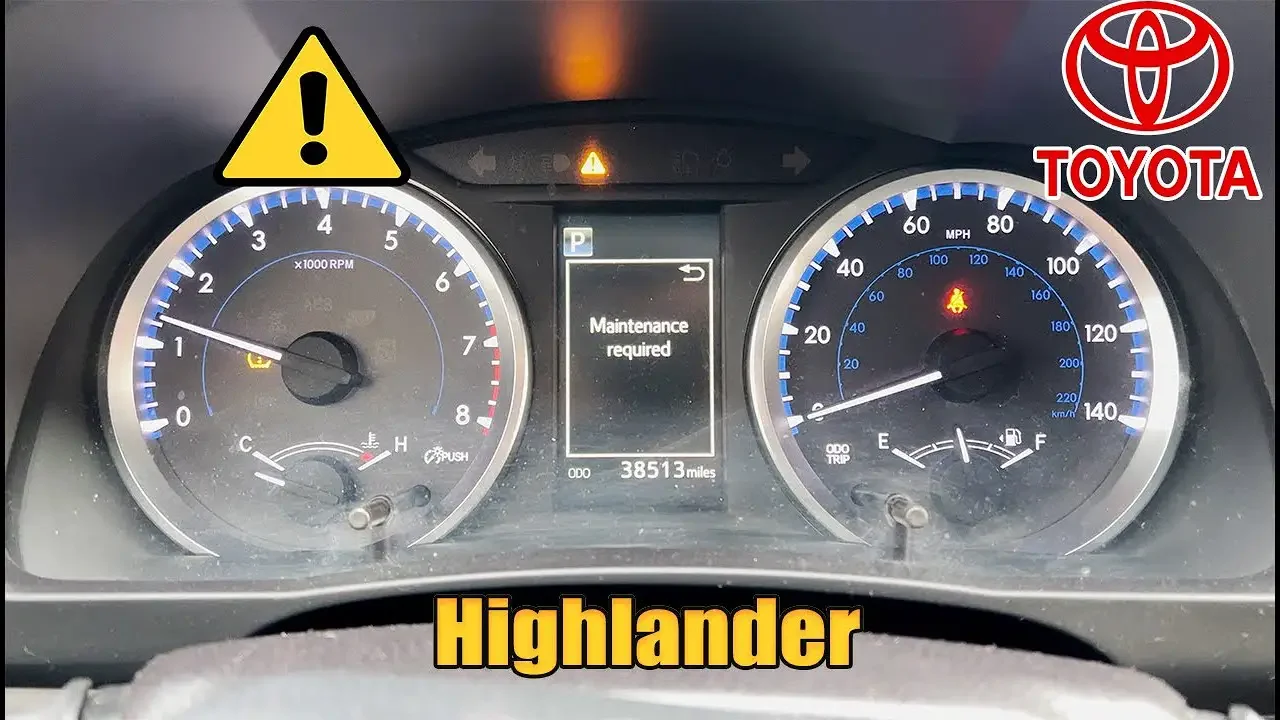
The computer inside your 4Runner is programmed to alert you every 5,000 miles. It does not actually “see” how dirty your oil is. Instead, it counts the miles you have driven since the last time the system was reset. When you reach the 4,500-mile mark, you might see a “Maintenance Required Soon” message. Once you hit the full 5,000-mile interval, the light stays on until it is cleared by a technician or the owner.
Maintenance Light vs. Check Engine Light
It is very important to distinguish between the maintenance light and the check engine light. One is a friendly reminder, while the other can signal a serious mechanical problem. Knowing the difference helps you react properly when a symbol appears on your dash. Here are a few key things to know about your 4Runner’s alert system:
- Maintenance Light: This is a routine reminder for oil changes and tire rotations.
- Check Engine Light: This indicates a fault in the engine management or emissions system.
- Predictable Timing: The maintenance light appears every 5,000 miles like clockwork.
- Manual Reset: The light will not turn off on its own after an oil change; it must be manually reset.
How to Reset Your 2020 Toyota 4Runner Maintenance Light Like a Pro: A Practical Walkthrough
Recommended Best Deal Products


The “Maintenance Required” light on your 2020 Toyota 4Runner is a persistent reminder that your vehicle is due for its periodic check-up, primarily an oil change and tire rotation. While this light is essential for vehicle longevity, it does not reset itself automatically just because you changed the oil. Learning how to manually reset this system is a vital skill for any DIY enthusiast or 4Runner owner who prefers to handle their own basic maintenance. This guide covers the digital reset process specifically for the 2020 model year, which utilizes the steering wheel controls and the Multi-Information Display (MID) rather than the older odometer button method found in previous generations. Following these steps ensures your vehicle’s computer is accurately tracking your next 5,000-mile interval.
Step 1: Preparing the Vehicle Electronics
What you need: Your 2020 Toyota 4Runner key fob and a clear view of the instrument cluster.
Instructions: Before you can access the deep settings of the 4Runner’s computer, you need to power the vehicle’s electronics without actually cranking the engine. If your 4Runner has a traditional key, insert it and turn it to the “On” position (position II). If you have a Push-Button Start model, which is common in the 2020 TRD and Limited trims, press the “Start” button twice without pressing your foot on the brake pedal. You will see the dashboard light up like a Christmas tree, and the Multi-Information Display (the digital screen in the center of your gauges) will go through its startup animation. It is crucial that the engine remains off during this process, as many of the deeper customization and reset menus are locked while the engine is running for safety reasons.

Audible — Listen Free for 30 Days
One free credit a month and thousands of titles included.
Listen Free for 30 DaysPro Tip: If the engine accidentally starts, the reset menu might be greyed out or inaccessible. Simply turn the vehicle completely off, wait five seconds for the modules to power down, and try the double-press method again without touching the brake.
Step 2: Navigating to the Settings Menu
What you need: Use the directional keypad located on the right-hand side of your steering wheel.
Instructions: Once the instrument cluster is fully powered, look at the digital screen between the tachometer and the speedometer. You will likely see your current fuel economy or digital speedometer. Using the left or right arrows on your steering wheel’s directional pad, toggle through the top-level menu icons. These icons represent different categories like “Drive Information,” “Navigation,” and “Audio.” You are looking for the icon that resembles a small gear or sprocket, which represents the “Settings” menu. This icon is typically located at the far right of the menu ribbon. As you scroll, the screen will highlight each category; stop once the gear icon is highlighted in the center of the display.
Pro Tip: If you see a warning message (like “Low Fuel” or “Door Ajar”), you must first clear it by pressing the “Back” button or “OK” button on the steering wheel before you can navigate the menus.
Step 3: Accessing the Vehicle Settings Sub-Menu
What you need: The “OK” button and the vertical (up/down) arrows on the steering wheel keypad.
Instructions: Now that you are in the Settings (gear icon) menu, you will see a list of various sub-menus such as “LTA” (Lane Tracing Assist), “PCS” (Pre-Collision System), and “Display Settings.” You need to scroll down using the down arrow on your steering wheel until you find the option labeled “Vehicle Settings.” Note that on the 2020 model, this is often represented by a small icon of a car with a gear inside it. Once “Vehicle Settings” is highlighted, press and hold the “OK” button in the center of your directional pad for about two seconds. Simply tapping it might not work; a firm hold is often required to enter this specific administrative menu where maintenance data is stored.
Pro Tip: If you accidentally enter the “Meter Settings” instead, just hit the “Back” button (the curved arrow) to return to the main list and try selecting “Vehicle Settings” again.
Step 4: Locating the Scheduled Maintenance Option
What you need: Continued use of the vertical directional arrows on the steering wheel.
Instructions: Inside the “Vehicle Settings” menu, you will be presented with a few options, typically including “TPMS” (Tire Pressure Monitoring System) and “Scheduled Maintenance.” Depending on your specific software version, you might also see “Oil Maintenance.” For a full reset of the service light, you want to highlight “Scheduled Maintenance.” This is the primary timer that triggers the “Maintenance Required” message every 5,000 miles. Use the down arrow to navigate to this line item. Ensure it is fully highlighted before proceeding, as selecting the wrong option could inadvertently reset your tire pressure sensors instead of your oil life timer, leading to a confusing warning light later down the road.
Audible Premium Plus — Annual Membership
12 audiobook credits up front, plus the full Audible catalogue.
See Annual PlansPro Tip: On some 2020 4Runner trims, resetting “Scheduled Maintenance” resets the overall light, while “Oil Maintenance” specifically resets the oil life monitor. For best results after a full service, it is recommended to reset both if they appear as separate options.
Step 5: Confirming the Maintenance Reset
What you need: The “OK” button and the directional pad.
Instructions: After selecting “Scheduled Maintenance,” the screen will change to a confirmation prompt asking, “Reset Data?” Below this question, you will see two options: “Yes” and “No.” By default, “No” is usually highlighted to prevent accidental resets. Press the up arrow to highlight the “Yes” option. Once “Yes” is selected, press the “OK” button one last time. The screen will briefly display a message that says “Resetting Maintenance Data” or “Reset Complete,” accompanied by a small progress bar. Once the bar fills and the message disappears, the vehicle has officially logged that the maintenance has been performed and has restarted the 5,000-mile countdown. You have now successfully cleared the internal timer that triggers the dashboard warning.
Pro Tip: Do not turn the vehicle off while the “Resetting…” progress bar is on the screen. Interrupting the power during this data-write process can occasionally cause the reset to fail, requiring you to start the process over from Step 1.
Step 6: Final Verification and Power Down
What you need: Brake pedal and the Start/Stop button (or key).
Instructions: To ensure the reset “stuck,” you should perform a power cycle. Press the “Back” button on your steering wheel several times to return to your preferred home screen (like the digital speedometer). Now, turn the vehicle completely off. To verify, start the engine normally by pressing the brake pedal and pushing the Start/Stop button (or turning the key to the Start position). Observe the instrument cluster as the vehicle starts. The “Maintenance Required” message that previously appeared during the startup sequence should now be gone. If the screen remains clear of maintenance warnings, your 2020 4Runner is ready for the next 5,000 miles of adventure. If the light persists, it usually means the “Yes” confirmation in Step 5 wasn’t fully registered, and you should repeat the steps.
Pro Tip: Use this moment to also check your oil dipstick one last time if you just performed the oil change. It is best practice to verify the mechanical work and the electronic reset at the same time for total peace of mind.
✅ Final Checklist
- Confirm the “Maintenance Required” text no longer appears upon engine startup.
- Verify that the “Scheduled Maintenance” reset was confirmed with the “Reset Complete” message.
- Ensure the Multi-Information Display (MID) has been returned to your preferred viewing screen (e.g., Speedometer or Fuel Range).
- Double-check that you did not accidentally reset the TPMS (Tire Pressure) system instead of the maintenance system.
- Record the current mileage and date in your physical maintenance logbook or the Toyota app for warranty backup.
Important Notes:
- Safety First: Always perform this reset while the vehicle is in “Park” and the emergency brake is engaged. Never attempt to navigate these menus while the vehicle is in motion.
- Professional Help: If the “Maintenance Required” light is accompanied by a “Check Engine” light (an amber engine-shaped icon), a simple reset will not solve the problem. You should visit a technician to have the OBD-II codes scanned.
- Estimated Time and Cost: This process takes approximately 2-4 minutes and costs $0. Performing this yourself saves the $20-$40 “diagnostic” or “reset fee” some quick-lube shops might charge if they forget to do it during your oil change.
Importance of Timely Oil Changes for the 4.0L V6 Engine
Under the hood of your 2020 4Runner sits the legendary 4.0L V6 engine, also known as the 1GR-FE. This engine is famous for its durability and “bulletproof” reputation among off-road enthusiasts. However, even the toughest engines rely on clean oil to survive. Oil acts as the lifeblood of your motor, reducing friction and moving heat away from sensitive internal parts.
Protecting Internal Components
Fresh oil does more than just lubricate the moving parts inside your engine. It also carries away tiny metal shavings and carbon deposits that build up over time. If you wait too long between changes, the oil breaks down and turns into thick sludge. This sludge can block narrow oil passages and starve your engine of the protection it needs to run smoothly. Consistent changes prevent this buildup and keep the internal components looking like new.
Factors That Affect Oil Health
While the 5,000-mile interval is the standard, your specific driving habits play a huge role in oil health. Not all miles are created equal when it comes to engine wear and tear. You should pay extra attention to your maintenance light if you frequently deal with the following conditions:
- Heavy Towing: Pulling a trailer puts extra thermal stress on your engine and its lubricating oil.
- Off-Roading: Dusty trails and slow-speed crawling can contaminate oil faster than standard highway driving.
- Short Trips: Driving less than five miles often prevents the oil from reaching its optimal operating temperature.
- Extreme Temperatures: Very hot summers or freezing winters cause oil to break down more quickly than mild weather.
By staying on top of your oil changes, you ensure that your V6 engine remains efficient and powerful. Consistent maintenance helps you avoid expensive repairs and keeps your resale value high for the future. Taking care of the oil is the best way to honor the engineering that makes the 4Runner so special.
Synthetic vs. Conventional Oil for Your 4Runner
Recommended Best Deal Products


Choosing the right oil for your 2020 Toyota 4Runner isn’t just about following the manual; it’s about protecting one of the most reliable engines on the market. While older SUVs might have thrived on conventional oil, the modern 4.0L V6 engine (the 1GR-FE) in your 4Runner is designed with tighter tolerances and advanced timing systems that demand higher performance from its lubricants.
The Shift to 0W-20 Synthetic
The 2020 4Runner specifically calls for 0W-20 synthetic oil. This low-viscosity formula is essential for reducing friction during cold starts and improving overall fuel efficiency. Because synthetic oil is engineered at a molecular level, it offers several advantages over its conventional counterpart that directly impact your vehicle’s health:
- Better Temperature Stability: It doesn’t break down or “cook” as quickly under the high heat generated during off-roading or heavy towing.
- Improved Flow: It reaches critical engine components faster in freezing weather, preventing the “dry starts” that cause the most engine wear.
- Extended Intervals: Toyota recommends a 10,000-mile interval for synthetic oil under normal driving conditions, whereas conventional oil typically requires a change every 3,000 to 5,000 miles.
Impact on Engine Longevity
Using the wrong oil or stretching intervals too far can lead to sludge buildup, which is the silent killer of high-mileage Toyotas. In a vehicle known for its ability to reach 300,000 miles or more, the extra cost of high-quality synthetic oil is a small investment in its future. If you frequently drive in “special operating conditions”—such as dusty trails, extreme cold, or heavy stop-and-go traffic—sticking to a 5,000-mile interval even with synthetic is often the best strategy for long-term durability.
The Benefits of Consistent Maintenance Record Keeping
Resetting that maintenance light is a satisfying feeling, but the job isn’t truly complete until you’ve logged the service. Keeping a detailed history of every oil change, tire rotation, and fluid flush is an often-overlooked part of vehicle ownership that pays massive dividends. In the world of 4Runners, a well-documented service history is as valuable as the vehicle itself.
Maximizing Resale Value
The Toyota 4Runner is legendary for its high resale value. When the time comes to sell or trade in your rig, a stack of receipts or a neatly organized digital log acts as a “certificate of health.” Potential buyers are much more likely to pay a premium for a vehicle that has documented proof of consistent care rather than just taking your word for it.
- Proof of Grade: Documentation shows you used the correct 0W-20 synthetic oils and genuine OEM filters.
- Pattern of Care: It demonstrates that you were a proactive owner who didn’t just wait for things to break.
- Warranty Protection: If you ever have a major engine claim, having records proves you met Toyota’s service requirements, keeping your warranty intact.
Tracking Beyond the Dashboard Light
While the dashboard maintenance light tracks oil life and basic tire rotations, it doesn’t know when your differential fluid is contaminated or when your cabin air filter is clogged with trail dust. By keeping a log, you can track maintenance items that don’t have a dedicated sensor. Pro tip: Use a dedicated notebook in the glovebox or a mobile app like Carfax Car Care to snap photos of your receipts. This ensures you never miss a milestone, such as greasing the driveshaft or checking the brake pads, which are vital for a heavy-duty SUV like the 4Runner.
Conclusion
Maintaining a 2020 Toyota 4Runner is a straightforward process, but it requires a commitment to consistency and quality. From choosing the right 0W-20 synthetic oil to keeping a meticulous service log, every small action you take today helps preserve the rugged reliability this SUV is famous for. Remember, that maintenance light is more than just a notification—it is a friendly nudge to ensure your engine stays lubricated and efficient for the many miles of adventure ahead.
Take Action Today: Check your current mileage and verify when your last oil change was performed. If you are approaching the 5,000 or 10,000-mile mark, schedule your service today and keep your 4Runner running like the day it left the showroom!
💬 Quick Questions & Answers
Why did my maintenance light come on?
It triggers every 5,000 miles as a reminder for scheduled service like oil changes and tire rotations.
Does the light reset itself after an oil change?
No, the maintenance light must be manually reset after the service is performed to restart the countdown.
Can I drive with the maintenance light on?
Yes, it is a reminder light, but you should perform the necessary service as soon as possible to avoid wear.
What oil does a 2020 4Runner require?
The 2020 Toyota 4Runner typically requires 6.6 quarts of SAE 0W-20 full synthetic motor oil.
Is ‘Maintenance Required’ the same as ‘Check Engine’?
No, maintenance is for routine service, while a check engine light indicates a specific mechanical or sensor fault.
❓ Frequently Asked Questions
What is the significance of the 5,000-mile maintenance interval for the 2020 4Runner?
Toyota designs the maintenance light to flash at 4,500 miles and stay solid at 5,000 miles. This interval covers basic inspections and tire rotations, ensuring the vehicle stays in peak operating condition.
Will skipping the maintenance light reset affect my vehicle’s performance?
Failing to reset the light won’t immediately damage the engine, but it prevents the system from accurately tracking your next service interval. This can lead to overdue oil changes, which eventually cause engine sludge and decreased efficiency.
How can I distinguish between the maintenance light and the oil pressure light?
The maintenance light appears as a text prompt in the multi-information display, whereas the oil pressure light is a red oil can icon. If the red icon appears, stop driving immediately as it indicates a dangerous drop in oil pressure.
Does the 2020 Toyota 4Runner have a true oil life percentage monitor?
Unlike some competitors, the 2020 4Runner uses a mileage-based countdown rather than a sensor-based oil quality percentage. This means the light triggers based strictly on distance traveled since the last manual reset.
Why does the maintenance light come on early for some drivers?
While the standard interval is 5,000 miles, factors like heavy towing, off-roading, or extensive idling can degrade oil faster. Toyota recommends more frequent inspections for vehicles operated under these ‘severe’ driving conditions.
Can an OBD-II scanner reset the maintenance light on a 2020 4Runner?
While most maintenance resets are done via dashboard controls, high-end OBD-II scanners can clear service intervals. However, it is much faster and more common to use the internal steering wheel menu or odometer button.