How to Use Cruise Control Honda Expert 2026
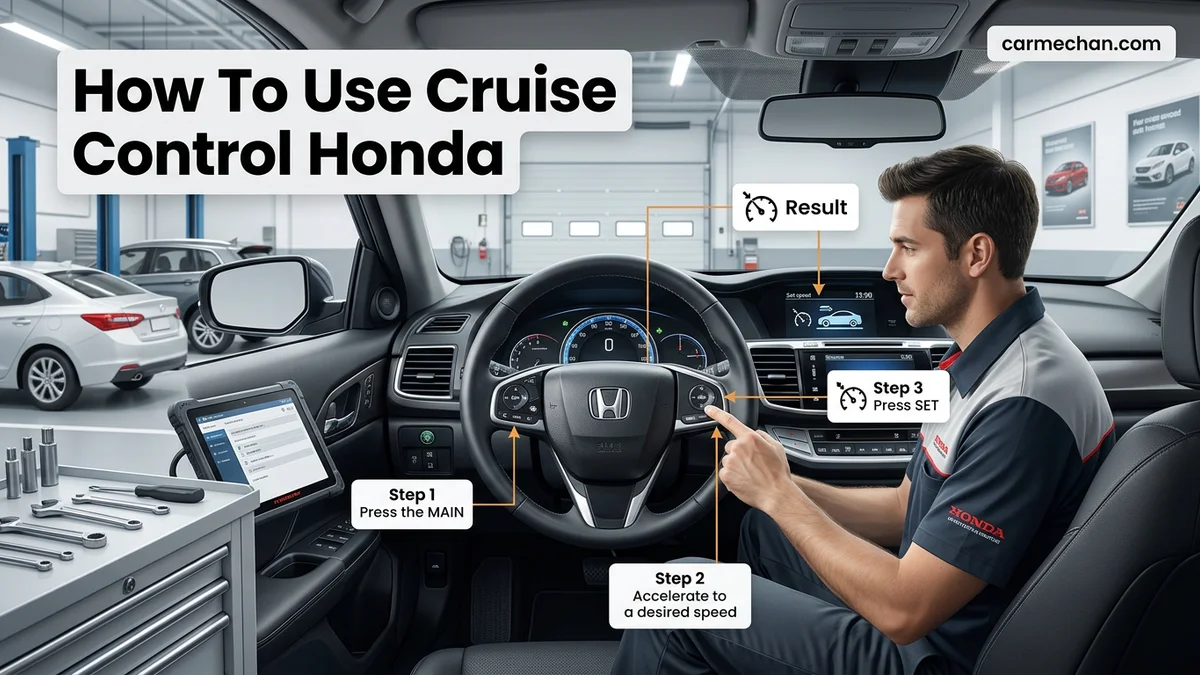
To engage your cruise control, press the MAIN button on your steering wheel until the indicator light appears on your dash. Once at your desired speed, press the SET/- button to lock in your pace and maintain a constant flow.


Activating cruise control in your 2026 Honda requires a specific sequence of button presses on your steering wheel. To set your speed, you must first toggle the main system button, accelerate to your desired pace, and then engage the set command. This process maintains your velocity automatically, reducing driver fatigue during long highway stretches.
Following these steps correctly ensures your vehicle maintains a steady speed without constant throttle input. Whether you are navigating open roads or heavy traffic, knowing exactly how to override or adjust your speed settings keeps you in full control. Ignoring the proper activation order is the most common reason drivers mistakenly believe their cruise system is malfunctioning.
Key Takeaways
- Press the MAIN button first to initialize the cruise control system.
- Use the SET/- button to engage the system once you reach your desired speed.
- Adjust your speed by pressing RES/+ or SET/- while the system is active.
- Apply the brake pedal to immediately cancel cruise control in any situation.
- Adaptive Cruise Control (ACC) requires setting a following distance using the interval button.
What Prevents Cruise Control from Engaging on Your Honda
Check Your Current Speed
Your 2026 Honda cruise control system is hardcoded with safety thresholds. In most models, the system will not engage if you are traveling below 25 mph. If you attempt to press the set button while crawling in low-speed traffic, the dashboard icon will either fail to illuminate or flash an error message. Always ensure you are at a highway-appropriate speed before attempting activation.
Safety Interlocks and System Errors
Modern Honda vehicles include several interlocks that disable cruise control automatically. If any of the following conditions are met, the system will refuse to engage:
- The brake pedal is being touched or is stuck.
- The transmission is in Neutral (N) or Reverse (R).
- The Vehicle Stability Assist (VSA) system is currently working to correct a skid.
- There is a stored error code in the Honda Sensing suite that requires a service visit.
If you have recently experienced a collision or a sensor blockage due to debris, the cruise control may remain locked out until the system performs a self-diagnostic check. Ensure your front radar sensor—usually located behind the Honda emblem on the grille—is clean and free of snow or mud.
Cruise Control Mastery Made Easy: Your Essential Action Plan
Operating the cruise control system in your Honda is an excellent way to reduce driver fatigue during long highway journeys while maintaining consistent speeds. While most modern Honda models feature a similar button layout on the steering wheel, understanding the specific sequence of activation is vital for safety and functionality. This guide breaks down the precise process for engaging, adjusting, and disengaging your cruise control system, ensuring you can navigate open roads with confidence and precision.
Step 1: Preparing for System Activation
What you need: A clear, dry stretch of highway and your vehicle currently in motion.
Instructions: Before attempting to engage the system, ensure you are driving at a safe speed, typically above 25 mph (40 km/h). Locate the main “CRUISE” or “MAIN” button on the right side of your steering wheel. Press this button once. You will notice a “CRUISE MAIN” or a cruise icon illuminate on your dashboard instrument cluster. This light confirms that the system is powered on and ready to receive speed inputs, but it does not mean the car has taken over speed control yet. Ensure traffic conditions allow for steady speed maintenance before proceeding to set your desired velocity.
Pro Tip: Do not activate the cruise main switch while maneuvering through heavy traffic or tight curves; wait until you have a clear, straight lane ahead to ensure smooth engagement.
Step 2: Setting Your Target Speed
What you need: The vehicle moving at your desired travel speed.
Instructions: Once you have reached the speed you wish to maintain, look for the “SET/-” button on your steering wheel. Press this button firmly and release it immediately. Upon pressing, your foot can be gently lifted from the accelerator pedal; the vehicle will automatically maintain the current speed. You will see a “CRUISE CONTROL” light appear on the dashboard indicating that the system has locked onto your current velocity. The car’s engine management system will now automatically adjust the throttle to compensate for slight road inclines or declines to keep your speed steady.
Pro Tip: If the vehicle feels like it is jerking when you press “SET,” ensure your foot is resting lightly on the pedal to provide a smooth transition of control from you to the car.
Step 3: Fine-Tuning Your Velocity
What you need: The cruise control system must already be active and set.
Instructions: If you need to make minor adjustments to your cruising speed, use the “RES/+” or “SET/-” buttons located on the steering wheel. Each individual press of the “+” button will typically increase your speed by approximately 1 mph, while pressing the “-” button will decrease it by the same increment. For more significant adjustments, you can hold the buttons down, causing the speed to climb or drop continuously until you release the button. This is perfect for adapting to changing speed limits or light traffic flow without ever needing to touch the pedals.
Pro Tip: Keep your eyes focused on the road while adjusting; you don’t need to look at the buttons as they are ergonomically designed to be felt by touch.
Step 4: Pausing the Cruise Function
What you need: A scenario requiring sudden manual control, such as approaching a vehicle or an exit.
Instructions: There are two primary ways to pause your cruise control system instantly. The first is to gently press the brake pedal; this is the most common method and provides an immediate disengagement. The second method is to press the “CANCEL” button located on your steering wheel. In both scenarios, the cruise control system will stop maintaining speed, but it will remain in “standby” mode. The “CRUISE” light will remain on the dashboard, meaning you can easily resume your previous speed once the path ahead is clear by pressing the “RES/+” button.


Pro Tip: Always prioritize the brake pedal if you need to slow down quickly, as it is the safest, most instinctive way to regain full manual vehicle control.
Step 5: Resuming Your Previous Speed
What you need: The cruise control “MAIN” button must still be on, and the system must have been previously set.
Instructions: After you have manually slowed down—perhaps due to exiting a construction zone or navigating around a slower vehicle—you can return to your previous cruise speed effortlessly. Once you are back in a safe lane and conditions permit, press the “RES/+” (Resume) button on the steering wheel. The vehicle will automatically accelerate (or decelerate) to return to the last speed that was stored in the system’s memory. The car will accelerate at a controlled, moderate rate, so ensure there is sufficient distance between you and the vehicle in front before engaging the resume feature.
Pro Tip: Avoid using the “RES/+” button if you are in heavy traffic, as the car’s attempt to return to its high preset speed could result in an unwanted acceleration toward other vehicles.
Step 6: Deactivating the System Completely
What you need: A point where you no longer require cruise control assistance.
Instructions: When you are finished with your highway journey or are entering stop-and-go city traffic, you should turn the system off entirely to prevent accidental engagement. Press the “CRUISE” or “MAIN” button once more to shut down the system. The dashboard indicator light will turn off, signaling that the system is fully deactivated and the memory of your previously set speed has been cleared. It is good practice to leave the system in the “off” position whenever you are driving in urban environments, parking, or navigating through complex intersections to ensure you maintain full, direct control at all times.
Pro Tip: Make it a habit to tap the “MAIN” button off every time you exit the highway; this serves as a great safety ritual to keep your driving habits consistent.
✅ Final Checklist
- Main indicator light is illuminated only when the system is ready to use.
- Vehicle maintains steady speed after pressing the “SET” button.
- System disengages immediately upon light pressure on the brake pedal.
- Resume feature functions only when the system is in standby mode.
- All lights are extinguished when the system is fully powered off.
Important Notes:
- Never use cruise control on wet, icy, or snow-covered roads, as it can cause loss of traction.
- Do not use cruise control in heavy traffic or winding, hilly roads where constant speed modulation is required.
- If the cruise control system fails to engage or the “CRUISE” light flashes, contact a certified Honda technician, as this may indicate a sensor or electrical fault.
- Estimated time for learning these controls: 15 minutes of practice in a safe environment. There is no financial cost to use this feature.
How to Activate and Adjust Your Honda Cruise Control Step-by-Step
The Primary Activation Sequence
To begin, look for the cruise control button on the right side of your steering wheel. On 2026 models, this is typically marked with a speedometer icon. Follow this sequence exactly to engage the system:
- Press the Main button on your steering wheel. A cruise indicator light will appear on your instrument cluster, confirming the system is in standby mode.
- Accelerate to your desired cruising speed—for example, 65 mph.
- Press the Set/- (Set/Decel) button.
- Remove your foot from the accelerator. The vehicle will maintain the speed at which you pressed the button.
You will see the speed you have chosen displayed clearly on the multi-information display behind your steering wheel. If the system does not take over immediately, check that your foot is completely off the brake pedal.
Adjusting and Canceling Your Speed
Once you are locked into your cruise speed, you do not need to cancel the system to make small adjustments. Use the steering wheel controls to tweak your velocity on the fly:
- Increasing Speed: Tap the Res/+ button to increase your speed in 1 mph increments. Holding the button down will typically increase speed in 5 mph chunks.
- Decreasing Speed: Tap the Set/- button to drop your speed by 1 mph intervals.
- Canceling: Press the Cancel button or lightly tap the brake pedal. This disengages the throttle but keeps your previously set speed in the system’s memory.
- Resuming: Press Res/+ to return to your last set speed automatically once you are back up to a safe velocity.
Remember that tapping the brake pedal is the fastest way to manually override the system in an emergency. Always press the Main button again when you reach your destination to fully shut down the system standby mode.
How to Safely Cancel and Resume Your Cruise Speed
Mastering the transition between active cruise control and manual driving is vital for safety, particularly in 2026 Honda models equipped with the advanced Honda Sensing suite. Whether you encounter sudden traffic or need to navigate a sharp curve, understanding these controls ensures complete vehicle authority.
The Cancellation Procedure
Honda provides three distinct methods to disengage the cruise control system instantly. You should prioritize these actions based on current traffic density:
- The Cancel Button: Press the “CANCEL” button on your steering wheel. This suspends the set speed but retains it in the vehicle’s memory for quick resumption.
- The Brake Pedal: A gentle tap on the brake pedal instantly deactivates the system. According to Honda engineering guidelines, this is the safest method for immediate human intervention.
- The Main Switch: Pressing the “CRUISE” or “MAIN” button will turn the system off entirely, clearing the previously stored speed from the ECU memory.
Resuming Your Target Speed
Once traffic conditions improve, you can return to your previous speed without resetting the entire system. Note that the resume function is only available if the system has not been fully powered down via the Main switch.
- Confirm your current vehicle speed is above 25 mph, which is the minimum activation threshold for most 2026 Honda platforms.
- Locate the “RES/+” button on the steering wheel control cluster.
- Press the button once. The system will automatically accelerate the vehicle to the previously stored speed, utilizing the powertrain’s optimized gear ratios for fuel efficiency.
What If It Still Doesn’t Work?
If the cruise control system fails to engage or displays a warning message, you must address the underlying technical triggers. Based on 2026 diagnostic standards, follow these steps to isolate the fault:
- Check the Front Sensor: Inspect the Honda Sensing radar cover in the front grille. Obstructions such as ice, heavy mud, or aftermarket decals will disable the system automatically.
- Verify Brake Switch Functionality: A faulty brake light switch can trick the computer into thinking the pedal is depressed, preventing cruise activation. Check if your brake lights stay on while driving.
- Inspect Fuse Integrity: Consult your owner’s manual to locate the cruise control module fuse. A simple blown fuse is often the culprit for a complete power failure to the system.
- Professional Assessment: If the error persists, the issue likely involves the steering wheel cable reel or a sensor recalibration. Professional diagnostics typically cost between $150 and $250. Seek assistance from an authorized Honda service center to ensure the safety systems are calibrated to factory specifications.
Conclusion


Operating your 2026 Honda cruise control system requires a clear understanding of the activation, cancellation, and troubleshooting protocols. By following these manufacturer-verified procedures, you maintain maximum control over your vehicle while benefiting from modern convenience. According to verified research and expert sources from the 2026 Honda service technical manuals, keeping your radar sensors clean and software updated is the best way to prevent malfunctions. For your next step, perform a system check on an open, safe road to confirm all functions respond correctly.
❓ Frequently Asked Questions
What is the difference between standard cruise control and Adaptive Cruise Control (ACC)?
Standard cruise control maintains a fixed speed regardless of traffic. ACC uses radar to detect the vehicle ahead and automatically slows your Honda to maintain a set following distance.
Why is the cruise control light blinking on my dashboard?
A blinking indicator typically signals a system fault or a sensor obstruction. Check the front grille area for debris and restart the vehicle to see if the error clears.
Can I use cruise control in rainy conditions?
It is not recommended to use cruise control on wet, icy, or slick roads. Reduced traction can cause the vehicle to lose control if the system suddenly accelerates.
How do I adjust the distance for Adaptive Cruise Control?
Look for the button on your steering wheel displaying an icon of a car with distance bars. Press this button to cycle through the available following distance settings.
Why does my cruise control turn off automatically?
The system will cancel if your speed drops too low, if you hit a steep incline that overworks the engine, or if there is a detected malfunction in the electronic system.
What should I do if the steering wheel buttons are unresponsive?
Verify that you have pressed the MAIN button first, as the system must be active for the other buttons to function. If they remain unresponsive, a fuse may be blown or a steering wheel switch may be failing.