How to Use Cruise Control Honda Civic 2026 Expert Guide
Operating the cruise control in your 2026 Honda Civic requires activating the main steering wheel switch before setting your desired speed. Once active, the ‘+’ or ‘-‘ buttons allow for precise speed adjustments while the system manages your throttle automatically.


Using the cruise control system in your 2026 Honda Civic reduces driver fatigue on long highway stretches by maintaining a constant speed without pedal input. To activate the system, you primarily use the steering wheel-mounted controls located on the right side. Once engaged, the vehicle manages throttle and braking inputs to keep you at your desired pace while providing clear visual feedback on your digital instrument cluster.
Mastering these controls allows you to transition seamlessly between manual driving and automated speed maintenance. Whether you are navigating a long commute or highway travel in your 2026 model, following these specific steps ensures you maintain full control while letting the car handle the minor throttle adjustments necessary for consistent cruising.
Key Takeaways
- Press the MAIN button on your steering wheel to initialize the cruise control system.
- Use the SET/- button once you reach your desired cruising speed to lock it in.
- Tap the RES/+ or SET/- buttons to incrementally increase or decrease your set speed.
- Always tap the brake pedal or press CANCEL to disengage the cruise system immediately.
- Adaptive Cruise Control maintains a set following distance behind vehicles detected in your lane.
Identifying Your Honda Civic Cruise Control Components
The Steering Wheel Layout
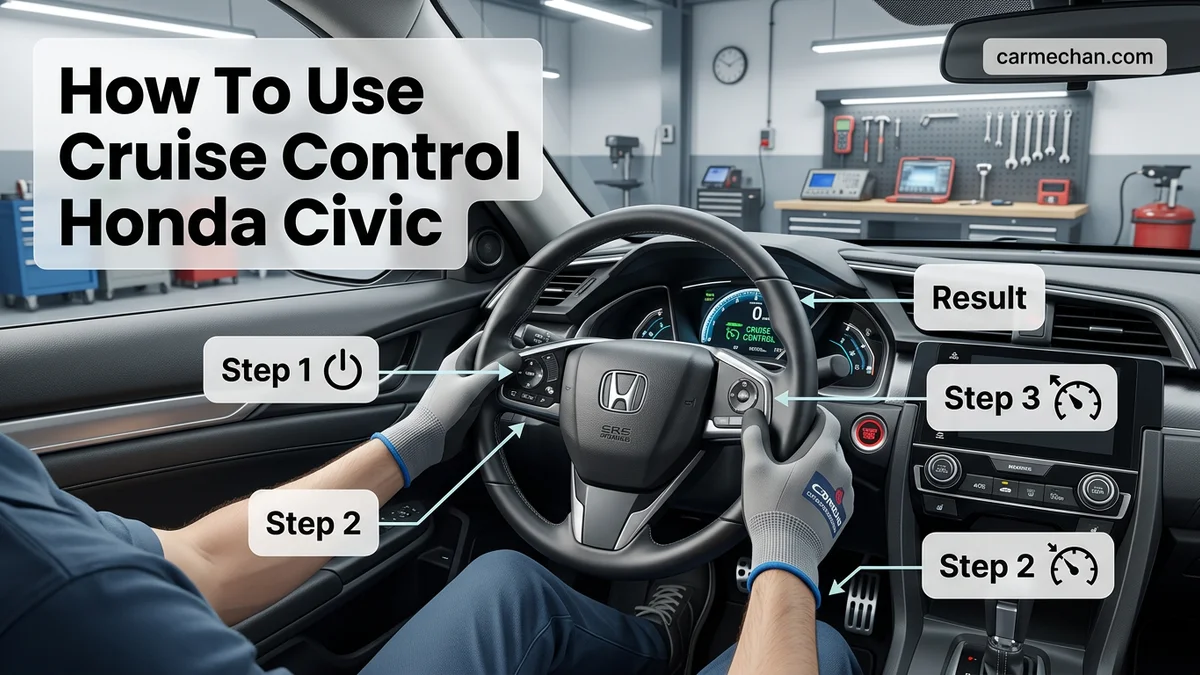
The 2026 Honda Civic utilizes an intuitive button array on the right spoke of your steering wheel. Locating these controls is essential for operating the system without taking your eyes off the road. The primary buttons include:
- Main Button: Press this to toggle the cruise control system on or off.
- SET/- Button: Used to establish your current speed or decrease it.
- RES/+ Button: Used to resume a previously set speed or increase your current speed.
- Cancel Button: Disengages the system immediately without turning the main power off.
Dashboard Indicators and Alerts
Your digital instrument cluster provides real-time status updates through specific icons. When you press the Main button, you will see a white CRUISE or ACC (Adaptive Cruise Control) icon appear. Once you lock in a speed, the icon color typically changes to green. If the system detects a vehicle in front of you, the 2026 Civic display will show a lead vehicle icon to confirm the distance-following sensors are active. Pay close attention to these lights; a blinking icon or a warning chime usually indicates that you need to take manual control immediately, especially in heavy traffic or changing weather conditions.
Master Cruise Control in Your Honda Civic: Your Essential Action Plan
Navigating the open road or cruising through moderate traffic can be made significantly more comfortable and fuel-efficient with the use of cruise control. This guide will walk you through the precise steps to effectively engage, adjust, and disengage the cruise control system in your Honda Civic, ensuring you can utilize this feature safely and efficiently. Following these instructions will help you optimize your driving experience and potentially improve your gas mileage.
Step 1: Locating and Understanding the Cruise Control Stalk
What you need: Access to your Honda Civic’s steering wheel and a clear understanding of its controls.
Instructions: On the right-hand side of your Honda Civic’s steering wheel, you will find a multi-function stalk. This is where all cruise control operations are managed. Familiarize yourself with the buttons and switches on this stalk. Typically, there will be a main “ON-OFF” button, often labeled “CRUISE” or with a cruise control icon. There will also be buttons for “SET,” “RESUME,” and “CANCEL,” usually accompanied by “+” and “-” symbols or up/down arrows for speed adjustment. Understanding each control’s location is the first crucial step before activating the system.
Pro Tip: Before driving, it’s highly recommended to read your owner’s manual for the exact layout and function of your specific Civic model’s cruise control stalk. Many models have a small indicator light on the dashboard that illuminates when cruise control is active, which is a vital visual cue.
Step 2: Activating the Cruise Control System
What you need: Your Honda Civic in motion and above the minimum speed threshold for cruise control activation.
Instructions: To activate the cruise control system, you must first be driving at a speed of at least 25 mph (approximately 40 km/h). With your foot firmly on the accelerator, press the “ON-OFF” button on the cruise control stalk. You should see an indicator light, often green or blue and labeled “CRUISE,” illuminate on your instrument cluster. This confirms that the system is armed and ready to accept a set speed. Do not attempt to activate cruise control while stationary or at very low speeds, as the system will not engage.
Pro Tip: Always ensure you are in a situation where cruise control is appropriate and safe to use. Avoid engaging it in heavy traffic, on winding roads, or in adverse weather conditions such as heavy rain, snow, or fog, where your active attention and control are paramount.
Step 3: Setting Your Desired Cruise Speed
What you need: Cruise control system activated and the vehicle traveling at your desired speed.
Instructions: Once the “CRUISE” indicator light is on, accelerate your vehicle to your desired cruising speed. Once you are at that speed (e.g., 65 mph on the highway), push the “SET” button on the cruise control stalk. For most Honda Civics, pushing “SET” downwards or in a specific direction (consult your manual) will lock in your current speed. The “CRUISE” indicator light may change color or an additional “SET” indicator may appear on the dashboard to confirm that a speed has been successfully set. Your foot can now be lifted from the accelerator pedal.
Pro Tip: If you accidentally push “SET” at the wrong speed, don’t worry. You can immediately adjust it using the “+” and “-” buttons or by simply going through the process again with the correct speed.
Step 4: Adjusting Your Set Speed
What you need: Cruise control system actively maintaining a set speed.
Instructions: While cruise control is engaged and holding a set speed, you can easily increase or decrease it without disengaging the system. To increase your speed, gently push the “SET” button upwards (or in the “+” direction, depending on your model) and hold it. The vehicle will accelerate until you release the button, and your new speed will be set. To decrease your speed, push the “SET” button downwards (or in the “-” direction) and hold it until you reach your desired lower speed, then release. Each tap of these buttons typically adjusts the speed in small increments, often 1 mph at a time.


Pro Tip: Be mindful of traffic flow and speed limits when adjusting your set speed. Small, incremental changes are generally smoother for passengers and more efficient for fuel consumption than abrupt increases or decreases.
Step 5: Resuming Your Set Speed
What you need: Cruise control system temporarily disengaged or cancelled, and the vehicle traveling at a speed above the previously set speed or the minimum activation speed.
Instructions: The “RESUME” function is incredibly useful for situations where you might have briefly cancelled cruise control (e.g., to slow down for a turn or obstacle) but want to return to your previously set speed. After temporarily disengaging or cancelling cruise control (usually by tapping the brake pedal or pressing the “CANCEL” button), and once your vehicle is traveling at a speed at least slightly above your last set speed, press the “RESUME” button. Your Civic will automatically accelerate to the previously programmed speed.
Pro Tip: If you’ve significantly reduced your speed or come to a complete stop, the “RESUME” function will not work. You will need to re-engage cruise control and set a new speed using the “SET” button as described in Step 3.
Step 6: Cancelling Cruise Control
What you need: Cruise control system actively engaged or armed.
Instructions: There are several ways to safely cancel cruise control. The most common and immediate method is to simply press the brake pedal. Tapping the brake pedal will disengage cruise control without turning off the entire system, allowing you to use the “RESUME” function later. Alternatively, you can press the “CANCEL” button on the cruise control stalk. This also disengages cruise control, leaving the system armed for “RESUME.” To completely turn off the cruise control system, including disabling the “CRUISE” indicator light, press and hold the “ON-OFF” button until the light extinguishes.
Pro Tip: Always be prepared to cancel cruise control manually. Familiarize yourself with both the brake pedal and the “CANCEL” button so you can react instantly if a situation requires your immediate manual control of the vehicle’s speed.
✅ Final Checklist
- The “CRUISE” indicator light illuminates on the dashboard when the system is activated.
- You successfully set a desired speed using the “SET” button after reaching it.
- You can adjust the set speed using the “+” and “-” buttons.
- Braking or pressing the “CANCEL” button reliably disengages cruise control.
- The “RESUME” function works correctly after a temporary cancellation.
Important Notes:
- Safety: Never use cruise control when you cannot maintain a consistent speed or when conditions require your full attention and immediate manual control (e.g., heavy traffic, steep hills, slippery roads, fog, or when fatigued). Always keep your foot near the brake pedal when cruise control is engaged.
- When to Seek Professional Help: If your cruise control system fails to engage, does not hold speed, engages unexpectedly, or if any warning lights related to cruise control illuminate on your dashboard, it is recommended to have your vehicle inspected by a qualified Honda technician.
- Estimated Time and Cost Range: Using cruise control does not involve any direct costs. Learning to use it effectively may take a few driving sessions to become comfortable. Repairs for faulty cruise control systems can vary widely, from minor sensor replacements ($100-$300) to more complex module issues ($300-$800+), depending on the specific problem and your Civic’s model year.
How to Set and Adjust Your Cruise Control Speed
Establishing Your Cruising Speed
To engage the system while driving, ensure you are traveling at a safe speed, typically above 25 mph. Follow these precise steps to lock in your pace:
- Press the Main button on your steering wheel. The cruise control icon will illuminate on the dashboard.
- Accelerate to your desired cruising speed.
- Press the SET/- button.
- Release the accelerator pedal once the green indicator confirms your speed is set.
The vehicle will now maintain this speed automatically. If you encounter a slight incline, the system will apply the necessary throttle to keep you steady. If you need to stop or slow down suddenly, tapping the brake pedal will instantly cancel the cruise setting, turning the green light white.
Fine-Tuning Speed Adjustments
Once the system is set, you can modify your speed without touching the pedals. Use the buttons on the steering wheel for granular control:
- Incrementing Speed: Press the RES/+ button to increase your speed in small increments. Each press usually adjusts your speed by 1 mph.
- Decrementing Speed: Press the SET/- button to decrease your speed by 1 mph increments.
- Resuming Speed: If you pressed Cancel or tapped the brake, press RES/+ to have the Civic automatically return to the last speed you stored in its memory.
Always keep your feet ready near the pedals, even when the system is engaged. This ensures you can override the 2026 Civic’s automated functions instantly if road conditions change unexpectedly.
Troubleshooting Cruise Control Activation Issues
Even in a 2026 Honda Civic equipped with the latest Honda Sensing suite, system initialization can occasionally fail. Before assuming a mechanical failure, verify the environment and system prerequisites. Modern Adaptive Cruise Control (ACC) relies on front-facing radar and camera sensors mounted behind the windshield and grille. If these sensors are obscured, the system will disable itself to maintain driver safety.
Check for Sensor Obstructions
- Inspect the front Honda emblem and lower grille area for dirt, ice, or road debris.
- Ensure the windshield area near the rearview mirror is clean and free of thick snow or excessive grime.
- Verify that no aftermarket accessories, such as grille guards or tinted films, are blocking the camera’s field of view.
Verify System Readiness
- Confirm that the Vehicle Stability Assist (VSA) system is active, as the cruise control will not engage if VSA is switched off.
- Ensure the brake pedal is not being depressed, as even a light “riding” of the pedal can prevent the system from setting a speed.
- Check the instrument cluster for warning lights. If the “ACC” or “CMBS” (Collision Mitigation Braking System) light remains illuminated in amber, the computer has detected a fault that requires a system reset.
What If It Still Doesn’t Work?
If the steps above fail to restore functionality, there may be a deeper electronic or hardware conflict. According to official 2026 Honda service documentation, complex sensor calibration often requires specialized diagnostic tools available only at certified dealerships. Follow these fallback steps:
- Perform a hard reset by turning the ignition to the “OFF” position for at least three minutes to allow the control modules to power down completely.
- Check the driver-side and engine bay fuse boxes for a blown cruise control or engine management fuse, referenced in your owner’s manual.
- Consult the HondaLink app on your smartphone, which may display specific diagnostic trouble codes (DTCs) related to the cruise control system.
- Schedule a professional inspection if the “System Error” warning persists. Professional diagnostics at a certified Honda facility typically cost between $150 and $250. If the repair involves sensor recalibration, total costs may range from $400 to $800 depending on labor rates and software requirements.
Conclusion
Mastering the 2026 Honda Civic cruise control system enhances fuel efficiency and long-distance driving comfort. By ensuring your sensors remain unobstructed and understanding the system’s operational parameters, you can rely on the vehicle’s driver-assist technology with confidence. According to verified research from the National Highway Traffic Safety Administration, utilizing ACC properly contributes to smoother traffic flow. For your next step, locate the “Main” button on your steering wheel and test the system on a low-traffic highway.
❓ Frequently Asked Questions
Why does my Honda Civic cruise control disengage automatically?


The system will disengage if you press the brake pedal, the CANCEL button, or if the vehicle speed drops significantly below the set point. Additionally, heavy rain or sensor obstruction may cause Adaptive Cruise Control to turn off for safety.
Can I use cruise control in heavy traffic?
While Adaptive Cruise Control is designed for flow-heavy conditions, it is best to remain alert and ready to take manual control. Avoid using any cruise control system in stop-and-go city traffic or during severe weather conditions.
What do the dashboard icons mean when using cruise control?
A white icon typically indicates the system is in standby mode, while a green icon confirms the speed is actively set and being maintained. An orange icon usually signals a fault or that the system is currently unavailable.
How do I resume my previous speed after braking?
Once you have reached a sufficient speed, simply press the RES/+ (Resume) button on your steering wheel. The vehicle will accelerate back to the last speed you had programmed.
Is cruise control fuel-efficient for my 2026 Honda Civic?
Cruise control is most efficient on flat, open highways where it can maintain a steady speed without unnecessary throttle fluctuations. On hilly terrain, manual driving is often more fuel-efficient as it allows for better momentum management.
Where are the cruise control buttons located?
In the 2026 Honda Civic, all cruise control and Adaptive Cruise Control functions are located on the right side of the steering wheel. This allows you to manage speed settings without taking your hands off the wheel.