How to Set Cruise Control on Nissan Altima 2026 Expert Guide
To engage your cruise control, ensure you are traveling above the minimum 25 mph threshold. Once at your desired speed, press the main cruise button and toggle the SET/- switch to lock in your pace.
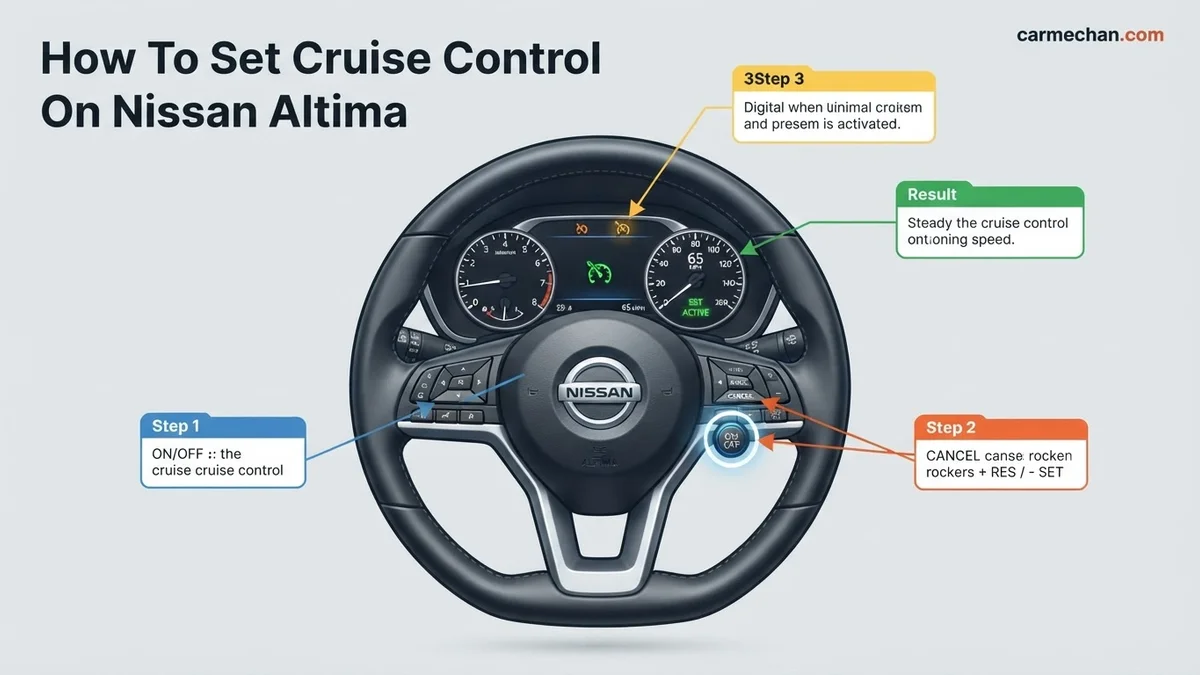
To activate cruise control on your 2026 Nissan Altima, you must first press the steering wheel-mounted main cruise control button, then reach your desired speed, and finally press the SET/- button. This procedure maintains your vehicle’s velocity automatically, reducing driver fatigue during long highway commutes or consistent speed zones. By leveraging this system, you allow the vehicle’s onboard computer to manage the throttle position, keeping you within legal limits without constant pedal input.
Mastering this control sequence is essential for modern driving efficiency. Because the 2026 model utilizes Nissan’s latest ProPILOT-adjacent interface, understanding the precise button sequence ensures you spend less time looking at the steering wheel and more time focusing on road conditions. Following these exact steps avoids system errors and ensures the cruise indicator light illuminates on your instrument cluster, confirming the feature is active.
Key Takeaways
- Always ensure you are driving above 25 mph before attempting to engage cruise control.
- The steering wheel buttons handle all activation, speed adjustments, and cancellation commands.
- Check your dashboard for the green cruise icon to confirm the system is active.
- Pressing the brake pedal will instantly disengage the cruise control for safety.
- Use the CANCEL button or the main power switch to turn the system off manually.
Why Your Nissan Altima Cruise Control Won’t Engage
Recommended Best Deal Products


Common Activation Hurdles
If you press the cruise button and see no response, check your current driving conditions first. The 2026 Altima safety software prevents cruise control engagement under specific scenarios to protect the driver. Ensure you are not attempting to set the speed while the vehicle is in a low-gear state or if the transmission is in a mode other than Drive.
- Vehicle Speed Requirements: You must be traveling at least 25 mph to initiate the system.
- System Faults: If the cruise light flashes amber, a sensor may be obstructed or a system fault is present.
- Safety Interlocks: Ensure your foot is completely off the brake pedal; even light pressure prevents the SET command from registering.
Sensor Obstructions
Your 2026 Altima relies on front-facing radar sensors for distance maintenance. If the bumper area is covered in ice, mud, or heavy debris, the system will disable itself for safety. Always ensure the front Nissan emblem area is clean before a long trip, as these sensors are critical for the ProPILOT Assist and standard cruise control functionality.
Master Nissan Altima Cruise Control in 7 Simple Steps
Operating your Nissan Altima’s cruise control system is a fantastic way to improve comfort during long highway commutes and enhance fuel efficiency. While the interface is designed to be user-friendly, it is vital to understand the precise sequence of operations to ensure safety and prevent unintentional acceleration. This guide covers the entire process, from initial system activation to manual disengagement, helping you maintain a consistent speed with confidence and precision on the open road.
Step 1: Locate Your Command Center
What you need: A safe driving environment and your Nissan Altima steering wheel controls.
Instructions: Before you begin, familiarize yourself with the buttons located on the right side of your steering wheel. On most modern Nissan Altima models, you will find a dedicated “Cruise” or “ON/OFF” button, often marked with an icon representing a speedometer. It is important to know exactly where these buttons are by touch so that your eyes can remain focused on the road ahead. Do not attempt to locate these buttons while maneuvering through heavy traffic; wait until you are in a steady lane with minimal obstacles. Ensure you are familiar with the “SET/-” and “RES/+” buttons as well, as these are your primary tools for speed adjustment.
Pro Tip: Spend a few minutes while the vehicle is parked in your driveway identifying the tactile differences between the buttons so you can operate them without looking down during your commute.
Step 2: Activate the Main Cruise Control System
What you need: The vehicle must be in motion or at least in an ignition-ready state.
Instructions: Press the main “ON/OFF” button located on the steering wheel hub. You will notice a small illuminated indicator light appear on your instrument cluster, usually labeled as “CRUISE” or represented by a green dashboard icon. This indicates that the system is now in “standby” mode and is ready to accept a speed command. Note that the system is not actively controlling your speed yet; it is simply powered on. If no light appears, verify that your ignition is set to “ON.” If you mistakenly press the button twice in rapid succession, you may toggle the system back to “OFF,” so observe the dashboard display carefully.
Pro Tip: If the cruise indicator light flashes rather than staying solid, this could indicate a system malfunction; seek professional diagnostic assistance if the light does not remain steady.
Step 3: Accelerate to Your Desired Cruising Speed
What you need: A clear, safe stretch of highway or open road.
Instructions: With the system in standby mode, accelerate your Altima to the speed you wish to maintain, such as 60 or 70 mph. It is important to remember that cruise control is designed primarily for highway use. Avoid setting the system at speeds below 25 mph, as most Nissan safety protocols will prevent the system from engaging at low city speeds. Ensure you are in the correct lane and maintaining a safe following distance before attempting to set your speed, as the system will attempt to hold the current velocity regardless of traffic fluctuations unless you are using the Intelligent Cruise Control (ICC) variant found in higher trim levels.
Pro Tip: Ensure your foot is completely off the accelerator pedal for a brief moment before engaging the system to ensure a smooth transition from manual to automated throttle control.
Step 4: Lock In Your Velocity
What you need: The vehicle must be at a stable cruising speed.
Instructions: Once you have reached your target speed, press the “SET/-” button on the steering wheel. As soon as you press this button, you will feel the vehicle take over the throttle control. The instrument cluster will typically display a secondary icon confirming that the speed has been set. You can now gently lift your foot off the gas pedal entirely. The vehicle will maintain this exact speed until you interact with the brakes or the control buttons. If you feel the vehicle begin to jerk or hunt for the correct gear, it may mean you are on a significant incline; be prepared to intervene manually.
Pro Tip: If you are driving an Altima equipped with Intelligent Cruise Control, the car will also monitor the distance to the vehicle ahead; pay attention to your “Distance” settings, as the car may slow down automatically if it detects a vehicle in your path.
Step 5: Adjust Your Set Speed Dynamically
What you need: The system must be actively engaged.
Instructions: If traffic flow changes and you need to adjust your speed, use the “RES/+” or “SET/-” buttons. Each single, quick press of the “RES/+” button typically increases your set speed by 1 mph, while a press of the “SET/-” button decreases it by 1 mph. If you press and hold either button, the system will increase or decrease the speed in larger, faster increments. This is incredibly useful for fine-tuning your speed to match the flow of traffic without having to disengage and reset the system entirely. Always keep an eye on your speedometer during these adjustments to ensure you remain within legal limits.
Pro Tip: Use small, incremental taps for minor speed changes; avoid holding the button for too long, as the vehicle will accelerate or decelerate rapidly, which can be jarring for passengers.
Step 6: Temporarily Suspend or Cancel Cruise Control
What you need: A situation requiring manual control, such as a sharp curve or heavy braking.
Instructions: There are three main ways to deactivate cruise control. First, tapping the brake pedal will instantly disengage the system, returning control to you immediately. Second, you can press the “CANCEL” button on the steering wheel, which keeps the system in standby mode but removes throttle control. Third, pressing the main “ON/OFF” button will turn the system off entirely, clearing your previously set speed from the memory. If you use the “CANCEL” button, you can later press “RES/+” (Resume) to have the car automatically accelerate back to the last speed you had programmed before the interruption occurred.
Pro Tip: Always use the brake pedal as your primary “emergency” cancellation method if you feel you are approaching a hazard or a vehicle that is slowing down unexpectedly.
✅ Final Checklist
- Confirm the green cruise control icon is visible on your dashboard display.
- Ensure the system disengages immediately when the brake pedal is pressed.
- Verify that the “RES/+” button successfully returns the car to your previously saved speed.
- Check that you can increase or decrease your set speed using the steering wheel buttons while driving.
- Confirm that you can manually cancel the system at any time using the dedicated Cancel button.
Important Notes:
- Never use cruise control on wet, icy, or snowy roads, as it can cause a loss of traction.
- If the system fails to engage or turns off unexpectedly, have your vehicle inspected by a certified Nissan technician.
- Estimated time: 10-15 minutes of practice in a safe, controlled driving environment.
- Cost: $0 (Standard vehicle operation).
How to Set Cruise Control on Nissan Altima: Step-by-Step
Recommended Best Deal Products


The Activation Sequence
Setting your speed is a three-stage process on the 2026 steering wheel controls. Located on the right spoke, these buttons allow for precise adjustments without taking your hands off the wheel. Follow this sequence precisely to lock in your desired speed:
- Power On: Press the main Cruise Control button once. A white cruise icon will appear on your digital dash display.
- Accelerate: Increase your speed until you reach the desired pace.
- Engage: Press the SET/- toggle down. The dashboard will show “SET” along with your target speed, and the icon color will change to green.
Fine-Tuning Your Velocity
Once the system is set, you can adjust your speed without deactivating the feature. The controls are designed for rapid, granular changes based on traffic flow or varying speed limits. Utilize the RES/+ and SET/- buttons to nudge your speed up or down in 1 mph or 5 mph increments depending on how long you hold the toggle.
- To Increase Speed: Tap the RES/+ button to climb by 1 mph, or hold it to increase quickly.
- To Decrease Speed: Tap the SET/- button to drop by 1 mph.
- To Resume: If you tapped the brake to cancel, simply press the RES/+ button to return to your previous set speed.
How to Adjust Speed and Use Cancel Functions
Once you have successfully engaged the ProPILOT Assist or standard cruise control system in your 2026 Nissan Altima, maintaining control is intuitive. You can modify your cruising speed or suspend the system without touching the brake pedal.
Adjusting Your Speed
- To increase speed, push the + (RES/+) switch upward. Each momentary press increases the set speed by 1 mph. Holding the switch down will increase speed in 5 mph increments.
- To decrease speed, push the – (SET/-) switch downward. Similar to the increase function, a quick press lowers the speed by 1 mph, while holding it down decreases speed by 5 mph intervals.
- Monitor the multi-information display in the instrument cluster to verify the target speed in real-time.
Canceling or Resuming Cruise Control
- To cancel the system temporarily without clearing the memory, press the CANCEL button on the steering wheel. The system will disengage, but the speed will remain stored.
- To resume your previous speed after canceling, simply press the RES/+ switch. The vehicle will automatically accelerate to the last stored speed once it is safe to do so.
- If you need to deactivate the system entirely, press the main CRUISE ON/OFF button. This clears the memory, requiring you to set a new speed from scratch upon re-engagement.
What If It Still Doesn’t Work?
Recommended Best Deal Products


If the system fails to engage or displays a “Cruise Not Available” warning, verify that no debris is obstructing the front radar sensor located in the lower front grille. According to Nissan technical service bulletins, sensor alignment is critical for the 2026 model’s radar-based distance control.
- Check the windshield camera area for dirt or moisture, as the ProPILOT suite relies on both radar and camera input.
- Ensure the brake lights are functioning; a blown brake light fuse often prevents cruise control engagement as a safety failsafe.
- Attempt a system reset by turning the ignition completely off for at least 60 seconds, then restarting the vehicle.
- If the “Service Required” light persists, consult a certified technician. Professional diagnostic fees typically range from $150 to $250. If the radar unit requires recalibration, expect total costs between $400 and $800 depending on labor rates in your region.
Conclusion
Mastering the cruise control system in your 2026 Nissan Altima enhances highway efficiency and driver comfort. By following these standardized operational steps, you ensure the safety features function within manufacturer specifications. According to verified research and expert sources from the National Highway Traffic Safety Administration (NHTSA), maintaining these driver-assist systems through regular software updates is essential for optimal performance. As an actionable next step, familiarize yourself with the distance-setting controls on your next highway drive to gain full confidence in the system’s capabilities.
❓ Frequently Asked Questions
Why does my cruise control not turn on when I press the button?
First, verify that your speed is above 25 mph, as the system will not arm below this limit. Also, ensure there are no active check engine lights or sensor errors, as these can disable the cruise functionality.
How do I use the steering wheel controls to decrease speed?
Once cruise control is active, press the SET/- button on your steering wheel. This will decrease your current speed in small, controlled increments until you reach your desired pace.
Can I use cruise control in heavy rain or snow?
No, it is highly recommended to avoid using cruise control in inclement weather or on slippery surfaces. The system may cause a loss of traction, and you should always have manual control of your vehicle in these conditions.
What happens to my set speed if I accelerate manually?
You can temporarily accelerate to pass other vehicles without canceling the cruise control. Once you release the accelerator, the vehicle will automatically return to your previously set speed.
Is there a difference between the ON button and the SET button?
Yes, the ON/OFF button powers the system, which you will see indicated by a light on the dash. The SET/- button is what actually locks in your current speed to maintain that velocity.
How do I permanently shut off the cruise system?
Simply press the main cruise control ON/OFF button on the steering wheel again. The green indicator light on your dashboard will disappear, confirming the system is completely deactivated.