Reset Tire Pressure Honda Civic: Essential Steps For Tpms Calibration
The illumination of your Honda Civic’s Tire Pressure Monitoring System (TPMS) warning light can be a source of immediate concern, signaling potential safety and performance issues. While often indicating a simple drop in tire pressure, this crucial dashboard indicator sometimes requires a system reset—a procedure many drivers are unsure how to perform correctly, leading to persistent warnings and anxiety. This authoritative guide will demystify the process, providing Honda Civic owners with a professional, step-by-step blueprint to accurately reset their TPMS, troubleshoot common issues, and maintain optimal tire health.

Understanding Your Honda Civic’s Tire Pressure Monitoring System (TPMS)
Recommended Best Deal Products


The Tire Pressure Monitoring System (TPMS) is a crucial safety feature mandated by the National Highway Traffic Safety Administration (NHTSA) designed to enhance vehicle safety and performance by continuously monitoring tire inflation. Its primary objective is to alert the driver to significantly under-inflated tires, which can compromise handling, increase braking distances, and lead to catastrophic tire failure.
📤 Share Image
In modern Honda Civic models, particularly from the 9th generation onwards (e.g., a 2018 Honda Civic), you will typically find an Indirect TPMS. Unlike Direct TPMS, which uses pressure sensors inside each wheel to transmit real-time data, Indirect TPMS operates through the vehicle’s Anti-lock Braking System (ABS) wheel speed sensors. When a tire begins to lose air, its rolling radius changes slightly, causing it to rotate at a different speed compared to the other tires. The ABS sensors detect this discrepancy, and the system interprets it as a low-pressure condition, illuminating the TPMS warning light on the dashboard.
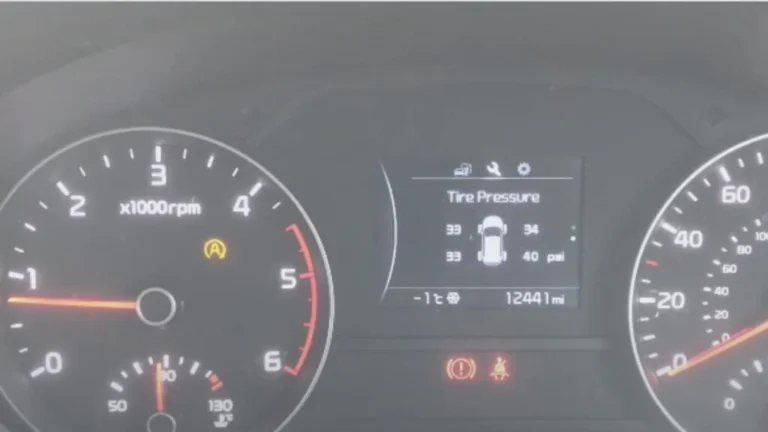
This dashboard warning typically appears as a flat tire icon with an exclamation mark (❗), instantly signaling a potential issue. The implications of incorrect tire pressure extend beyond safety; under-inflated tires significantly reduce fuel efficiency and accelerate tire wear, leading to premature replacement. For instance, studies indicate that properly inflated tires can improve fuel efficiency by up to 3%, directly impacting your operating costs. According to NHTSA, TPMS systems have significantly reduced the incidence of tire-related crashes, underscoring its role as a vital preventative safety feature that helps maintain your Civic’s optimal driving dynamics and tire longevity.
Indirect TPMS Benefits
Lower cost, no sensor battery replacements, integrated with existing ABS hardware.
Indirect TPMS Considerations
Requires calibration drive, may not detect simultaneous pressure loss across all tires evenly.
When and Why to Reset Your Honda Civic’s TPMS
Resetting your Honda Civic’s TPMS is not merely about extinguishing an annoying warning light; it’s about re-establishing the system’s baseline, ensuring it can accurately monitor your tire pressures moving forward. There are several specific scenarios that necessitate a TPMS reset to ‘restore’ optimal system functionality and prevent persistent, often false, warnings.
One of the most common triggers for a TPMS reset occurs after adjusting tire pressure. Even if you correct a low tire, the system needs to be informed of the new, correct pressure values to use as its ‘default’ benchmark. Similarly, if you perform a tire rotation on your 2020 Honda Civic, the relative positions of the tires change, and the Indirect TPMS needs a fresh start to learn their new positions and rotational patterns. Without a reset, the system might incorrectly detect variances and illuminate the light despite all pressures being correct.
Replacing tires entirely or installing a spare tire are also critical times for a reset. These actions fundamentally alter the system’s reference points. Furthermore, fluctuations in ambient temperature frequently cause temporary low-pressure warnings. For instance, experiencing a sudden temperature drop of 20°F can cause tire pressure to decrease by approximately 2 PSI (1 PSI for every 10°F drop), triggering the TPMS light even if the tires were perfectly inflated hours earlier. After reinspecting and adjusting the pressures once temperatures stabilize, a reset is required to recalibrate the system to these new conditions.

Audible — Listen Free for 30 Days
One free credit a month and thousands of titles included.
Listen Free for 30 DaysThe importance of resetting the system cannot be overstated. It effectively performs a ‘reboot’ of the monitoring parameters, preventing a persistent warning light that could desensitize you to genuine safety alerts. Many reputable tire service centers recommend a TPMS reset as a standard procedure post-service, precisely for this reason – to give the system a clean slate with accurate pressure data.
Pre-Reset Procedures: Ensuring Accurate Tire Pressure in Your Civic
Recommended Best Deal Products


Before you even consider initiating a TPMS reset, it is absolutely paramount to verify and adjust the tire pressures to their manufacturer-specified levels. This foundational step ensures the system recalibrates to correct pressure values, rather than propagating an incorrect baseline. Skipping this crucial preparatory stage will inevitably lead to recurring TPMS warnings.
First, you must accurately check all four tires (and the spare, if it’s integrated into your Civic’s TPMS, though most indirect systems don’t monitor spares). Use a reliable, calibrated tire pressure gauge. Always check pressures when the tires are cold, meaning the vehicle has been parked for at least three hours or has not been driven for more than a mile at moderate speed. Driving heats the tires, increasing internal pressure and providing an inaccurate reading. The average lifespan of a tire pressure gauge is 2-3 years before accuracy may degrade, so regular checks on your gauge are also a good practice.
Next, locate your vehicle’s recommended tire pressure specifications. For all Honda Civic models, this information is prominently displayed on a placard typically found on the driver’s side door jamb (e.g., on a 2021 Civic). This sticker provides the recommended cold tire inflation pressures (e.g., 32 PSI cold for a 2017 Honda Civic Si) for both front and rear tires, as well as the spare, if applicable. Your owner’s manual is another definitive source for this critical data, often detailing specifications for various trim levels and tire sizes.
Finally, adjust the tire pressure to the manufacturer’s specifications. If the pressure is too low, add air using an air compressor until the gauge reads the correct PSI. If the pressure is too high, gently depress the center pin of the tire valve stem to release air in short bursts, rechecking the pressure frequently. The proper technique involves making small adjustments and re-measuring to achieve precise inflation. Honda recommends checking tire pressure monthly, regardless of TPMS status, as a diligent maintenance practice.
Always use the vehicle manufacturer’s recommended pressure from the door jamb sticker, not the ‘max pressure’ stamped on the tire sidewall. The latter refers to the maximum safe pressure for the tire itself, not the optimal pressure for your specific vehicle.
Step-by-Step Guide: Resetting Your Honda Civic’s TPMS System
Once you’ve meticulously verified and adjusted all tire pressures to their specified levels, you are ready to perform the TPMS reset. The procedure varies slightly depending on your Honda Civic’s model year and its equipped interface. It’s essentially a ‘reboot’ that allows the indirect system to learn its new ‘default’ values.
📋
Step-by-Step Guide
Recommended Best Deal Products


- Ignition On: Turn the ignition to the “ON” position without starting the engine (or start the engine if preferred, it makes no difference for this step).
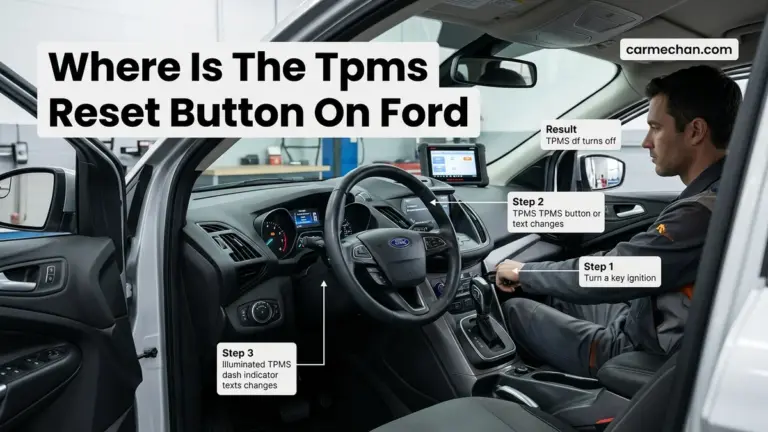
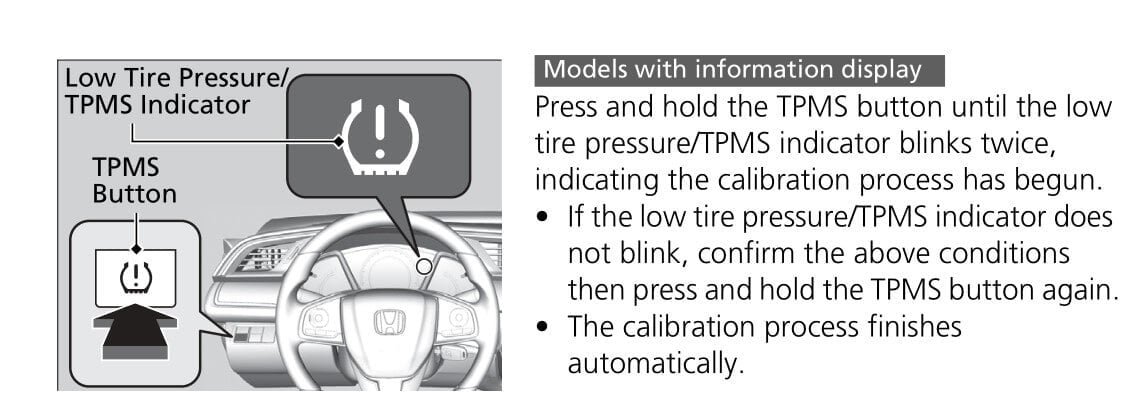
- Locate Button: Find the TPMS “CALIBRATE” button. This is often located beneath the steering wheel column, on the lower dashboard to the left of the steering wheel, or occasionally in the glove box. Refer to your owner’s manual for its exact location on your 2014 Civic.
- Press and Hold: Press and hold the TPMS button until the TPMS indicator light on the dashboard blinks twice, then release it. This indicates the system has initiated the reset process.
Audible Premium Plus — Annual Membership
12 audiobook credits up front, plus the full Audible catalogue.
See Annual Plans
- Access Settings: Start the engine. Using the steering wheel controls or the touchscreen (for models like a 2019 Honda Civic EX), navigate to the main menu.
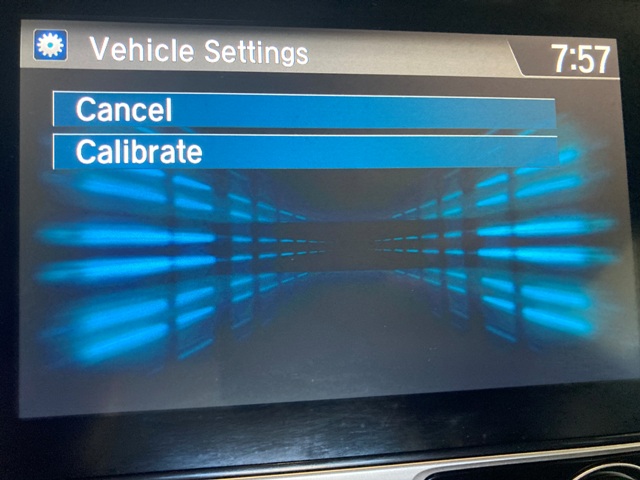
- Find TPMS Calibration: Look for a menu option such as “Settings”, then “Vehicle Settings”, and finally “TPMS Calibration” or “Initialize TPMS”.
- Select Calibrate/Initialize: Select “Calibrate” or “Initialize” to begin the reset. A confirmation message typically appears, indicating the process has started.
- Crucial Step: The TPMS will not reset instantly. It requires a calibration drive to ‘learn’ the new default tire pressure values.
- Driving Conditions: Drive your Civic at speeds between 30-60 mph (50-100 km/h) for a continuous duration, typically 20-30 minutes. Honda’s service manuals specify a minimum calibration drive time of 15-20 minutes for indirect TPMS systems to re-establish a baseline.
- System Learning: During this drive, the system utilizes the ABS wheel speed sensors to monitor the rotation speeds of all four tires and establish the new reference points for correctly inflated tires. The TPMS warning light should turn off during or shortly after this drive once calibration is complete.
If a direct reset option isn’t immediately apparent through these methods, or if your Civic falls outside these general model years, always consult your vehicle’s owner’s manual. It contains precise, model-specific instructions for your particular vehicle. While some sources might suggest disconnecting the battery as an alternative method to ‘reboot’ systems, it’s generally not recommended for TPMS resets in modern Civics as it can reset other vehicle settings and may not properly initialize the TPMS without the specific calibration steps outlined above.
Never attempt to reset the TPMS without first verifying and correcting all tire pressures. Resetting a system with improperly inflated tires will cause the TPMS to ‘learn’ incorrect baseline pressures, leading to inaccurate warnings or delayed alerts in the future.
Troubleshooting Common TPMS Reset Issues on Your Honda Civic
Even after meticulously following the reset procedures, it’s not uncommon for the TPMS warning light to persist or reappear. This often indicates a deeper issue than a simple pressure adjustment or calibration. Understanding these nuances is key to effective troubleshooting.
The most frequent reason the TPMS light may remain on or reappear after a reset is persistent low pressure. Double-check all four tires, ideally with a different, known-accurate gauge, to rule out a slow leak or an initially incorrect adjustment. Even a small variance (e.g., 2-3 PSI below specification) can be enough to trigger the system again. An incomplete calibration drive is another common culprit. If you didn’t maintain the recommended speed for a sufficient duration (e.g., 20-30 minutes consistently), the system may not have had enough time to ‘initialize’ the new baseline successfully.
A more serious scenario occurs when the TPMS light blinks for an extended period, typically for about 60-90 seconds upon startup, and then stays solid. This is a classic indicator of a system malfunction, not just a pressure issue. For example, a 2022 Civic’s light blinking then staying solid often points directly to a failing TPMS sensor (in direct systems, though indirect systems can also register errors with the ABS sensors they rely on) or a fault within the TPMS control unit itself. TPMS sensor batteries typically last 5-10 years, and if your Civic has direct TPMS (less common in newer models but present in some older ones), a dead sensor battery will prevent a successful reset. A single faulty sensor can prevent the entire system from resetting correctly.
If after three attempts to reset and a thorough check of tire pressures, the light persists or blinks, professional intervention is necessary. This requires specialized diagnostic tools. An OBD-II scanner capable of TPMS functions can read specific diagnostic trouble codes (DTCs) related to the TPMS, providing insight into sensor failures, wiring issues, or control module problems. Professional TPMS tools can read individual sensor IDs and battery life. We advise seeking certified Honda service for complex issues, as their technicians have proprietary diagnostic equipment and expertise to accurately pinpoint the root cause and perform necessary repairs or sensor replacements, ensuring the integrity of your safety system.
Maintaining Optimal Tire Pressure and TPMS Longevity for Your Civic
Proactive maintenance extends far beyond merely resetting a warning light; it encompasses consistent practices that ensure both your tires and your TPMS operate reliably for the long term. This strategy guarantees a ‘clean’ and correct foundation for your Civic’s safety and efficiency.
We advocate for a consistent schedule of manual tire pressure checks, ideally on a monthly basis. This acts as a vital complementary practice to your TPMS. While the TPMS alerts you to significant pressure drops, a manual gauge provides precise readings, allowing you to maintain pressures exactly at the manufacturer’s specifications. Keeping a reliable tire pressure gauge (a good backup to the electronic system) in your 2016 Civic’s glove compartment ensures you can perform these checks conveniently.
Furthermore, proper tire maintenance, including regular tire rotations and wheel alignments, is crucial. Uneven tire wear, often caused by poor alignment or neglected rotations, can subtly alter tire diameters and rotation speeds, potentially confusing indirect TPMS systems. Honda recommends tire rotations every 5,000-7,500 miles. Neglecting this could lead to premature wear or even affect how your indirect TPMS interprets wheel speed data.
For Civics with direct TPMS, or as a general best practice during any tire service, consider professional TPMS service. This includes inspecting sensors for physical damage or corrosion during tire changes or replacements. While indirect TPMS doesn’t have individual sensors in the wheels, ensuring the ABS system components are healthy is equally important. When you get new tires, ensure the system receives a ‘fresh start’ by performing an immediate reset after installation and inflation. The average lifespan of a direct tire pressure sensor battery is between 7-10 years; having them inspected (or even proactively replaced during a tire change after 5-7 years) helps maintain system integrity and prevents unexpected failures. Approximately 75% of vehicles on the road have at least one tire under-inflated, a statistic that underscores the importance of both TPMS and diligent manual checks.
By The Numbers
Pressure loss per 10°F drop
Fuel efficiency improvement with proper inflation
Average TPMS sensor battery life
Vehicles with at least one under-inflated tire
Regularly verifying and adjusting tire pressure is paramount for safety and efficiency. The TPMS reset procedure varies slightly by Honda Civic model year, often involving a dedicated button or the infotainment system. Persistent TPMS lights or error codes may indicate a sensor malfunction requiring professional diagnosis and intervention. Empower yourself by mastering these TPMS reset techniques, ensuring your Honda Civic’s tires are always optimally calibrated. For complex or recurring issues, consult a certified Honda service technician to maintain peak vehicle integrity and safety.
Frequently Asked Questions
How do I know if my Honda Civic has direct or indirect TPMS?
Most Honda Civics from 2012 onward utilize an indirect TPMS system, which doesn’t use physical sensors in each tire but rather measures tire rotation speed via ABS sensors. A direct TPMS uses individual sensors mounted inside each wheel. Consult your owner’s manual or a certified Honda service center for your specific model’s configuration.
Why does my TPMS light keep coming on after I reset it?
If your TPMS light persists after a reset, ensure all tires are precisely at the recommended cold inflation pressure, including the spare if applicable. If pressures are correct, the issue might stem from a faulty TPMS sensor, an incomplete calibration drive, or a system malfunction requiring professional diagnostic assessment.
Can I reset the TPMS myself without special tools?
Yes, for most Honda Civic models, the TPMS can be reset by the owner using either a dedicated TPMS button or through the vehicle’s Multi-Information Display (MID) or infotainment system. Special tools are generally not required for a standard reset, but professional equipment is needed for sensor replacement or advanced diagnostics.
How long does a TPMS calibration drive take?
After initiating the reset sequence, Honda’s indirect TPMS typically requires a calibration drive of approximately 15-30 minutes, driving at speeds between 30-60 mph, for the system to ‘learn’ the new baseline tire pressures. Avoid abrupt accelerations or braking during this period for optimal recalibration.
What if my TPMS light is blinking?
A blinking TPMS light on your Honda Civic typically signifies a system malfunction, not just low tire pressure. This often indicates a faulty TPMS sensor, a system error, or a low battery within a direct TPMS sensor. In such cases, professional diagnosis using an OBD-II scanner capable of TPMS-specific functions is highly recommended.