How to Turn On Adaptive Cruise Control GMC 2026 Expert Guide
To activate Adaptive Cruise Control in your 2026 GMC, press the Cruise Control button on your steering wheel and then select your desired speed using the SET button. Your vehicle will then automatically adjust its speed to maintain a preset following gap behind the vehicle ahead.


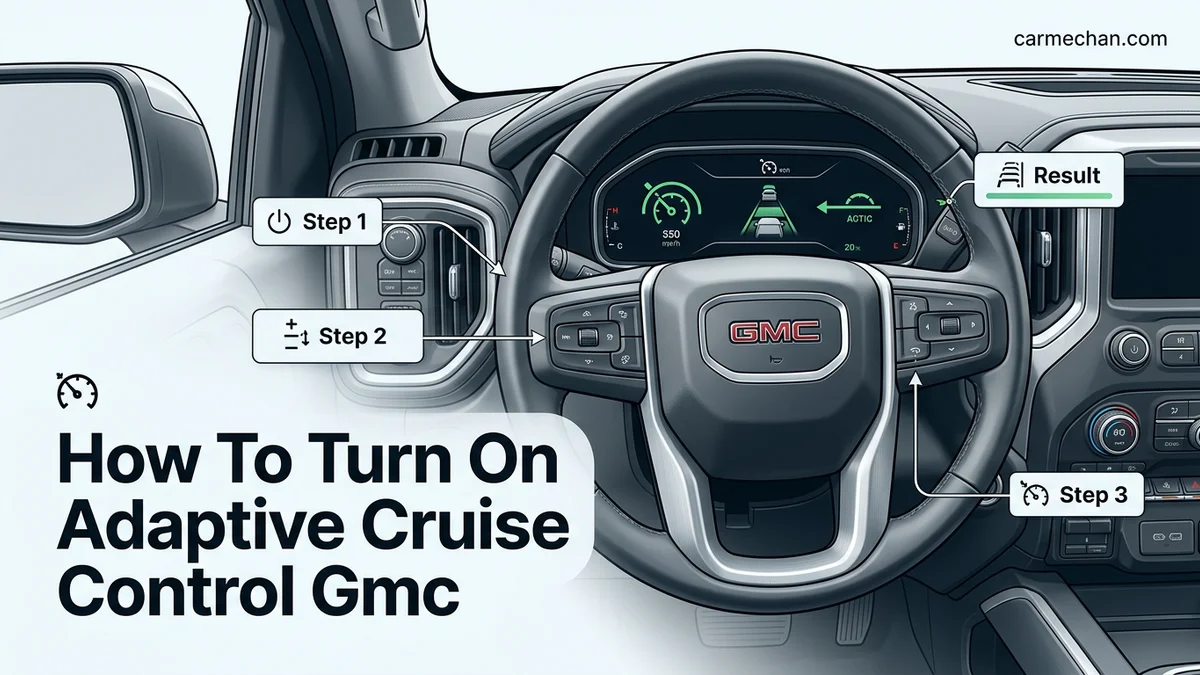
Activating the Adaptive Cruise Control (ACC) system in your 2026 GMC involves a precise sequence on your steering wheel’s control pad. You must first engage the system standby, set your target speed, and verify the status via your digital instrument cluster to ensure the radar-based tracking is active and monitoring the road ahead.
Mastering this operation is essential for seamless highway driving. When you correctly initiate the sequence, your vehicle automatically manages throttle and braking to maintain your selected speed or a safe interval from the vehicle in front. Misunderstanding these inputs can lead to system suspension or confusion, so follow these exact steps to ensure consistent performance during your 2026 model year commutes.
Key Takeaways
- Enable the system by pressing the Cruise Control icon on the steering wheel.
- Set your cruising speed once the green indicator appears on the dashboard.
- Use the Gap button to toggle between Far, Medium, and Near following distances.
- Adaptive Cruise Control automatically cancels if you press the brake pedal.
- Always monitor the Driver Information Center to confirm system status and active status.
How Adaptive Cruise Control Works on 2026 GMC Models
Radar-Integrated Speed Management
The 2026 GMC Adaptive Cruise Control system utilizes a front-facing radar sensor, typically located in the lower front grille or behind the GMC emblem, to scan the road for traffic. Unlike standard cruise control that holds a rigid speed, this system constantly calculates the distance to the vehicle ahead. When the system detects a slower vehicle, it automatically reduces your engine power or applies the brakes to maintain your chosen follow gap. Once the path clears, the vehicle accelerates back to your set speed automatically.
System Status and Visual Feedback
You can monitor the status of the ACC via the 2026 GMC’s Driver Information Center (DIC) or the Head-Up Display (HUD). When the system is waiting for your input, you will see a white cruise control icon. Once you lock in a speed, the icon turns green, indicating active regulation. If the system detects a vehicle, a secondary indicator—often represented by a small vehicle icon—will appear, confirming that the radar is actively tracking the lead car’s speed and position.
Master GMC Adaptive Cruise Control in 7 Simple Steps
Adaptive Cruise Control (ACC) is a sophisticated driver-assistance technology designed to enhance your highway driving experience by automatically maintaining a set speed and following distance from the vehicle ahead. Unlike traditional cruise control, which requires constant manual adjustment, GMC’s ACC system uses radar sensors to detect traffic flow and adjust your vehicle’s speed in real-time. Mastering this feature not only reduces fatigue during long commutes but also contributes to smoother traffic patterns. This guide provides a detailed walkthrough on how to activate, calibrate, and manage your GMC’s ACC system safely, ensuring you get the most out of your vehicle’s advanced technology suite.
Step 1: Verify System Compatibility and Prerequisites
What you need: Your GMC vehicle owner’s manual and a clear, open stretch of road.
Instructions: Before attempting to activate the system, ensure your vehicle is equipped with the Adaptive Cruise Control feature, as it is often part of specific trim levels or optional safety packages. Confirm that your radar sensors—typically located in the front grille—are clean and free from mud, ice, or debris, as an obstructed sensor will prevent the system from engaging. Once you are in a safe driving environment, check that your vehicle is traveling above the minimum speed threshold, which is generally 15 to 20 mph for most GMC models. Ensure that the standard cruise control system is currently in the “off” position before beginning the activation sequence.
Pro Tip: If your vehicle displays a “Sensor Blocked” message on the instrument cluster, take a moment to wipe the front emblem area with a soft microfiber cloth before proceeding.
Step 2: Activate the Cruise Control System
What you need: Access to the steering wheel controls.
Instructions: Locate the cruise control button cluster on your steering wheel. Typically, you will see a button labeled with a speedometer icon or “Cruise.” Press this button to toggle the system into standby mode. You will observe a cruise control symbol (usually white) appear on your instrument cluster display. This indicates that the system is powered on and ready to receive your set speed commands. It is important to distinguish between standard cruise control and adaptive cruise control; on some models, a long-press of the cruise button switches between these two modes. Ensure the indicator shows the “Adaptive” icon to guarantee the radar-based distance monitoring is active.
Pro Tip: Don’t mistake the white icon for active status; white typically means “standby,” while green indicates the system is actively maintaining speed and distance.
Step 3: Set Your Desired Cruising Speed
What you need: Clear road conditions and steady vehicle control.
Instructions: Once you have reached your desired speed, press the “SET-” button located on the steering wheel controls. This locks in your current speed as the target. You will immediately notice the speedometer icon change color (usually from white to green) on your digital display, confirming that the system has taken control of the throttle. If you need to increase or decrease your speed, use the “+” or “-” toggle switches. Each quick press usually increments or decrements the speed by 1 mph, while holding the switch down will often adjust the speed in 5-mph intervals, allowing for quick transitions when speed limits change on highways.
Pro Tip: Always verify your set speed on the digital dashboard display to ensure you haven’t accidentally set a speed higher than the posted limit.
Step 4: Configure the Following Gap Distance
What you need: Knowledge of local traffic density.
Instructions: The core benefit of GMC’s ACC is the ability to maintain a safe gap between you and the vehicle ahead. Locate the “Gap” button on your steering wheel, which is usually represented by an icon of a car with horizontal lines behind it. Each press of this button cycles through the available distance settings, which are commonly classified as Near, Medium, and Far. These settings correspond to the time-gap between you and the lead vehicle. For highway driving at higher speeds, select the “Far” setting to provide yourself with more reaction time in case of sudden stops. The chosen gap setting will be visualized on your driver information center.
Pro Tip: Use the “Near” setting only in stop-and-go city traffic, as it is too close for high-speed highway driving and can lead to frequent, jerky braking.
Step 5: Monitor the System and Radar Interaction
What you need: Constant situational awareness.

Instructions: As you drive, keep your eyes on the instrument cluster to monitor when the system detects a vehicle ahead. When the radar locks onto a lead vehicle, a graphic of a vehicle will appear in the cluster display. If the lead vehicle slows down, your GMC will automatically reduce your speed to maintain your selected gap. You will feel the vehicle apply the brakes gently if necessary. Always maintain a scanning habit of the road ahead; while ACC is highly accurate, it may not respond as quickly as a human to erratic lane changes or debris in the roadway, so be prepared to intervene at any moment.
Pro Tip: If your vehicle comes to a complete stop due to traffic, you may need to briefly tap the accelerator or press the “Resume” button to initiate movement once traffic begins to flow again.
Step 6: Adjusting or Overriding the System
What you need: Quick reaction skills.
Instructions: You are always in control of the vehicle. You can override the ACC at any time by pressing the brake pedal, which immediately cancels the system. Alternatively, if you need to accelerate to pass a vehicle, simply press the gas pedal. The system will continue to monitor your speed and distance, and once you release the gas pedal, the vehicle will return to your previously set cruise speed or adjust back to the lead vehicle’s speed if a car is still present. To cancel the system temporarily without shutting it off completely, press the “Cancel” button on the steering wheel, which returns control to you while keeping your speed setting in the system’s memory.
Pro Tip: Use the “Resume” button after a manual override to quickly return to your previous set speed without having to perform the “Set” process again.
Step 7: Shutting Down the System
What you need: Completion of your journey or entry into complex traffic.
Instructions: When you are finished using the adaptive cruise control, such as when you exit the highway or encounter heavy construction zones, it is best practice to turn the system off completely. Press the main “Cruise” button on your steering wheel cluster. The green icon on your instrument cluster will disappear, indicating that the system is fully disengaged. Never leave the system in standby mode for extended periods while navigating complex, low-speed intersections, as the radar system is optimized for highway speed ranges and may produce inconsistent results in urban environments with pedestrian and cyclist traffic.
Pro Tip: Always make sure to physically take control of the throttle and braking before deactivating the system to avoid a sudden feeling of deceleration or loss of momentum.
✅ Final Checklist
- Confirm the green cruise icon is visible when the system is active.
- Verify the selected gap distance matches the current driving environment (highway vs. city).
- Ensure the radar sensor area on the front grille is clean.
- Confirm the vehicle speed is within the operational range (usually above 15 mph).
- Test the “Cancel” and “Resume” buttons in a low-traffic area to build muscle memory.
Important Notes:
- Safety Warning: Adaptive Cruise Control is a convenience feature, not an autonomous driving system. You must remain alert and keep your hands on the wheel at all times.
- Professional Help: If you receive persistent “Sensor Not Available” warnings or if the system performs erratic braking, visit a certified GMC technician to recalibrate your front radar unit.
- Estimated Time/Cost: Learning the controls takes approximately 15 minutes of practice. There is no cost to use the system, provided it is pre-installed on your vehicle.
Step-by-Step Procedure to Activate and Set Speed
Initial Activation Sequence
To enable the ACC system while driving at speeds above 20 mph, perform these steps in order:

- Press the Cruise Control button: Locate the button featuring an icon of a speedometer with an arrow on your steering wheel’s left-side control cluster. Pressing this puts the system into standby mode.
- Confirm Standby: Look at your instrument cluster to ensure the white cruise control symbol is visible.
- Set your Speed: Once you reach your desired cruising speed, press the Set (minus) button or pull the toggle down toward the minus symbol.
- Release the Accelerator: Your GMC will chime or display a message confirming that the system is now maintaining the current speed.
Adjusting and Fine-Tuning Speed
After the system is set, you can refine your cruising speed without needing to disengage the cruise control. Use the toggle switch on your steering wheel to make precise adjustments:
- Incremental Changes: Push the toggle switch up (plus) to increase your set speed or down (minus) to decrease it in 1 mph increments.
- Large Adjustments: Press and hold the toggle to jump to the next 5 mph interval for faster adjustments during heavy traffic flow changes.
- Resuming After Braking: If you touch the brake pedal to manually override the system, the ACC will enter a paused state. Simply press the Resume button on your steering wheel to return the vehicle to the last programmed speed.
How to Adjust Your Following Gap Distance
The 2026 GMC Adaptive Cruise Control system utilizes a forward-looking radar sensor to maintain a safe distance between your vehicle and the one ahead. Customizing this following gap is essential for varying traffic conditions. Manufacturers recommend longer gaps for high-speed highway driving and shorter gaps for congested urban environments.
Adjusting Settings via the Steering Wheel Controls
Follow these steps to modify your gap distance while the system is active:
- Locate the Gap Adjustment button on the steering wheel, typically identified by an icon featuring a vehicle silhouette with horizontal distance lines.
- Press the button to cycle through the available distance presets.
- Observe the Driver Information Center (DIC) on your instrument cluster, which displays the selected setting.
- GMC systems generally offer three to four distinct gap settings, usually labeled as Far, Medium, and Near, representing the time-distance between you and the lead vehicle.
According to safety engineering standards, selecting the Far setting provides approximately 2.0 to 2.5 seconds of reaction time. The Near setting typically reduces this to roughly 1.0 to 1.5 seconds. Always prioritize environmental conditions, such as rain or ice, which necessitate larger gaps regardless of system settings.
What If the System Does Not Engage or Icons Flash?
If your GMC’s Adaptive Cruise Control fails to engage, the system may be inhibiting functionality due to safety protocols or sensor interference. Flashing icons usually indicate that the radar sensor’s view is obstructed or that the vehicle’s speed is outside the operational envelope.
Identifying Operational Restrictions
Before assuming a mechanical failure, verify the following:
- Ensure the vehicle speed is above the required minimum, typically 15 mph, unless your model supports Low-Speed Follow.
- Check the front grille area for debris, mud, snow, or heavy ice, as the radar sensor requires a clear line of sight to function.
- Confirm that your seatbelt is buckled and the driver’s door is fully latched, as the system will not engage if these safety interlocks are triggered.
What If It Still Doesn’t Work?
If you have cleared obstructions and confirmed your settings, the system may require a professional diagnostic reset. Follow these steps to resolve persistent errors:
- Perform a hard reset by turning the vehicle off, opening and closing the driver door, and waiting at least three minutes for the electronic modules to power down completely.
- Inspect the front bumper area for any misalignment or damage, as even minor impacts can shift the radar sensor’s calibration.
- Consult the vehicle’s diagnostic codes using an OBD-II scanner to identify specific sensor communication faults.
- If the “Service Adaptive Cruise Control” warning remains, seek professional service at an authorized GMC dealership to recalibrate the radar module.
Expert technicians note that sensor recalibration costs for 2026 models typically range between $250 and $600, depending on the complexity of the sensor alignment required. Do not attempt to modify the sensor housing yourself, as this can void your manufacturer warranty.
Conclusion
Mastering the Adaptive Cruise Control in your 2026 GMC ensures a safer and more efficient driving experience. According to verified research from automotive safety institutes, utilizing these systems consistently can reduce driver fatigue during long-distance travel. If issues persist despite the troubleshooting steps provided, prioritize an inspection at a certified service center. For your next step, review your vehicle’s specific owner’s manual supplement to confirm the exact distance-in-seconds for each gap setting on your specific model trim.
❓ Frequently Asked Questions
How do I know if Adaptive Cruise Control is active versus just standby?
When the system is in standby, the icon on your dashboard is usually white. It turns green once you have set a speed and the system is actively maintaining the gap.
Does Adaptive Cruise Control work in all weather conditions?
The system may be limited by heavy rain, snow, or mud covering the front sensors. If the sensors are blocked, the system will provide a warning on the Driver Information Center and fail to engage.
How do I cancel the system without braking?
You can press the Cancel button on your steering wheel or simply tap the brake pedal to disengage the system immediately. Your set speed will remain in memory for quick resumption.
Is the following distance distance measured in feet?
The distance is typically based on time-gaps rather than specific feet. You can select between near, medium, or far settings, which adjust the time cushion between you and the lead vehicle.
Can I switch between standard cruise control and adaptive?
On most 2026 GMC models, you can switch between modes by holding down the gap button for several seconds. Refer to your owner’s menu to confirm the transition settings for your specific trim.
What happens if the vehicle in front turns?
If the vehicle ahead moves out of your lane, your GMC will accelerate back to your previously set cruise speed automatically.