Toyota Corolla TPMS Reset Button Location by Year 2026
Last Updated on June 24, 2026 by Albert Duke
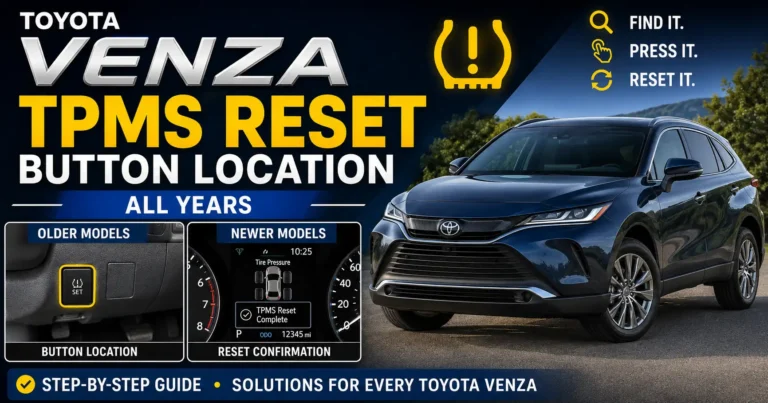
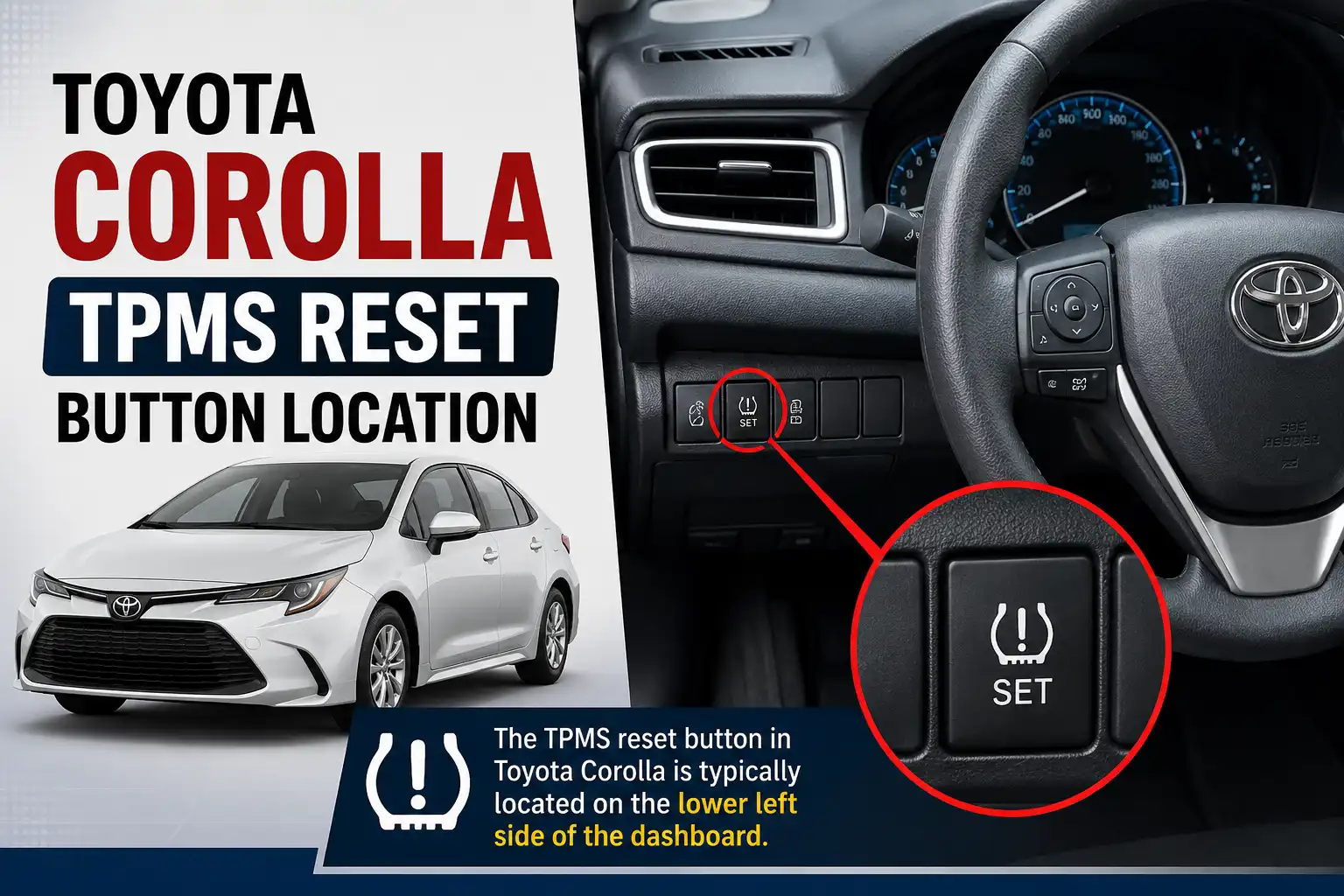
The Toyota Corolla TPMS reset button location depends on your model year. On many older Corolla models, the button is low on the driver-side dash or under the steering wheel. On some Corolla iM models, Toyota places the tire pressure warning reset switch inside the glovebox.
Newer Corolla models may not have a visible reset button at all. Instead, they use the multi-information display and steering wheel controls to reset TPWS, which means Tire Pressure Warning System.
Before you reset anything, inflate all tires to the pressure shown on the driver-side door jamb label. The first step is knowing which reset setup your Corolla uses.
Which Toyota Corolla Years Have a TPMS Button


Your Corolla’s model year decides where you should look first. Toyota does not use one reset location across every Corolla generation, trim, and market, so the safest answer is year-based plus manual-based.
Use this table as the starting point before searching the cabin.
| Toyota Corolla Model | Most Likely Reset Style | Where to Check First |
|---|---|---|
| 2009 to 2019 Corolla Sedan | Physical TPMS button | Low dash, under steering wheel, or driver knee panel |
| 2017 to 2018 Corolla iM | Physical reset switch | Inside the glovebox |
| 2020 to 2026 Corolla Sedan and Hybrid | Menu-based TPWS reset on many trims | Instrument cluster vehicle settings menu |
| 2020 to 2026 Corolla Hatchback | Menu-based TPWS reset on many trims | Multi-information display settings |
| GR Corolla | Menu or sensor registration logic may apply | Owner manual and TPWS settings menu |
Toyota support says some Toyota models place the reset button “low and to the right of the steering wheel on the instrument panel,” and the tire pressure light should blink slowly three times during reset. Toyota’s TPMS reset instructions confirm this lower dash location.
For the Corolla iM, Toyota’s quick reference guide identifies the tire pressure warning reset switch as being inside the glovebox. Toyota’s Corolla iM guide shows the glovebox reset switch location.
If you own another Toyota sedan and want to compare the reset setup, our guide to the Toyota Camry TPMS reset button location shows how similar Toyota reset layouts can vary by model year.
Now that you know which system your Corolla likely uses, the next step is checking the exact physical locations.
Where to Find the Corolla TPMS Button


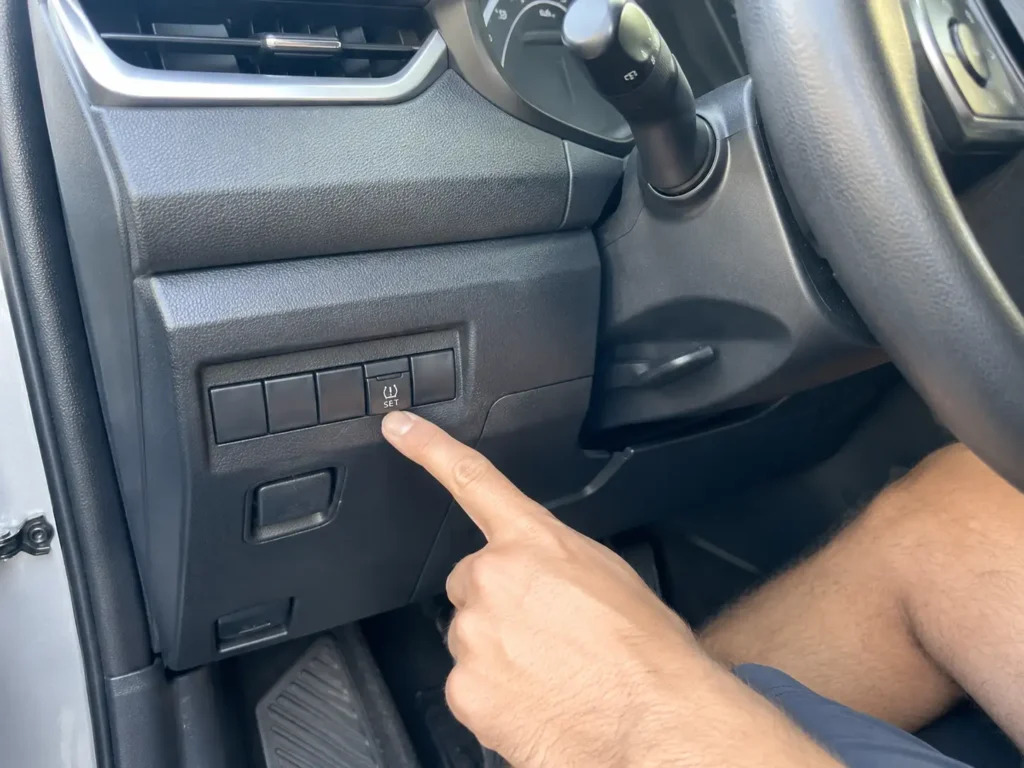
If your Corolla has a physical TPMS button, check the lower dash first. The button is small, easy to miss, and may be labeled SET or marked with a tire pressure warning symbol.
Lower Dash Button
Look low on the driver-side dashboard, near the area below and to the right of the steering wheel. This matches Toyota’s general support guidance for models with a physical TPMS reset button.
Use a flashlight if needed. The button can sit low enough that you may not see it from a normal seated position.
Steering Column Area
On some Corolla model years, owners report finding the button under the steering column or near the lower knee panel. This is also where many drivers search first because it is close to the fuse cover and lower trim.
Do not confuse the TPMS SET button with traction control, trip reset, or panel brightness controls. The tire pressure button should relate to the tire warning system.
Glovebox Reset Switch
If you have a Corolla iM, open the glovebox and inspect the inside area carefully. Toyota’s Corolla iM quick reference material places the tire pressure warning reset switch inside the glovebox.
This location causes confusion because many Corolla sedan owners expect the button under the steering wheel. Corolla iM owners should check the glovebox before removing dash panels.
No Visible Button
If you cannot find a TPMS button, your Corolla may use a menu reset instead. This is common on newer Corolla models with a multi-information display.
Do not force trim panels or assume the button is hidden behind plastic. If the car has TPWS settings in the dash menu, that is likely the correct reset path.
Finding the button only helps if the tire pressure has already been corrected.
How to Reset Toyota Corolla TPMS After Inflation


Do not press the reset button before correcting tire pressure. TPMS, or Tire Pressure Monitoring System, stores the current pressure as the baseline, so resetting with low tires can make the warning system less useful.
Follow these steps if your Corolla has a physical SET button.
- Park the Corolla on level ground and let the tires cool if possible.
- Check all four tires with a reliable pressure gauge.
- Inflate each tire to the cold tire pressure listed on the driver-side door jamb placard.
- Turn the ignition to ON or put the vehicle in the correct power mode without driving.
- Press and hold the TPMS SET button.
- Release the button after the tire pressure warning light blinks three times.
- Wait for initialization to complete, then drive normally and check whether the warning light turns off.
Toyota’s Corolla iM quick reference guide says to adjust the tire pressures, turn the ignition switch to ON, press and hold the reset switch until the indicator blinks three times, and then wait while the setting is recorded.
For owners who want a better gauge before resetting tire pressure, our best tire pressure gauge guide can help you avoid inaccurate gas-station readings.
If your Corolla does not have a physical reset button, use the dashboard menu instead.
How Newer Toyota Corolla TPWS Menu Reset Works
If you cannot find a TPMS button, your Corolla may reset through the dashboard menu. Toyota labels this system TPWS on newer models, which means Tire Pressure Warning System.
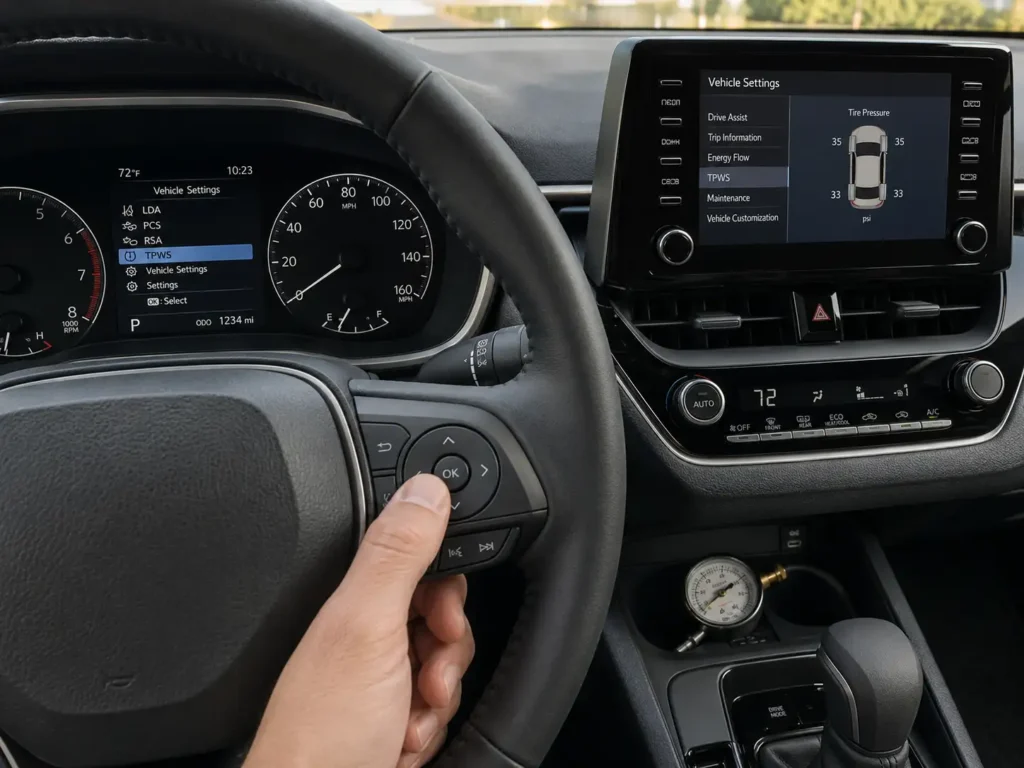
The exact wording can vary by year and trim, but the general process is similar.
- Set all tires to the correct cold pressure from the driver-side door jamb label.
- Turn the Corolla on without starting to drive.
- Use the steering wheel controls to open the settings screen in the multi-information display.
- Select Vehicle Settings.
- Select TPWS.
- Choose Setting by Current Pressure or Set Pressure.
- Press and hold OK until the tire pressure warning light blinks three times.
Toyota’s 2023 Corolla quick reference guide tells owners to maintain tire pressures at the levels specified in the owner’s manual before using the TPWS reset procedure. Toyota’s 2023 Corolla quick reference guide confirms the TPWS menu reset approach.
If your dashboard menu looks different, use the owner manual for your exact year. Toyota sometimes changes menu wording between model years, hybrid trims, hatchback trims, and regional versions.
For a similar Toyota menu-reset layout, see our Toyota RAV4 TPMS reset button location guide, which explains why newer Toyota models often move reset control into the display menu.
If the warning light stays on after the reset, the problem may not be the button location.
Why the Corolla TPMS Light Stays On
A reset will not fix every Toyota Corolla TPMS warning. The light may stay on because the tire pressure is still wrong, the system has not finished initialization, or a sensor problem exists.
Common causes include:
- One or more tires are still below the door-jamb pressure.
- Tire pressure was checked when the tires were hot.
- The pressure difference between tires is too large.
- A TPMS sensor battery is weak.
- New wheels or winter wheels have sensors the car does not recognize.
- A tire repair or wheel replacement disturbed a sensor.
- The system needs sensor registration, not just pressure initialization.
Toyota owner discussions show a common pattern with newer Corolla models: drivers sometimes fix a tire or adjust pressure but still see a warning until they use the TPWS menu correctly. In one Corolla owner thread, users pointed the driver back to the door-jamb pressure label and the TPWS “set by current pressure” setting.
A flashing tire pressure light is different from a steady low-pressure warning. If the light flashes at startup and then stays solid, the Corolla may not be detecting one or more sensors.
That is when a simple reset turns into a diagnosis.
When You Need a TPMS Tool or Mechanic
A Corolla TPMS reset button only initializes pressure, not every sensor problem. If the car cannot read the sensor IDs, holding the reset button will not solve the warning.
Use this decision logic:
- If you only inflated the tires, reset the pressure baseline with the button or TPWS menu.
- If you rotated tires and the pressures are correct, drive briefly and recheck the warning light.
- If you installed new TPMS sensors, the sensors may need registration.
- If you installed winter wheels, the Corolla may need the second tire set selected or sensor IDs registered.
- If the light flashes and then stays on, treat it as a possible TPMS malfunction.
- If the menu reset fails more than once, use a compatible TPMS scan tool or visit a tire shop.
A 2025 Corolla owner discussion about winter wheel swaps reported that owners may need to use instrument-cluster TPWS settings to register new sensors, and another commenter noted that sensor codes may need registration with a scan tool. Toyota owner reports show sensor registration confusion after wheel swaps.
If you need scan-tool help for Toyota warning systems, our best OBD2 scanner for Toyota guide explains what Toyota owners should look for in a diagnostic tool.
With the fault conditions clear, the fastest next step is a simple decision check.
Quick Toyota Corolla TPMS Decision Guide
Use this quick guide if you just want the fastest next step. Start with tire pressure, then choose the reset path that matches your Corolla.
Toyota Corolla TPMS Reset Decision Flow
Use this visual path before pressing a reset button or changing TPWS settings.
Check Tire Pressure
Set all tires to the cold pressure on the driver-side door jamb label.
Look for SET Button
Check the lower dash, steering column area, or glovebox on button-based models.
Use TPWS Menu
If no button is visible, open Vehicle Settings and choose the TPWS pressure setting.
Watch for Three Blinks
The warning light should blink three times when the reset or initialization starts.
Diagnose If Flashing
A flashing light that turns solid points to a sensor or registration issue.
| If This Matches Your Corolla | What to Do Next |
|---|---|
| You have a SET button under the dash | Inflate tires, turn ignition on, hold SET until the light blinks three times |
| You have a Corolla iM | Check inside the glovebox for the reset switch |
| You have a newer Corolla with no visible button | Use Vehicle Settings, TPWS, then Setting by Current Pressure |
| The light is steady after inflation | Recheck all tire pressures cold and repeat the reset once |
| The light flashes then stays solid | Check for sensor, battery, registration, or system faults |
| You changed wheels or sensors | Use TPWS settings or a TPMS scan tool for sensor registration |
The main mistake is resetting before the tires are set correctly. The second mistake is treating a sensor fault like a normal low-pressure warning.
Once you know which row fits your Corolla, the safe next action is straightforward.
What to Do Before Driving Again
The safest fix starts with tire pressure, not the reset button. The Toyota Corolla TPMS reset button location depends on year, so check the lower dash, steering column area, or glovebox if your model has a physical switch.
If your Corolla has no visible button, use the TPWS menu through the multi-information display. Set the tires to the door-jamb pressure first, then initialize the system.
Do not ignore a flashing TPMS light that turns solid. That behavior points toward a sensor or system issue, not just a reset-button problem. Check pressure first, reset correctly, then get sensor diagnosis if the warning returns.
FAQ
Where Is the Toyota Corolla TPMS Reset Button Located
The Toyota Corolla TPMS reset button is usually low on the driver-side dash, under the steering wheel, or near the lower instrument panel on older models. On Corolla iM, Toyota documentation places the reset switch inside the glovebox. Newer Corolla models may use the TPWS menu instead.
Does a 2023 Toyota Corolla Have a TPMS Reset Button
Many 2023 Corolla models use a menu-based TPWS reset instead of a physical reset button. Use the steering wheel controls to open Vehicle Settings, select TPWS, and choose the pressure-setting option. Check your exact owner manual because trim menus can vary.
Why Can’t I Find the TPMS Button in My Corolla
You may not find a TPMS button because your Corolla uses the dashboard menu to reset tire pressure. Toyota moved many newer reset functions into the multi-information display. If there is no button under the dash or in the glovebox, check Vehicle Settings for TPWS.
How Long Do I Hold the Corolla TPMS Reset Button
Hold the Corolla TPMS reset button until the tire pressure warning light blinks three times. Release the button after the blinks and give the system time to initialize. Always inflate the tires to the door-jamb pressure before holding the button.
Why Is My Toyota Corolla TPMS Light Flashing
A flashing TPMS light usually points to a system or sensor problem, especially if it flashes at startup and then stays solid. Common causes include missing sensor IDs, dead sensor batteries, damaged sensors, or wheel swaps with unregistered sensors. A normal pressure reset may not fix that.
Do I Need to Reset TPMS After Rotating Corolla Tires
You may need to reset or initialize TPMS after rotating Corolla tires if the warning light stays on or the system needs a new pressure baseline. If the tires use different front and rear pressures, reset only after setting each tire to the correct placard value.