Reset Oil Life on Toyota Camry: Step-by-Step Guide for Every Year (2007–2025)
Last Updated on September 1, 2026 by Albert Duke


The MAINT REQD light is on your Toyota Camry dashboard. You just had your oil changed. Nothing is wrong with your car — but the light stays on because the reset is a manual step that shops often skip, and that you can do yourself in under two minutes.
Two reset methods exist across all Camry generations. Models from 2007 through 2017 use a trip meter button on the dashboard. Models from 2018 through 2025 use a Settings menu accessed through the steering wheel controls. Which method you need depends entirely on your model year.
Find your year in the sections below and follow the exact steps. The light will clear on the first try when you follow the timing correctly.
What the MAINT REQD Light Means on a Toyota Camry
The MAINT REQD message is a mileage-based reminder counter, not a fault code. Toyota programs it to trigger automatically every 5,000 miles from the last reset — regardless of your actual oil condition or driving habits.
This is NOT the same as the check engine light. The MAINT REQD light is a small amber message near your odometer. The check engine light is a separate amber engine-shaped icon that signals an actual diagnostic fault. If an engine icon is lit, that requires a scan — not just a reset.
The MAINT REQD counter does not reset on its own after an oil change. It does not know you changed the oil. You must reset it manually every time. If you skip the reset, the light stays on permanently until you perform the procedure — even with fresh oil in the engine.
Once reset, the counter restarts from zero and the light will return at the next 5,000-mile mark to remind you again.
How to Reset Oil Life on Toyota Camry 2007 to 2017
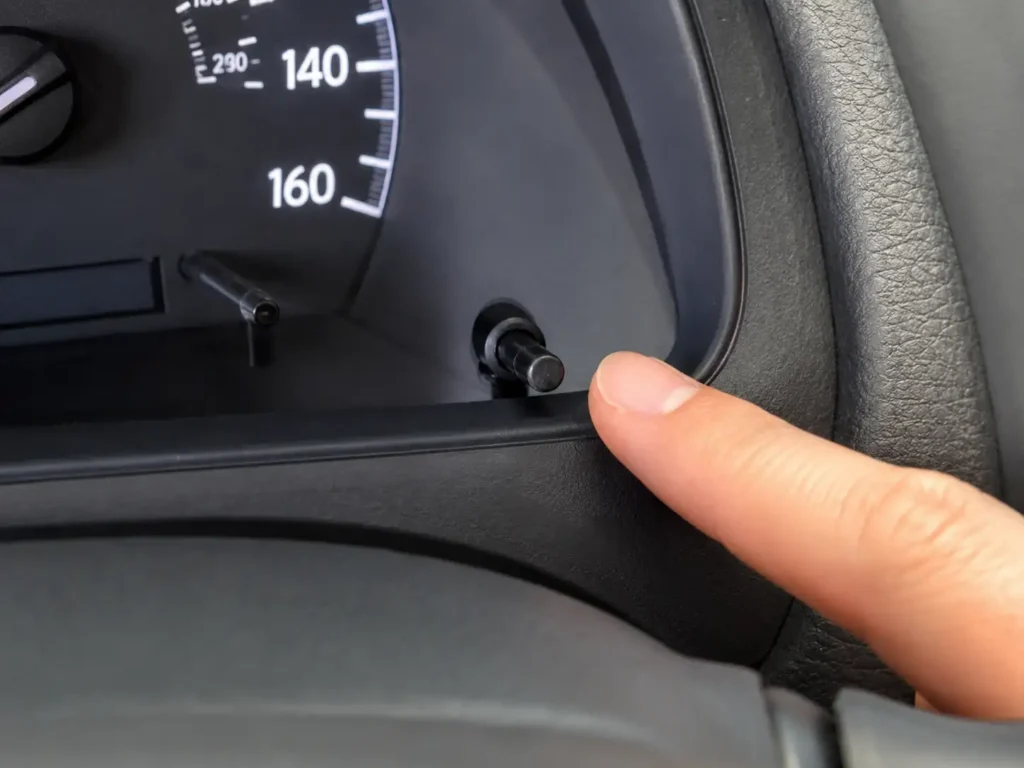
For Camry models from 2007 through 2017, the reset uses the trip meter button on your dashboard instrument cluster. This button is the small knob or stick near your odometer display.
What You Need Before Starting
No tools required. Before you begin, confirm your odometer is displaying “Trip A” — not total mileage and not “Trip B.” You switch between displays by pressing the trip meter button once. The timing during the hold step is what most people get wrong on the first attempt, so read through all steps before you start.
Step-by-Step Reset for 2007–2017 Camry (Non-Hybrid)
- Sit in the driver’s seat with the car off.
- Press the trip meter button until the display shows Trip A.
- Turn the ignition to the OFF position while Trip A is still showing.
- Press and hold the trip meter button down — do not release it.
- While holding the button, turn the ignition to the ON position (do not start the engine — turn the key to position II, one click before engine start).
- Keep holding the button for 5 to 10 seconds. The display will flash and then show 000000 or the word COMPLETE.
- Release the button.
- Start the engine and confirm the MAINT REQD light is gone.
The light should clear immediately. If it flashes but does not fully clear, repeat the process — the most common error is releasing the button a second too early.
Hybrid Camry 2007–2017 Variation
The hybrid reset follows the same basic sequence but uses the Power switch instead of an ignition key. Set the odometer to Trip A, then press and hold the trip meter knob while turning the Power switch to ON mode (not READY mode — foot off the brake). Hold until the display shows “MAINT REQD RESET MODE COMPLETE.” Release the knob when the confirmation message disappears.
If your Camry is a 2018 or newer model, or has a push-button start, use the Settings menu method in the next section.
How to Reset Oil Life on Toyota Camry 2018 to 2025
Starting with the 2018 model year, Toyota replaced the button method with a menu-driven reset through the multi-information display (MID) — the digital screen between your speedometer and tachometer. You navigate this menu using the arrow buttons on the left side of your steering wheel.
Push-Button Start Models
If your Camry has a push-button start (most 2018 and newer trims), you need to power up the electronics without starting the engine. Press the START button twice with your foot off the brake pedal. The dashboard should light up but the engine should not crank.
Step-by-Step Reset for 2018–2025 Camry
- Power up the dash — key to ON position, or press START twice with foot off the brake.
- Use the left steering wheel arrow buttons to scroll through the multi-information display until you reach the Settings menu (gear icon).
- Press OK to enter Settings.
- Scroll down to “Vehicle Settings.”
- Scroll to “Scheduled Maintenance” or “Oil Maintenance” — the label varies by trim and year.
- Select “Reset Data.”
- A confirmation prompt appears — select “Yes.”
- The screen displays “Reset Complete.” The MAINT REQD light is now cleared.
- Turn the ignition off, then restart the engine to confirm.
For 2020 and newer models, some trims show separate categories for oil maintenance and general inspection. If you see two entries, reset both after a full-service oil change.
For 2023 and newer models on higher trims, the confirmation step may appear on the touchscreen infotainment display rather than the MID. The menu labels are the same — select “Scheduled Maintenance,” then confirm the reset.
If the light comes back on within a few hundred miles, or the reset procedure does not work on the first attempt, the next section covers the most common reasons why.
4 Reasons Your Toyota Camry Oil Reset Is Not Working
If the light stayed on or came back within days, one of these four issues is almost always the cause.
You Released the Button Too Early


For 2007–2017 models, the hold step requires a full 5 to 10 seconds of continuous pressure on the trip meter button. Many owners see the light flash and assume the reset is done — releasing a second before the display shows “000000” means the reset did not complete. Hold until you see the zeros or the word COMPLETE, then release.
The Odometer Was Not on Trip A
Pre-2018 Camrys require the display to be on Trip A before the reset sequence begins. If your odometer showed total mileage or Trip B when you started holding the button, the procedure will not work. Set it to Trip A first, turn the ignition off, then begin.
You Are Looking at the Wrong Light
The check engine light and the MAINT REQD reminder are different icons and require different responses. The MAINT REQD text appears near the odometer and clears with the reset procedure. A check engine light shaped like an engine outline will not clear with the trip meter method — that requires an OBD2 scanner to read and clear the fault code. If the light persists after a correct reset, confirm which icon you are looking at.
The Oil Pressure Warning Light Is On Instead
If a red oil can icon or the word OIL appears on your dashboard, stop driving immediately. That is an oil pressure warning — not the maintenance reminder — and it indicates a real problem. Check your oil level on the dipstick before starting the engine again. The reset procedure will not clear a genuine oil pressure fault.
Knowing when to reset and when to actually check your oil keeps your Camry running reliably for the long term.
Toyota Camry Oil Change Intervals Before You Reset
The MAINT REQD light trips at 5,000 miles — but that does not mean your oil needs changing at exactly 5,000 miles if you use full synthetic oil.
| Year Range | Engine | Recommended Oil | Toyota’s Interval (Synthetic) |
|---|---|---|---|
| 2007–2017 | 2.5L / 3.5L | 0W-20 Full Synthetic | 10,000 mi / 12 months |
| 2018–2024 | 2.5L (A25A-FKS) | 0W-16 Full Synthetic | 10,000 mi / 12 months |
| 2018–2024 | 3.5L V6 (2GR-FKS) | 0W-20 Full Synthetic | 10,000 mi / 12 months |
| 2025 | 2.5L Hybrid | 0W-16 Full Synthetic | 10,000 mi / 12 months |
Sources: Toyota TSB via NHTSA; manufacturer oil specifications
According to Toyota’s official maintenance guidance for synthetic oil, the Camry’s oil change interval with 0W-20 full synthetic is 10,000 miles or 12 months, whichever comes first. Toyota extended this interval when it transitioned to synthetic oil precisely because modern synthetic oil lasts significantly longer than conventional oil.
If you use conventional oil, the 5,000-mile light trigger is accurate — change at that interval.
For synthetic oil users, you will reset the MAINT REQD light twice between oil changes. That is normal and expected. <!– HTML DATA VISUAL: Insert Toyota Camry oil spec table here (see HTML block below) –>
Use the correct oil specification for your engine. Using the wrong viscosity — particularly putting 0W-20 in a 2018–2024 four-cylinder that requires 0W-16 — can affect the variable oil pump system on those engines. Check your oil filler cap or door jamb sticker to confirm the spec before every change. If you want a reliable synthetic oil for your Camry, our guide to the best synthetic oil for high mileage engines covers the top-rated options that meet Toyota’s specifications.
Keep the schedule above and reset the light each time — your engine stays protected without unnecessary oil changes.
Keep Your Toyota Camry Maintenance Light Under Control
Resetting the oil life on your Toyota Camry takes under two minutes once you know which method applies to your model year. Pre-2018 Camrys use the trip meter button hold sequence. 2018 and newer models use the steering wheel controls to navigate to Scheduled Maintenance in the Settings menu.
Neither method requires tools, dealership access, or an OBD scanner. It is a routine step after every oil change — whether you do the change yourself or a shop does it and forgets to reset the counter.
Make a note of your Camry’s year and the correct method. Reset the oil life on your Toyota Camry after every service and you will never drive with a stale reminder lighting up your dash.
Frequently Asked Questions
How do I reset the oil life on a 2024 Toyota Camry?
Press the START button twice with your foot off the brake to power up the dash without starting the engine. Use the left steering wheel arrow buttons to navigate to Settings, then select Vehicle Settings, Scheduled Maintenance, and Reset Data. Confirm the prompt and the screen will show “Reset Complete.”


Why does the MAINT REQD light come back on after I reset it?
The light is programmed to return every 5,000 miles automatically. If it comes back within a few hundred miles of a reset, the reset likely did not complete fully — repeat the procedure and confirm you see the “000000” display or “Reset Complete” message before releasing the button or confirming.
Is it safe to drive my Toyota Camry with the maintenance light on?
Yes, the MAINT REQD light is a reminder, not a fault indicator. You can drive safely until you complete your oil change and reset. Do not confuse it with a red oil pressure warning light or a check engine light — those require immediate attention.
Can I reset the Toyota Camry maintenance light with an OBD2 scanner?
Some 2012–2017 Camry models support oil service resets through an OBD2 scanner’s Service Resets menu, though compatibility is inconsistent by year and trim. The manual trip meter method works reliably on all pre-2018 models without needing a scanner. If you already own a scanner for your Toyota, our best OBD2 scanner for Toyota guide covers models that support Toyota service resets.
How often does the Toyota Camry maintenance light come on?
The MAINT REQD light triggers every 5,000 miles from the last reset on all Camry models. Toyota recommends 10,000-mile oil change intervals for modern Camrys using full synthetic oil, so most synthetic oil users will reset this light twice per oil change cycle.