Toyota 4Runner Oil Life Reset by Year 2026 and Display Type
Last Updated on June 24, 2026 by Albert Duke
The Toyota 4Runner oil life reset clears the maintenance reminder after an oil change. On most 4Runner models, you reset it through the trip meter button, the odometer display, or the dashboard settings menu.
This reset does not test your oil condition. It only clears the maintenance counter that tells the dashboard when to show the oil or maintenance reminder again.
Use the correct method for your model year and display type. The fastest method depends on your model year and dashboard display.
Which Toyota 4Runner Years Use Each Reset Method
Toyota did not use one identical oil reminder reset path across every 4Runner year. Older 4Runner models usually rely on the odometer or trip reset button, while later models may use Trip A or a settings menu.
Toyota says owners can access vehicle-specific manuals through its Toyota manuals and warranties page. Use that as the final reference if your trim has a different cluster layout.
| Toyota 4Runner Year Range | Common Display Type | Reset Method To Try First | Best Fit |
|---|---|---|---|
| 2003 to 2009 | Odometer and trip button | Odometer or trip reset button | 4th gen models |
| 2010 to 2024 | Trip A and reset button | Trip A reset method | Most 5th gen models |
| 2010 to 2024 push button | Trip A and start button | Trip A plus ignition ON mode | Push-button 5th gen models |
| 2025 to 2026 | Digital settings menu | Vehicle settings menu | 6th gen digital cluster models |
Toyota 4Runner Oil Reset Method Finder
Match your model year and display type first. Then use the reset method that fits your 4Runner.
ODO Reset Method
Use the odometer or trip reset button with the key in ON mode.
Trip A Reset Method
Set the display to Trip A, hold reset, and turn ignition back on.
Trip A Plus Start Button
Keep your foot off the brake and enter ignition ON mode only.
Settings Menu Reset
Use Vehicle Settings and choose oil or scheduled maintenance reset.
Basic Reset Confirmation Flow
Finish oil service
Select Trip A, ODO, or Settings
Enter ignition ON mode
Hold or confirm reset
Confirm warning clears
The wording may appear as “MAINT REQD,” “Oil Maintenance Required,” or a maintenance reminder message depending on year and display. Once you know your year range, follow the matching reset steps below.
How To Reset Toyota 4Runner Oil Life With Trip A
Most 2010 to 2024 Toyota 4Runner oil reminder resets start with Trip A on the display. This is the common method for many 5th-gen models, especially when the cluster has a physical trip reset button.
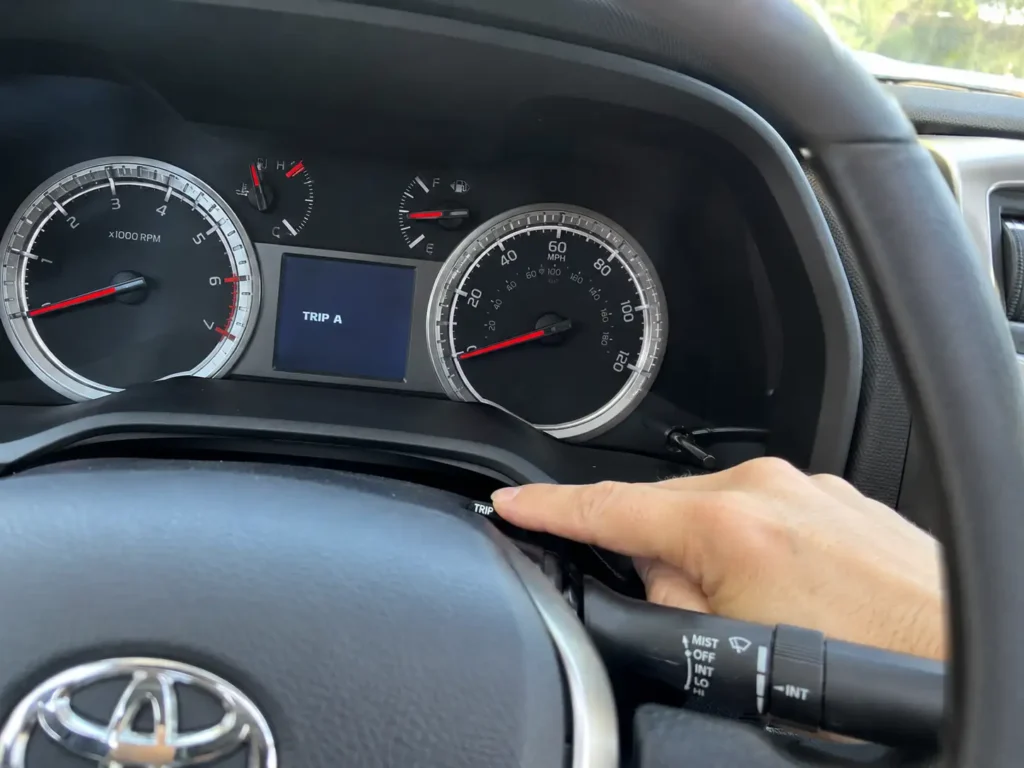
Before you begin, park safely and close the doors. Do not start the engine during the reset sequence.
- Turn the ignition to ON without starting the engine.
- Press the trip or display button until the screen shows Trip A.
- Turn the ignition back off.
- Press and hold the trip reset button.
- While holding the button, turn the ignition back to ON.
- Keep holding until the reset message, progress bar, or flashing marks finish.
- Release the button after the reminder clears.
For push-button start models, keep your foot off the brake. Press the start button enough times to enter ignition ON mode without starting the engine.
Trail4Runner documents a 5th-gen push-button sequence where the driver powers the vehicle off, holds the trip button, presses the ignition button twice without the brake, and waits for the “Resetting oil maintenance data” message to finish. The reset progress usually completes in under 10 seconds according to that procedure from Trail4Runner documents the 5th-gen reset sequence.
For a narrower model-year walkthrough, Car Mechan also has a dedicated 2021 Toyota 4Runner oil light reset guide. If your display does not show Trip A, the odometer method may fit your 4Runner better.
How To Reset Toyota 4Runner Maintenance Light With Odometer
Older Toyota 4Runner models often reset through the odometer display instead of the newer settings menu. This method is most useful for 4th-gen 4Runner owners and some key ignition setups.
Try this method when your 4Runner has a traditional key and a basic odometer screen.
- Turn the key to ON without starting the engine.
- Set the display to ODO or total mileage if your manual requires it.
- Turn the key back off.
- Press and hold the trip or reset button.
- Turn the key back to ON while still holding the button.
- Keep holding until the light flashes, the bars disappear, or the reminder clears.
- Release the button and turn the ignition off.
Some older Toyota reset procedures vary between ODO and Trip A. If the first attempt fails, repeat the process using the other display setting before assuming something is broken.
Owner discussion on Reddit’s 4Runner community includes both Trip A and trip or odometer button reset methods, with one owner noting the reset procedure is in the owner manual and another describing holding the trip or ODO button while turning the key to run mode. Treat owner reports on Reddit as a support reference, not a replacement for the Toyota manual.
For older 4th-gen details, use Car Mechan’s 4th gen 4Runner maintenance light reset guide. A newer digital display changes the process because the reset may live inside the vehicle settings menu.
How To Reset Toyota 4Runner Oil Reminder From Settings
Some newer Toyota 4Runner displays reset the oil reminder through the dashboard settings menu. This is more likely on late digital-cluster layouts and 2025 to 2026 4Runner models.
Use the steering wheel controls instead of the trip button if your 4Runner does not have a simple reset stem near the cluster.
- Turn the vehicle to ignition ON mode.
- Use the steering wheel arrows to open the settings or gear icon.
- Scroll to Vehicle Settings.
- Press and hold OK if the menu requires a long press.
- Look for Scheduled Maintenance, Oil Maintenance, or Oil Reset.
- Select Reset.
- Confirm Yes when the display asks for confirmation.
The exact wording can vary by trim and software version. A 2024 4Runner owner discussion on AskAMechanic described using the gear icon, Vehicle Settings, and oil reset or maintenance reset menu, but another owner in the same thread did not see the same labels. That shows why the official manual matters for exact menu wording.
If your menu does not show oil reset, check Scheduled Maintenance first. If that option is missing too, return to the main settings screen and look for a long-press OK action inside Vehicle Settings.
If the reset does not work, the problem is usually the display mode, ignition mode, or unfinished service reminder path.
Why Toyota 4Runner Oil Life Reset May Not Work
A failed reset usually means the 4Runner is not in the exact display or ignition state the reset process needs. Most failed attempts are simple setup errors, not electrical problems.
Wrong Display Selected
Trip A, Trip B, and ODO can behave differently during reset. If the Trip A method fails, switch to ODO and repeat the same ignition sequence.
For 2010 to 2024 models, Trip A is usually the first method to try. For older 4th-gen models, ODO may be the better starting point.
Engine Started Too Soon
Push-button models need ignition ON mode, not engine running mode. Keep your foot off the brake when pressing the start button.
If the engine starts, turn the 4Runner off and begin again. The reset sequence often fails when the cluster leaves accessory or ignition mode.
Button Released Early
Hold the trip reset button until the display finishes the reset. Releasing it as soon as the display changes may interrupt the process.
Wait for the progress bar, flashing marks, or reset message to complete. Then release the button and turn the ignition off.
Menu Path Is Different
Digital clusters may separate oil maintenance from scheduled maintenance. If one reset item does not clear the message, check the other maintenance reset option.
Some owner reports mention missing menu labels on certain trims. That is when the Toyota manual for your exact year becomes the safest reference.
Service Reminder Still Due
A reminder can return if another scheduled maintenance item is active. Oil reset clears the oil or maintenance counter, but it does not inspect the vehicle.
If warning lights remain after the reset, scan the 4Runner before assuming the oil reminder is the only issue. Car Mechan’s best OBD2 scanner for Toyota guide can help if you need to read stored diagnostic codes.
After the reminder clears, the final step is making sure the maintenance service itself was done correctly.
When To Reset Toyota 4Runner Oil Life After Service
Reset the Toyota 4Runner oil life reminder only after the oil service is finished. Clearing it early makes the dashboard reminder inaccurate.
Toyota’s 2024 4Runner maintenance guide lists repeated maintenance visits by mileage and includes engine oil and oil filter replacement at specific service points. It also lists additional oil and filter replacement under special operating conditions such as dirt roads, dusty roads, towing, heavy loading, repeated short trips in freezing temperatures, and extended idling or low-speed driving.
The reset reminder is not an oil quality sensor. It does not know whether the oil was actually changed, whether the filter was replaced, or whether the correct oil was used.
Before resetting, confirm these items:
- Oil and filter were changed if due.
- Oil level is correct on the dipstick.
- Oil cap and drain plug are secure.
- No fresh leaks appear under the engine.
- The correct maintenance item was selected on the display.
For older or higher-mileage Toyota engines, choosing the right oil matters too. Car Mechan’s best synthetic oil for high mileage guide can help when mileage and engine wear become part of your maintenance decision.
With the timing clear, the final checklist helps confirm the reset was successful.
Quick Toyota 4Runner Oil Reset Checklist
Use this checklist if you only need the reset path and confirmation steps.
- For many 2010 to 2024 models, set the display to Trip A.
- For older 2003 to 2009 models, try ODO or the trip reset button method.
- For push-button models, keep your foot off the brake.
- For newer digital clusters, use Settings, Vehicle Settings, and the maintenance reset menu.
- Hold the reset button until the display finishes the reset.
- Confirm the oil or maintenance message disappears.
- Recheck engine oil level after the vehicle sits on level ground.
- Use the owner manual if the wording on your display does not match any common method.
These answers cover the common questions owners ask after the reset.
What Toyota 4Runner Owners Should Do Next
The correct Toyota 4Runner oil life reset method depends on your year, ignition type, and dashboard display. Most owners will use Trip A, ODO, or the vehicle settings menu.
Reset the reminder only after the oil service is complete. Then confirm the warning message is gone, check the oil level, and watch for leaks after the first short drive.
If the dashboard still shows a maintenance message, repeat the reset with the correct display selected. If other warning lights remain, use an OBD2 scanner or have the system checked.
Toyota 4Runner Oil Life Reset FAQ
How Do I Reset the Oil Life on a Toyota 4Runner
Most Toyota 4Runner models reset through Trip A, ODO, or the dashboard settings menu. Select the correct display, turn the ignition off, hold the trip reset button, then turn the ignition back on until the reset completes.
Why Does My Toyota 4Runner Still Say Oil Maintenance Required
Your 4Runner may still show the message if the wrong display was selected, the engine was started, or the reset button was released too early. On newer displays, you may also need to reset the oil maintenance item instead of scheduled maintenance.
Does Resetting the Oil Light Change the Oil Condition
No, resetting the oil light does not change or test the oil condition. It only clears the dashboard reminder counter, so reset it only after the oil and filter service has been completed.
Should I Use Trip A or Odometer to Reset a 4Runner Oil Light
Use Trip A first on many 2010 to 2024 5th-gen 4Runner models. Use ODO first on older 4th-gen models or if the Trip A method does not work.
Can I Reset the Toyota 4Runner Maintenance Light Before an Oil Change
You can physically reset the light before an oil change, but you should not do that. Resetting early makes the reminder inaccurate and can cause you to miss the next correct service interval.