Honda Civic TPMS Reset Guide by Year and Display
Last Updated on June 24, 2026 by Albert Duke
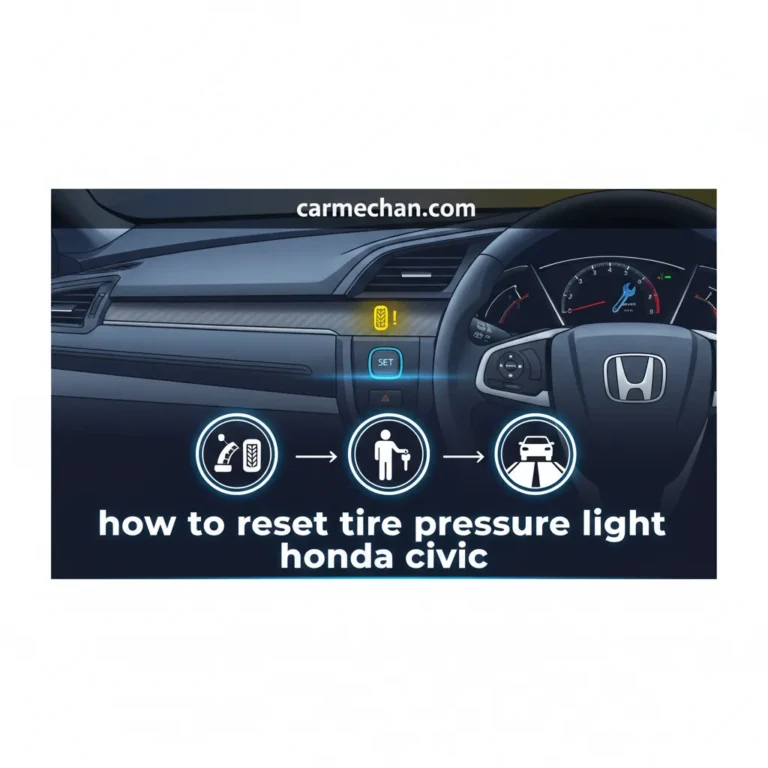
A Honda Civic TPMS reset depends on your Civic’s model year and display setup. TPMS means Tire Pressure Monitoring System, and on many modern Civic models, the reset is actually a calibration that teaches the car what normal tire rotation looks like after pressure changes.
Do not reset the light before checking the tires. If one tire is low, leaking, replaced, or running on a compact spare, the warning may return even after calibration.
Start with tire pressure first. Then choose the reset method that matches your Civic’s button, driver display, or touchscreen.
What To Check Before Honda Civic TPMS Reset


Before you reset the Honda Civic TPMS, make sure the tires are actually set correctly. Honda says TPMS calibration must be started after you adjust tire pressure, rotate tires, or replace one or more tires.
Use a tire gauge when the tires are cold. Honda also states that TPMS is not a replacement for normal tire maintenance, and drivers are still responsible for keeping tires at the correct pressure.
Check these items first:
- Check all four tires when cold.
- Inflate each tire to the pressure listed on the driver door placard.
- Inspect for a nail, valve stem leak, sidewall damage, or uneven tire wear.
- Confirm that a compact spare tire is not installed.
For accurate pressure checks, use <a href=”https://carmechan.com/buying-guide/best-tire-pressure-gauge/” target=”_blank”>a reliable tire pressure gauge</a> instead of guessing from the dashboard light.
Honda’s 2023 Civic TPMS document says each tire should be checked monthly when cold and inflated to the pressure listed on the vehicle placard or tire pressure label. <a href=”https://owners.honda.com/utility/download?path=%2Fstatic%2Fpdfs%2F2023%2FCivic+Sedan%2F2023_Civic_4D_Tire_Pressure_Monitoring_System_%28TPMS%29.PDF” target=”_blank”>Honda’s required TPMS explanation</a> also warns that underinflated tires can overheat, reduce tread life, reduce fuel efficiency, and affect handling.
Once the tire pressure is correct, the reset method depends on how your Civic controls TPMS calibration.
Which Honda Civic TPMS Reset Method Fits Your Year
The fastest way to choose the right Civic TPMS reset method is to match your year and dashboard setup. Honda has used more than one TPMS calibration path across Civic generations and trims.
Honda Civic TPMS Reset Decision Flow
Use this flow after checking all four tires cold. A reset should start only after the tire pressure is corrected.
Check Tire Pressure First
Set all four tires to the cold pressure listed on the driver door placard before starting calibration.
If Your Civic Has A TPMS Button
Press and hold the TPMS button until the low tire pressure indicator blinks twice, then drive normally.
If Your Civic Has A Touchscreen
Use Vehicle Settings, then TPMS Calibration, then Calibrate. This applies to many newer Civic trims.
If Your Civic Uses Driver Display
Use the steering wheel controls to open Vehicle Settings, choose TPMS Calibration, and select Calibrate.
If The Light Blinks And Stays On
Stop repeating the reset. Check for a compact spare, tire issue, or TPMS system fault that needs diagnosis.
Drive To Complete Calibration
Give the Civic normal driving time so TPMS can learn the corrected tire condition and finish calibration.
Use this table as a starting point before following the detailed steps.
| Civic Setup | Best Reset Method | What You Should See |
|---|---|---|
| Civic with physical TPMS button | Press and hold TPMS button | Low tire pressure indicator blinks twice |
| Civic with driver information display | Use steering wheel selector and Vehicle Settings | Calibration Started screen appears |
| Civic with 7 inch screen | Use driver information interface settings | TPMS Calibration appears on display |
| Civic with 9 inch touchscreen | Use audio screen Vehicle Settings | Calibrate or Cancel option appears |
| Light blinks and stays on | Do not keep resetting | Possible TPMS fault or compact spare condition |
Honda’s 2024 Civic manual confirms that 7 inch color touchscreen models use the driver information interface, while 9 inch color touchscreen models use the audio or information screen path. <a href=”https://techinfo.honda.com/rjanisis/pubs/OM/AH/AT202424IOM/enu/details/131229047-43831.html” target=”_blank”>Honda’s 2024 Civic TPMS calibration instructions</a> list both methods.
The physical button method is the simplest, but it only applies to Civic setups that actually have that button.
How To Reset Honda Civic TPMS With Button
If your Civic has a TPMS button, the reset starts from the lower dashboard area. This method appears on some older Civic trims, especially models without a newer touchscreen calibration menu.
Follow these steps:
- Park the Civic on level ground.
- Set all four tires to the correct cold pressure.
- Turn the ignition to ON or set the power mode to ON.
- Find the TPMS button near the lower left dashboard area.
- Press and hold the TPMS button.
- Release the button when the low tire pressure indicator blinks twice.
- Drive normally so the system can finish calibration.
Honda’s 2016 Civic TPMS document says the low tire pressure indicator blinks twice when calibration begins. It also says recalibration is needed any time you inflate, change, or rotate one or more tires. <a href=”https://owners.honda.com/utility/download?path=%2Fstatic%2Fpdfs%2F2016%2FCivic+Coupe%2F2016_Civic_2D_Tire_Pressure_Monitoring_System.pdf” target=”_blank”>Honda’s 2016 Civic TPMS PDF</a> supports this button based reset method.
If your Civic does not have this button, use the screen based method instead.
How To Reset Honda Civic TPMS Through Touchscreen
Newer Honda Civic models usually place TPMS calibration inside the touchscreen settings menu. The exact menu path depends on whether your Civic has the 7 inch screen, 9 inch screen, or a driver display controlled by the steering wheel.
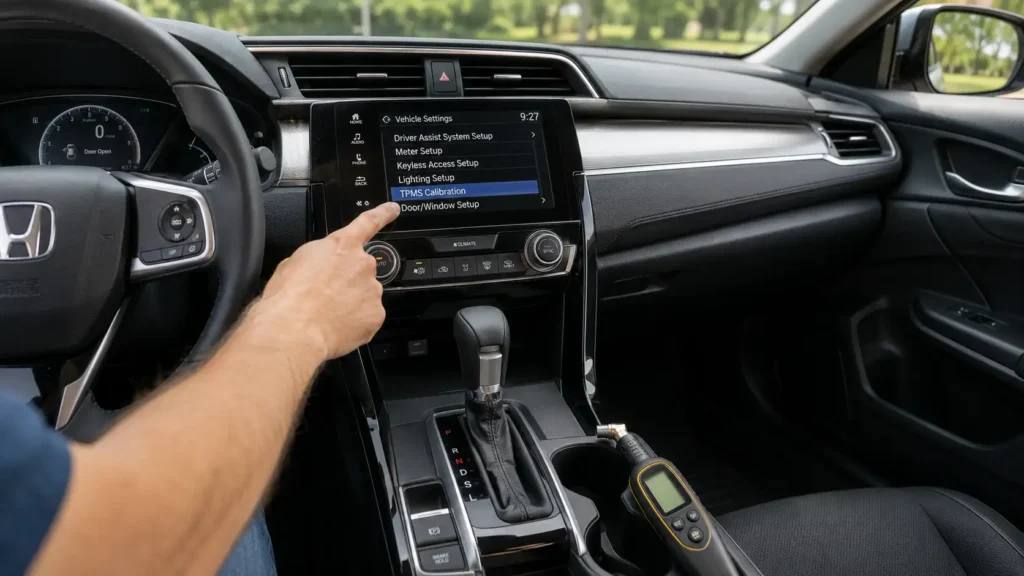
For 9 inch touchscreen Civic models, use this path:
- Set the power mode to ON.
- Press the Home button.
- Select Vehicle Settings.
- Select TPMS Calibration.
- Select Calibrate.
- Wait for the screen to confirm that calibration started.
Honda’s 2024 Civic manual lists this 9 inch touchscreen path as Vehicle Settings, TPMS Calibration, then Calibrate or Cancel. It also says that if the “Calibration Failed To Start” message appears, repeat the final selection step.
For some 2022 to 2026 Civic models with a 7 inch screen, the path may run through the driver information interface instead of the center screen. Honda Info Center also reminds owners that TPMS should be recalibrated after a tire is refilled, replaced, or rotated, and that tire pressure should still be checked with a gauge. <a href=”https://www.hondainfocenter.com/2024/Civic-Sedan/How-To-Videos/LX/Notable-Features/How-to-Reset-the-Tire-Pressure-Indicator7-Color-Touch-Screen-Models/” target=”_blank”>Honda’s 7 inch touchscreen TPMS reset guidance</a> confirms this owner workflow.
Some Civic trims use the driver display instead of the center touchscreen, so the menu path is slightly different.
How To Reset Honda Civic TPMS From Driver Display
Some Honda Civic trims use the driver information display for TPMS calibration instead of the center screen. This is common on models where the steering wheel selector controls vehicle settings.
Use this method when your Civic shows TPMS Calibration inside the driver display:
- Stop the car completely.
- Set the power mode to ON.
- Use the steering wheel Home button or selector controls.
- Select Settings.
- Open Vehicle Settings.
- Find TPMS Calibration.
- Select Calibrate.
- Confirm that the calibration started screen appears.
Honda’s 2023 Civic TPMS PDF says 7 inch touchscreen models can calibrate the system from the driver information interface. The listed process uses the Home button, left selector wheel, Vehicle Settings, TPMS Calibration, and Calibrate.
If the menu does not appear where expected, check your exact model year manual. Civic menus can vary by trim, market, and screen package.
Starting calibration is only half the process, because the Civic still needs driving time to learn tire behavior.
How Long Honda Civic TPMS Calibration Takes
A Honda Civic TPMS reset may not clear the light the moment you press Calibrate. In many Civic models, calibration finishes automatically after you drive.
Honda’s 2021 Civic Hatchback TPMS PDF says calibration requires about 30 minutes of cumulative driving at 30 to 65 mph. Honda’s 2024 Civic sedan manual gives a similar range of about 30 minutes of cumulative driving at 31 to 62 mph.
During this learning period, the tire pressure light may briefly come on if the power mode is ON and the car does not move within about 45 seconds. Honda describes this as normal while calibration is not complete.
Do not restart calibration over and over during this drive cycle. Set the tire pressure, start calibration once, then give the system enough normal driving time.
If the light comes back after that drive cycle, the problem is probably not the reset procedure.
Why Honda Civic TPMS Light Comes Back After Reset
If the Honda Civic tire pressure light comes back, the reset probably did not solve the real trigger. Treat the warning pattern as a clue.
Low Tire Pressure
The most common reason is still low tire pressure. Honda’s newer Civic TPMS does not directly measure tire pressure in each tire. Instead, it compares wheel and tire rotation behavior while you drive.
Honda’s 2025 Civic Hatchback manual says its TPMS monitors rolling radius and rotational characteristics to detect significantly underinflated tires. Cold weather and altitude changes can also affect pressure and trigger the indicator.
Slow Tire Leak
A slow leak can make the light return after a reset. Common causes include a nail, leaking valve stem, bead leak, cracked wheel, or tire damage.
Do not keep recalibrating if the same tire keeps losing pressure. Mark the pressure reading, recheck it later, and inspect the tire before driving far.
Unfinished Calibration
Calibration may not finish if the Civic does not get enough normal driving time. Short trips, stop and go driving, or repeated resets can delay the process.
Use Honda’s drive cycle guidance as the baseline. The system needs cumulative driving time at normal road speeds before it learns the new tire condition.
Compact Spare Tire
TPMS calibration may not work correctly with a compact spare tire installed. Honda’s 2021, 2023, and 2024 TPMS documents all state that TPMS cannot be calibrated if a compact spare tire is installed.
Replace the compact spare with a properly inflated regular tire before expecting normal TPMS behavior.
TPMS System Fault
A blinking TPMS indicator is different from a normal low tire pressure warning. Honda’s 2016 Civic owner guide says that if the TPMS indicator blinks and remains on, there may be a TPMS system problem or the vehicle may be fitted with a compact spare tire.
If the pressure is correct and the light still returns, a DIY reset is no longer the main fix.
Once you know the warning pattern, the next step is deciding whether this is a DIY reset or a shop diagnosis.
When Honda Civic TPMS Needs A Mechanic
A Civic TPMS reset is a DIY job only when the tire pressure and tire condition are correct. If the system warning keeps returning after proper inflation and calibration, the car needs inspection.
Get the tire or TPMS system checked when:
- The light blinks and then remains on.
- Calibration repeatedly fails to start.
- The warning returns after the tires are correctly inflated.
- One tire keeps losing pressure.
- A compact spare tire is installed.
- Tires are mixed by size, type, brand, or condition.
- The warning started after wheel or tire replacement.
Honda’s 2025 Civic Hatchback manual says TPMS may not work properly if tire type and size are mixed. Honda’s 2024 Civic manual also says that if the low tire pressure or TPMS indicator comes on even when properly inflated specified regular tires are installed, the car should be checked by a dealer.
If other warning lights appear with the TPMS light, a <a href=”https://carmechan.com/buying-guide/best-obd2-scanner-for-honda/” target=”_blank”>Honda compatible OBD2 scanner</a> can help check broader vehicle fault codes. TPMS specific diagnosis may still require a tire shop or Honda capable scan tool.
For most Civic owners, the right action depends on the warning pattern they see.
Quick Honda Civic TPMS Reset Decision Guide
Use this quick guide if you only need the next step for your Civic.
| What Happened | What To Do |
|---|---|
| You added air to one or more tires | Set cold pressure, then start TPMS calibration |
| You rotated the tires | Start TPMS calibration after rotation |
| You replaced one or more tires | Start TPMS calibration after installation |
| You have a TPMS button | Hold the button until the indicator blinks twice |
| You have a touchscreen menu | Use Vehicle Settings and TPMS Calibration |
| You have driver display settings | Use steering wheel controls and select Calibrate |
| The light blinks and remains on | Stop resetting and inspect for TPMS fault or spare tire |
| A compact spare is installed | Replace it with a regular tire before calibration |
For a model specific older guide, see our <a href=”https://carmechan.com/troubleshooting/2013-honda-civic-tpms-reset/” target=”_blank”>2013 Honda Civic TPMS reset steps</a>. For SUV owners, the <a href=”https://carmechan.com/troubleshooting/2022-honda-crv-tpms-reset/” target=”_blank”>Honda CRV TPMS reset process</a> follows the same basic pressure first logic, but the menu path can differ.
The main rule is simple. Fix tire pressure first and reset TPMS second.
What To Do Next With Honda Civic TPMS
The safest Honda Civic TPMS reset starts with a tire gauge, not the dashboard menu. Set all four tires to the correct cold pressure, then use the button, driver display, or touchscreen method that matches your Civic.
If the tire pressure light comes back after calibration and normal driving, do not keep resetting it. Inspect for a leak, compact spare, mismatched tire, or TPMS fault. A reset clears the learned baseline, but it cannot fix a tire that is still losing air.
Honda Civic TPMS Reset FAQ
Why Will My Honda Civic TPMS Light Not Reset
Your Honda Civic TPMS light may not reset because tire pressure is still incorrect, calibration did not finish, a compact spare is installed, or the system has a fault. Check all four tires cold before repeating calibration.
Where Is The Honda Civic TPMS Reset Button
On Civic models that have a physical TPMS button, it is usually near the lower dashboard area to the left of the steering wheel. If you cannot find the button, your Civic may use the driver display or touchscreen calibration menu instead.
How Long Does Honda Civic TPMS Calibration Take
Honda TPMS calibration can take about 30 minutes of cumulative driving, depending on model year. Honda’s 2021 Civic document lists 30 to 65 mph, while the 2024 Civic manual lists 31 to 62 mph.
Do I Need To Reset TPMS After Rotating Civic Tires
Yes, Honda says you must start TPMS calibration after rotating the tires. You should also recalibrate after adjusting tire pressure or replacing one or more tires.
Can I Reset Honda Civic TPMS With A Compact Spare Installed
No, Honda states that TPMS cannot be calibrated if a compact spare tire is installed. Replace the compact spare with a regular properly inflated tire before expecting normal TPMS calibration.