Chevy Silverado TPMS Reset Guide by Year and Method
Last Updated on June 24, 2026 by Albert Duke

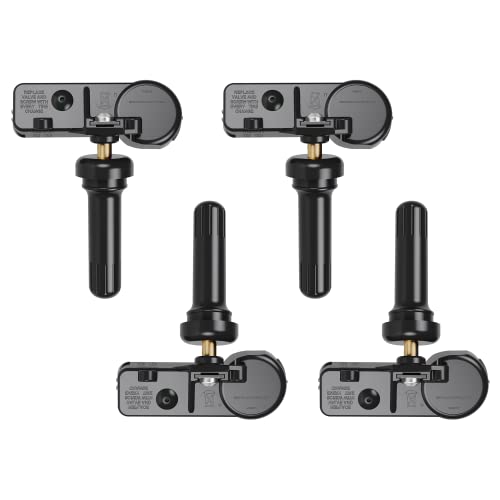

A chevy silverado tpms reset is not always one button press. TPMS means Tire Pressure Monitoring System, and on a Silverado it can mean a low-pressure warning, a tire position relearn after rotation, or a sensor relearn after replacing a wheel sensor.
The right method depends on your Silverado year, dashboard display, ignition type, and whether the truck can still read all four sensors. Start with the warning pattern, then choose the reset method that matches what changed before the light came on.
The first step is knowing which TPMS problem your Silverado actually has.
What Chevy Silverado TPMS Reset Actually Means
Most Silverado TPMS confusion starts because owners use the word reset for three different jobs. A low tire pressure warning may clear after you inflate the tires, but a sensor position problem needs a relearn.
Chevrolet says the tire pressure light stays on when one tire is significantly underinflated. If the tire pressure light keeps flashing when you start the truck, the Tire Pressure Monitor System may need service, according to Chevrolet warning light guidance.
| What You See | What It Usually Means | Correct Action |
|---|---|---|
| Steady tire pressure light | One or more tires are low | Check cold tire pressure and inflate |
| Light after tire rotation | Tire positions may not match the display | Perform TPMS sensor position relearn |
| Light after sensor replacement | New sensor ID may not be stored | Relearn or program the new sensor |
| Flashing light then stays on | TPMS fault is likely | Diagnose sensor, receiver, or system issue |
| Service Tire Monitor System message | Fault, dead sensor, or communication issue | Scan or test the TPMS system |
Federal TPMS rules require systems to warn drivers of significant underinflation. The regulation defines the system as one that detects underinflated tires and illuminates a low tire pressure warning telltale, and it requires warning within 20 minutes when pressure is at or below the standard’s threshold. See 49 CFR 571.138 TPMS requirements.
Once you know which reset you need, the year range becomes the next filter.
Which Silverado Years Need Each TPMS Method
Silverado TPMS relearn steps changed across generations, so start with your model year. The biggest difference is how you enter learn mode, not the tire order.
A base cluster usually uses the trip odometer stem. An uplevel Driver Information Center, or DIC, uses steering wheel or dashboard menu controls to reach the tire pressure screen.
| Silverado Year Range | Common Entry Method | TPMS Tool Needed | Best Use Case |
|---|---|---|---|
| 2007 to 2013 Silverado | DIC buttons or trip odometer stem | Usually yes for sensor activation | Tire rotation or sensor relearn |
| 2014 to 2018 Silverado | Vehicle information menu or trip stem | Usually yes for sensor activation | Tire rotation, new wheels, new sensors |
| 2019 to 2026 Silverado 1500 | Tire pressure screen in DIC | Yes for manual relearn on many trucks | Tire rotation and sensor matching |
| Silverado HD models | Similar GM relearn logic, year dependent | Usually yes | HD tire rotation or replacement sensors |
The commonly documented Silverado relearn order is driver front, passenger front, passenger rear, then driver rear. ATEQ’s Silverado TPMS procedure lists that sensor sequence and shows separate menu paths for earlier trucks, 2015 to 2020 uplevel DIC trucks, and 2015 to 2020 base DIC trucks in its Chevrolet Silverado TPMS diagnostic procedure.
For 2021 to 2026 trucks, verify your exact owner manual because menu wording can change by cluster and software version. The practical rule still holds: correct the tire pressure first, then relearn sensors only when the truck no longer matches wheel positions.
If your light is steady after cold tire pressure correction, you may not need a full sensor relearn.
How To Reset Silverado TPMS After Low Pressure
If the TPMS light is steady, treat it as a tire pressure problem first. Do not start relearn mode until you confirm the tires are actually inflated to the correct cold pressure.

- Park the Silverado on level ground and let the tires cool.
- Open the driver door and find the Tire and Loading Information label.
- Check all four tires with a real gauge. The number on the tire sidewall is the maximum tire rating, not the Silverado’s recommended cold pressure.
- Inflate each tire to the door label pressure.
- Start the truck and drive normally for a short trip if the light does not clear immediately.
- Recheck the tire that was low the next day. If it drops again, inspect for a nail, leaking valve stem, or bead leak.
A good gauge matters here because a few PSI can change what the dashboard shows. If your gauge is old or inconsistent, compare it with a reliable option from our best tire pressure gauge guide before blaming the sensor.
Some Silverado models have Tire Fill Alert, which may chirp the horn when a tire reaches the recommended pressure. If your truck does not have that feature, use the door label and gauge instead of guessing from the dashboard reading.
If you rotated the tires or replaced a sensor, pressure correction alone will not fix the stored wheel positions.
How To Relearn Silverado TPMS Sensor Positions
The Silverado sensor relearn tells the truck which sensor belongs to each wheel position. This matters after tire rotation because the dashboard may show the right pressure on the wrong corner.
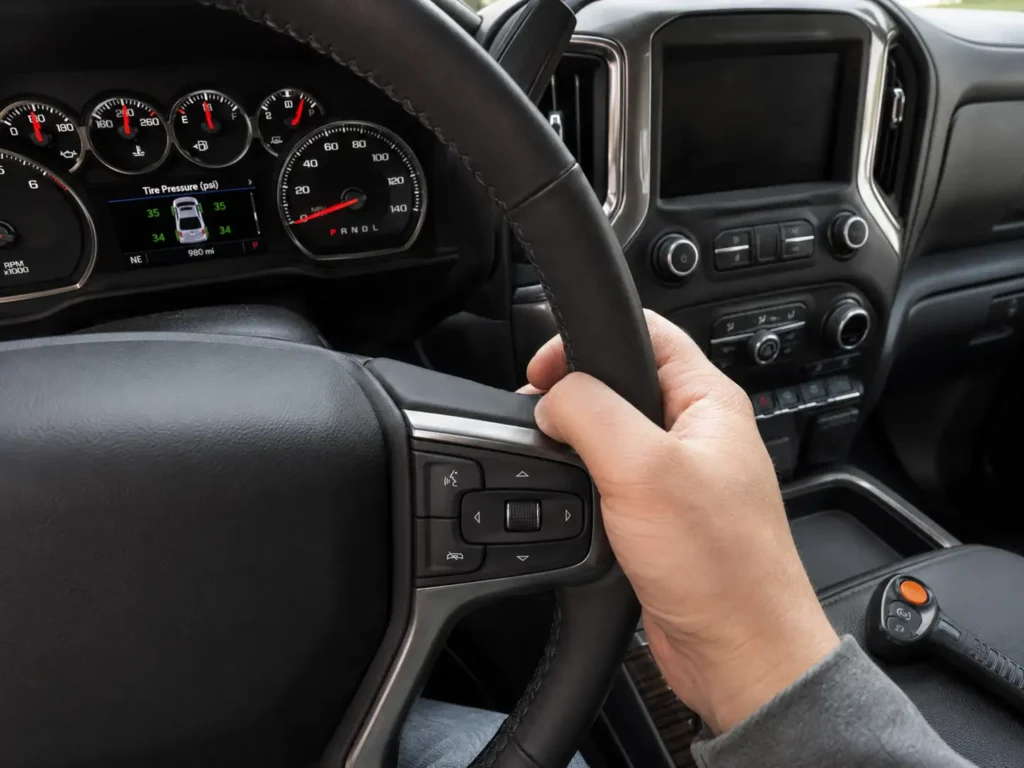
Follow this general GM Silverado relearn sequence, then confirm your exact menu wording in your owner manual.
- Set the parking brake.
- Turn the ignition to On or Run without starting the engine. On push-button trucks, press the start button without pressing the brake pedal if your manual confirms that method.
- Open the tire pressure screen in the Driver Information Center.
- Start the sensor matching process. On some trucks, you press and hold the Set, Reset, check mark, or trip stem control.
- Wait for the horn to chirp twice. This confirms the truck has entered Tire Learning Active mode.
- Hold the TPMS activation tool near the driver front valve stem and trigger the sensor.
- Wait for one horn chirp.
- Move to the passenger front tire and trigger the sensor.
- Move to the passenger rear tire and trigger the sensor.
- Move to the driver rear tire and trigger the sensor.
- Listen for the final double horn chirp.
- Turn the ignition off and release the parking brake.
The correct order is driver front, passenger front, passenger rear, then driver rear. Do not go clockwise from the wrong starting point, because the truck stores sensor IDs in the order it receives them.
ATEQ notes that the Silverado owner manual gives two minutes to match the first tire and five minutes total to match all four positions. If you miss the time limit, the matching process stops and you must restart the relearn.
After the final horn chirp, check the dashboard pressure readings against your gauge. If the readings match each tire position, the relearn worked.
The relearn process is simple when the tool works, but several common mistakes can make it fail.
Why Silverado TPMS Relearn Fails Most Often
A failed relearn usually means the truck never received one or more sensor IDs. The problem can be the procedure, the tool, the sensor, or the truck’s ability to hear the sensor signal.
Wrong Sensor Order



The Silverado expects the sensors in a specific sequence. Start at the driver front tire, then move to passenger front, passenger rear, and driver rear.
If you start at the wrong wheel, the dashboard may assign pressures to the wrong corners. Restart the relearn and follow the order exactly.
Relearn Mode Timed Out
The Silverado relearn process has a time limit. If you take too long before the first tire or between wheels, the truck can leave learn mode.
When that happens, do not continue triggering sensors. Restart the process from the beginning and keep the activation tool ready before entering learn mode.
Weak Sensor Battery
A TPMS sensor has a sealed internal battery. When that battery gets weak, the sensor may trigger sometimes and fail other times.
If one wheel never chirps during relearn, test that sensor with a TPMS scan tool or have a tire shop check it. Repeatedly restarting relearn mode will not fix a dead sensor.
Aftermarket Sensor Problem
Some aftermarket sensors are programmable. Others are pre-programmed for specific GM applications.
A sensor that does not match the Silverado’s frequency, protocol, or programming requirement may not register. Confirm compatibility by year, trim, wheel setup, and sensor frequency before installation.
Radio Signal Interference
TPMS sensors send radio signals to the truck. Strong interference near the vehicle can make relearn harder.
Move away from other vehicles, shop equipment, or strong wireless devices if the tool works on some wheels but not others. Lowering the driver window is also listed as a troubleshooting tip in ATEQ’s Silverado TPMS guidance.
If low pressure keeps coming back after the reset, the problem may be a slow leak rather than the TPMS system. A portable inflator can help you correct pressure at home, and our guide to the best tire inflators for car owners covers practical options.
If the TPMS light flashes instead of staying steady, stop treating it like a pressure reset.
When Silverado TPMS Needs Professional Service
A flashing TPMS light points to a system fault, not just low tire pressure. Chevrolet says a tire pressure light that keeps flashing when you start the vehicle may mean the Tire Pressure Monitor System needs service.
Get the system checked if you see any of these signs:
- The TPMS light flashes at startup and then stays on.
- The truck shows Service Tire Monitor System.
- One tire position shows no pressure reading.
- A new sensor will not register.
- The TPMS activation tool cannot trigger one wheel.
- The relearn process fails several times with the correct order.
- The warning comes back even after all tires are properly inflated.
A tire shop can scan each sensor ID, check battery status where supported, confirm frequency, and program compatible replacement sensors. A dealer or well-equipped independent shop can also check for receiver or module faults if all four sensors test good.
For cost context, RepairPal estimates average TPMS sensor replacement at $246 to $313, with labor estimated at $77 to $113 and parts at $169 to $200. See the RepairPal TPMS sensor replacement estimate before approving a quote.
With the failure points clear, the safest path is a simple decision sequence.
Quick Silverado TPMS Decision Guide
Use this quick guide if you want the shortest path to the correct fix. Match your symptom to what changed before the warning appeared.
| Silverado TPMS Situation | Best Next Step | Tool Needed |
|---|---|---|
| Steady TPMS light with no recent tire work | Check cold tire pressure and inflate | Tire pressure gauge |
| Light came on after tire rotation | Relearn sensor positions | TPMS activation tool |
| Light came on after replacing a sensor | Relearn or program sensor ID | TPMS tool or shop scan tool |
| One tire shows no reading | Test that wheel sensor | TPMS scan tool |
| Light flashes then stays on | Diagnose TPMS system fault | Shop scan likely needed |
| Pressure keeps dropping after reset | Inspect tire for leak | Gauge, soapy water, or tire shop |
Chevy Silverado TPMS Reset Decision Flow
Check the Light Pattern
Steady light usually means low tire pressure. Flashing light usually points to a TPMS fault.
Verify Cold Tire Pressure
Use the driver door placard and a tire pressure gauge before starting any relearn procedure.
Match the Recent Work
If tires were rotated or sensors were replaced, the truck may need a TPMS relearn.
Trigger Sensors in Order
Use driver front, passenger front, passenger rear, then driver rear during sensor relearn.
Scan if Relearn Fails
Repeated failure, no pressure reading, or a flashing light means the sensors need diagnosis.


Use this flow before replacing parts. Many Silverado TPMS warnings are solved by correcting pressure or relearning sensor positions.
If you also see other Silverado dashboard warnings, do not assume every warning is TPMS related. For example, a stability warning follows a different diagnostic path, which we cover in our guide on how to reset the Service StabiliTrak light on a Silverado.
For most Silverado owners, the right answer comes down to the light pattern and what changed before the warning appeared.
What To Do Before Driving Your Silverado
The safest Chevy Silverado TPMS reset starts with real tire pressure, not the dashboard menu. Check all four tires cold, use the driver door placard, and correct the pressure before entering any relearn mode.
If you rotated tires or replaced a sensor, use a TPMS activation tool and follow the correct wheel order. If the light flashes, one wheel will not read, or Service Tire Monitor System stays on, stop resetting and get the sensors scanned before driving long distances.
Chevy Silverado TPMS Reset Questions
Can I Reset a Chevy Silverado TPMS Light Without a Tool
Yes, you can clear a normal low-pressure warning without a TPMS tool by inflating the tires to the door placard pressure. You usually need a TPMS activation tool when relearning tire positions after rotation or sensor replacement.
Why Is My Silverado TPMS Light Flashing Then Staying On
A flashing TPMS light that later stays on usually points to a TPMS system fault. Chevrolet says the Tire Pressure Monitor System may need service when the tire pressure light keeps flashing at startup.
What Order Do I Relearn Silverado TPMS Sensors
The common Silverado relearn order is driver front, passenger front, passenger rear, and driver rear. Listen for a horn chirp after each sensor and a final double chirp when the process completes.
Does a Chevy Silverado Spare Tire Have a TPMS Sensor
Many Silverado owner manual procedures describe TPMS monitoring for the road wheel sensors and exclude the spare tire and wheel assembly from active pressure monitoring. Verify your exact model year because equipment and wheel packages can vary.
Why Does My Silverado Say Service Tire Monitor System
Service Tire Monitor System usually means the truck sees a TPMS fault, not just low air. Common causes include a dead sensor battery, incompatible replacement sensor, failed relearn, or communication issue that needs sensor scanning.