2017 Ford F-150 Oil Reset Complete Guide 2026
Last Updated on June 24, 2026 by Albert Duke
The 2017 Ford F-150 oil reset is done from the steering wheel controls after you change the engine oil and oil filter. You do not need a scan tool, a dealer visit, or any special reset device.
The official 2017 F-150 owner manual points owners to the information display controls on the steering wheel for the oil change indicator reset. Your menu wording may vary by cluster type, so this guide gives the official path first, then the alternate paths owners commonly see.
Start with the main reset path, then use the alternate menu section if your screen looks different.
What the 2017 Ford F-150 Oil Reset Does


The oil reset clears the dashboard oil change reminder and restarts the truck’s oil life calculation. Ford calls this system the Intelligent Oil-Life Monitor.
This reset does not change the oil, fix low oil pressure, or correct an engine problem. It only tells the truck that a fresh engine oil and filter service has already been completed.
Ford’s scheduled maintenance information says the Intelligent Oil-Life Monitor helps determine oil service timing based on how the truck is used.
Ford also says not to exceed one year or 10,000 miles between normal service intervals, and to reset the monitor after oil and filter changes: Ford’s normal scheduled maintenance note lists the one year or 10,000 mile service limit and oil life reset requirement.
Once that difference is clear, the reset procedure itself is straightforward.
What You Need Before Resetting 2017 Ford F-150 Oil Life


You do not need a scanner or mechanic tool to reset the 2017 F-150 oil life. The reset is handled through the driver information display and steering wheel buttons.
Before starting, make sure you have:
- Parked the truck safely.
- Changed the engine oil and oil filter.
- Turned the ignition to ON.
- Kept the engine off during the menu reset.
- Located the arrow buttons and OK button on the steering wheel.
For a keyed truck, turn the key to ON without starting the engine. For a push-button truck, press the start button without pressing the brake pedal so the display powers on without starting.
If you are choosing oil for an older or high-mileage truck, our guide to the best synthetic oil for high mileage engines can help after you finish the reset.
With the truck powered on and the steering wheel controls ready, use the main reset path first.
How To Reset 2017 Ford F-150 Oil Life


Use this path first because it matches the 2017 Ford F-150 owner manual procedure.
- Turn the ignition to ON without starting the engine.
- Use the steering wheel arrow buttons to open the main display menu.
- Scroll to Settings.
- Press the right arrow button.
- Scroll to Convenience.
- Press the right arrow button.
- Scroll to Oil Life Reset.
- Press the right arrow button.
- When the display shows Hold OK to Reset, press and hold OK.
- Keep holding OK until the screen shows Reset Successful.
- Confirm the display shows 100% Remaining Life.
- Turn the ignition off, then restart the truck to confirm the reminder is gone.
2017 Ford F-150 Oil Reset Flow
Use this quick visual path after changing the engine oil and oil filter.
Ford’s 2017 F-150 manual states that the oil change indicator reset uses the steering wheel information display controls. The manual also lists the path through Settings, Convenience, and Oil Life Reset, then says to hold OK until the reset message appears: Ford’s 2017 F-150 owner manual shows the oil change indicator reset procedure.
What you should see: after a successful reset, the instrument cluster should show Reset Successful and 100% Remaining Life. If your truck does not show this exact menu path, use the alternate screen paths below.
3 Alternate 2017 Ford F-150 Oil Reset Menu Paths
Ford used different display layouts across F-150 trims, so your 2017 truck may show a slightly different path. The official 2017 manual includes more than one oil life location in the information display menus.
Settings Convenience Oil Life
Use this path if your menu matches the owner manual wording.
Go to Settings, then Convenience, then Oil Life Reset. Press the right arrow as needed, then hold OK until the reset completes.
This is the best path to try first because it appears in the 2017 owner manual’s oil change indicator reset section.
Settings Vehicle Oil Life
Use this path if your menu shows Vehicle instead of Convenience.
Some F-150 owner reports show the path as Settings, then Advanced Settings, then Vehicle, then Oil Life Reset. A forum thread for a nearby model year lists that owner-reported path and says to hold OK until the display resets to 100%: F150Forum owner reports list the Settings and Vehicle oil life reset path.
Use this as an alternate path, not as the primary factory path for every 2017 truck.
Truck Info Engine Information
Use this path if your cluster has a Truck Info menu.
The 2017 owner manual lists Truck Info as a display mode and shows Engine Information with Oil Life, Engine Hours, and Engine Idle Hours. It also notes that OK is used to reset displayed information in the menu area.
If your screen shows Truck Info, open Engine Information, select Oil Life, then follow the hold OK reset prompt if shown.
After the screen says 100%, you still need to confirm the reminder is gone.
How To Confirm the 2017 F-150 Oil Reset Worked
A successful reset should leave the oil life display at 100%. The 2017 Ford manual says the cluster displays 100% remaining life after the reset succeeds.
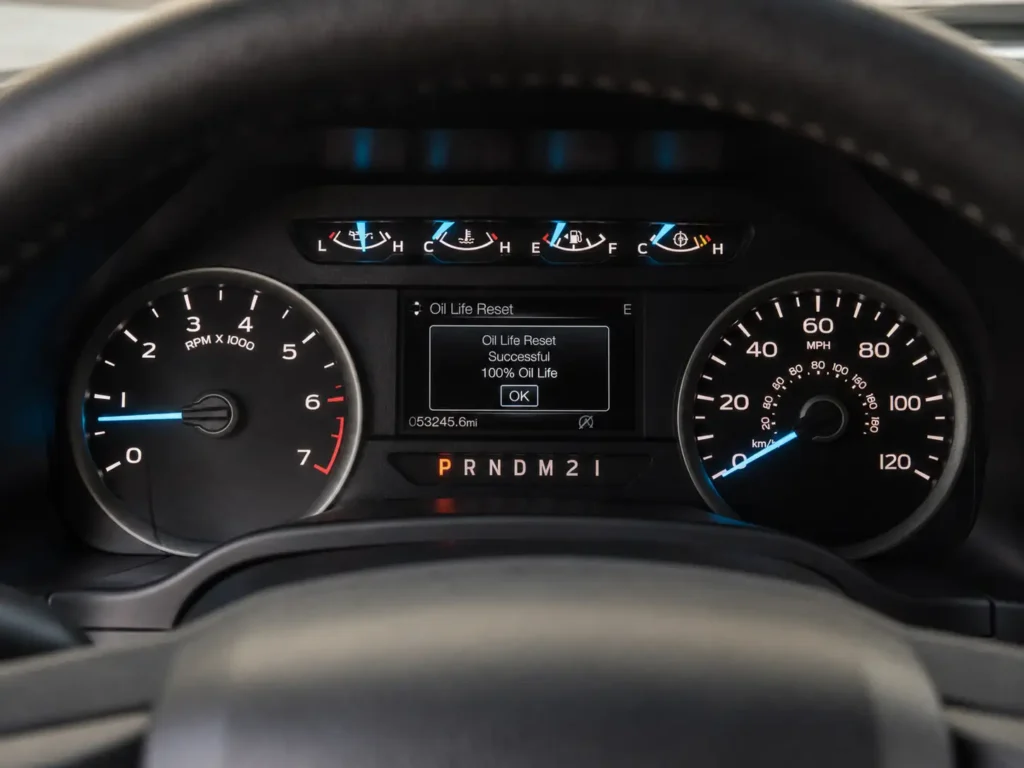
Use this quick check:
- Turn the ignition off.
- Wait a few seconds.
- Turn the ignition back to ON.
- Check the oil life screen again.
- Confirm it still shows 100%.
- Confirm the oil change reminder does not return.
If the display says Not Reset or Reset Cancelled, repeat the process slowly and hold OK until the confirmation finishes.
This reset is different from clearing a check engine light. If your truck has an engine warning, our guide to Ford F150 check engine light reset steps explains that separate process.
If the reset does not save, the next step is to check the common causes.
5 Reasons the 2017 Ford F-150 Oil Reset Does Not Work
If the 2017 Ford F-150 oil reset does not work, the problem is usually the menu path, ignition mode, or button timing. Start with the simple causes before assuming there is a cluster fault.
Ignition Mode Is Wrong
The display needs to be fully powered so the settings menu is available. Accessory mode may not show every menu on every truck.
Use ON mode with the engine off. On push-button models, do not press the brake pedal when pressing the start button.
OK Button Was Released Too Early
A quick tap on OK is not enough. The manual says to press and hold OK until the cluster displays the reset message.
Hold the button until the progress finishes or the screen confirms the reset. If you release early, the cluster may show Not Reset or Reset Cancelled.
Wrong Menu Path Was Used
Your 2017 F-150 may not show the same path as another owner’s truck. Cluster type, trim, and screen layout can change where Oil Life appears.
Try Settings > Convenience > Oil Life Reset first. If that path is missing, check Settings > Vehicle > Oil Life Reset or Truck Info > Engine Information > Oil Life.
Oil Life Screen Is Hidden
Some owners get stuck because they are inside Trip, Fuel, Towing, or Display Mode instead of the settings area. Back out to the main menu before searching again.
If the truck has a Type 2 display, the manual shows Engine Information under Display Mode with Oil Life, Engine Hours, and Engine Idle Hours.
Warning Is Not an Oil Life Reminder
Do not confuse an oil life reminder with a low oil pressure warning. An oil life reset is only for maintenance tracking.
If the truck shows a red oil pressure warning, abnormal engine noise, or a low oil level, stop and check the engine oil first. A reset will not fix an oil pressure problem.
The reset is safe when used correctly, but it should never replace real oil service.
When Not To Reset the 2017 Ford F-150 Oil Light
Do not use the oil reset as a way to silence a warning before checking the truck. The reset should only happen after the oil and filter have been changed.
Do not reset the oil life if:
- The oil and filter were not changed.
- The dipstick shows low oil.
- The engine has a ticking or knocking noise.
- The truck has an active oil pressure warning.
- You see a fresh oil leak under the engine.
- The oil warning appeared immediately after service.
Ford’s manual also warns not to overfill the engine oil because oil above the maximum mark may cause engine damage. Before you reset, check that the oil level is between the minimum and maximum marks on the dipstick.
Once the oil service is confirmed, the final decision is simple.
Should You Reset Oil Life After Every 2017 F-150 Oil Change
Yes, reset the oil life after every oil and filter change on your 2017 F-150. Ford’s maintenance schedule specifically tells owners to reset the Intelligent Oil-Life Monitor after engine oil and filter changes.
Forgetting the reset creates a wrong oil life reading. The truck may continue counting from the previous service interval, which can bring back an oil change message too early.
Resetting too early creates the opposite problem. If you reset without changing the oil, the truck may show 100% remaining life even though the oil is still used.
For oil timing questions beyond the dashboard reminder, our guide on how often to change synthetic oil gives a broader maintenance view.
The key takeaway is to reset only after the service is actually complete.
Final Takeaway for 2017 Ford F-150 Owners
The 2017 Ford F-150 oil reset is a steering wheel menu procedure, not a shop-only service. Use Settings, then Convenience, then Oil Life Reset, and hold OK until the cluster shows Reset Successful and 100% remaining life.
If your screen uses a different layout, check the alternate paths through Vehicle or Truck Info. Reset the oil life only after a real oil and filter change, then restart the truck and confirm the reminder is gone.
5 Common 2017 Ford F-150 Oil Reset Questions
How Do You Reset Oil Life on a 2017 Ford F-150?
Turn the ignition to ON, open Settings from the steering wheel controls, go to Convenience, then Oil Life Reset, and hold OK. The reset worked when the cluster shows Reset Successful and 100% remaining life.
Why Will My 2017 F-150 Oil Life Not Reset?
The most common causes are wrong ignition mode, releasing OK too early, or using the wrong menu path. Repeat the process in ON mode and hold OK until the confirmation finishes.
Do I Need a Scanner To Reset the 2017 Ford F-150 Oil Light?
No, you do not need a scanner for the oil life reset. The 2017 F-150 oil reset is done through the steering wheel controls and dashboard information display.
Should the 2017 F-150 Oil Life Show 100% After Reset?
Yes, a successful reset should show 100% remaining life. Ford’s owner manual says the instrument cluster displays 100% when the oil change indicator resets.
Is the Oil Life Reset the Same as a Low Oil Pressure Warning?
No, the oil life reset is not the same as a low oil pressure warning. A low oil pressure warning needs immediate oil level and engine checks, not a simple dashboard reset.