Dynamic Radar Cruise Control (Drcc) Dynamic Radar 2026
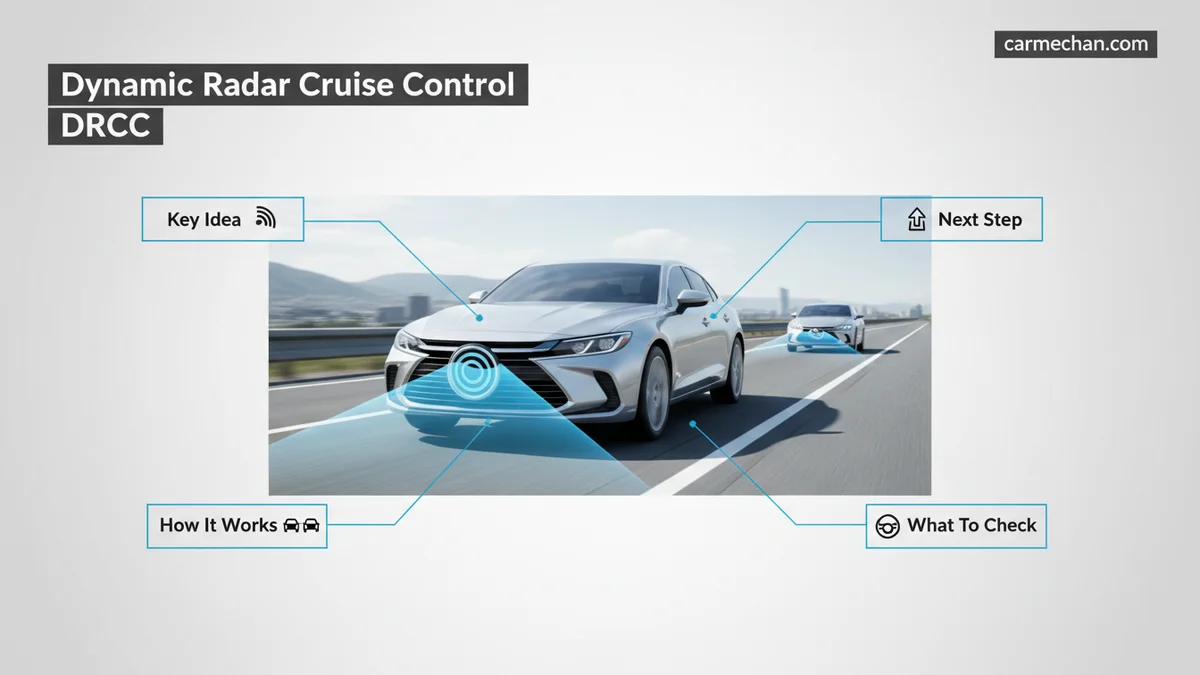
Dynamic Radar Cruise Control (DRCC) automatically adjusts your vehicle’s speed to maintain a preset safety distance from the car ahead. Unlike traditional cruise control, this system uses radar sensors and cameras to throttle and brake independently as traffic flow changes.
Dynamic Radar Cruise Control (DRCC) is an advanced driver-assistance system designed to automatically adjust your vehicle’s speed to maintain a pre-selected following distance from the car ahead. Unlike traditional cruise control that locks you into a static speed, DRCC uses high-frequency radar and front-facing cameras to monitor the flow of traffic, physically braking your vehicle when you close in on a slower lead car and accelerating back to your target speed once the lane clears.


For 2026 drivers, this technology serves as a critical fatigue-reduction tool during highway commuting. By automating the constant micro-adjustments required in heavy traffic, the system prevents the “accordion effect” where you are forced to toggle between the gas and brake pedals repeatedly. When functioning correctly, it provides a smoother, more predictable travel experience that preserves your fuel efficiency and improves overall traffic flow consistency.
Key Takeaways
- DRCC maintains a consistent gap by automatically accelerating and braking based on vehicle traffic.
- Radar sensors detect the distance and relative speed of the vehicle directly in front of you.
- You must remain alert; the system may disengage in sharp curves or heavy precipitation.
- Always keep your eyes on the road, as the system does not recognize all stationary objects.
- Adjust your follow-distance settings to match current highway traffic conditions and speed.
What Causes Variations in Dynamic Radar Cruise Control Performance
Sensor Obstruction and Environmental Interference
Your DRCC system relies on a clean field of vision to maintain reliable distance-keeping. In 2026, many vehicles utilize a grille-mounted millimeter-wave radar sensor combined with a windshield-mounted optical camera. If these sensors are obscured, the system may disengage or trigger a warning light on your dashboard.

- Weather conditions: Heavy rain, thick fog, or accumulating snow can scatter radar signals, leading to reduced sensor accuracy or temporary system suspension.
- Physical debris: Mud, ice, or even large road grime buildup on the front bumper emblem—where the radar is typically hidden—acts as a barrier to signal transmission.
- High-glare environments: Direct sunlight hitting the front camera lens at a low angle can occasionally cause the optical component to lose track of lane markings or vehicle silhouettes.
Traffic Dynamics and Detection Limitations
DRCC is optimized for highway driving, but it does not possess human-like foresight. It calculates distance based on time-gaps, not static physical measurements. This means your vehicle will respond differently to high-speed traffic versus stop-and-go congestion.
- Cut-ins: When a vehicle abruptly merges into your lane, the system may delay its braking response for a split second while it identifies the object, requiring you to remain alert.
- Curved roads: On sharp bends, the radar might lose sight of the vehicle ahead because the signal is projected in a straight line, potentially causing your vehicle to accelerate unexpectedly until the lead car is re-centered in the beam.
- Stationary objects: Most 2026 systems are programmed to ignore stationary objects (like parked cars on the shoulder) to prevent “phantom braking,” meaning the system will not stop for a dead-stopped vehicle if you are traveling at high speeds.
How to Operate and Calibrate Your DRCC System
Setting Your Following Distance Preferences
Operating your DRCC system involves three main inputs: setting the target cruise speed, activating the cruise master switch, and defining your desired time-gap. Most 2026 systems provide three distinct distance settings—Short, Medium, and Long—which correlate to the number of seconds of travel distance maintained between you and the lead vehicle.
- Engagement: Press the Cruise Main button on your steering wheel to initialize the standby mode.
- Speed Selection: Accelerate to your desired cruising speed and toggle the Set button downward.
- Gap Adjustment: Press the vehicle-to-vehicle distance button to cycle through the available gaps.
- Monitoring: Watch your Multi-Information Display; it will usually show a graphic representation of your selected gap and highlight the lead vehicle once it has been acquired by the radar.
System Calibration and Initialization
In 2026 vehicles, the DRCC system generally performs a self-check every time you start the ignition. If you have recently had the windshield replaced or the front bumper repaired, the system may require a professional static or dynamic calibration to ensure the radar and camera are perfectly aligned.
- Static Calibration: A technician uses specific target boards in a controlled shop environment to align the radar beam angle.
- Dynamic Calibration: Some systems require a “drive-to-calibrate” process, where the vehicle is driven on straight, well-marked roads for a specific duration to map the camera’s perspective relative to the road.
- Verification: If your system consistently shows “Radar Sensor Blocked” despite a clean bumper, you likely need a software re-calibration at an authorized service center to reset the internal distance-calculation parameters.
How to Fix Common DRCC Sensor Interference Issues
By 2026, Dynamic Radar Cruise Control (DRCC) systems have become highly sophisticated, yet they remain susceptible to environmental and physical interference. The radar sensor, typically housed behind the front grille emblem or in the lower bumper, requires a clear line of sight to maintain precise distance tracking. When the onboard computer detects a “Radar Blocked” or “Sensor Cleanliness” alert, immediate intervention is usually required to restore full functionality.

Clearing Obstructions and Debris
- Locate the radar sensor module, usually situated in the center of the front grille.
- Use a soft, lint-free microfiber cloth dampened with mild soap and water to gently wipe the surface.
- Avoid high-pressure car washes directly on the sensor, as the force can misalign the internal mounting brackets.
- Ensure that no aftermarket accessories, such as license plate frames or brush guards, are obstructing the radar beam’s path.
- In extreme winter conditions, remove any heavy snow or ice buildup that may be insulating the sensor housing.
Addressing Environmental Interference
Technological reports from 2026 indicate that extreme weather—specifically heavy downpours, dense fog, or heavy snowfall—can disrupt the radar waves. If the system disengages due to weather, the vehicle’s ECU is programmed to prioritize safety over automation. Wait for environmental conditions to improve before attempting to re-engage the system. If the warning light persists after the debris is removed, allow the vehicle to undergo a full power cycle by turning the ignition off and back on after sixty seconds.
What If It Still Doesn’t Work?


If the DRCC system remains inactive after manual cleaning and power cycling, the issue likely resides in the electronic calibration or hardware integrity. Persistent failure often indicates a misaligned sensor or a damaged radar transceiver unit. Follow these steps to resolve persistent faults:
- Check the instrument cluster for specific diagnostic trouble codes (DTCs) that indicate a communication failure between the radar module and the engine control unit.
- Inspect the front bumper area for minor impact damage; even a slight bump can shift the radar sensor out of its factory-calibrated “aim.”
- Verify that the windshield-mounted camera is not obscured by a cracked or improperly replaced glass, as the 2026 fusion-based systems require camera input to verify radar data.
- Schedule a professional diagnostic scan at an authorized service center.
Professional recalibration is mandatory if the sensor has been moved or if the bumper was repaired. According to manufacturer service guidelines, a stationary radar calibration service typically ranges from $250 to $600, depending on labor rates and software complexity. If the radar unit itself requires replacement due to internal electronic failure, total repair costs can reach $1,200 to $2,000. Seek certified technician support immediately to ensure the safety systems remain within OEM specifications.
Conclusion
Maintaining a functional DRCC system relies on keeping the sensor surface pristine and ensuring the radar alignment remains precise. According to verified research and expert service bulletins for 2026, most system faults stem from minor obstructions or sensor displacement following impact. When standard cleaning fails, professional diagnostic recalibration is the only reliable path to restore system autonomy. For your next step, consult your vehicle’s specific owner’s manual to identify your model’s unique sensor location and recommended service intervals.
❓ Frequently Asked Questions
How does the radar sensor distinguish between traffic?
The sensor uses millimetre-wave radar to calculate the time it takes for a signal to bounce off the vehicle ahead. This constant feedback loop allows the vehicle to adjust speed dynamically to maintain the selected distance gap.
Why does my DRCC disengage on winding roads?
Sharp curves can cause the radar sensor to lose track of the lead vehicle or mistakenly lock onto a vehicle in an adjacent lane. When the sensor loses its clear line of sight, the system typically alerts the driver to take manual control.
Can I trust DRCC to prevent all collisions?
No, DRCC is a driver-assist feature, not a self-driving system. It cannot account for all road hazards, pedestrian movements, or stationary debris, making your active participation essential at all times.
What should I do if the sensor is blocked?


Ensure the front grille area where the radar sensor is located is free from mud, ice, or thick dirt. If the sensor is clean and a warning light persists, have a technician inspect the housing for misalignment.
Does DRCC affect my fuel economy?
Yes, DRCC can affect fuel efficiency because the system may brake and accelerate more frequently than a smooth human driver. Maintaining a consistent speed in light traffic generally yields better fuel economy than relying on the system.
Is it safe to use DRCC in stop-and-go traffic?
Yes, it is designed for this purpose, but it can be less smooth than manual driving. Stay focused on the lead vehicle’s movements to ensure the system resumes movement correctly after a full stop.