Toyota Prius TPMS Reset Button Location: A Complete Guide
Last Updated on September 1, 2026 by Ryan
📋 Table of Contents
- 🎯 Key Takeaways
- Variations in TPMS Reset Button Placement by Prius Generation
- The Ultimate Toyota Prius TPMS Reset Walkthrough
- Technical Factors That Trigger the Tire Pressure Warning Light
- Understanding the Role of the TPMS Set Switch in Maintenance
- Common Troubleshooting Scenarios for Unresponsive Reset Buttons
- Conclusion
- 💬 Quick Questions & Answers
- ❓ Frequently Asked Questions

The Toyota Prius TPMS reset button is typically found underneath the steering wheel or inside the glove box depending on the model year. Finding this set switch is essential for recalibrating sensors after tire rotations or pressure adjustments. Understanding the system’s location saves time and prevents unnecessary trips to the dealership.
🎯 Key Takeaways
- Look under the driver-side dashboard near the knee bolster for the button.
- Older Prius models often hide the TPMS switch inside the glove compartment.
- Ensure all tires are inflated to placard pressure before pressing the button.
- The button requires a long press until the TPMS light flashes slowly.
- Knowing the location prevents accidental resets when searching for other controls.
Have you ever started your Toyota Prius only to see a bright orange icon glowing on your dashboard? That little horseshoe-shaped symbol is your Tire Pressure Monitoring System (TPMS) alert. It is your car’s way of telling you that one or more tires are not at the right pressure level. Ignoring this light can lead to poor gas mileage, faster tire wear, and even a dangerous blowout while you are driving.
Finding the reset button can feel like a scavenger hunt. Toyota has moved the location of this button several times over the years. Depending on which Prius generation you own, the button might be tucked under the dashboard or hidden deep within a digital menu. Understanding where to look saves you time and frustration during your morning commute. This guide will help you locate your specific reset point and understand why that light appeared in the first place.
Variations in TPMS Reset Button Placement by Prius Generation
The Toyota Prius has evolved significantly since it first hit the road. Because of these changes, the TPMS reset location is not the same for every model. Older models rely on a physical button, while newer versions use the onboard computer system. Knowing your car’s year is the first step in finding the right spot. Toyota designers often place these buttons in discreet locations to keep the cabin looking clean and to prevent accidental resets.
The Classic Physical Button (2004 to 2015)
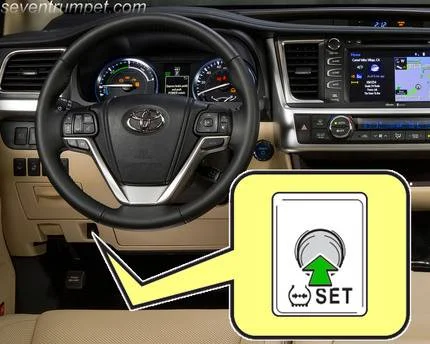
For many years, Toyota kept things simple with a hard-wired button. If you drive a second or third-generation Prius, you will likely find a physical SET button. It is usually located in the driver’s footwell area. You often have to get low and look upward to see it. It is placed there to prevent you from pressing it by accident while you are driving. If you are sitting in the driver’s seat, it is typically near your right knee or directly under the steering column.
- Second Gen (2004-2009): Look under the steering wheel, near the plastic panel by your knees. It is a small, round button.
- Third Gen (2010-2015): Check the lower dash area. It is often hidden near the steering column or tucked slightly toward the glove box side.
- Prius V and C: These variants often follow the third-generation layout with a button located under the dashboard on the driver’s side.
The Digital Transition (2016 to Present)
Starting with the fourth generation, Toyota moved away from the physical button for many models. For these modern cars, the reset function is part of the digital display system. You use the steering wheel controls to navigate through the settings on your dashboard screen. This change reflects the shift toward more tech-focused interiors in newer hybrid vehicles. It allows the car to provide more specific feedback about which tire is low.
- Menu Navigation: You will usually find the reset option under the Vehicle Settings gear icon on your main display.
- Prius Prime: These plug-in models almost exclusively use the digital menu for all TPMS management and monitoring.
- Fourth Gen (2016-2022): Look for the TPMS setting within the multi-information display (MID). You will navigate to the “TPMS” sub-menu to find the initialization option.
The Ultimate Toyota Prius TPMS Reset Walkthrough
The Tire Pressure Monitoring System (TPMS) in a Toyota Prius is a vital safety feature that alerts you when your tires are under-inflated. However, the system often needs a manual reset after you rotate your tires, change a flat, or adjust the air pressure for seasonal changes. Finding the reset button is famously difficult because Toyota engineers tucked it away in an inconspicuous location that varies by model year. This guide will walk you through finding the physical button, navigating the digital menus for newer models, and completing the calibration process to ensure your dashboard stays clear of warning lights.
Step 1: Verify and Adjust Tire Pressure
What you need: A high-quality digital tire pressure gauge and an air compressor or access to a gas station air pump.
Instructions: Before you even look for the reset button, you must ensure your tires are at the correct specification. Open the driver’s side door and look at the “Tire and Loading Information” sticker located on the B-pillar. Most Prius models require roughly 35 PSI in the front and 33 PSI in the rear, but this can vary based on your specific trim and wheel size (15-inch vs. 17-inch). Use your gauge to check all four tires while they are “cold” (driven less than a mile). If the pressure is uneven or low, the TPMS light will simply reappear immediately after a reset. Fill the tires exactly to the manufacturer’s recommendation to provide the computer with a clean baseline for calibration.
Pro Tip: Don’t forget the spare tire! While most Prius models use a “donut” that isn’t monitored, some premium trims or older versions might have a full-size spare with a sensor. If your light won’t go off despite four perfect tires, check the spare’s pressure.
Step 2: Prepare the Vehicle Electronics
What you need: Your Prius key fob and a clear space to park the vehicle safely.
Instructions: To initiate a TPMS reset, the vehicle’s computer must be in a specific power state. Park the car on a level surface and ensure the transmission is in “P” (Park) with the parking brake engaged. For Gen 2, Gen 3, and early Gen 4 models, you need to turn the car to the “IG-ON” mode. This is done by pressing the “Power” button twice without your foot on the brake pedal. The dashboard should light up with all the warning icons, but the hybrid system should not be “Ready.” For newer models (2018+), you can often perform the reset while the car is in “Ready” mode (engine/motor on), but it is safer to do it while stationary to avoid distractions while navigating menus.
Pro Tip: If you have a plug-in Prius (Prime), make sure the charging cable is disconnected before starting this process, as the car may disable certain electronic configurations while tethered to a charger.
Step 3: Locate the Physical Reset Button (Gen 2 & Gen 3)
What you need: A flashlight or a smartphone with a bright screen.
Instructions: For Prius models manufactured between 2004 and 2015, the TPMS reset button is a physical switch hidden underneath the dashboard on the driver’s side. You literally have to get on your knees and look upward near the area where your knees would be while driving. Look for a small, round button labeled “SET.” It is usually located near the steering column, often tucked behind a plastic panel or near the OBD-II diagnostic port. It is positioned so that it cannot be pressed accidentally while driving. If you are sitting in the driver’s seat, reach down past the lower edge of the dashboard, slightly to the right of the hood release lever. You will likely have to feel for it blindly unless you have a flashlight to illuminate the dark cavern under the dash.
Pro Tip: Many owners mistake the “Smart Key Cancel” button for the TPMS button. Ensure the button you are pressing has the tire cross-section icon (the “U” shape with an exclamation point) or says “SET” directly on or above it.
Step 4: Access the Digital Menu (Gen 4 & Gen 5)
What you need: Use of the steering wheel mounted directional pad (D-pad).
Instructions: If your Prius is a 2016 model or newer, you likely do not have a physical button under the dash. Instead, the reset is handled through the Multi-Information Display (MID) located in the center or driver-side of the dashboard. Use the arrows on your steering wheel to scroll through the icons until you reach the “Gear” icon (Settings). Once in settings, scroll down to “Vehicle Settings” and press the center “OK” button. Inside that menu, look for “TPMS” or “Tire Pressure Guide.” You may need to scroll through several sub-menus to find the “Set Pressure” or “Initialize” option. This digital shift allows the car to handle different sets of tires (like winter vs. summer sets) more gracefully than the old physical button systems.
Pro Tip: If the “Vehicle Settings” menu is greyed out or inaccessible, make sure the car is fully stopped and in Park. Many Toyota safety systems lock these menus while the vehicle is in motion to prevent driver distraction.
Step 5: Perform the “Set” Command
What you need: Focus on the instrument cluster to watch for visual feedback.
Instructions: Once you have located the physical button or the digital “Initialize” menu, you must trigger the reset. For the physical button: Press and hold the button down for several seconds. Watch the TPMS warning light on your dashboard; it should blink slowly three times. This signifies that the computer has acknowledged the current tire pressures as the new “normal.” For the digital menu: Press and hold the “OK” button on your steering wheel while the “Tire Pressure Initialization” option is highlighted. A message should appear on the screen saying “Initialization Started” or “Tire Pressure Resetting.” Keep holding until the screen confirms completion. Release the button only after the visual confirmation (blinks or text) has finished.
Pro Tip: Do not just tap the button. A quick press does nothing. The system requires a “long press” (typically 3 to 5 seconds) to prevent accidental resets from stray knees or curious passengers.
Step 6: The Initialization Drive


What you need: 15 to 20 minutes of uninterrupted driving time.
Instructions: The reset process isn’t finished the moment you release the button. The car’s ECU (Engine Control Unit) now needs to collect data from the sensors while the wheels are spinning to calibrate the radio frequency signals and pressure readings. Drive the vehicle at a steady speed, preferably above 20 mph (32 km/h), for at least 15 to 30 minutes. Avoid heavy stop-and-go traffic if possible; a short trip on a highway or a suburban main road is ideal. During this time, the sensors “wake up” and transmit their IDs and current pressures to the receiver. If you turn the car off too soon, the system may not finish the handshake, and the light may return the next time you start the car.
Pro Tip: If the light begins to flash rapidly during this drive, it indicates a system malfunction rather than a pressure issue. This usually means the car can’t find one of the sensors, possibly due to a dead battery in the sensor itself.
Step 7: Confirming Success and Troubleshooting
What you need: Observation of the dashboard display after the calibration drive.
Instructions: After your drive, park the car and turn it off completely. Wait a minute, then restart the car. If the TPMS light remains off, the process was successful. However, if the light comes back on immediately, or if it flashes for 60 seconds and then stays solid, the reset failed. The most common reason for failure in a Prius is a dead TPMS sensor battery. Since these batteries are sealed inside the sensors and last about 7–10 years, many older Prius models (Gen 2 and Gen 3) are now reaching the age where the sensors are failing. Another common issue is signal interference from aftermarket electronics like dashcams or USB chargers plugged into the 12V outlet, which can sometimes block the TPMS radio frequency.
Pro Tip: If you use a Bluetooth OBD-II scanner and an app like “Dr. Prius” or “Carista,” you can actually see the individual pressures and battery statuses for each sensor, which takes the guesswork out of troubleshooting a stubborn light.
✅ Final Checklist
- All four tires (and the spare, if applicable) are inflated to the PSI listed on the driver-side B-pillar sticker.
- The car was in “IG-ON” or “Ready” mode and in “Park” during the reset command.
- The TPMS light on the dashboard blinked three times (physical button) or the MID screen confirmed “Initialization” (digital menu).
- A calibration drive of at least 15 minutes at speeds above 20 mph was completed.
- The warning light remains off after a full power cycle of the vehicle.
Important Notes:
- Safety Warning: Never ignore a TPMS light. Low tire pressure significantly increases braking distances and can cause a dangerous blowout at high speeds.
- Professional Help: If the light flashes for one minute before staying solid, a sensor is likely dead. A tire shop must replace the sensor as it requires “unbeading” the tire from the rim.
- Estimated Time: 10 minutes for pressure adjustment and reset; 20 minutes for the calibration drive.
- Estimated Cost: $0 for a DIY reset. If a sensor is dead, expect to pay $50–$150 per wheel for parts and labor at a professional shop.
Technical Factors That Trigger the Tire Pressure Warning Light
The TPMS light does not just turn on for no reason. It is a sensitive system designed to keep you safe on the road. Understanding why the light triggered can help you decide if you just need a quick reset or if your tires need professional attention. Most triggers are related to basic physics or the lifespan of the hardware itself. Knowing these factors can help you predict when the light might appear.
Environmental and Seasonal Changes
Temperature is the most common reason for a TPMS alert. Air is a gas that expands when it is hot and shrinks when it is cold. When the temperature drops overnight, the air inside your tires becomes more dense. This lowers the internal pressure, even if no air has actually escaped the tire. This is why many Prius owners see the light pop up on the first cold morning of winter.
- The 10-Degree Rule: For every 10 degrees the temperature drops, your tires can lose about one pound of pressure (PSI).
- Altitude Shifts: Driving from a low-elevation city to a high-altitude mountain area can change the pressure balance and trigger the sensors.
- Sun Exposure: If one side of your car sits in the hot sun while the other is in the shade, you may get uneven readings that confuse the system.
Sensor Malfunctions and Battery Life
Your TPMS system relies on small, battery-powered sensors located inside each wheel. These sensors are tough, but they are not immortal. Over time, the electronic components can fail or the signal can weaken. If the car’s computer cannot get a clear signal from a sensor, the warning light will flash or stay on permanently to alert you of a system fault rather than just low pressure.
- Battery Depletion: Most TPMS sensor batteries last about five to ten years. If your Prius is older, the battery inside the wheel sensor might be dying.
- Physical Damage: Hitting deep potholes or scraping against rough curbs can damage the sensor housing inside the rim.
- Corrosion: In areas with heavy snow, road salt and moisture can corrode the valve stem where the sensor is attached, leading to leaks or electronic failure.
- Radio Interference: Occasionally, other electronic devices or powerful radio towers can briefly interfere with the wireless signal from the sensors to the car.
Understanding the Role of the TPMS Set Switch in Maintenance
The TPMS reset button, officially known as the “tire pressure set switch,” is more than just a way to turn off an annoying dashboard light. Its primary function is to calibrate the system to a specific “baseline” pressure. When you press this button, you are essentially telling the Prius’s onboard computer that the current pressure in all four tires is the ideal standard it should monitor. This is why the button is a critical component of your regular maintenance routine rather than just a troubleshooting tool.
Calibration After Tire Rotations or Replacements
Whenever you rotate your tires or install a fresh set, the physical position of the sensors changes. Even if the tires are inflated correctly, the system might get confused by the new data points. By using the set switch, you synchronize the computer with the new tire positions. This ensures that if a specific tire loses air later on, the system can accurately identify the drop. It is a best practice to engage the calibration process every time your car comes off the lift at the mechanic.
Adapting to Seasonal Temperature Fluctuations
As the seasons change, especially when moving into colder months, the air inside your tires becomes denser, leading to a drop in pressure. This often triggers the TPMS light on chilly mornings. While your first step should always be adding air, the reset button plays a secondary role in “re-learning” the environment.
- Winter Baseline: Cold weather can cause frequent “false alarms” if the system is calibrated to high summer temperatures.
- Load Changes: If you are planning a long road trip with a heavy load, you might increase your tire pressure slightly; the reset button helps the car recognize this temporary “new normal.”
- Nitrogen vs. Air: Regardless of what you fill your tires with, the set switch remains the final step in ensuring the sensors are watching for the right numbers.
Common Troubleshooting Scenarios for Unresponsive Reset Buttons
There are times when you find the reset button, press it correctly, and… nothing happens. The light stays stubbornly lit, or perhaps it blinks at you in defiance. Understanding why the button might seem “broken” can save you hours of frustration. In many cases, the issue isn’t the button itself, but a deeper communication problem within the Toyota’s electronic ecosystem.
Distinguishing Between System Errors and Simple Resets
One of the most common reasons a reset button fails to work is that the system has detected a hardware fault rather than just low pressure. If your TPMS light flashes for one minute and then stays solid, the reset button will not fix the problem. This sequence indicates a system malfunction, often caused by a dead sensor battery. Since most Prius sensor batteries last between 5 and 10 years, older models frequently encounter this issue. The button cannot “reset” a dead battery or a broken sensor; it can only recalibrate a functioning one.
External Interference and Electronic Glitches
The TPMS sensors communicate with your Prius via radio frequencies. Sometimes, the reset process is interrupted by electronic noise.
- Aftermarket Electronics: High-powered dash cams or cheap USB chargers plugged into the 12V outlet can sometimes create electromagnetic interference that prevents the car from “hearing” the sensors during a reset.
- Sensor Shielding: Metal objects or heavy luggage placed directly over the areas where the receivers are located can occasionally dampen the signal.
- System Lag: The Prius computer sometimes requires a few minutes of driving at speeds over 19 mph to finalize the data transmission after the button has been pressed. If you are sitting in a driveway, the light might not disappear immediately.
Conclusion
Locating and understanding the Toyota Prius TPMS reset button is an essential skill for any owner looking to maintain their vehicle’s efficiency and safety. Whether your button is tucked under the steering wheel or accessed via the multi-information display, knowing its purpose—and its limitations—helps you stay in control of your car’s maintenance. Remember that the button is a tool for calibration, not a fix for a punctured tire or a dead sensor battery.
Your next steps should be simple: check your tire pressure manually today using a high-quality gauge to ensure it matches the sticker on your driver-side door jamb. If your light is on and your pressures are perfect, use the reset button to give your Prius a fresh start. Keep your tires properly inflated, and enjoy the legendary fuel economy your Prius was built to deliver!
💬 Quick Questions & Answers
Where is the TPMS button on a 2015 Prius?
It is located under the dashboard on the driver’s side, near the steering column.
Does every Prius have a physical TPMS reset button?
Most generations do, but newer models may manage resets through the multi-information display menu.
Can I find the button in the glove box?
Yes, some Prius iterations place the TPMS set switch on the left side of the glove box interior.
Why is my reset button not working?


This usually happens if the tire pressures are still incorrect or a sensor battery has failed.
Is the button labeled clearly?
It is usually a small button marked with the TPMS symbol and the word SET.
❓ Frequently Asked Questions
Why did Toyota change the location of the TPMS reset button across different years?
Toyota relocated the button to improve accessibility and interior aesthetics as dashboard designs evolved. Newer models favor digital interfaces, while older ones tucked the button away to prevent accidental engagement during driving.
Is the TPMS reset button location different for the Prius Prime or Prius V?
Yes, while the general area remains under the driver-side dash, specific trim levels like the Prime may utilize the infotainment screen for system initialization. Always check the lower dash panels first before diving into the digital menus.
What should I do if I can’t find a physical button under my Prius dashboard?
If no physical button is visible, your Prius likely uses the steering wheel controls to navigate to the Vehicle Settings menu on the dashboard display. Look for the TPMS or Tire Pressure section to initiate the reset process digitally.
Does the TPMS reset button fix a blinking warning light?
A blinking light often indicates a system malfunction or a dead sensor battery rather than just low pressure. While the button can attempt a reset, a persistent blink usually requires professional diagnostic tools to identify the faulty sensor.
Will pressing the TPMS button clear the light if a tire is flat?
No, the system is designed to detect pressure discrepancies, and the light will return almost immediately if a leak is present. You must inflate all tires to the correct PSI listed on the driver door jamb before using the button.
Can the TPMS button location vary based on the country of manufacture?
Generally, the location is standardized across regions for the Prius, but minor differences in right-hand drive models may mirror the placement to the opposite side. Regardless of the region, it stays within the driver reach near the lower dash or glove box.