Nissan Immobilizer Reset Button: Truths and Solutions
Last Updated on September 1, 2026 by Ryan
📋 Table of Contents
- 🎯 Key Takeaways
- Understanding the Nissan Anti-Theft System (NATS) Architecture
- Everything You Need to Know About the Nissan Immobilizer Reset
- Identifying Symptoms of a Malfunctioning Immobilizer System
- Professional Diagnostic Tools vs. Manual Software Resets
- Cost Factors for Nissan Security System Repairs
- Conclusion
- 💬 Quick Questions & Answers
- ❓ Frequently Asked Questions
Most modern Nissan vehicles do not feature a physical immobilizer reset button as the security system is managed digitally via the ECU and key transponder. To restore access, you must typically use specific key sequences or diagnostic OBD-II tools to re-sync the vehicle’s security protocols.
🎯 Key Takeaways


- Nissan models rarely have a dedicated physical security reset button.
- The NATS (Nissan Anti-Theft System) relies on transponder-ECU communication.
- Security light patterns are the primary indicator of system status.
- Key fob battery failure is a frequent cause of system lockouts.
- Professional OBD-II scanning is often required for deep system resets.
Have you ever sat in your Nissan, turned the key, and realized the engine simply will not start? It is a stressful moment that happens to many drivers at the worst possible time. Most people immediately search for a hidden Nissan immobilizer reset button to fix the problem in seconds. You want a quick solution so you can get back on the road and continue with your day.
The truth is that modern vehicle security is more complex than a single physical button. Understanding how your Nissan protects itself is the key to solving these frustrating lockouts. In this guide, we will explore the reality of the Nissan security system. You will learn how it works and how to tell if it is actually causing your car troubles. Knowledge is your best tool when your vehicle refuses to cooperate.
Understanding the Nissan Anti-Theft System (NATS) Architecture
Nissan uses a sophisticated security framework known as the Nissan Anti-Theft System, or NATS for short. This system is designed to prevent your car from starting unless the correct, programmed key is present. It acts as a digital handshake between your key and the car’s computer. If the handshake fails, the car remains a stationary piece of metal. There is no physical reset button because the system relies on encrypted data rather than a simple toggle switch.

The Role of the Transponder Chip
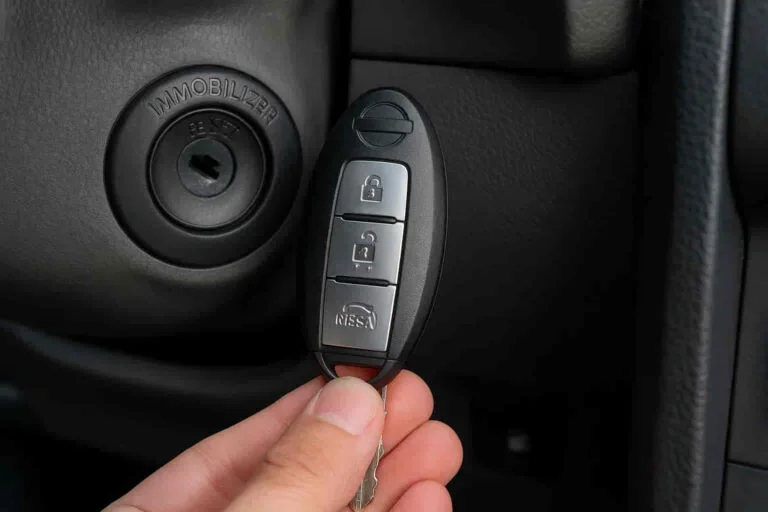
Your Nissan key contains a tiny piece of technology called a transponder chip. This chip does not need a battery to function for the immobilizer. Instead, it uses radio frequency identification to talk to your car. When you insert the key or bring the fob inside the cabin, an antenna near the ignition coil sends out a tiny burst of energy. This energy powers the chip just long enough for it to send a unique digital code back to the vehicle.
- Digital Signature: Every key has a code that is unique to your specific Nissan.
- Passive Technology: The immobilizer chip works even if your key fob battery is dead.
- High Security: This prevents “hot-wiring” because the engine computer requires a digital “go” signal.
The Communication Chain
The NATS architecture involves several different computers inside your vehicle. Once the antenna receives the code from your key, it sends that data to the Body Control Module (BCM). The BCM then checks this code against a master list of authorized keys stored in its memory. If the code matches, the BCM sends a “permission” signal to the Engine Control Module (ECM). Only after this successful chain of events will the fuel pump and ignition system actually turn on.
If any link in this chain is broken, the car will stay in a “locked” state. This could happen because of a damaged key, a faulty antenna, or a glitch in the BCM. Understanding this chain helps you realize why a simple button wouldn’t solve a complex communication error between these high-tech modules.
Everything You Need to Know About the Nissan Immobilizer Reset
The Nissan Anti-Theft System (NATS) is a sophisticated security layer designed to prevent vehicle theft by ensuring that only a programmed key can start the engine. However, this system can sometimes malfunction due to a dead battery, a faulty key fob, or electrical surges, leaving you stranded with a car that refuses to crank. While most modern Nissans do not have a physical “reset button” in the traditional sense, they utilize a specific sequence of actions that act as a software reset for the immobilizer. This guide covers the essential methods to bypass a lockout, reset the security logic, and get your vehicle back on the road without an expensive tow to the dealership.
Step 1: Diagnostic Assessment of the Security Light
What you need: Your vehicle’s primary ignition key and a clear view of the dashboard instrument cluster.
Instructions: Before attempting a reset, you must confirm that the immobilizer is indeed the culprit. Sit in the driver’s seat and close all doors. Look for the security indicator light, which usually looks like a small red car with a key icon inside it or a simple red LED near the windshield. Under normal circumstances, this light should blink once every few seconds when the car is locked. If you insert the key and turn it to the “ON” position, and the light stays solid red or flashes rapidly, the NATS has engaged a lockout. Document the pattern of the light; a solid light during cranking attempts is the most common sign that the transponder chip in your key is not being recognized by the vehicle’s BCM (Body Control Module).
Pro Tip: Ensure no other transponder keys (like those for other cars or high-frequency RFID badges) are on your keychain, as they can cause signal interference that triggers a false immobilizer lockout.
Step 2: The Ignition Cycling Sequence
What you need: The original OEM (Original Equipment Manufacturer) key. Valet keys or unprogrammed duplicates will not work for this sequence.
Instructions: This is the primary method for resetting the software logic of the NATS. Insert your key into the ignition cylinder. Turn the key to the “ON” position (the position where the dash lights up, but the engine is not yet cranking). Leave the key in this position for exactly five seconds. After five seconds, turn the key back to the “OFF” position and wait for at least ten seconds. You must repeat this cycle three times in total. On the fourth attempt, turn the key all the way to “START.” This sequence signals the BCM to re-authenticate the transponder chip and can often clear “soft” errors caused by low voltage or temporary signal loss.
Pro Tip: Use a stopwatch or your phone to time the intervals precisely. The Nissan computer is sensitive to timing, and turning the key too quickly or too slowly may cause the reset to fail.
Step 3: The Driver’s Side Door Lock Override
What you need: The physical metal key blade associated with your vehicle.
Instructions: If the ignition cycle fails, the security system may be stuck in an “armed” state that prevents ignition. Step out of the vehicle and ensure all doors are closed. Insert the physical key into the driver’s side door lock cylinder. Turn the key to the “Lock” position, then back to the “Unlock” position. Repeat this action twice (Unlock-Lock-Unlock-Lock). Finally, turn the key to the “Unlock” position and hold it there for roughly 30 seconds. This mechanical signal often overrides the immobilizer by proving that a physical key is being used to gain entry, which the car interprets as a legitimate authorized access event. Return to the interior and attempt to start the engine normally.
Pro Tip: If your Nissan has a “Keyless Entry” system with a hidden keyhole under a plastic cap on the door handle, you must remove that cap carefully to access the manual cylinder for this step to work.
Step 4: Performing a Hard ECU Reset
What you need: A 10mm wrench or socket set and protective gloves.
Instructions: If the software sequences don’t work, you may need to clear the temporary memory (RAM) of the Engine Control Unit (ECU) and the Body Control Module. Open the hood and locate the battery. Using your 10mm wrench, loosen the nut on the negative (black) battery terminal and remove the cable. Ensure the cable is moved aside so it cannot touch the terminal. Enter the car and press the brake pedal several times or turn on the headlight switch; this helps drain any residual electricity stored in the capacitors. Wait at least 15 to 20 minutes. Reconnect the negative terminal and tighten the nut. This “hard reset” forces the immobilizer system to reboot from its base firmware, often clearing persistent lockout codes.
Pro Tip: Be aware that a hard reset will likely erase your radio presets, clock settings, and potentially the “learned” idle parameters of your engine, which may cause a slightly rough idle for the first few miles of driving.
Step 5: Locating and Using the Aftermarket Valet Button
What you need: A flashlight and a bit of patience to search the lower dashboard area.
Instructions: Many used Nissan vehicles have aftermarket alarm systems (like Viper or K9) installed by previous owners. These systems often have their own immobilizers that override the factory NATS. These systems almost always have a physical “Valet” or “Reset” button. Look under the driver’s side dashboard, near the kick panel, or tucked inside the fuse box cover. The button is usually very small and black. To reset, turn the ignition to “ON” and immediately press and hold this button for 5-10 seconds until the alarm chirps or the small LED light on the dash turns solid. This puts the aftermarket system into valet mode, disabling its starter-kill feature and allowing the car to start.
Pro Tip: If you find a toggle switch instead of a button, it serves the same purpose. Flip it to the opposite position while the ignition is on to attempt an override.
Step 6: Re-syncing the Key Fob Transponder
What you need: The key fob and your presence inside the vehicle with all doors locked.
Instructions: Sometimes the immobilizer fails because the “rolling code” between the fob and the car has fallen out of sync. To re-sync, sit in the driver’s seat and lock the doors using the power lock switch on the door panel. Insert and remove the key from the ignition quickly six to ten times within 15 seconds. If successful, the hazard lights will flash twice. Insert the key and turn it to the “ACC” position, then press any button on the key fob. The hazard lights should flash again, indicating the fob and immobilizer are now synchronized. This process ensures the BCM is actively looking for that specific transponder signal during the next start attempt.
Pro Tip: This method is specific to older Nissan models (pre-2015). For newer “Push to Start” models, hold the key fob directly against the Start/Stop button while pressing it to use the passive NFC chip in the fob.
Step 7: Verifying the Key Chip Integrity
What you need: A second spare key (if available) or a smartphone with an NFC reader app (for newer keys).
Instructions: If none of the reset steps work, the transponder chip inside your key may be physically damaged or “de-programmed.” If you have a spare key, attempt all the previous steps with that key instead. If the spare key starts the car immediately, you have confirmed that the first key’s chip is faulty. For newer “Intelligent Keys,” ensure the battery inside the fob (usually a CR2032) is fresh. While the immobilizer chip itself is passive and doesn’t technically require the battery to start the car, a very weak battery can sometimes cause signal “noise” that prevents the car from reading the chip correctly. Replace the battery and try the ignition cycle one more time.
Pro Tip: Avoid placing your car keys near strong magnets or inside wireless charging cradles, as these can occasionally scramble the data on the immobilizer’s transponder chip.
✅ Final Checklist
- Confirm the security light on the dash is no longer flashing rapidly or staying solid red during cranking.
- Verify that the car battery voltage is at least 12.6V; low voltage is the #1 cause of NATS malfunctions.
- Ensure all aftermarket alarms have been put into “Valet Mode” or bypassed.
- Check that the key fob battery is fresh and the physical key blade is clean of debris.
- Test the start function at least three times consecutively to ensure the reset is permanent.
Important Notes:
- Safety Warning: Never attempt to bypass the immobilizer by cutting wires unless you are a certified technician, as this can trigger the airbag system or permanently brick the ECU.
- When to call a pro: If the security light remains solid after all these steps, the NATS antenna (the ring around the ignition cylinder) may be broken. This requires a professional locksmith or dealer with a Nissan Consult-III diagnostic tool.
- Estimated Time: 15–45 minutes.
- Cost Range: $0 (DIY reset) to $150 (Mobile Locksmith diagnostic fee).
Identifying Symptoms of a Malfunctioning Immobilizer System
Before you try to fix anything, you must be sure the immobilizer is actually the culprit. Many drivers mistake a dead battery or a bad starter for a security issue. A malfunctioning immobilizer has very specific “tells” that set it apart from mechanical failures. Paying close attention to your dashboard is the first step in diagnosing the problem correctly.
Visual Warnings on the Dashboard
The most obvious sign of an immobilizer issue is the security indicator light. On most Nissan models, this is a small red icon shaped like a car with a key inside it. Under normal conditions, this light should blink occasionally when the car is off and go out once you start the engine. If the light behaves differently, your car is trying to tell you that the security system is active and blocking the start sequence.
- Solid Red Light: If the light stays solid while you try to crank the engine, the system does not recognize your key.
- Rapid Flashing: A fast-flashing light often indicates a system error or a key that has lost its programming.
- Light Stays On While Driving: This suggests a fault was detected while the car was already running, which may prevent a restart later.
Mechanical and Electrical Clues
Sometimes the symptoms are not just visual but mechanical. A Nissan immobilizer often allows the engine to “crank” or turn over, but it prevents the engine from actually “catching” and running. In some models, the engine might start for exactly one or two seconds and then immediately die. This is the ECM cutting off the fuel supply because it did not receive the final security clearance signal.
You might also notice that your remote keyless entry functions, like locking and unlocking the doors, still work perfectly. This is a common point of confusion. The system that unlocks your doors is often separate from the immobilizer chip inside the key. If your doors open but the car won’t stay running, you are likely dealing with an immobilizer mismatch. This distinction helps you rule out issues with the key fob battery and points the finger directly at the NATS components.
Professional Diagnostic Tools vs. Manual Software Resets
While the internet is full of “life hacks” claiming you can reset your Nissan immobilizer with a series of secret turns of the key, modern security systems are rarely that simple. Nissan’s Anti-Theft System (NATS) is designed to be difficult to bypass; otherwise, it wouldn’t be much of a security feature. The reality is that “resetting” the system usually involves a software handshake rather than a physical button press.
The Power of Nissan Consult Tools
Professional technicians use proprietary software, typically the Nissan Consult diagnostic system. This isn’t just a basic code reader; it is a bidirectional tool that “talks” to the Body Control Module (BCM) and the Engine Control Unit (ECU). When an immobilizer locks you out, these modules often need to synchronized. Manual resets—like disconnecting the battery—rarely solve deep-seated software conflicts and can sometimes lead to more error codes or lost memory settings for your seats and radio.
Can Consumer OBD2 Scanners Do the Job?
- Basic Readers: Most budget-friendly scanners can read “P” codes (powertrain) but lack the permissions to access the security layer of the BCM.
- Mid-Range Tools: Some advanced DIY tools can program keys, but they often struggle with the encrypted rolling codes found in newer Nissan models (2018 and later).
- The Locksmith Advantage: Mobile automotive locksmiths carry high-end tablets that emulate dealer software. This allows them to perform a reset right in your driveway, saving you a trip to the service center.
Cost Factors for Nissan Security System Repairs
When the immobilizer light stays solid and your engine refuses to crank, the next logical question is: “How much is this going to cost me?” Because there is no physical nissan immobilizer reset button to press for free, you are usually looking at a professional service fee to get the software back in alignment.
Labor and Diagnosis Fees
The price for a reset or repair varies based on your location and the specific Nissan model you drive. Dealerships typically charge a flat diagnostic fee, often ranging from $150 to $250, just to hook the car up to their computer. If the fix is a simple software re-sync, that might be your total cost. However, if the antenna coil around your ignition cylinder has failed or a module is “fried,” parts and labor will quickly add up.
Common Cost Variables
- Key Replacement: If the issue is a dead transponder in your key, a new programmed fob can cost between $200 and $400 depending on whether it is a physical key or a proximity “Intelligent Key.”
- BCM Replacement: In rare cases, the Body Control Module itself fails. This is a major repair that can exceed $800, as it involves significant labor and parts costs.
- Mobile Convenience: Hiring a mobile locksmith might save you a $100+ towing fee to the dealership, making it the more cost-effective choice for many stranded owners.
- Aftermarket Interference: If you have an aftermarket remote start installed, it may be interfering with the factory NATS, requiring additional labor to diagnose and bypass.
Conclusion
In summary, the search for a physical Nissan immobilizer reset button usually ends in disappointment because the “reset” is actually a complex digital process. While it can be frustrating to find yourself locked out by your own car, these systems are essential for preventing theft in an era of high-tech carjacking. Understanding that your car’s security is working to protect you—even when it’s inconvenient—is the first step toward finding a permanent fix.
Next Steps: First, check your key fob battery and your car’s main 12V battery, as low voltage is the #1 cause of security errors. If the battery is healthy and the light remains on, contact a reputable automotive locksmith or your local Nissan service department to perform a professional diagnostic reset. Don’t let a security glitch keep you off the road—get a pro on the case and get back behind the wheel today!
💬 Quick Questions & Answers
Is there a physical Nissan immobilizer reset button?
No, most Nissan models use a digital software-based security system without a physical button.
Why is my security light flashing rapidly?
A rapid flash typically means the vehicle does not recognize the transponder chip in your key.
Can a dead car battery trigger an immobilizer lockout?
Yes, low voltage can cause the security system to lose its sync with the key fob.
Will a locksmith be able to reset my Nissan immobilizer?
Yes, automotive locksmiths have the specialized tools to program Nissan keys and reset the NATS.
Does disconnecting the battery reset the security system?
It may clear minor electronic glitches but usually won’t bypass a hard security lockout.
❓ Frequently Asked Questions
Why won’t my Nissan start even with the correct key?
This is often due to a failure in the NATS antenna coil located around the ignition cylinder or a corrupted transponder chip. If the vehicle doesn’t receive the correct signal, it will disable the fuel system to prevent theft.
Can I disable the Nissan immobilizer permanently?
While technically possible through ECU remapping or bypass modules, it is not recommended as it leaves your car vulnerable to theft. Most insurance companies also require an active immobilizer for coverage.
What is the difference between a valet switch and a reset button?
Older aftermarket alarms featured valet switches to disable sirens, but factory Nissan systems are integrated into the BCM. There is no simple ‘override’ button for modern factory-installed immobilizers.
How do I know if my key fob battery is the problem?
If the car doesn’t respond to remote commands but starts when the fob is held directly against the start button, the fob battery is likely the culprit. A dead fob battery is the most common ‘false’ immobilizer failure.
Is the immobilizer system covered under Nissan warranty?
Generally, the security system is covered under the 3-year/36,000-mile bumper-to-bumper warranty. If the car is older, you may be responsible for the cost of the diagnostic and parts.
What tools do dealerships use to reset the system?
Nissan dealerships use the CONSULT-III Plus diagnostic system to access the BCM and IMMU. This tool allows them to read specific security fault codes and re-program encrypted key IDs.