How to Use Cruise Control Toyota Expert 2026
Most Toyota cruise control issues stem from incorrect button sequencing or failing to reach the minimum activation speed. This guide provides the exact steps to safely enable and manage your vehicle’s speed settings.
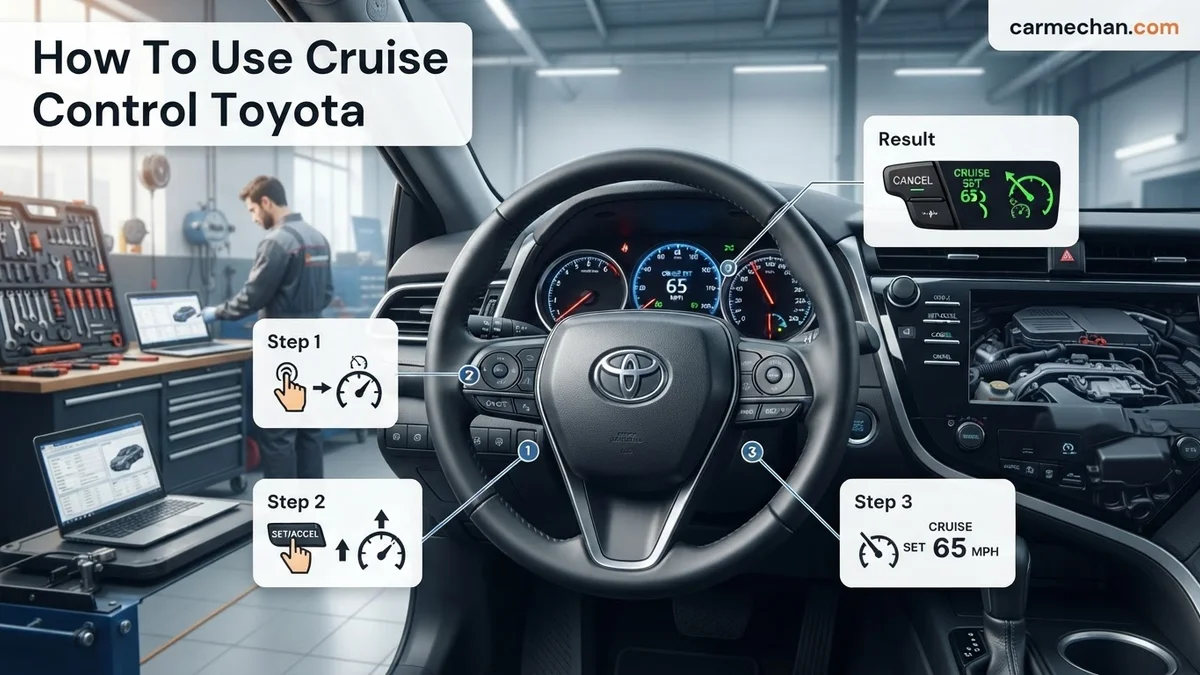
You activate your 2026 Toyota cruise control by pressing the main power button located on the steering wheel, usually marked with a speedometer icon. Once the indicator light illuminates on your instrument cluster, you simply accelerate to your desired speed and press the “SET” button downward to lock it in. This system maintains your velocity automatically, reducing driver fatigue during long commutes or highway travel.
Mastering these controls is essential for modern driving in 2026. Whether you are navigating heavy traffic or open highways, knowing how to toggle these settings instantly ensures you remain in control of your vehicle. Relying on the intuitive button layout allows you to make adjustments without taking your hands off the wheel or your eyes off the road.
Key Takeaways
- Ensure your vehicle speed is above 25-30 mph before attempting to engage the system.
- Use the ‘ON/OFF’ button on the steering wheel to prime the system before setting speed.
- Press the ‘SET’ button downward to lock in your current speed immediately.
- Push the lever up or down to adjust your speed incrementally while cruising.
- Tap the brake pedal or press ‘CANCEL’ to instantly deactivate the cruise control system.
Why Your Toyota Cruise Control Won’t Engage
Recommended Best Deal Products


Common System Inhibitors
If you press the button and nothing happens, your Toyota’s safety logic is likely preventing activation. The system is designed to disable itself or refuse engagement under specific conditions to protect you and your passengers. Check the following factors before troubleshooting mechanical issues:

- Vehicle Speed: Most 2026 Toyota models require you to be traveling above 20-25 mph before the system will accept a set command.
- Transmission Gear: The vehicle must be in “Drive” (D) or a specific manual gear range; it will not engage in “Park,” “Reverse,” or “Neutral.”
- Brake Pedal Activation: If your foot is resting lightly on the brake, the sensor prevents the cruise control from latching.
- Active Warnings: If a check engine light or traction control warning is present, the cruise control system is often disabled as a fail-safe.
Sensor and Radar Interference
Modern 2026 Toyotas utilize Dynamic Radar Cruise Control (DRCC). If your front grille sensor—usually located behind the Toyota emblem—is covered by ice, mud, or heavy dirt, the system will provide a dashboard alert and refuse to engage. Always ensure the front sensor area is clean if you experience an unexpected “Radar Ready” failure.
Master Toyota Cruise Control in 7 Simple Steps
Operating the cruise control system in your Toyota is a fundamental skill that significantly enhances highway comfort and fuel efficiency. While most modern Toyota vehicles feature similar interfaces, the location of the controls—often found on a steering wheel stalk or integrated buttons—can vary by model and year. This guide provides a clear, practical walkthrough to ensure you can confidently engage, adjust, and disengage your cruise control system while maintaining optimal vehicle safety on open roads.
Step 1: Confirm System Readiness
What you need: A Toyota vehicle equipped with cruise control and a clear stretch of road with a speed limit above 25 mph.
Instructions: Before attempting to engage the system, ensure your vehicle is in a safe driving state. Locate the cruise control main power button. On many Toyota models, this is a button located on the end of the stalk behind the steering wheel or on the face of the steering wheel, typically marked with a speedometer icon. Press this button once. You should see a “CRUISE” or a speedometer-style dashboard indicator light illuminate. This light confirms that the system is energized and waiting for your command to lock in a specific speed. If the light does not appear, check your owner’s manual, as some older models may require the ignition to be in the “ON” position before the system will power up.
Pro Tip: Always look for the green indicator light on your dashboard; a yellow or amber light often indicates a system malfunction that requires professional inspection.
Step 2: Accelerate to Desired Cruising Velocity
What you need: Control of the accelerator pedal and a safe, legal speed zone.
Instructions: Cruise control is designed to maintain your current speed, not to accelerate you to it from a dead stop. Use the accelerator pedal to bring your vehicle to your preferred highway speed. For example, if the speed limit is 65 mph, accelerate smoothly until your speedometer needle points steadily to that number. Hold this speed as consistently as possible for a few seconds. Do not attempt to engage cruise control while accelerating rapidly or climbing a steep hill, as the system may struggle to maintain the initial input, leading to a jerky transition when the computer takes over the throttle management.
Pro Tip: Ensure you are at least 5-10 mph above your vehicle’s minimum operational speed, which for most Toyotas is approximately 25 mph, to prevent the system from failing to engage.
Step 3: Set Your Speed
What you need: A steady vehicle speed and access to the “SET” control.
Instructions: Once you have reached your target cruising speed, locate the “SET” button or move the cruise control stalk downward to the “SET” position. Immediately release the accelerator pedal. You will feel the vehicle’s engine management system take over to maintain the current velocity. You may notice a slight movement in the pedal as the computer adjusts the throttle. At this point, your vehicle is locked into your chosen speed. Your foot should remain hovering near the brake pedal, not resting on the floor, so you can react instantly to any sudden changes in traffic conditions or emergency braking scenarios ahead.
Pro Tip: Keep your eyes on the road during this transition; do not look down at the steering wheel controls once you have reached your desired speed.
Step 4: Making Incremental Speed Adjustments
What you need: Steering wheel-mounted “RES/+” and “SET/-” buttons.
Instructions: Once the system is set, you can fine-tune your speed without touching the pedals. Most Toyota steering wheels feature a toggle switch or two buttons labeled “+” (Resume/Accel) and “-” (Set/Coast). Pressing the “+” button once typically increases your speed by 1 mph. If you hold the button down, the vehicle will increase its speed more rapidly until you release it. Similarly, pressing the “-” button will decrease your speed by 1 mph increments. This is highly useful for adjusting to changing speed zones or subtle traffic flow shifts without the need to cancel and re-engage the entire cruise control system manually.
Pro Tip: Use the buttons for fine adjustments rather than the brake, as braking will automatically disengage the system, forcing you to start the setup process from scratch.
Step 5: Cancelling the Cruise Control
What you need: Awareness of the “CANCEL” button or brake pedal.
Instructions: There are three primary ways to cancel your cruise control. The most common and immediate method is tapping the brake pedal firmly; this mechanically cuts power to the cruise control system and returns full throttle control to you. Alternatively, you can press the “CANCEL” button located on the steering wheel or pull the cruise control stalk toward you. This “soft” cancellation keeps the system in standby mode (the “CRUISE” light remains on), allowing you to return to your previous speed later. Use this when approaching moderate traffic or gentle curves where you prefer to modulate speed manually for a few moments.
Pro Tip: In heavy traffic or rain, avoid using cruise control entirely. If you feel the need to tap the brake constantly, it is time to turn the system off manually.
Step 6: Resuming Your Previous Speed
What you need: The system must be in standby mode (the CRUISE light is visible).
Instructions: After a temporary cancellation—such as slowing down for an exit ramp or a brief traffic lull—you can easily return to your previously set speed without accelerating manually. Look for the “RES” or “RESUME” button on your steering wheel. Pressing this will cause the car to automatically accelerate back to the last speed you had “SET.” The vehicle will resume speed somewhat assertively, so ensure there is ample room between you and the vehicle in front of you. If you turn the ignition off, the memory of your previous speed will be erased, and you will have to reset it from scratch next time.
Pro Tip: Never use the Resume feature in wet, icy, or highly congested conditions, as the rapid acceleration to the previous speed might cause the tires to lose traction.
Step 7: Shutting Down the System
What you need: A safe, stationary parking position or the end of your journey.
Instructions: When you no longer need the system, it is best practice to power it down completely to prevent accidental engagement. Simply press the main “ON/OFF” button you used in Step 1. The “CRUISE” light on the dashboard will extinguish, indicating that the system is fully powered down and the steering wheel controls are inactive. This is an important safety habit to develop, especially if your vehicle has an easy-to-press stalk or button, as it prevents the system from activating if you accidentally bump the controls while maneuvering in a parking lot or tight space.
Pro Tip: Making this a part of your post-drive routine ensures that your cruise control is never left in an active or standby state unnecessarily.
✅ Final Checklist
- Did you verify that the “CRUISE” indicator light illuminates upon pressing the main power button?
- Did you ensure the system engages only after you have reached the minimum operating speed (approx. 25 mph)?
- Did you confirm that the system cancels immediately upon pressing the brake pedal?
- Are you able to successfully use the “+” and “-” buttons to adjust speed without disconnecting?
- Did you ensure the cruise control system light is off before parking the vehicle?
Important Notes:
- Safety Warning: Never use cruise control on slippery roads, heavy rain, or in winding, hilly, or heavy traffic conditions. Always maintain a safe distance and be prepared to take manual control at all times.
- Seeking Help: If the cruise control does not set, frequently disengages on its own, or shows a warning light, have your speed sensor and electrical connections inspected by a certified Toyota technician.
- Cost/Time: Learning to use this system takes approximately 10–15 minutes of practice. There is no cost involved in the operation.
Step-by-Step Guide to Operating Toyota Cruise Control
Recommended Best Deal Products


Basic Activation and Speed Setting
Operating your cruise control should be a seamless experience. Follow these specific steps to engage the system during your next drive:

- Power On: Press the main cruise control button on the steering wheel. Look for the white or green speedometer icon on your Multi-Information Display (MID).
- Achieve Speed: Use the accelerator to reach your preferred highway speed.
- Set Velocity: Push the “SET” lever downward or press the “SET” button. Your current speed will be displayed as the target on the dashboard.
- Release: Once set, you can remove your foot from the accelerator, and the vehicle will maintain that speed automatically.
Adjusting and Managing Your Speed
Once you are cruising, you can fine-tune your speed without touching the pedals. Use the “RES/+ ” and “SET/-” buttons on the steering wheel face or side stalk:
- Increase Speed: Tap the “RES/+” button to increment your speed by 1 mph. Holding the button down will increase speed continuously until released.
- Decrease Speed: Tap the “SET/-” button to lower your speed by 1 mph.
- Cancel/Resume: Press the “CANCEL” button or tap the brake pedal to disengage the system instantly. To return to your previously stored speed, press the “RES” (Resume) button once you are back above the minimum activation speed.
Pro Tips for Adjusting and Canceling Speed
Mastering Toyota’s Dynamic Radar Cruise Control (DRCC) in 2026 requires precise manipulation of the steering wheel controls. Maintaining optimal speed flow ensures maximum fuel efficiency and safety during long-distance highway travel.
Fine-Tuning Your Velocity
- To increase your set speed, push the lever or button upward or press the (+) icon repeatedly. Each single tap typically adjusts the speed by 1 mph.
- For rapid acceleration, hold the lever or button upward; the system will increase speed in 5-mph increments until released.
- To decrease speed, push the lever or button downward or press the (-) icon. Similarly, a sustained press will decrement speed in 5-mph intervals.
Safe Disengagement Procedures
- Manual Cancellation: Press the “Cancel” button on the steering wheel cluster. This suspends active speed control while keeping the system in “standby” mode.
- Brake Intervention: Depressing the brake pedal instantly deactivates the system. This is the safest method for sudden traffic density changes.
- Resume Function: Once clear, press the “RES” or “Resume” button to return the vehicle to the last programmed cruising speed, provided the system remains active.
What If It Still Doesn’t Work?
If the system fails to engage despite following standard operating procedures, verify that the Multi-Information Display (MID) is not showing a specific sensor obstruction warning. By 2026, Toyota’s Safety Sense 3.0+ utilizes highly sensitive millimeter-wave radar; even minor blockages can trigger a system lock-out.
- Clear the Sensor: Inspect the front Toyota emblem and lower grille area for ice, mud, or debris. Use a soft, non-abrasive cloth to clear the sensor housing.
- Check Brake Light Switches: A faulty brake light switch can signal to the ECU that the brakes are permanently applied, preventing cruise control engagement.
- Perform a Hard Reset: Turn the vehicle ignition off and wait exactly 60 seconds. This allows the electronic control unit (ECU) to cycle through its self-diagnostic protocol upon restart.
- Consult a Certified Technician: If the “Cruise Control Malfunction” warning persists, internal sensor misalignment or fuse failure is likely. Professional diagnostic services typically range between $150 and $250 for a full system scan.
Conclusion
Utilizing cruise control in your 2026 Toyota significantly reduces driver fatigue while optimizing fuel economy. According to verified research from the Insurance Institute for Highway Safety (IIHS), active cruise systems contribute to smoother traffic flow and reduced collision rates on major highways. Should persistent issues arise, consult your vehicle’s specific owner’s manual or contact a Toyota-certified service center immediately. For your next trip, perform a quick sensor check before departure to ensure seamless operation.
❓ Frequently Asked Questions
Why won’t my cruise control set even when I press the button?
Ensure you are traveling at the required minimum speed, typically 25-30 mph. If you are below this threshold, the computer will prevent the system from engaging to ensure safety.
What is the difference between CANCEL and turning it off?
The ‘CANCEL’ button disengages the throttle but keeps the system active and ‘primed’ in memory. Turning it off via the ‘ON/OFF’ button clears your set speed from the system’s memory.
How do I safely increase my speed using the cruise controls?
Once set, push the cruise control stalk upward or press the ‘+’ button on the steering wheel to increase speed in small increments without needing the accelerator.
Can I use cruise control in heavy traffic or rain?
Toyota recommends against using cruise control on wet, icy, or winding roads, as well as in heavy traffic. Always maintain manual control in conditions where traction or speed adjustments are unpredictable.
How do I tell if I have Dynamic Radar Cruise Control?
If your vehicle has radar cruise, you will see a ‘distance’ button on your steering wheel. This allows you to set the gap between you and the vehicle ahead, which is a feature not found in basic cruise control.
Is it normal for the engine to rev when resuming speed?
Yes, when you press ‘RESUME’, the system may accelerate the vehicle more aggressively than you would manually to return to your previously set speed as quickly as possible.