How to Make Your Tesla Fart: A Fun Guide to Emissions Testing Mode
Last Updated on September 1, 2026 by Ryan
Unlocking Tesla’s ‘Emissions Testing Mode’ is a fun, straightforward process found within your car’s Toybox. This guide will show you how to easily activate and customize various hilarious fart sounds, assigning them to different seats or the external speaker. Get ready to surprise passengers with unique auditory effects!
Making the most of your Tesla’s entertainment? These tech accessories pair great:


As an Amazon Associate we earn from qualifying purchases.
🎯 Key Takeaways
Recommended Best Deal Products



- Access ‘Emissions Testing Mode’ via the Toybox menu.
- Choose from a variety of distinct fart sound options.
- Assign specific sounds to individual car seats.
- Utilize external speaker for amusing outside sounds.
- Feature available on most modern Tesla models.
Want to add a truly unique, lighthearted touch to your Tesla driving experience? Activating ‘Emissions Testing Mode,’ widely known as ‘fart mode,’ is surprisingly straightforward and incredibly fun. This built-in Easter egg allows your Tesla to generate various comical sounds, providing entertainment for both you and your passengers directly from the vehicle’s infotainment system.

Far beyond just a novelty, ‘Emissions Testing Mode’ offers a practical way to inject humor into everyday drives. Whether you’re entertaining kids in the backseat, surprising a first-time Tesla passenger, or simply want to lighten the mood on a long journey, knowing how to access and customize this feature enhances the interactive appeal of your Tesla. It’s an instant conversation starter and a testament to Tesla’s playful engineering.
Understanding Tesla’s Emissions Testing Mode
Tesla’s ‘Emissions Testing Mode’ is an entertainment feature, not a diagnostic tool, cleverly disguised within the ‘Toybox’ section of your vehicle’s touchscreen. Accessing and triggering these sounds is a simple process, designed to be intuitive and user-friendly for all Tesla owners.

Accessing and Activating ‘Fart Mode’
The core of making your Tesla “fart” lies in navigating a few taps on your central display. Follow these steps to unleash the comedic sounds:
- Activate Your Tesla’s Touchscreen: Ensure your vehicle’s infotainment system is powered on and the main display is active. This is your primary interface for accessing all Tesla features and entertainment.
- Open the Application Launcher: Locate and tap the small “car” icon situated at the bottom of your touchscreen. This icon serves as the gateway to your vehicle’s main application launcher and settings.
- Navigate to the “Toybox”: Within the Application Launcher, scroll through the available categories or apps until you find “Toybox.” This section specifically houses all of Tesla’s fun and unique Easter eggs and entertainment features. Tap on it to proceed.
- Select “Emissions Testing Mode”: Inside the Toybox, you’ll see various whimsical options. Locate and tap on the “Emissions Testing Mode” icon. It often features a humorous graphical representation, making it easy to spot among the other features.
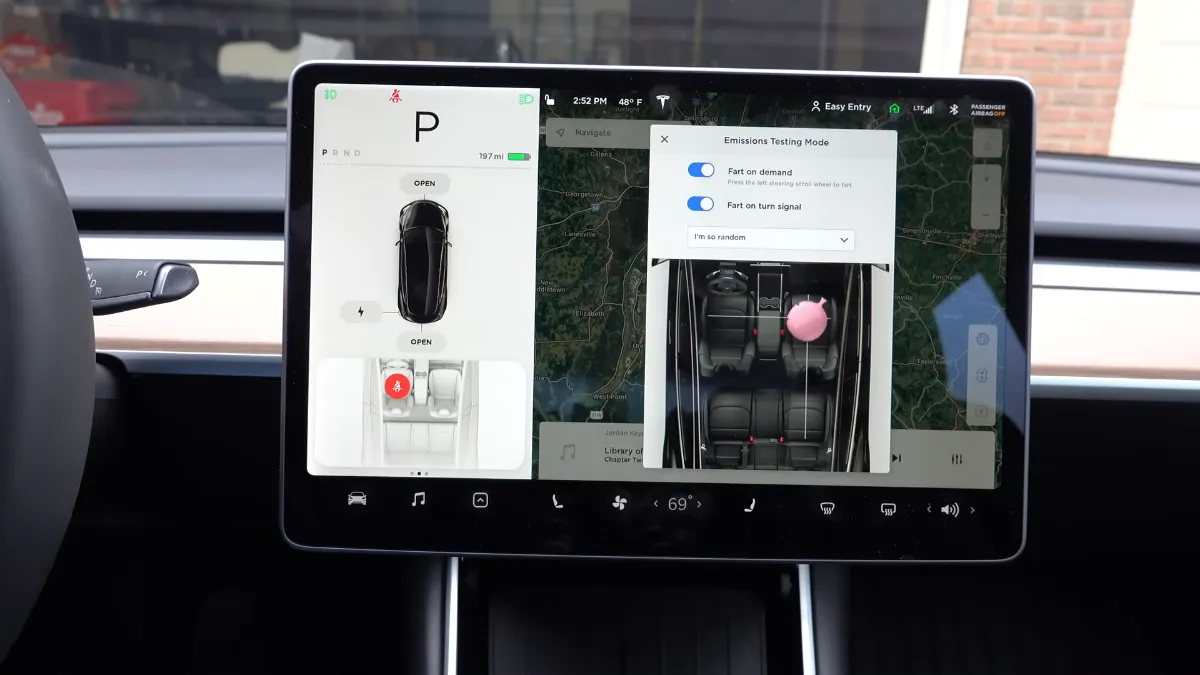
- Access the Fart Mode Interface: Tapping “Emissions Testing Mode” will immediately bring up the dedicated control screen. Here, you’ll see a visual representation of your car’s interior, typically showing all passenger seats.
- Assign Fart Sounds to Specific Seats: On this interface, you’ll notice a small “fart cloud” icon or similar indicator above each seat. Tap on a specific seat to assign a sound to that position. The chosen sound will then originate from the speaker nearest to that seat. You have the flexibility to assign different sounds to different seats simultaneously for varied effects.
- Trigger the Sound Manually: To activate a chosen sound at will, simply tap the designated “Press to Fart” button (or similar wording) that appears prominently on the screen. The assigned sound will play instantly from the selected speaker.
- Enable “Fart on Turn Signal”: For a truly interactive and surprising experience, look for the “Fart on Turn Signal” toggle. Activating this option will cause a pre-selected fart sound to play automatically through the external Pedestrian Warning System (PWS) speaker (if equipped) or from the interior speakers each time you engage your turn signal. This adds an unexpected and amusing element to your driving.
The Ultimate Tesla Fart Mode Walkthrough
Recommended Best Deal Products


Welcome, fellow pranksters and Tesla enthusiasts! This comprehensive guide will walk you through every detail of activating and mastering your Tesla’s infamous “Emissions Testing Mode” – affectionately known as Fart Mode. Far from any actual emissions, this delightful feature allows you to entertain, surprise, and occasionally bewilder your passengers (and even passersby!). By following these step-by-step instructions, you’ll soon be orchestrating perfectly timed sonic surprises from your state-of-the-art electric vehicle. Get ready to unleash the digital flatulence!
Step 1: Understanding and Accessing the Toybox
What you need: A Tesla vehicle (Model S, 3, X, or Y) with updated software, and your vehicle powered on and in ‘Park’.
Instructions: Before we dive into the delightful world of digital flatulence, you need to understand where to find it. “Fart Mode” is officially called “Emissions Testing Mode” and resides within your Tesla’s ‘Toybox’. To access it, locate the ‘App Launcher’ icon on the bottom bar of your main display – it often looks like a small car or a grid of dots. Tap this icon to reveal the applications tray, then select the ‘Toybox’ icon, which typically resembles a gift box or chest. This is your gateway to all of Tesla’s fun, quirky features.
Pro Tip: Ensure your Tesla’s software is up-to-date. Newer software versions frequently add more fart sounds and enhance the functionality of the Toybox features, so it’s always worth checking for the latest updates.
Step 2: Navigating to Emissions Testing Mode
What you need: The Toybox menu displayed on your Tesla’s touchscreen.
Instructions: Once you’ve opened the ‘Toybox’, you’ll be greeted with a selection of various entertaining features. Scroll through these options carefully until you locate the ‘Emissions Testing’ icon. This icon often depicts a small cloud of gas or an exhaust pipe, making it easy to spot. Tap on this icon to open the dedicated Fart Mode interface. This screen is where you’ll configure all the gassy goodness your Tesla has to offer, from choosing sounds to assigning their activation.
Pro Tip: If you’re having trouble finding “Emissions Testing,” a quick soft reboot of your Tesla’s main screen (hold down both scroll wheels on the steering wheel until the screen goes black, then releases) can sometimes help refresh the interface and reveal all options.
Step 3: Selecting Your Preferred Fart Sound
What you need: The ‘Emissions Testing’ interface open on your touchscreen.
Instructions: On the left-hand side of the ‘Emissions Testing’ screen, you’ll discover a curated list of various fart sound options. These range from the subtle to the spectacularly absurd, with names like ‘Not a Fart,’ ‘Short Shorts Fart,’ ‘Ludicrous Fart,’ and ‘Fart of the Century.’ To audition each sound, simply tap on its name. The selected fart sound will then play through your car’s internal speakers. Take your time to preview each one and pick the sound that best suits your comedic style and desired impact.
Pro Tip: Some sounds are significantly louder or have more ‘character’ than others. For maximum impact, consider the ‘Fart of the Century’ for a deep, resonant rumble, or ‘Short Shorts Fart’ for a quick, sharp surprise.
Step 4: Assigning Internal Farts to Passenger Seats
What you need: A chosen fart sound and the ‘Emissions Testing’ screen active.
Instructions: This is where the real fun begins! On the right side of the ‘Emissions Testing’ screen, you’ll see a graphical representation of your Tesla’s interior seats. To create a truly immersive and surprising experience, you can assign your chosen fart sound to emanate from specific passenger seat locations. Simply tap on the desired seat (e.g., “Front Passenger Seat,” “Rear Left Seat,” “Rear Right Seat”). Once assigned, the fart will play through the speaker closest to that seat, creating the illusion that the passenger has, well, let one rip. You can change these assignments at any time.
Pro Tip: To truly bamboozle your passengers, assign the fart to the seat they are currently occupying or are about to sit in. The element of surprise is key to a successful Tesla fart prank!
Step 5: Activating Farts On Demand and Via Turn Signals
What you need: A selected fart sound and seat assignment.
Instructions: Now that your sounds are chosen and seats assigned, it’s time to deploy! You have two primary methods for internal fart activation. First, the “Fart on demand” button: simply tap this button on the ‘Emissions Testing’ screen at any moment to instantly trigger your chosen sound from the assigned seat. Second, and even more mischievously, you can choose to “Fart on turn signal.” With this option selected, every time you engage your turn signal, a fart will play from the corresponding side’s assigned seat. To disable turn signal farts, simply uncheck this option.
Pro Tip: For internal farts, timing is everything. A perfectly timed “Fart on demand” during a quiet moment in conversation or during a dramatic pause can elevate the comedic effect significantly. For turn signal farts, a quick tap of the stalk will often trigger a single fart without committing to a full blink cycle.
Step 6: Utilizing the Boombox Feature for External Farts (If Applicable)
What you need: A Tesla manufactured after September 1, 2019, equipped with an external pedestrian warning speaker (PWS).
Instructions: For an even grander spectacle, newer Teslas (typically 2020 models and later) come equipped with an external speaker as part of the Pedestrian Warning System (PWS). This allows your chosen fart sounds to be played outside the vehicle via the ‘Boombox’ feature. To access this, navigate back to the main ‘Toybox’ menu and select ‘Boombox’. Within Boombox, you can choose ‘Emissions Testing’ as one of the sounds to broadcast. Ensure Boombox is active, then select your fart sound. Your Tesla will now share its flatulent humor with the outside world!
Pro Tip: The external fart feature is best used in open, unpopulated areas or to playfully prank friends. Be mindful of your surroundings and avoid disturbing others, especially in quiet residential zones or at inconvenient times. A gentle toot at a drive-thru can be hilarious; a prolonged blast at a solemn event is not.
Step 7: Troubleshooting and Temporarily Disabling Fart Mode
What you need: Access to your Tesla’s touchscreen and a basic understanding of its menus.
Instructions: If your Tesla isn’t delivering the expected sonic surprises, here are a few things to check: Ensure your media volume is turned up, as fart sounds are linked to the car’s audio system. Verify that you have indeed selected a sound and assigned it to a seat or activated the ‘Fart on demand’ or ‘Fart on turn signal’ options. If using the Boombox, ensure it’s enabled and ‘Emissions Testing’ is selected as the sound source. To temporarily disable Fart Mode, simply go back into the ‘Emissions Testing’ menu and uncheck any “Fart on turn signal” options, or close the ‘Boombox’ application if using external farts. You can also simply navigate away from the ‘Emissions Testing’ screen.
Pro Tip: A quick “soft reboot” of the main screen (holding down both steering wheel scroll wheels until the screen goes black and then reboots, takes about 10-15 seconds) can resolve many minor software glitches that might affect entertainment features like Fart Mode.
✅ Final Checklist
- Confirmed Tesla software is up to date for the latest features.
- Successfully navigated to ‘Emissions Testing’ within the ‘Toybox’.
- Previewed various fart sounds and selected a preferred option.
- Successfully assigned a fart sound to at least one passenger seat.
- Successfully triggered an internal fart using either “on demand” or “turn signal” activation.
- If applicable, successfully enabled and triggered an external fart using the ‘Boombox’ feature.
Important Notes:
- Safety Considerations: While Fart Mode is a fun feature, always prioritize safe driving. Avoid excessive use or distraction that could compromise your focus on the road or annoy other drivers. Use external farts responsibly and considerately.
- When to Seek Professional Help: Fart Mode is a software-based entertainment feature. If you encounter issues such as no sound from your speakers, unresponsive touchscreen, or the feature is missing entirely after a software update, it might indicate a broader system issue. In such rare cases, contact Tesla Service for diagnostics and assistance.
- Estimated Time and Cost Range: Learning and mastering Tesla’s Fart Mode typically takes between 5 to 10 minutes for a first-time user. As it is a standard, built-in software feature, there is absolutely no additional cost associated with its use. Enjoy your free comedic genius!
Customizing Your Tesla’s Fart Sounds
Once you’ve mastered activating the Emissions Testing Mode, the real fun begins with personalizing your auditory experience. Tesla provides a selection of distinct “fart” sounds, allowing you to tailor the humor to your preference and even choose where the sounds emanate from.
Selecting Different Sounds and Placement
Within the Emissions Testing Mode interface, you’ll find options to cycle through various pre-loaded sound effects. Each sound offers a unique comedic quality, ensuring there’s a perfect “emission” for any occasion. Understanding these choices empowers you to maximize the hilarity.
- Variety of Sounds: Tesla typically includes a suite of distinct sounds, each with its own character. These often feature playful names such as “The Falcon,” “Not a Fart,” “Ludicrous Fart,” “Short Shorts Ripper,” “Old Man,” “Whoopee Cushion,” and “Plaid Fart.” You can preview each sound directly from the menu before making your selection.
- Assigning Sounds to Seats: To change the sound assigned to a particular seat, simply tap on the seat graphic within the Emissions Testing Mode display. A pop-up or scrollable list will appear, allowing you to select a different sound for that specific seating position. This flexibility means you can mix and match, having a unique sound emanating from each passenger’s area if desired, creating a symphony of silliness.
- Internal vs. External Output: An important customization involves where the sound plays. Tesla vehicles equipped with a Pedestrian Warning System (PWS) can broadcast these sounds externally. This means you can surprise pedestrians or amuse fellow drivers as you pass by. The interface will usually provide a toggle or selection for “When in Car” (playing through internal speakers) or “External” (playing through the PWS speaker) output, giving you precise control over the audience for your sonic prank.
Experiment with these options to discover your favorite combinations and deploy them strategically. Whether it’s a subtle “Whoopee Cushion” from the back seat or a boisterous “Ludicrous Fart” projected outside, the extensive customization options significantly enhance the entertainment value of this truly unique Tesla feature.
Compatibility and Software Considerations for Fart Mode
While the “Emissions Testing Mode” is a beloved feature, not every Tesla on the road will necessarily have the full suite of sounds or the exact same interface. Understanding the compatibility aspects and software requirements ensures you’re ready to unleash the fun.
Which Teslas Get to Fart?
Good news! This playful feature is broadly available across the modern Tesla fleet. You’ll typically find Emissions Testing Mode on:
- Model S & Model X: Most recent generations and those updated to compatible software.
- Model 3 & Model Y: These popular models almost universally include the feature, especially those manufactured in recent years.
Older Teslas might have a more limited version or different sound options compared to newer models. The specific range of fart sounds can also vary slightly by vehicle model and year, as Tesla occasionally tweaks its toybox offerings through software updates. It’s always a good idea to check your car’s specific software version to confirm functionality.
Software Versions and Updates
The “Emissions Testing Mode” was a significant part of Tesla’s “V10” software update, which rolled out to vehicles starting in late 2019. This means that if your Tesla is running software version 10.0 or newer, you should have access to this feature.
- Minimum Requirement: Software version 10.0 or later.
- Keeping Current: Ensure your Tesla’s software is regularly updated. New features, enhancements, and sometimes even new sound effects are often introduced with these updates. An older software version might mean missing out on some of the latest “fart” innovations or other fun additions to your Tesla’s “Toybox.”
- Connectivity is Key: For seamless updates, make sure your Tesla is connected to Wi-Fi. This allows it to download software updates efficiently when they become available.
Checking your software version is straightforward within your car’s settings, so you can easily verify if your ride is ready to “pass gas.”
Troubleshooting and Fun Applications of the Feature
Sometimes, even the simplest fun features can hit a snag. And once you’ve mastered the art of the Tesla “fart,” you’ll want to explore all the creative ways to deploy it. Here are some quick tips for when things aren’t quite working, and ideas for maximizing your comedic timing.
When the Fart Fails: Quick Checks
If you’re trying to make your Tesla “fart” and nothing happens, don’t fret! A few common scenarios might be at play:
- Volume Settings: Is your car’s media volume turned down or muted? The “fart” sounds play through the car’s speakers, so a low volume means a silent prank. Double-check your audio settings.
- Sound Selection: Have you selected a specific “fart” sound? Sometimes, if no sound is chosen, the feature won’t activate. Ensure you’ve picked one of the delightful options from the list.
- Software Glitch: On rare occasions, a minor software hiccup might prevent the feature from working as expected. A quick reboot of the infotainment system can often resolve such temporary issues, bringing the flatulence back online.
- Active Updates: If your car is in the middle of a software update, some features might be temporarily unavailable until the update is complete.
A little patience and a quick check of these basics usually get the sounds flowing again.
Beyond the Prank: Creative Uses
While the primary joy of Emissions Testing Mode is the element of surprise, there are many ways to get creative with your Tesla’s sound effects:
- Drive-Thru Delight: Imagine ordering your coffee and, just as you pull up to the window, letting out a perfectly timed “Whoopee Cushion” sound. Priceless reactions guaranteed.
- Surprising Passengers: The classic use! Waiting for a friend or family member to step into the car, then deploying a strategically chosen sound as they get comfortable. The initial confusion followed by laughter is always a winner.
- Unique Car Horn: While not a replacement for the actual horn for safety, using the exterior “fart” sounds (if available on your model) as a quirky way to announce your arrival in a casual setting is undeniably fun.
- Content Creation: For those who love making videos, these sounds can add a hilarious, unexpected audio layer to your Tesla-related content or vlogs. Think comedic timing for reactions or funny background noise.
The beauty of this feature lies in its versatility. It’s not just a one-off joke; it’s a tool for ongoing, lighthearted entertainment on your drives.
Conclusion
The “Emissions Testing Mode” in your Tesla is a testament to the company’s fun-loving spirit, turning an ordinary driving experience into something extraordinary. From its initial debut to its compatibility across various models and software versions, this feature is all about bringing smiles and unexpected laughter to your journeys. Whether you’re surprising passengers, adding humor to a drive-thru run, or just amusing yourself, the range of “fart” sounds offers endless entertainment.
So, go ahead and explore your Tesla’s “Toybox.” Experiment with the different sound options, find your favorite, and perfect your comedic timing. Don’t forget to share your funniest moments with fellow Tesla enthusiasts! Get ready to make your Tesla sing – or rather, fart – with joy!
❓ Frequently Asked Questions
What exactly is Tesla’s Emissions Testing Mode?
Tesla’s ‘Emissions Testing Mode’ is a fun Easter egg feature designed by Elon Musk that allows your car to play various fart sounds. It’s found within the infotainment system’s Toybox and serves purely for entertainment purposes.
How do I access the ‘Emissions Testing Mode’ menu on my Tesla?
To access it, tap the car icon on your touchscreen, then navigate to the ‘Toybox’ menu. From there, select ‘Emissions Testing Mode’ to reveal the sound and customization options.
What customization options are available for the fart sounds?
You can select from different types of fart sounds (e.g., ‘Ludicrous Fart,’ ‘Short Shorts,’ ‘Falcon Heavy’), assign specific sounds to individual seats, and even control whether the sound plays through the external speaker if your car is equipped with one.
Which Tesla models and software versions support this feature?
The ‘Emissions Testing Mode’ is available on most Tesla Model S, 3, X, and Y vehicles. Ensure your car is running a relatively recent software update, generally from late 2019 or newer, to access this feature.
What if I can’t find ‘Emissions Testing Mode’ in my Tesla?
If you can’t locate the feature, first ensure your Tesla’s software is up to date. You might also try a soft reboot of your car’s infotainment screen by holding down both scroll wheels on the steering wheel until the Tesla logo appears.
Can the fart sounds be played outside the car?
Yes, if your Tesla is equipped with the Pedestrian Warning System (PWS) speaker, which became standard on models produced after September 1, 2019. You can select the option to play the fart sounds externally via this speaker.