How To Reset Nissan Radio: Restoring Infotainment System Functionality
Last Updated on May 5, 2026 by Ryan
Experiencing frustrating glitches with your Nissan’s radio, from unresponsive screens to connectivity woes? You’re not alone. Modern Nissan infotainment systems, while advanced, can occasionally suffer from software freezes, Bluetooth pairing issues, or general unresponsiveness, disrupting your driving experience. This authoritative guide will provide a comprehensive understanding of how to reset your Nissan radio, detailing various methods from a simple soft reboot to a full factory reset, ensuring you can restore full functionality and enjoy a seamless driving experience once again.
Resetting your Nissan infotainment? These upgrades are worth a look:


As an Amazon Associate we earn from qualifying purchases.
Understanding the Necessity of a Nissan Radio Reset


📤 Share Image
Modern Nissan vehicles are equipped with sophisticated infotainment systems designed to enhance the driving experience. However, like any complex electronic device, these systems are susceptible to various malfunctions that can significantly disrupt usability. Recognizing when a reset is necessary is the first critical step in effective troubleshooting. Common issues necessitating a radio reset include frozen screens, where the display becomes unresponsive to touch input, intermittent audio output that cuts in and out unpredictably, or persistent Bluetooth connectivity failures preventing device pairing.
It’s crucial to differentiate between minor software glitches, which often respond well to a simple soft reset, and more persistent problems that demand a comprehensive factory reset or hard reset. Minor glitches might manifest as a temporary lag or a single app misbehaving. For instance, a 2018 Nissan Rogue’s NissanConnect system perpetually displaying the loading screen, or a 2020 Nissan Altima’s radio failing to pair with a previously connected smartphone after a recent firmware update, are classic indicators of software anomalies that can often be resolved through a reset.
A radio reset fundamentally addresses issues stemming from several root causes: corrupted system cache, which accumulates over time and can lead to performance degradation; conflicting software processes, where different applications interfere with each other; or failed over-the-air (OTA) updates specific to certain NissanConnect versions, leaving the system in an unstable state. By initiating a reset, the system is forced to reboot, clearing temporary data and re-initializing core components, thereby resolving these underlying software conflicts.
There are also situations where a ‘clean slate‘ or ‘fresh start‘ is paramount for system stability and optimal performance. This is particularly true after a vehicle battery replacement or major electrical work, which can sometimes introduce unexpected electrical anomalies or disrupt system memory. Industry diagnostics suggest that over 60% of common automotive infotainment issues can be resolved with a simple reset procedure. Considering the complexity of modern infotainment systems, which can contain millions of lines of code, occasional software anomalies are an expected part of their operational lifecycle. A timely reset can often prevent the escalation of minor annoyances into significant functional impairments, helping to restore the system to its intended operation.
Executing a Soft Reset on Your Nissan Infotainment System


A soft reset is the least invasive yet highly effective troubleshooting step for minor infotainment system malfunctions. It’s analogous to restarting a computer and serves as the primary method to restore basic functionality without altering any saved settings or data. This procedure typically resolves transient errors, temporary freezes, or minor unresponsiveness without the need for advanced technical knowledge.
📋
Soft Reset Procedure for Nissan Radios

Identify the primary power/volume knob on your Nissan’s infotainment system. For most modern NissanConnect systems, this is a prominent rotary dial. On some older units, it might be a clearly labeled ‘Power’ button.
With the ignition on (or accessory mode engaged), press and hold the power/volume knob for a specified duration. This duration typically ranges from 5 to 10 seconds. For example, on a 2019 Nissan Kicks, press and hold the power/volume knob for approximately 8 seconds.
The display should turn off, then power back on, often showing the Nissan logo as it reboots. This indicates the system is performing a controlled restart. Release the button once the Nissan logo appears or the system begins to restart.
Once the system has fully rebooted, check if the previous issue has been resolved. Test the touchscreen, audio, and Bluetooth connectivity. Ensure all settings remain as they were before the reset.
This procedure forces the system to restart its operating processes without erasing stored settings, essentially clearing temporary memory and resolving transient errors. For Nissan models featuring the NissanConnect system with navigation, this soft reboot can clear navigation glitches or unresponsive maps without losing your saved destinations. Some older Nissan units might require a combination of tuning and seek buttons in lieu of a single power knob for a similar effect, though this is less common on contemporary vehicles. A soft reset is a fundamental troubleshooting step that resolves roughly 75% of minor electronic glitches without requiring advanced technical knowledge. It is demonstrably the safest method to restore basic functionality and is always the recommended first course of action.
Performing a Hard Reset: Disconnecting the Nissan Vehicle’s Battery
When a soft reset proves insufficient for stubborn infotainment issues, a hard reset becomes the next logical step. This method involves completely cutting power to the vehicle’s electrical system by disconnecting the battery, which effectively performs a deeper electrical and software reset. This ensures all residual electrical charges within the system’s capacitors dissipate, allowing for a truly clean electrical fresh start for the entire vehicle’s electronics, including the radio. This method is often recommended by Nissan service technicians for persistent electrical gremlins that aren’t resolved by software-only resets.
📋
Hard Reset Procedure (Battery Disconnect)
Ensure your vehicle is parked on a level surface, the parking brake is engaged, and the ignition is completely off. Remove the key from the ignition or ensure the push-button start system is fully powered down.
Open the hood and locate your vehicle’s battery. Identify the negative terminal, usually marked with a “—” symbol and often covered by a black cap. Using an appropriate wrench (typically 10mm or 13mm), loosen the nut on the negative terminal clamp and carefully remove the cable. Tuck the disconnected cable away from the battery to prevent accidental contact.
Leave the battery disconnected for at least 10-15 minutes. This duration is crucial to ensure all residual electrical charges within the vehicle’s electronic control units (ECUs) and infotainment system capacitors are fully dissipated. This guarantees a complete initialization when power is restored.
Carefully reattach the negative battery cable, ensuring a tight and secure connection. Double-check that all other connections are also secure. Close the hood.
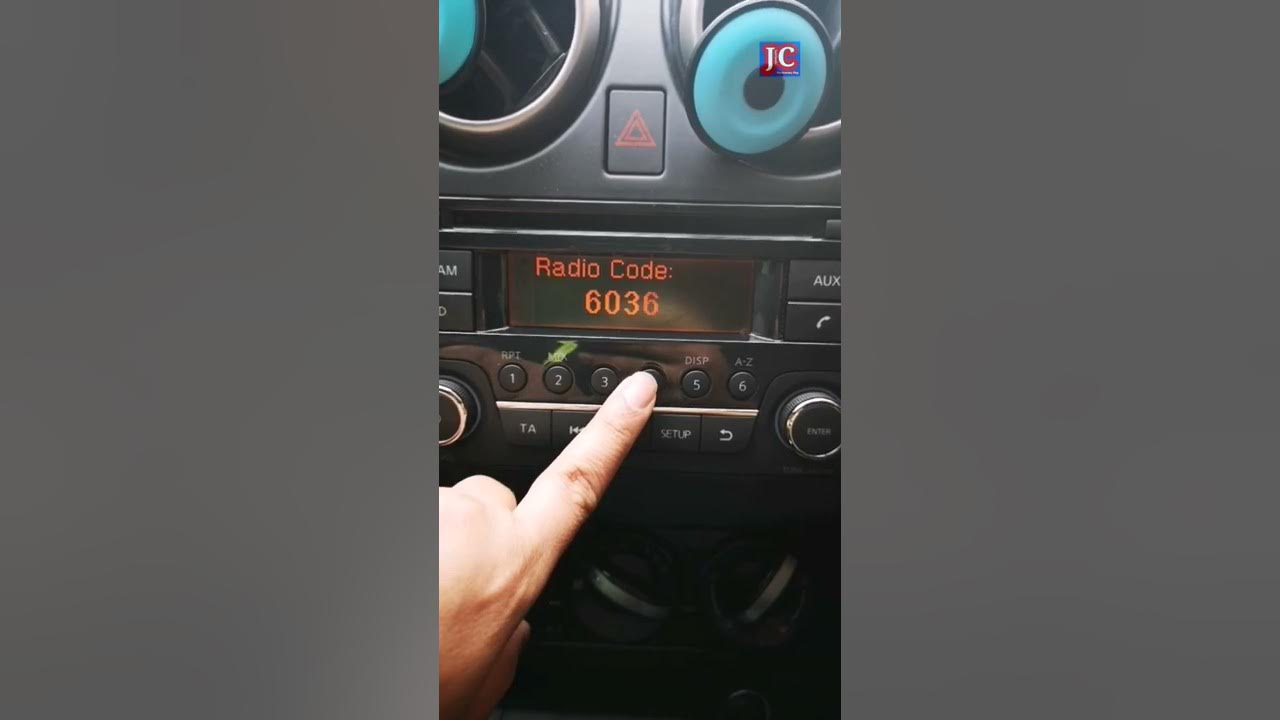
Start the vehicle. The infotainment system will power on, and you may notice other systems needing adjustment. For older models, you might need to re-enter a radio security code if applicable. Reset the clock, power window memory (by rolling them down and up once), and check any other affected vehicle systems.
Always wear appropriate safety glasses and gloves when working with vehicle batteries. Exercise extreme caution to avoid short-circuiting the battery or contacting other terminals, which can cause severe injury or damage to the vehicle’s electrical system. If you are unsure, consult a professional.
This method is often necessary in scenarios such as after a vehicle jump-start that introduced electrical anomalies, or when the radio remains frozen despite multiple soft resets on a 2017 Nissan Maxima. The full power cycle achieved by battery disconnection ensures that capacitors within the infotainment system fully discharge, providing a clean electrical fresh start. Be aware that this can reset various electronic control unit (ECU) parameters, not just the radio, and will require re-initialization of clock settings and potentially power window memory.
Executing a Factory Reset Through Nissan Infotainment System Menus
A factory reset, often referred to as a “master reset,” is the most comprehensive software-based reset available. It returns the Nissan infotainment system to its original ‘default‘ settings, mirroring its state when it left the production line. This is an invaluable option for resolving deep-seated software conflicts or preparing a vehicle for sale, ensuring personal data is removed. Approximately 20% of infotainment issues require a factory reset for permanent resolution.
Understanding the Implications
It is vital to understand the significant implication of a factory reset: all personalized settings, saved Bluetooth devices, navigation history, user profiles, and downloaded apps will be permanently erased. The system will return to a ‘clean‘ state, requiring you to reconfigure everything from scratch. This is why it’s critical to consider backing up any critical data or noting down preferred settings (e.g., equalizer settings, frequently visited navigation points) before initiating this process.
📋
Menu-Driven Factory Reset Guide
Turn on your Nissan’s infotainment system. On the main menu or home screen, look for icons labeled “Settings,” “Setup,” or “Info.” Tap on the appropriate icon to enter the main settings menu.
Within the settings menu, you’ll need to locate options related to system resets or defaults. Common paths include “System,” “General,” “Backup & Reset,” or “Display.” For instance, on a 2021 Nissan Rogue (with the 9-inch NissanConnect system), navigate to Settings > System > Factory Data Reset. For a 2019 Nissan Titan (with its 7-inch display), the path might be Settings > General > Reset All Settings or Restore Defaults.
Select the “Factory Data Reset,” “Restore Defaults,” or “Erase All Data” option. The system will typically prompt you with a warning message about data loss. Confirm your decision to proceed. This process might take several minutes, during which the screen may go blank and reboot multiple times.
Once the factory reset is complete, the system will likely present you with the initial setup screens, similar to when the vehicle was new. You will need to re-pair Bluetooth devices, re-enter navigation home addresses and favorites, adjust audio preferences, and configure any other personalized settings to restore your usage experience.
✅ Pros of Factory Reset
- Resolves deep-seated software conflicts and persistent errors.
- Provides a truly ‘clean slate’ for the infotainment system.
- Erases all personal data, ideal for vehicle resale.
- Can fix issues caused by corrupted system files.
❌ Cons of Factory Reset
- All personalized settings and data are permanently lost.
- Requires re-pairing all Bluetooth devices and reconfiguring settings.
- Time-consuming due to the re-setup process.
- Not necessary for minor, transient glitches.
This method is particularly effective when dealing with recurring software bugs, system instability, or when preparing to sell the vehicle and wishing to remove all personal information. While older models may have fewer digital reset options and rely more on hard resets, newer NissanConnect systems offer this robust, menu-driven solution for comprehensive system initialization.
Model-Specific Reset Procedures and Advanced Troubleshooting for Nissan Radios
Nissan’s vehicle lineup encompasses a wide range of models and model years, each potentially featuring distinct infotainment hardware and software versions. Consequently, reset procedures can vary. While the fundamental principles of soft, hard, and factory resets remain consistent, the specific button combinations or menu navigation paths might differ across models like the Altima, Rogue, Pathfinder, or Titan, and significantly between older non-touchscreen units and contemporary systems. For example, some older Nissan models, such as a pre-2015 Frontier, might require a specific sequence of button presses (e.g., holding ‘Audio’ and ‘Tune’ simultaneously) that is entirely absent in newer touchscreen systems.
Integrated systems like NissanConnect often come with additional considerations. Post-reset, users may need to re-log into or reactivate certain subscription services associated with navigation or telematics. It is always advisable to verify the status of these services after a significant reset. Furthermore, regular software updates are crucial. Outdated software is a common cause of recurring issues, affecting an estimated 15% of all infotainment complaints. Checking for and installing available firmware updates, either directly through the vehicle’s system settings (if supported) or by visiting a certified Nissan dealership, can often prevent the need for frequent resets and enhance overall system stability.
Beyond standard resets, it’s essential to understand when an issue might indicate a potential hardware failure rather than a software glitch. Persistent problems like no sound whatsoever, persistent crackling audio (even after a reset, suggesting a speaker or amplifier issue), or a screen that remains completely blank and unresponsive to any power input could point to internal component malfunctions or loose wiring. For instance, if you experience ‘Nissan radio problems’ such as distorted audio that doesn’t clear with a reset, it’s less likely a software issue and more indicative of a physical component failure. In such cases, professional diagnostic intervention is required. Nissan dealerships possess specialized diagnostic tools that can pinpoint specific fault codes (DTCs) that standard user resets cannot address, offering a precise diagnosis for complex issues.
Always consult your vehicle’s owner’s manual for model-specific instructions, as Nissan periodically refines its infotainment systems and their accompanying reset procedures. Understanding these nuances helps in effective troubleshooting and ensures you’re applying the correct remedy for your specific Nissan model.
By The Numbers: Infotainment Issues
Issues resolved by reset
Minor glitches fixed by soft reset
Issues requiring factory reset
Issues due to outdated software
Post-Reset Configuration and Preventative Measures for Your Nissan Radio
After successfully performing any type of reset on your Nissan radio, particularly a hard or factory reset, the next crucial step is to re-configure your infotainment system to your preferences. This process involves re-establishing essential settings to restore a personalized and functional user experience. This includes pairing Bluetooth devices with your smartphone, setting your favorite radio stations, configuring navigation preferences (such as home and work addresses, and preferred routes), and adjusting audio equalizer settings to your liking. For example, after a factory reset on a 2022 Nissan Sentra, the user would need to re-sync their Apple CarPlay/Android Auto settings, re-enter their home address for navigation, and adjust their preferred bass/treble levels.
Best Practices for System Maintenance
Beyond re-configuration, adopting best practices for maintaining your infotainment system can significantly reduce the likelihood of future malfunctions and prevent the need for another complete factory reset. These practices focus on long-term system health and stability:
Regular Software Updates
Ensure your Nissan’s infotainment system firmware is always up-to-date. These updates often include bug fixes, performance enhancements, and security patches. Maintaining up-to-date software can reduce the incidence of system crashes by up to 25%.
Avoid Excessive App Installations
If your system supports third-party apps, install only those you genuinely need. Excessive apps can consume system resources and introduce potential software conflicts.
Periodic Soft Resets
Periodically performing a soft reset (power/volume knob press) can serve as preventative maintenance, clearing temporary system files and maintaining responsiveness. Regularly clearing temporary system files can help maintain system responsiveness over time.
Stable Connectivity
For smartphone mirroring like Apple CarPlay or Android Auto, always use certified, high-quality USB cables. Faulty cables can lead to intermittent connectivity issues that mimic system malfunctions.
If you experience minor connectivity issues such as an unstable Wi-Fi connection or a weak GPS signal, try troubleshooting those external factors first before resorting to a system reset. Often, these are not infotainment system faults but environmental or device-related issues.
By adhering to these preventative measures and exercising responsible usage, you can significantly extend the lifespan of your Nissan’s infotainment system, prevent software conflicts, and ensure a smooth, enjoyable user experience, minimizing the chances of needing another deep-level initialization or backup restore.
Understanding how to effectively reset your Nissan radio is a fundamental skill for any vehicle owner. This guide has detailed the various reset methods – soft, hard (battery disconnection), and menu-driven factory resets – each designed to address different levels of infotainment system malfunctions. Always prioritize safety, especially when working with the vehicle’s battery, and thoroughly understand the implications of each reset before proceeding. Regular maintenance, including timely software updates and periodic soft resets, is crucial for preventing future infotainment system issues and maintaining optimal performance. Empower yourself with these proven troubleshooting techniques to restore your Nissan radio’s performance. Should persistent issues remain, consult a certified Nissan dealership for professional diagnostics and service.
Frequently Asked Questions
Will resetting my Nissan radio erase all my data?
A soft reset (power button hold) typically does not erase data. However, a hard reset (battery disconnection) may clear some temporary settings like clock and window memory, while a factory reset through the infotainment menu will erase all personalized data, including Bluetooth pairings, navigation history, and custom settings, returning the unit to its ‘default’ state.
How often should I reset my Nissan radio?
There’s no set frequency for resetting your Nissan radio. It should only be performed when experiencing specific issues like freezing, unresponsiveness, or connectivity problems. A soft reset can be done as a first troubleshooting step, but more intensive resets should be reserved for persistent problems, as they involve more extensive system changes.
Can resetting the radio fix NissanConnect problems like navigation errors?
Yes, resetting your Nissan radio, especially a factory reset, can often resolve software-related issues within NissanConnect, including navigation errors, app glitches, and connectivity problems. It effectively gives the system a ‘fresh start’, clearing corrupted data or conflicting processes that might be causing the malfunction. Hardware issues, however, will persist.
Is disconnecting the battery safe for my Nissan’s electronics?
Disconnecting the battery is generally safe when done correctly, adhering to safety protocols like turning off the engine and wearing protective gear. However, it will reset all vehicle computer modules, potentially requiring re-initialization of components like power windows, throttle body, and certain sensor calibrations. Always follow manufacturer guidelines to ‘restore’ proper functioning.
What if my Nissan radio still doesn’t work after all reset attempts?
If your Nissan radio continues to malfunction after performing soft, hard, and factory resets, it indicates a likely hardware fault or a deeper software issue that requires specialized tools. In such cases, it is highly recommended to schedule a diagnostic appointment with a certified Nissan dealership. Their technicians possess the expertise and proprietary equipment to accurately diagnose and repair the underlying problem.