Tesla Battery Health Check: Monitor Degradation & Capacity
Last Updated on September 1, 2026 by Ryan


Understanding your Tesla’s battery health is crucial for maximizing its lifespan. The primary method involves monitoring your estimated range at 100% charge and observing actual range loss over time through the in-car display and mobile app. This provides key insights into your battery’s current performance and degradation.
🎯 Key Takeaways
- Monitor 100% range for degradation signs.
- Track energy app consumption patterns.
- Compare current vs. original rated range.
- Note how charging habits affect health.
- Consider a service check for sudden changes.
To assess your Tesla’s battery health and monitor degradation, the most direct and reliable methods involve closely observing your vehicle’s estimated maximum range displayed on the in-car screen and through the mobile app. Tesla doesn’t provide a direct “battery health percentage” like some devices, so understanding the degradation means tracking your car’s reported capacity over time. This proactive monitoring allows you to identify typical degradation patterns and spot any unusually rapid drops that might warrant further investigation.
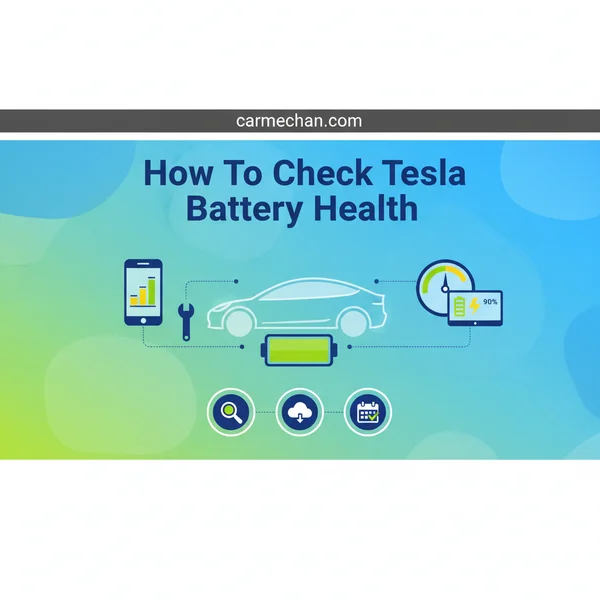
Checking your battery’s health is crucial for understanding its long-term performance and potential resale value. By consistently tracking key indicators, you gain practical insight into how your battery is aging. This knowledge helps manage range expectations, plan trips more accurately, and ensures you’re aware of your vehicle’s condition, empowering you to address any significant changes early on.
Understanding Tesla Battery Degradation Metrics
Tesla vehicles present battery capacity and estimated range through user-friendly interfaces, primarily focusing on what your car can deliver. You won’t find a secret “health percentage” hidden in a deep menu; instead, you’ll interpret the displayed range and how it evolves over your ownership.
What Tesla Shows You
Your Tesla’s primary indicator of battery capacity is the estimated range displayed on the main touchscreen and in the Tesla mobile app. This number represents the car’s best estimate of how far it can travel on a full charge, based on various factors including temperature, recent driving efficiency, and most importantly, the battery’s current maximum energy storage capacity. When discussing degradation, this is the figure you’ll be monitoring. It’s crucial to understand that while driving efficiency influences the real-world range you achieve, this estimated range at 100% charge is the direct proxy for the battery’s health.
Key Indicators to Monitor
To effectively check your Tesla’s battery health, focus on these specific metrics that are readily available to you:
- Estimated Range at 100% Charge: This is the most critical metric. Periodically charge your Tesla to 100% (only when needed for long trips, as frequent 100% charging can accelerate degradation) and note the displayed range. Compare this number to the car’s original EPA-rated range when new. For instance, if your Model 3 Long Range was rated for 310 miles when new, and after 50,000 miles it now consistently shows 280 miles at 100%, you’re observing a 30-mile, or approximately 9.7%, degradation.
- Consistent Monitoring of Percentage-Based Range: If you prefer not to charge to 100% often, note the estimated range at a common charge level, such as 80% or 90%. Over time, track if the range shown at these specific percentages declines. For example, if your car used to show 248 miles at an 80% charge and now shows 224 miles under similar conditions, that indicates a clear capacity loss.
- Long-Term Trends: Don’t react to single data points. Battery estimates can fluctuate slightly due to temperature changes, recent driving styles, or minor software recalibrations. Instead, look for a consistent downward trend in your 100% (or 80-90%) charge range over several months or thousands of miles. This trend is the true indicator of degradation.
Remember to note these figures in consistent environmental conditions where possible, or at least be aware that extreme cold or heat will temporarily impact the displayed range and actual efficiency, making it seem lower even if capacity hasn’t changed dramatically.
How to Check Your Tesla Battery Health Like a Pro: A Practical Walkthrough
Welcome to your essential guide for understanding and monitoring the health of your Tesla’s most vital component: its battery. This comprehensive, step-by-step walkthrough empowers you to independently assess your battery’s degradation, identify potential issues early, and make informed decisions about its care. By following these detailed instructions, you’ll gain valuable insights into your Tesla’s longevity and maintain its peak performance for years to come.
Step 1: Understanding Tesla Battery Basics and Degradation
What you need: A basic understanding of electric vehicle battery principles.
Instructions: Before diving into diagnostics, it’s crucial to grasp what “battery health” entails. Tesla batteries, like all lithium-ion batteries, naturally degrade over time and use. This degradation manifests as a reduction in the total usable energy capacity, leading to a shorter maximum range. Factors accelerating degradation include frequent charging to 100%, consistent deep discharges below 20%, extreme temperatures (very hot or very cold), and rapid charging. A healthy battery will typically show minor degradation (5-10%) in the first few years, which then slows down significantly.
Pro Tip: For daily driving, aim to keep your Tesla’s charge between 20% and 80-90% to minimize stress on the battery and prolong its lifespan. Only charge to 100% when you need the full range for a long trip, and then leave it unplugged as soon as possible after reaching full.
Step 2: Checking Your Current Maximum Range and Battery Capacity Display
What you need: Your Tesla vehicle, preferably fully charged (100%).
Instructions: A primary indicator of battery health is the estimated range displayed on your car’s screen when fully charged. Drive your Tesla until its charge is below 20%, then plug it in and charge it all the way to 100%. Once fully charged, note the projected maximum range. Compare this number to your car’s original EPA-rated range (e.g., a Model 3 Long Range might have an EPA rating of ~333 miles initially). Remember that Tesla’s range estimates are dynamic and based on recent driving efficiency, so variations can occur. A significant, consistent drop (e.g., more than 10-15% below original EPA after a few years) might warrant further investigation.
Pro Tip: Occasionally (once every 1-3 months), performing a “BMS calibration” can help improve the accuracy of your car’s range estimate. This involves charging to 100%, driving it down to a very low state of charge (e.g., 10-20%), and then charging it back up to 90% or more. This process allows the Battery Management System (BMS) to recalibrate its energy readings.
Step 3: Monitoring Charging Behavior and Efficiency
What you need: Your Tesla vehicle, access to charging (home or Supercharger), Tesla mobile app.
Instructions: Observe how your Tesla charges, both at home and at Superchargers. When Supercharging, pay attention to the peak charging rate (kW) your vehicle achieves, especially when the battery is at a low state of charge (e.g., 10-20%). While charging speeds vary with battery temperature and ambient conditions, a noticeable and consistent reduction in peak charging rates compared to what you experienced when the car was newer, under similar conditions, could indicate some battery degradation. Also, use the Tesla app to track the kWh added during a charging session and compare it to the range gained. If you consistently add significantly more kWh for less range gain, it might suggest diminished efficiency.
Pro Tip: Keep a mental note of your typical Supercharging speeds. Newer Tesla models with pre-conditioned batteries can often hit 200-250 kW when starting from a low SoC. Significant drops to below 100 kW even with a warm, low battery might be a minor flag for observation.
Step 4: Utilizing Third-Party Telemetry Apps (e.g., TezLab, Tessie, TeslaFi)
What you need: Smartphone, a chosen third-party app (often subscription-based), your Tesla login credentials (to grant API access).
Instructions: Several excellent third-party applications can connect to your Tesla’s API and provide detailed battery health insights that aren’t readily available in the car’s interface. Apps like Tessie, TeslaFi, or TezLab track data such as battery capacity estimates, degradation curves over time, charging cycles, and overall efficiency. After subscribing and linking your Tesla account, allow the app to collect data for several weeks or months. These apps often present the data visually, showing a percentage of original capacity remaining. This can be one of the most accurate ways for an owner to track long-term battery health trends.
Pro Tip: Install one of these apps early in your ownership and let it run continuously. The longer it collects data, the more accurate and insightful its degradation trend graphs will become, providing a reliable baseline for future comparisons.
Step 5: Performing a Controlled “Range Test” for Consistent Data
What you need: A fully charged Tesla, a planned route, pen and paper or a note-taking app.
Instructions: For a more scientific approach, conduct a controlled range test. Charge your Tesla to 100%. Record the displayed range. Choose a consistent route that you can drive under similar conditions (e.g., a flat highway stretch). Drive a predetermined distance, ideally 50-100 miles, maintaining a consistent speed (e.g., 60-70 mph) and keeping climate control settings the same. After completing the drive, record the remaining range and the actual miles driven. Calculate the actual energy consumption per mile and compare it to historical data or the car’s efficiency rating. Repeating this test periodically (e.g., every 6-12 months) can reveal subtle changes in real-world range performance.


Pro Tip: To minimize variables, perform this test on a day with moderate temperatures and low wind. Avoid aggressive acceleration or heavy braking, as these significantly impact efficiency and can skew your results.
Step 6: Observing Visual Cues and Error Messages
What you need: Your Tesla vehicle and an attentive eye.
Instructions: While less scientific, keeping an eye out for visual cues or specific error messages is crucial. Your Tesla is designed to alert you to significant issues. Pay attention to any warning lights or messages that appear on the main touchscreen related to the battery system, charging, or overall vehicle performance (e.g., “Reduced Power,” “Battery Degradation Detected,” “Service Required”). Any sudden, unexplained drops in range, particularly after a full charge, or persistent warnings should be taken seriously. Also, note any unusual noises or smells coming from the battery area, although these are rare.
Pro Tip: Do not ignore persistent warning lights or messages. While minor, temporary alerts can sometimes occur, any continuous or recurring warnings concerning the battery should prompt an immediate call to Tesla Service.
Step 7: Analyzing Your Data and Drawing Conclusions
What you need: All collected data from the previous steps, original EPA range for your specific Tesla model, a calm and analytical mindset.
Instructions: Compile all your observations. Compare your current 100% charged range estimate to the original EPA rating for your model. Review the degradation curves from your chosen third-party app. Look at the trends over several months, not just isolated data points. For instance, if your 100% range has consistently dropped by 1-2% per year, and your third-party app shows a stable degradation curve, your battery health is likely normal. Remember, an initial degradation of 5-10% over the first 50,000-100,000 miles is considered typical and expected. If you observe a sudden, significant, and unexplained drop (e.g.,>10% in a few months), or if warnings appear, then it’s time to act.
Pro Tip: Don’t panic over minor fluctuations in range estimates. The BMS constantly learns and adapts. Focus on long-term trends and significant, sustained changes rather than daily variations.
✅ Final Checklist
- Your Tesla has been fully charged to 100% at least once during your assessment.
- You have compared your current 100% charged range to your Tesla’s original EPA rating.
- If used, your third-party telemetry app has collected data for several weeks and its degradation graphs have been reviewed.
- You have noted any unusual charging behaviors or unexpected reductions in charging speed.
- You have confirmed the absence of any persistent battery-related warning messages on your Tesla’s screen.
Important Notes:
- Safety Considerations: NEVER attempt to open the battery pack or work on high-voltage components yourself. This is extremely dangerous and requires specialized training and tools.
- When to Seek Professional Help: Contact Tesla Service immediately if you experience a sudden, significant, and unexplained loss of range (e.g., more than 15% overnight), persistent battery-related error messages, “Service Required” alerts that don’t clear, or noticeable reductions in performance or charging ability that aren’t explained by external factors (like cold weather).
- Estimated Time and Cost Range: Most of these checks can be performed passively over weeks or actively in 30-60 minutes per check. The cost ranges from free (using in-car data) to approximately $5-$10 per month for a third-party telemetry app subscription.
Interpreting Your Tesla’s Range and Capacity Data
Once you’ve collected data on your Tesla’s estimated range, understanding what those numbers mean in the context of battery health is the next crucial step. It helps you differentiate between normal aging and potential issues.
What Your Estimated Range Tells You
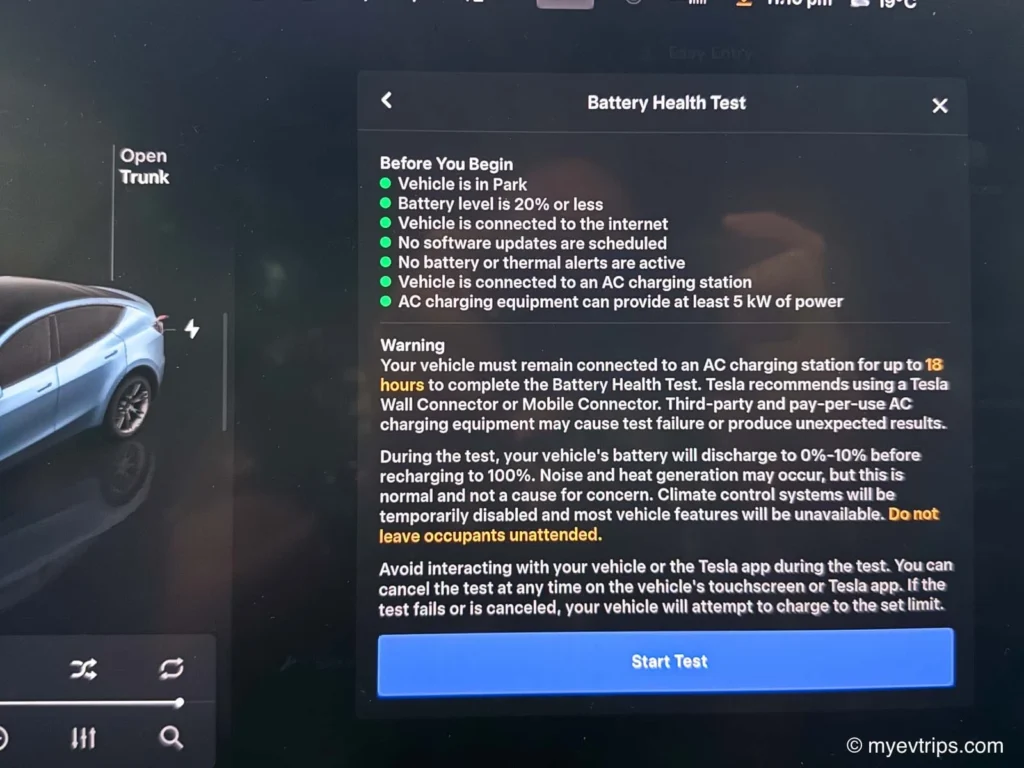
A lower estimated range at 100% charge, compared to when your car was new, directly signifies battery degradation. This means your battery can no longer hold as much energy as it once could. Think of it as a bucket that used to hold 10 gallons but now only holds 9 gallons, even when completely full. That 10% reduction in capacity translates directly to a 10% reduction in maximum potential range. This is a natural process for all lithium-ion batteries; they gradually lose capacity over their lifespan due to charge cycles, age, and exposure to environmental factors like heat.
It’s important to contextualize this loss. A displayed range of 280 miles on a car originally rated for 310 miles indicates about a 9.7% degradation. This isn’t just about how far you can drive; it’s a direct window into the physical state of your battery pack. A sudden, unexplained drop in this figure warrants closer attention, as it deviates from typical gradual degradation.
Typical Degradation & Red Flags
Understanding typical degradation rates helps you assess if your Tesla’s battery health is normal or if there’s a cause for concern. Generally, Tesla batteries exhibit the most significant capacity loss in the first 1-2 years or 50,000 miles, typically around 5-10%. After this initial period, the rate of degradation tends to slow down considerably. For example, many Teslas will show around 90-95% of their original capacity after the first few years, which is well within expected norms.
Signs of normal degradation:
- A gradual, slow decrease in your 100% charge range over thousands of miles and multiple years.
- Capacity remaining above 80% after 100,000 miles, which is a common benchmark for warranty coverage on many EV batteries.
Potential red flags indicating significant health issues:
- Sudden, dramatic drop: A sudden decrease of 5% or more in your 100% charge range within a short period (e.g., a few weeks) without obvious external factors like extreme cold weather or a recent major software update.
- Inconsistent range estimates: If your estimated range at a specific charge percentage (e.g., 50%) fluctuates wildly between charges, even when conditions are similar.
- Rapid decline after a software update: While updates can sometimes recalibrate range, a very large drop immediately following an update might indicate an underlying issue that the software has now accurately reflected.
Always consider environmental factors; cold weather significantly impacts displayed range and efficiency. If you observe a concerning trend, repeating your measurements under more consistent conditions is advisable before contacting Tesla service.
Factors Influencing Tesla Battery Health & Longevity
Understanding what impacts your Tesla’s battery health empowers you to make smarter choices. While some degradation is inevitable, your habits play a significant role in how quickly it occurs. Think of your battery as an athlete – consistent, moderate training yields better long-term performance than constant extreme workouts.
Charging Habits: The Sweet Spot
How you charge your Tesla is arguably the most critical factor. Lithium-ion batteries thrive in a “middle ground” and dislike being fully empty or completely full for extended periods. This is why Tesla recommends daily charging within a specific range.
- Daily Charging: Aim to keep your battery between 20% and 80% for regular use. This range minimizes stress on the battery cells, promoting longer life. Imagine it as a comfortable resting zone for your battery.
- Long Trips & Supercharging: For extended journeys, charging to 90-100% is fine, but try to start driving shortly after reaching full. Similarly, Supercharging is convenient but generates more heat and current, which can contribute to faster degradation if done excessively. Use it when necessary, but prioritize Level 2 home charging for daily needs.
- Avoid Deep Discharges: Letting your battery frequently drop below 10-20% puts extra strain on the cells. It’s like running on fumes – not ideal for the engine or the battery!
Temperature Extremes & Driving Style
The environment your Tesla operates in and how you drive it also leave their mark on battery health.
- Temperature Management: Batteries prefer moderate temperatures. Extreme heat (like parking in direct summer sun for hours) or extreme cold (especially when left unplugged) can accelerate degradation. Your Tesla’s thermal management system works hard to protect the battery, but you can assist it. Parking in the shade or a garage, and preconditioning your car before driving in cold weather, can make a difference.
- Aggressive Driving: Frequent, rapid acceleration and hard braking demand high power output from the battery. While exhilarating, consistently pushing your Tesla to its performance limits generates more heat and can stress the battery cells more than a smoother, more relaxed driving style. Think of it as bursts of intense activity versus a steady jog – the latter is better for endurance.
When to Consider a Tesla Service Battery Check
While self-monitoring gives you a good baseline, there are times when a professional assessment from Tesla service is advisable. They have specialized diagnostic tools to dive deeper into your battery’s health.
Unusual Performance or Range Loss
It’s normal for a Tesla battery to degrade by 1-2% per year. However, if you notice significant or sudden changes, it might be time for a closer look.
- Sudden Drop in Range: If your estimated range suddenly plummets by a large percentage without a clear environmental or charging explanation, it’s a red flag.
- Charging Issues: Experiencing unusually slow charging speeds at home or Superchargers, or if your car consistently fails to reach its expected charge capacity, could indicate a battery issue.
- Warning Lights/Messages: Your Tesla is smart. If it displays battery-related warning messages on the screen, don’t ignore them. These are direct indicators that something needs attention.
- Consistency Check: If your usual driving routes suddenly require significantly more charge than before, and this isn’t explained by weather or driving style, a professional check can help identify the root cause.
Warranty Concerns & Pre-Purchase Inspections
Understanding Tesla’s battery warranty is important, and a professional check is crucial in certain scenarios, especially when dealing with used vehicles.
- Tesla Battery Warranty: All Tesla vehicles come with a battery warranty that covers capacity retention over a certain mileage and duration. If you suspect your battery is performing below the warranted capacity, a service check can verify this. For example, most models are guaranteed to retain 70% battery capacity over 8 years or 100,000-150,000 miles (depending on the model).
- Buying a Used Tesla: This is perhaps the most critical time for a professional battery health check. A certified Tesla service inspection can provide invaluable peace of mind by giving you an accurate picture of the battery’s current state of health and estimated remaining capacity before you commit to a purchase. It’s an investment that can save you from costly surprises down the road.
Conclusion


Staying informed about your Tesla’s battery health doesn’t have to be complicated. By regularly monitoring your range, checking the in-car display, and understanding the subtle cues from your vehicle’s performance, you can keep a proactive eye on your investment. Adopting smart charging habits and being mindful of extreme conditions will significantly contribute to your battery’s longevity.
If you observe unusual degradation or performance, don’t hesitate to consult Tesla Service for a professional diagnosis. Empower yourself with knowledge, drive smart, and enjoy many years of efficient, reliable electric motoring!
❓ Frequently Asked Questions
How do I access in-car battery data to assess its health?
Navigate to the ‘Trips’ card or ‘Energy’ app on your Tesla’s screen to view consumption patterns, and check your estimated range at 100% charge in the main display to track capacity loss over time. You can also view charging limits and historical charging data in the mobile app.
What specific metrics should I monitor to identify battery degradation?
Focus on your estimated range at 100% charge, comparing it to the original rated range for your model, and observe the consistency of energy consumption in the ‘Energy’ app. Significant, sudden drops in range, or much higher than expected kWh/mile consumption for your driving style, can be indicators.
What is the typical battery degradation rate for Teslas over time or mileage?
Tesla batteries generally see their most significant degradation (around 5-10%) within the first 50,000 miles or few years, after which the rate typically slows considerably, often settling into 1-2% annually for subsequent years. Total degradation for older, high-mileage Teslas often sits around 10-15%.
How do my charging habits impact my Tesla’s battery health and longevity?
Frequent charging to 100% (especially for daily use), consistently draining the battery to very low levels, and excessive Supercharging can all accelerate degradation. For optimal longevity, aim to keep your daily charge between 20-80% and utilize Supercharging only when necessary for long trips.
Is there an official ‘health percentage’ displayed in my Tesla’s interface?
Tesla vehicles do not display an explicit ‘battery health percentage’ like a phone. Instead, owners assess health by observing their maximum estimated range when fully charged and comparing it to the vehicle’s original rated range, along with monitoring consumption data over time.
When should I contact Tesla service regarding potential battery health concerns?
You should consider a service appointment if you observe a sudden, unexplained, and significant drop in maximum range (e.g.,>10% in a short period), persistent error messages related to the battery system, or noticeable performance issues that aren’t explained by driving conditions or software updates. Tesla’s warranty covers severe degradation beyond typical rates.