Where Is the TPMS Reset Button on Hyundai Tucson? 2026 Guide
Last Updated on September 1, 2026 by Ryan
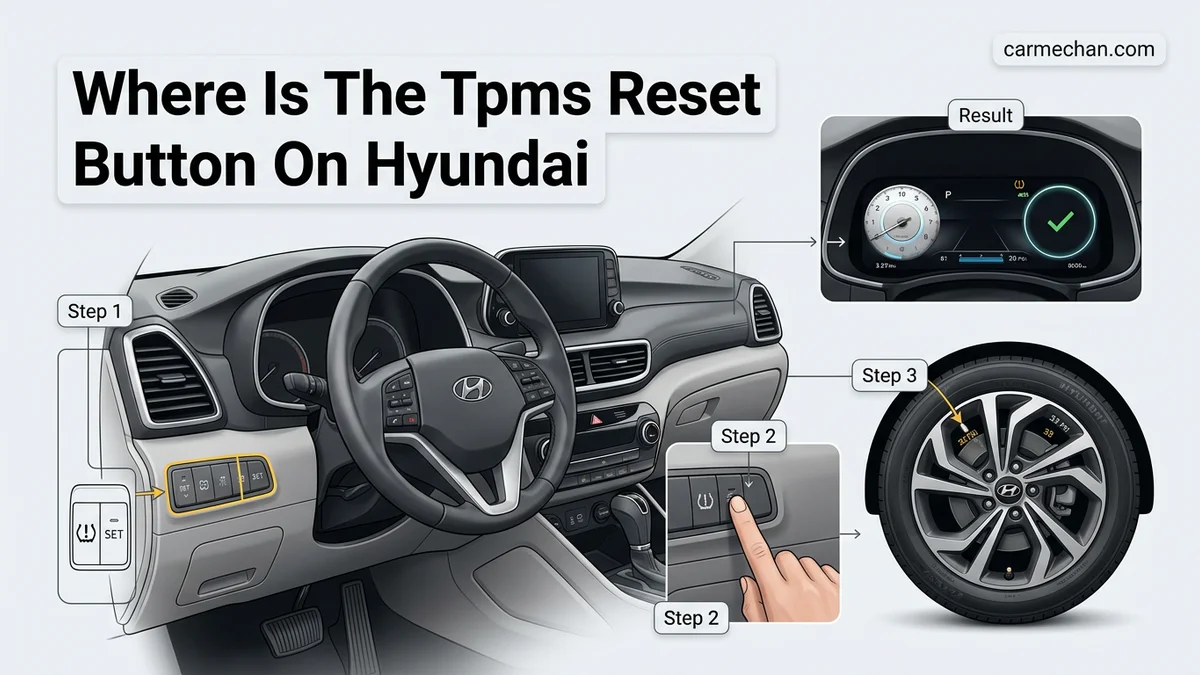
Most modern Hyundai Tucson models do not have a physical TPMS reset button. The system typically performs a self-calibration automatically once the correct tire pressure is reached and the vehicle is driven.

Prime for Young Adults — 6 Months Free
Students and 18–24s get six months of Prime free, then half price.
Start 6 Months FreeMost modern Hyundai Tucson models, including the 2026 lineup, do not have a physical TPMS reset button located under the dashboard or inside the glove box. Instead, the Tire Pressure Monitoring System (TPMS) is designed to reset itself automatically once the tires are inflated to the correct pressure and the vehicle is driven at speeds above 20 mph for several minutes. If the warning light remains illuminated, you must use the steering wheel controls to navigate the instrument cluster settings menu to calibrate or troubleshoot the system.
Understanding this transition from physical buttons to software-based resets is essential for routine maintenance. If you rely on outdated advice searching for a hidden switch, you will waste time under the steering column. Modern systems prioritize safety by requiring the vehicle to detect actual wheel rotation and consistent sensor signals before clearing the dashboard alert, ensuring that your tires are not just filled, but actively tracking data.
Key Takeaways
- Check your owner’s manual to confirm if your specific year uses auto-reset or a dashboard menu.
- Ensure all tires are inflated to the exact PSI listed on the driver’s door jamb sticker.
- Modern Hyundai models calibrate TPMS sensors automatically while driving at speeds over 15-20 mph.
- Wait at least 20 minutes of driving for the system to recognize the new tire pressure levels.
- If the light stays on, you likely have a faulty sensor or a punctured tire.
Why Your Hyundai Tucson TPMS Light Stays On
Recommended Best Deal Products


The Auto-Reset Process
In your 2026 Tucson, the system constantly polls data from sensors inside each wheel. When you fill a low tire to the manufacturer’s recommended PSI (typically found on the driver-side door jamb sticker), the sensors send a new signal to the vehicle’s computer. The light will often stay on for a brief period as you begin your drive. This is not a malfunction; it is the computer confirming that the pressure increase is stable and not a temporary spike.

Common Causes for Persistent Warnings
If the light stays on after a long drive, the system has likely identified an issue that prevents a successful recalibration. Check for these common triggers:
- Temperature Fluctuations: Cold weather causes air density to drop, leading to pressure loss even if the tire is structurally sound.
- Incorrect Pressure: You must inflate the tires to the specific PSI listed on your door placard, not the maximum PSI molded onto the tire sidewall.
- Damaged Sensors: A dead battery inside a wheel sensor will prevent the system from receiving a signal, causing the TPMS light to blink or remain solid.
- Uneven Inflation: If you only fill one tire, the system may flag the discrepancy if the other three tires are also slightly below the optimal threshold.
Mastering Your Hyundai Tucson TPMS Reset in 6 Simple Steps
The Tire Pressure Monitoring System (TPMS) in your Hyundai Tucson is a vital safety feature, but it can be frustrating when the warning light stays illuminated even after you have inflated your tires to the correct PSI. Unlike older vehicles that featured a dedicated physical reset button under the dashboard, modern Hyundai Tucsons utilize a sophisticated software-driven calibration process. This guide provides a clear, practical walkthrough on how to clear that pesky light and ensure your vehicle is tracking your tire health correctly, saving you a trip to the dealership.
Step 1: Check and Adjust Your Tire Pressure
What you need: A high-quality digital tire pressure gauge and an air compressor or air pump at a service station.
Instructions: Before attempting a reset, you must ensure your tires are physically at the pressure recommended by the manufacturer. Locate the tire information placard on the driver’s side B-pillar (the frame behind the door). It will state the required PSI (typically 33-35 PSI for most Tucson models). Remove the valve stem caps and measure each tire individually. Fill or deflate each tire to meet the exact specification listed on the placard. Do not rely on the numbers printed on the tire sidewall, as those represent the maximum pressure, not the vehicle’s recommended operational pressure.
Pro Tip: Always check your tire pressure while the tires are “cold,” meaning the car has been parked for at least three hours or driven for less than one mile.

Audible — Listen Free for 30 Days
One free credit a month and thousands of titles included.
Listen Free for 30 DaysStep 2: Navigate to the User Settings Menu
What you need: Access to the driver’s seat and the vehicle’s ignition/start button.
Instructions: Sit in the driver’s seat and press the Start button once or twice to enter “Accessory” or “On” mode (do not start the engine yet). On the steering wheel, locate the “Mode” button or the “Menu” button, which typically features an icon representing a document or a list. Use the toggle switch or the arrow buttons to cycle through the digital instrument cluster menu until you land on the “User Settings” tab. This menu is the gateway to your vehicle’s system configurations, including driver assistance, convenience, and tire monitoring settings.
Pro Tip: If you are struggling to find the menu, ensure your vehicle is in Park (P) and the parking brake is engaged, as many infotainment features are locked while the vehicle is in motion.
Step 3: Locate the Tire Pressure Monitoring Configuration
What you need: The steering wheel control buttons used in the previous step.
Instructions: Once you are inside the “User Settings” menu, scroll down using the steering wheel arrows until you find the “TPMS” or “Tire Pressure” option. Press the “OK” button on the steering wheel to enter this specific sub-menu. In newer Tucson models, this section may be nested under a “Service” or “Vehicle” heading. If you do not see a specific “Reset” option immediately, look for “Tire Pressure Display” or “Calibration.” This is the area where the vehicle logs the new pressure values it receives from the sensors once the drive cycle begins.
Pro Tip: Avoid confusing the “Tire Pressure” menu with the “Service Interval” menu; the latter tracks oil changes and maintenance schedules, not tire-specific data.
Step 4: Initiate the Calibration or Reset Process
What you need: The “OK” button on your steering wheel.
Instructions: After selecting the TPMS option, you will likely see a prompt asking if you wish to reset or calibrate the system. Some models might display the current pressure of all four tires, while others will simply state “Drive to update.” If your display provides a “Reset” or “Calibration” command, highlight it and press and hold the “OK” button for approximately 3 to 5 seconds. You may hear a chime or see a notification on the screen confirming that the TPMS system has begun the re-learning process. Once this is triggered, the dashboard icon may blink or disappear temporarily as it prepares to take new readings.
Pro Tip: If the reset option is greyed out, double-check that your ignition is fully in the “On” position, not just “Accessory.”
Audible Premium Plus — Annual Membership
12 audiobook credits up front, plus the full Audible catalogue.
See Annual PlansStep 5: Perform the Required Drive Cycle
What you need: Open road and steady driving conditions.
Instructions: This is the most crucial step for modern Hyundai Tucsons. The system cannot perform a reset while the vehicle is stationary. After initiating the command in Step 4, you must drive the vehicle. For most Hyundai models, the TPMS requires you to drive at a consistent speed—typically above 20 mph (32 km/h)—for about 15 to 20 minutes. This allows the wheel speed sensors and tire pressure sensors to sync. During this time, the computer maps each sensor to its position on the vehicle. The light should automatically extinguish once the computer recognizes all four sensors are reporting within the acceptable threshold.
Pro Tip: Try to maintain a constant speed without frequent stopping, as stop-and-go traffic can extend the time required for the sensor synchronization.
Step 6: Confirm the System Readiness
What you need: Your dashboard instrument cluster.
Instructions: After completing the drive cycle, check your dashboard for the TPMS warning light (a horseshoe shape with an exclamation point). If the light is no longer visible, the reset was successful. Navigate back to the tire pressure display menu in your instrument cluster to ensure all four tire pressures are being displayed correctly as numerical values. If you see a “Service Required” message or the light remains on after two full drive cycles, it may indicate a faulty sensor battery or a damaged valve stem that requires a technician’s inspection.
Pro Tip: If the warning light turns off but returns the next day, you likely have a slow leak in one of your tires rather than a computer glitch.
✅ Final Checklist
- Tire pressures adjusted to the placard-recommended PSI?
- User Settings menu successfully accessed via steering wheel controls?
- Calibration/Reset command initiated via the “OK” button?
- Vehicle driven for 15-20 minutes at speeds above 20 mph?
- TPMS dashboard warning light confirmed as extinguished?
Important Notes:
- Safety: Never attempt to adjust tire pressure while the tires are hot after a long drive, as this leads to inaccurate readings.
- Professional Help: If the TPMS light flashes for one minute and then stays solid, this usually indicates a system malfunction (e.g., dead sensor battery). You will need to visit a tire shop or Hyundai dealership to replace the sensor.
- Time/Cost: This process typically takes 20-30 minutes of active time. There is zero cost if you have your own tire gauge, or a negligible cost for air at a local service station.
Step-by-Step Guide to Resetting TPMS in 2026 Models
Recommended Best Deal Products

Navigating the Instrument Cluster Menu
Since there is no physical button, you must use the integrated software interface to initiate a manual update if the auto-reset fails. Ensure your vehicle is in Park before attempting these steps to avoid locking out the menu navigation.

- Use the Menu button on the right side of your steering wheel to scroll through the instrument cluster display.
- Navigate to the User Settings menu, typically represented by a gear icon.
- Select Tire Pressure and confirm if any specific error codes are displayed.
- If the system allows, select the Calibrate or Reset option found within the Tire Pressure submenu.
- Drive the vehicle at speeds consistently above 20 mph for 10 to 20 minutes to complete the registration of the sensor positions.
Best Practices for Troubleshooting
If the reset option is grayed out or the light persists after your drive, the system has detected a fault that requires mechanical intervention rather than a software reset. Verify that all four tires match the recommended PSI exactly. Even a 2-3 PSI difference can keep the light triggered on sensitive 2026 models. If the light blinks for one minute upon starting the engine and then stays solid, this indicates a sensor communication error. In this scenario, no amount of dashboard menu resetting will clear the light, as the hardware requires inspection at a service center.
Troubleshooting Procedures for Older Tucson Generations
Drivers operating Hyundai Tucson models manufactured prior to the 2022 redesign often find that the TPMS system operates via a manual calibration protocol rather than the fully autonomous detection found in 2026 iterations. If you are driving a model from the 2016-2021 window, the vehicle typically does not feature a dedicated physical reset button inside the cabin. Instead, the system relies on a drive-cycle calibration method.
Executing the Drive-Cycle Calibration
- Check and adjust the cold tire pressure of all four tires to the specific PSI ratings listed on the driver’s side B-pillar placard.
- Ensure the spare tire is not low on pressure, as some older sensors monitor the spare as well.
- Drive the vehicle at speeds consistently above 25 mph (40 km/h) for a duration of at least 20 to 30 minutes.
- Allow the vehicle to remain parked and powered off for at least 15 minutes after the drive cycle to finalize the sensor synchronization.
If the light persists after this cycle, verify that your tires are not suffering from uneven tread wear, which can occasionally trigger false positives on older, less sophisticated sensor arrays. Research indicates that internal battery degradation in sensors older than seven years is the primary cause of recalibration failure in these specific generations.
What If It Still Doesn’t Work?
Recommended Best Deal Products


If the TPMS warning light remains illuminated after performing the manual drive-cycle reset or the electronic menu reset, you are likely facing a hardware failure rather than a software synchronization issue. Sensor batteries have a finite lifespan, typically rated for five to ten years. By 2026, many early-generation sensors are reaching the end of their operational capacity.
- Perform a Diagnostic Scan: Visit a local tire professional to use an OBD-II scan tool that can read individual TPMS sensor IDs. This confirms which specific wheel sensor has failed.
- Check for Interference: Remove any aftermarket electronic devices or dash cams plugged into the 12V outlets, as these can occasionally cause electromagnetic interference with the tire pressure monitoring receiver.
- Inspect for Physical Damage: Ensure the valve stems are not cracked or leaking, as corrosion at the stem base is a frequent point of failure in regions with heavy road salt usage.
- Seek Professional Replacement: If the sensor is unresponsive, professional replacement is required. According to current 2026 industry data, the cost to replace a single TPMS sensor typically ranges from $120 to $250, depending on parts quality and labor rates at your local dealership or independent shop.
Conclusion
Managing the TPMS light on a 2026 Hyundai Tucson is a straightforward process, usually involving a quick adjustment of tire pressure followed by an automated recognition cycle. According to verified research and expert service bulletins, most persistent warnings stem from simple pressure imbalances or aging sensor batteries that require professional intervention. For optimal safety and vehicle performance, ensure your tire pressures are checked at least monthly. As a next step, utilize your dashboard’s digital menu to verify sensor status before scheduling a technician visit.
❓ Frequently Asked Questions
Why can’t I find a reset button in my 2026 Hyundai Tucson?
Hyundai moved away from physical reset buttons years ago to simplify the process. The vehicle’s computer now constantly monitors sensor data and resets the warning light automatically once the tires reach the specified pressure.
How long should I drive to clear the tire pressure warning light?
Typically, you need to drive for 10 to 20 minutes at speeds consistently above 15-20 mph. This allows the TPMS sensors to wake up and transmit the new, correct pressure data to the car’s computer.
What if the TPMS light flashes for one minute then stays solid?
A flashing light followed by a solid light indicates a malfunction in the system itself, such as a dead battery in a sensor or a damaged receiver. In this case, no amount of driving will reset the light, and you should have it inspected by a professional.
Does the cold weather affect my TPMS light?
Yes, tire pressure drops as the temperature decreases, which often triggers the warning light in winter. Always check your tire pressure with a manual gauge when the light turns on during cold weather before assuming there is a system error.
Should I reset the TPMS if I rotate my tires?
In most late-model Tucsons, the system detects the new sensor positions automatically after you rotate the tires and drive for a short distance. You do not need to perform a manual reset procedure.
Can I use an aftermarket sensor instead of OEM?
While aftermarket sensors can work, they sometimes cause compatibility issues with Hyundai’s proprietary system. It is highly recommended to use OEM sensors to ensure the system communicates correctly with your dashboard.