Nissan Rogue Key System Error: Reset & Fixes
Last Updated on September 1, 2026 by Ryan
📋 Table of Contents
Resolve your Nissan Rogue key system error with this guide. Understand common causes and effective reset methods to regain access to your vehicle. Don’t get locked out!
Nissan Rogue key system error? These fix it without a dealer visit:


![Au-TOMOTIVE GOLD Compatible Keychain and Keyring for Nissan Rogue [KC1540.ROG] - Premium…](https://m.media-amazon.com/images/I/31vIAKQQiDL._SS500_.jpg)
As an Amazon Associate we earn from qualifying purchases.
🎯 Key Takeaways
- Identify common causes of Nissan Rogue key errors.
- Learn simple reset procedures to try yourself.
- Understand the role of the Intelligent Key system.
- Know when professional diagnosis is necessary.
- Prevent future key system issues with proper care.
Ever found yourself locked out of your Nissan Rogue, or had the dashboard light up with a cryptic “Key System Error” message? It’s a frustrating moment, especially when you’re in a hurry. This common issue can leave you stranded and wondering what went wrong with your usually reliable vehicle.
Understanding and troubleshooting these key system errors is crucial for any Nissan Rogue owner. It can save you time, money, and a lot of unnecessary stress. This post is here to guide you through what these errors mean and what might be causing them, so you can get back on the road quickly.
Understanding Nissan Rogue Key System Errors
When your Nissan Rogue’s key system throws an error, it means the car isn’t communicating properly with your intelligent key fob. This system is pretty advanced. It uses radio frequencies to let you start the engine, unlock doors, and even remotely start your car. Think of it as a secret handshake between your key and your car. If that handshake fails, you get an error.

These errors aren’t always a sign of a major breakdown. Often, they stem from simple issues that are easy to fix. Knowing what these common errors look like helps you diagnose the problem faster. It stops you from panicking and assuming the worst. Your car is trying to tell you something is amiss, and we’ll help you understand its message.
Common Error Indicators
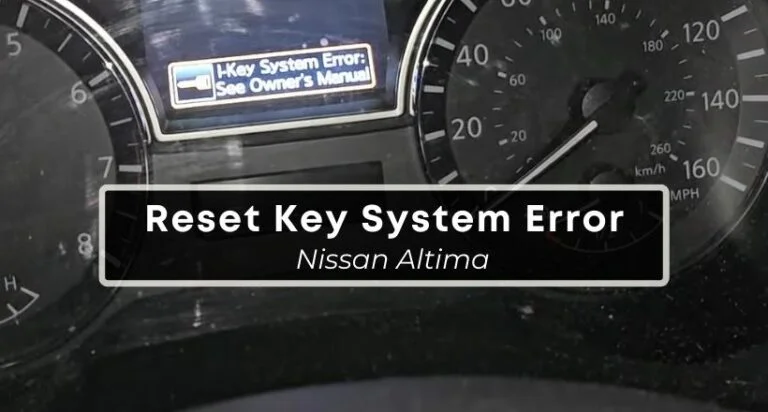
You might see a few different things when the key system has a problem. The most obvious is a warning light on your dashboard. This light often looks like a key inside a circle. Sometimes, the car will simply refuse to start. You might also have trouble unlocking or locking the doors. An audible chime might also sound. These are all signals your key system needs attention.
What the Error Really Means
At its core, a key system error means the vehicle’s immobilizer system cannot verify your key. This is a security feature. It prevents someone from stealing your car. If the car can’t “see” or recognize a valid key, it will prevent the engine from starting. It’s a safety measure, though inconvenient when you’re the rightful owner.
Nissan Rogue Key System Error Reset: Your Complete DIY Guide
Encountering a “Key System Error” message on your Nissan Rogue can be frustrating, preventing you from starting your vehicle or accessing certain functions. This guide provides a detailed, step-by-step process to help you diagnose and potentially reset the key system error, empowering you to get back on the road with confidence. Following these instructions carefully can save you time and money by resolving common issues without the need for immediate professional intervention.
Step 1: Initial System Restart (The “Power Cycle”)
What you need: Your Nissan Rogue key fob and vehicle.
Instructions: This is the simplest and often most effective first step. Ensure all doors and the trunk are completely closed and locked. Insert the key fob into the designated slot (if applicable) or simply have it inside the vehicle. Turn the ignition completely OFF. Wait for at least 30 seconds to allow the vehicle’s electronic systems to fully power down. After the wait, turn the ignition ON (but do not start the engine) for a few seconds, then turn it OFF again. Finally, attempt to start the engine. This process essentially reboots the vehicle’s computer and can clear temporary glitches in the key system communication.
Pro Tip: Make sure there are no other key fobs or electronic devices emitting strong radio frequencies (like some garage door openers or wireless chargers) very close to the vehicle during this restart, as they could potentially interfere with the system’s reset.
Step 2: Battery Check for the Key Fob
What you need: Your Nissan Rogue key fob, a small flathead screwdriver or a coin, and a new CR2032 (or equivalent, check your owner’s manual for the exact type) button cell battery.
Instructions: A weak or dead battery in your key fob is a very common cause of key system errors. Locate the seam around the edge of your key fob. On many Nissan Rogue fobs, there’s a small notch or indentation. Gently insert the flathead screwdriver or coin into this notch and twist carefully to pry open the fob. Be cautious not to damage the plastic. Once open, carefully remove the old battery and note its orientation (positive and negative sides). Insert the new battery, ensuring it’s correctly aligned, then snap the fob back together. Test the fob’s buttons and then attempt to start your Rogue.
Pro Tip: If your Rogue has a slot for the key fob and a separate start button, try holding the fob directly against the start button if the battery is low or suspected to be the issue. Your vehicle has a backup system that can often detect a nearly dead fob this way.
Step 3: Verify Key Fob Immobilizer Recognition
What you need: Your Nissan Rogue key fob and vehicle.
Instructions: Sometimes the issue isn’t a complete failure but a temporary communication breakdown. With the key fob inside the vehicle, try to engage the ignition. Observe the dashboard for any illuminated security or key indicator lights. If the light is blinking rapidly or remains solid red, it indicates the vehicle is not recognizing the fob. If you have a spare key fob, try using that one. If the spare fob works, the problem is almost certainly with the primary fob (either its battery, internal chip, or programming). If neither fob works, the issue may lie with the vehicle’s immobilizer system or receiver.
Pro Tip: Avoid repeatedly trying to start the engine if the security light is actively indicating a recognition issue. This can sometimes lock out the system temporarily, requiring a longer wait or a more involved reset.
Step 4: Clean and Inspect the Key Fob
What you need: A soft, dry cloth, and potentially a small amount of isopropyl alcohol (90% or higher).
Instructions: Exterior grime, moisture, or corrosion on the key fob’s internal contacts can interfere with its signal. After opening the fob for the battery replacement (Step 2), carefully inspect the small metallic contacts where the battery sits and where the fob communicates with the vehicle’s antenna. If you see any visible dirt or corrosion, gently wipe them clean with a soft, dry cloth. For stubborn residue, lightly dampen a cotton swab with isopropyl alcohol and clean the contacts, ensuring it dries completely before reassembling the fob. This can restore a clean electrical connection.
Pro Tip: Be extremely gentle when cleaning the internal components. Avoid using abrasive materials or excessive force that could damage the delicate circuitry within the key fob.
Step 5: Check the Vehicle’s Key Reader Antenna
What you need: Your Nissan Rogue and its owner’s manual.
Instructions: Your Nissan Rogue has an antenna designed to detect the presence of the key fob. This antenna is typically located in a specific area within the cabin, often near the steering column, the center console, or the dashboard. Consult your owner’s manual to identify the precise location of this antenna. Ensure that nothing is obstructing this area, such as coins, debris, or aftermarket accessories that might be interfering with the signal reception. A clear path for the signal is crucial for the system to recognize the key fob.

Pro Tip: If your Rogue has a key fob slot, ensure the slot itself is free of debris and that the fob is inserted correctly, as this slot often houses or is in close proximity to the primary key detection mechanism.
Step 6: Perform a “Soft” Reset of the Vehicle’s BCM (Body Control Module)
What you need: Your Nissan Rogue and the owner’s manual; knowledge of your vehicle’s fuse box locations.
Instructions: The Body Control Module (BCM) manages many of the vehicle’s electronic functions, including the keyless entry and ignition system. A “soft” reset involves temporarily disconnecting power to this module. Locate your vehicle’s interior fuse box (usually under the dashboard on the driver’s side). Consult your owner’s manual to identify the specific fuses related to the “BCM,” “Keyless Entry,” or “Immobilizer” systems. With the ignition OFF and the key fob out of the vehicle, carefully remove these identified fuses for approximately 5-10 minutes. Then, reinsert them securely. This can reset the BCM’s memory and clear persistent error codes.
Pro Tip: Always ensure the ignition is completely off and the key fob is out of the vehicle before removing fuses. Reinsert fuses in their correct positions; mixing them up can cause more significant electrical problems.
Step 7: Check for Diagnostic Trouble Codes (DTCs)
What you need: An OBD-II scanner compatible with Nissan vehicles (available for purchase or can be borrowed from auto parts stores).
Instructions: If the above steps don’t resolve the error, the vehicle may have stored diagnostic trouble codes (DTCs) related to the key system. Locate the OBD-II port, usually found under the dashboard near the steering column. Plug in your scanner and follow its instructions to read the codes. Look for any codes related to “immobilizer,” “keyless entry,” “BCM communication,” or “smart key system.” These codes can provide more specific information about the root cause of the error, guiding further troubleshooting or informing a mechanic.
Pro Tip: Write down any codes you find exactly as they appear, including any accompanying descriptions. This information is invaluable if you need to consult a professional mechanic.
✅ Final Checklist
- Key fob battery has been replaced with a fresh one.
- All doors and trunk are confirmed to be fully closed and locked.
- Vehicle has undergone at least one complete power cycle (ignition off for 30+ seconds).
- Spare key fob (if available) has been tested to see if it resolves the issue.
- Any identified DTCs from the OBD-II scanner have been recorded.
Important Notes:
- Safety Considerations: Always ensure the vehicle’s ignition is OFF and the parking brake is engaged before performing any maintenance or accessing fuse boxes.
- When to Seek Professional Help: If the key system error persists after completing all these steps, or if you are uncomfortable performing any of these procedures, it is highly recommended to contact a qualified Nissan dealership or an automotive locksmith specializing in key systems. The issue may involve more complex electronic failures, such as a faulty immobilizer control unit, a damaged key antenna in the vehicle, or a need for reprogramming the key fob to the vehicle.
- Estimated Time and Cost Range: Basic troubleshooting like battery replacement and power cycling can take 15-30 minutes and cost $5-$10 for a battery. Reading OBD-II codes can be free if you borrow a scanner, or the scanner might cost $30-$100. Professional diagnosis and repair at a dealership could range from $100 to $500 or more, depending on the complexity of the issue and the parts required.
Factors Affecting Intelligent Key Performance
Your Nissan Rogue’s intelligent key relies on a few things to work smoothly. Several factors can interfere with its signal or its ability to communicate with your car. Understanding these can help you prevent future issues. It’s like knowing the best way to keep your phone signal strong; you avoid certain places.
Even small things can impact your key fob’s performance. This includes the battery, its proximity to other electronic devices, and even physical damage. Keeping these potential culprits in mind can save you a lot of troubleshooting headaches down the line. It’s about proactive care for your key.
The Key Fob Battery
The most frequent cause of key system errors is a weak or dead key fob battery. The intelligent key uses a small button-cell battery. Like any battery, it eventually runs out of power. When the battery is low, the key’s signal becomes weaker. The car might struggle to detect it, leading to errors. Replacing this battery is usually a straightforward process.
Signal Interference
Modern life is full of radio waves. Many electronic devices can interfere with your key fob’s signal. This includes things like smartphones, other key fobs, and even certain types of portable chargers. If you’re in an area with a lot of electronic “noise,” your key might have trouble communicating with your Rogue. Try moving away from these sources of interference.
Troubleshooting and Resetting Your Nissan Rogue Key
Experiencing a “Key System Error” on your Nissan Rogue can be frustrating, but often, a simple reset is all that’s needed. Before you panic or head to the dealership, try these common troubleshooting steps. Sometimes, the issue isn’t a complex malfunction but a minor glitch that a quick reboot can resolve. Remember, the goal here is to help the system re-recognize your key fob.
Common Culprits and Quick Fixes
Several factors can trigger a key system error. Understanding these can help you address the problem effectively.
- Low Key Fob Battery: This is by far the most common cause. A weak battery can lead to intermittent communication issues. Replacing the battery is a straightforward process and often solves the problem immediately. Look for a small indicator light on your fob that might be dim or not illuminating.
- Interference: Electronic devices, especially those operating on similar frequencies, can sometimes interfere with your key fob’s signal. Try moving away from strong Wi-Fi routers, portable chargers, or even other key fobs in close proximity.
- Key Fob Proximity: Ensure your key fob is sufficiently close to the vehicle. While modern Rogues have excellent range, extremely weak batteries or unusual circumstances can reduce this. Try holding the fob directly near the start/stop button.
Performing a System Reset
A system reset can clear temporary electronic hiccups. While exact procedures can vary slightly by model year, the general principle involves a sequence of actions that prompts the car’s computer to re-evaluate the key system. Think of it as a quick refresh for the car’s brain when it comes to recognizing your key.
- The “Turn Off and On Again” Method: For many minor glitches, simply turning the vehicle completely off, removing the key fob from the ignition or proximity of the start button, waiting a minute, and then trying to start the car again can reset the system.
- Key Fob Battery Re-seating: Even with a new battery, ensure it’s correctly inserted. Sometimes, removing the battery for a few seconds and reinserting it can help the fob’s internal electronics reset.
When to Seek Professional Nissan Rogue Key Assistance
While many Nissan Rogue key system errors can be resolved with basic troubleshooting, some issues point to more significant problems that require expert attention. If the simple resets and checks don’t resolve the error message, it’s time to consider professional help. Don’t let a persistent error leave you stranded.
Signs You Need a Technician
Recognizing when a DIY fix isn’t enough is crucial. Certain symptoms strongly suggest that a professional diagnosis is necessary.
- Multiple Key Fobs Affected: If the error persists across all your programmed key fobs, it indicates a broader system issue rather than a problem with a single fob. This could involve the vehicle’s receiver or an internal computer module.
- Persistent Error Message: If the “Key System Error” message remains on your dashboard after trying all reset procedures, it’s a clear sign that the problem is not a temporary glitch.
- Ignition or Door Lock Malfunctions: When the key system error is accompanied by problems with your ignition not turning over, or if your door locks are behaving erratically, these point to underlying electrical or mechanical faults that require specialized tools and knowledge.
Navigating Dealership and Independent Service
When you do need professional help, you have a couple of primary options. Both have their advantages, and the best choice might depend on your situation and preference.
- Nissan Dealership: Dealerships offer specialized knowledge of your specific Rogue model. They have access to the latest diagnostic tools and genuine Nissan parts, ensuring a precise fix. This is often the most reliable route for complex electrical issues.
- Reputable Independent Mechanic: For some less complex issues, a trusted independent mechanic with experience in Nissan vehicles can be a more cost-effective solution. However, ensure they have the necessary diagnostic equipment for modern keyless entry systems.
Conclusion
Dealing with a Nissan Rogue key system error can be a minor inconvenience or a more significant concern. We’ve explored common culprits like low key fob batteries and interference, along with simple reset methods to get you back on the road. Remember that if these steps don’t resolve the issue, or if you experience multiple symptoms, it’s best to seek professional assistance. Don’t let a nagging error disrupt your drive – take proactive steps to diagnose and fix the problem.
💬 Quick Questions & Answers
What does a Nissan Rogue key system error mean?
It signifies a problem with your Intelligent Key fob or the vehicle’s receiver, preventing it from recognizing or communicating with the key.
Can I reset my Nissan Rogue key myself?
Yes, simple resets often involve removing the key from the vehicle and reinserting it, or checking the key fob battery.
What are common reasons for a key system error?
Low key fob battery, interference, or a malfunction in the vehicle’s keyless entry system can cause these errors.
How long does a Nissan Rogue key reset take?
Simple resets can take just a few minutes. More complex issues requiring dealer intervention may take longer.
Is a Nissan Rogue key system error serious?
It can be inconvenient, but often fixable. However, persistent errors may indicate a more significant underlying issue.
❓ Frequently Asked Questions
What are the most common symptoms of a Nissan Rogue key system error?
Common symptoms include the vehicle not starting when the push-button is pressed, the doors not unlocking/locking remotely, or a warning light on the dashboard indicating a key system issue. You might also see a message like ‘Key Not Detected’.
What should I do if my Nissan Rogue key fob battery is low?
Most Nissan Rogue models have a physical key hidden inside the fob. You can use this to unlock the doors manually. Inside the vehicle, there’s usually a specific slot or place to insert the fob to start the engine, even with a dead battery.
Can radio interference cause a Nissan Rogue key system error?
Yes, strong radio frequencies or other electronic devices operating nearby can sometimes interfere with the signal between your Intelligent Key fob and the Rogue’s receiver. Moving to a different location can often resolve this temporary issue.
What is the purpose of the Intelligent Key system in a Nissan Rogue?
The Intelligent Key system allows for keyless entry and starting. It detects the presence of the authorized key fob within a certain range, enabling you to unlock doors, start the engine, and even remotely operate windows or the tailgate without physically using a key.
How does a Nissan Rogue key system error affect remote start or alarm functions?
A key system error will typically disable all functions tied to the Intelligent Key, including remote start, the vehicle’s alarm system arming/disarming, and any other features that rely on the key fob’s communication with the car.
When is it necessary to visit a Nissan dealership for a key system error?
You should visit a dealership if you’ve tried basic troubleshooting (like battery replacement or reseating the fob) and the error persists, if the key fob is physically damaged, or if you suspect a problem with the vehicle’s onboard receiver or immobilizer system.