How to reset TPMS in MMI: Expert Procedure Decoded
Is your Audi dashboard glowing with an annoying tire pressure warning even after you’ve checked the air? Many owners struggle to find the hidden ‘Store’ function within the complex Audi MMI, or worse, reset the system under the wrong conditions, leading to persistent alerts. This guide will walk you through the correct procedure to initialize your TPMS, explain the common pitfalls to avoid, and clarify when you need a professional technician versus a simple software reset.



Understanding How to Reset TPMS in MMI and Warning Light Logic

📤 Share Image
To master the reset process, you must first recognize what the system is telling you. Audi vehicles use two distinct types of monitoring, and knowing which one is under your wheel arches prevents wasted diagnostic time.

Direct vs Indirect TPMS Hardware Differences
Modern Audi vehicles utilize either Direct TPMS or Indirect TPMS. Direct systems use actual tire pressure sensors (TPMS sensors) mounted inside each wheel to transmit exact PSI data via radio frequency. Indirect systems, conversely, utilize Wheel Speed Sensors connected to the Anti-lock Braking System (ABS) and Electronic Stability Control (ESC) modules. These systems detect a “flat” by noticing that a tire with lower air pressure has a slightly different rolling circumference, causing it to spin faster than the others.

Symptoms of a Genuine TPMS Electrical Fault
If the TPMS light simply illuminates, it is likely a pressure discrepancy. However, if the warning light on your instrument cluster flashes for a minute before remaining solid, your vehicle has detected a system-wide fault. This often indicates a failed RF transmitter in a sensor (Direct) or a damaged wheel speed sensor (Indirect). Industry data confirms that failing to distinguish between a simple pressure variance and an electrical fault leads to unsuccessful initialization cycles.
By The Numbers
Required Calibration Speed
PSI Accuracy Requirement

How to Reset TPMS in MMI: The Step-By-Step Calibration
The MMI (Multi-Media Interface) is the command center for your vehicle’s electronic systems. Resetting the TPMS is a software-driven process that effectively takes a “snapshot” of your current wheel state.
📋
The Calibration Procedure
Use a high-quality digital gauge to set every tire to the specific PSI listed on your driver-side door jamb placard. Do not rely on “cold” estimates; ensure the tires have been sitting for at least three hours.
Navigate to the ‘Vehicle’ menu, select ‘Service & Checks’ (or ‘Servicing & Checks’), and find ‘Tire Pressure Monitoring’. Select ‘Store tire pressures’ and confirm the request.
Once stored, the system requires a learning phase. Drive the vehicle for 10-20 minutes at speeds consistently between 15-25 mph. This allows the ABS sensors to verify the rotation speeds of all four tires.
Common How to Reset TPMS in MMI Problems and Fixes


Even with the correct procedure, users frequently encounter roadblocks. Understanding the “why” behind these failures is key to a successful reset.
- Addressing the ‘Greyed Out’ MMI Reset Option: This usually occurs if the vehicle is in motion or if the TPMS control module has logged a permanent fault code that inhibits manual reset.
- Distinguishing Between MMI Initialization and OBDII Relearning: A standard MMI reset simply creates a new baseline for existing sensors. If you have installed new sensors (e.g., for winter tires), the MMI may not automatically recognize them without an OBDII Scan Tool to pair the new sensor IDs.
- Avoiding False Alerts: Resetting the system while tires are improperly inflated creates a dangerous “new normal.” If your tires are at 28 PSI and you reset the system, the Audi will think 28 PSI is the correct pressure, failing to alert you if a tire loses more air.
- When to Seek Help: If the light returns immediately after a calibration drive, you are likely dealing with a leaking valve stem or a dying sensor battery.
Proactive TPMS Maintenance for Audi Owners
TPMS maintenance is often overlooked until the light turns on. A proactive approach saves you from emergency roadside stops and preserves tire life.
Managing TPMS During Seasonal Tire Swaps
Whenever you swap wheels—especially between summer and winter sets—the tire pressure monitoring system must be re-initialized. Because winter tires often require different pressures and have different rolling characteristics, the “Store” command is mandatory every time you change a set.
Extending the Life of Wheel Speed Sensors
For vehicles using indirect systems, the wheel speed sensors are sensitive to metallic dust and road debris. Keep your wheel hubs and speed sensors clean during brake services. A “clean” baseline is easier for the computer to maintain, resulting in fewer false alarms during aggressive driving or cold snaps.
✅ Why Resetting Works
- Establishes a known “fresh start” baseline
- Clears temporary software glitches
- Confirms sensor connectivity after rotations
❌ When It Won’t Help
- Mechanical punctures (nail in tire)
- Dead sensor batteries
- Damaged wiring in the wheel arch
Final Considerations for TPMS Health
Mastering the MMI interface ensures your Audi remains safe and ready for the road. Always check your tire pressure against the manufacturer’s door placard before attempting a reset; the ‘Store’ function is a tool for calibration, not a shortcut to fix low-pressure issues. Remember, this function creates a new software baseline based on the current environment. Driving the vehicle immediately after the reset is essential, as the system must accumulate enough rolling data to verify the baseline. If you notice the warning light flashing consistently or it fails to clear after a 20-minute drive, do not force further resets. In these cases, it is time to consult your local Audi technician to perform a deeper diagnostic on the control module and wheel sensors.
How to Reset Tpms in Mmi: Frequently Asked Questions
Do I need to reset TPMS after adding air?
Yes, it is highly recommended to reset your TPMS via the MMI after any adjustment to tire pressure. Because the system calculates a baseline based on rotation speed or sensor data, adding air changes these variables. A reset ensures the system recognizes the new, correct pressure as the ‘default’ and prevents the warning light from triggering unnecessarily due to minor fluctuations.
Why does my TPMS light come on after changing tires?
The TPMS light illuminates after a tire change because the rotational diameter or sensor IDs have changed. If your Audi uses indirect TPMS, the system detects a discrepancy in wheel speed. If it uses direct TPMS, it may no longer recognize the new sensors. You must perform a reset in the MMI to sync the new hardware with the vehicle’s computer for accurate monitoring.
How do I know if my Audi has direct or indirect TPMS?
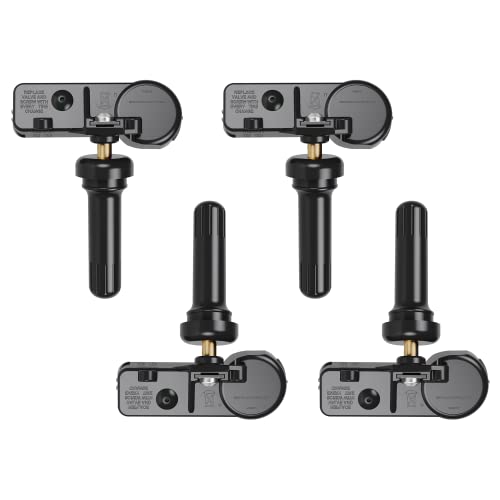


You can identify your system type by looking for metal valve stems; direct systems typically use physical sensors inside the wheel attached to the stem. Indirect systems rely on the vehicle’s ABS wheel speed sensors to detect tire diameter changes. A quick way to verify is to check your VIN with an Audi dealer or observe if the MMI displays individual tire pressures.
Can I drive if the TPMS light is on?
If the TPMS light is solid, you should check your tire pressures immediately at the nearest service station. Driving on under-inflated tires is dangerous and can lead to blowouts or rim damage. If the light is flashing, it indicates a system malfunction that requires professional diagnostic equipment. Drive slowly to a repair facility and avoid long highway trips until the issue is resolved.
Does the reset process work for run-flat tires?
Yes, the MMI reset procedure for run-flat tires is identical to standard tires. Because run-flats are designed to maintain their shape during air loss, they can sometimes trigger the system differently, but the calibration principle remains the same. Always ensure the tire pressures are set precisely to the door jamb specifications before you initiate the store command in the MMI interface.