2017 Toyota Camry TPMS Reset: Button Location & Info
Last Updated on September 1, 2026 by Ryan
📋 Table of Contents
- 🎯 Key Takeaways
- Understanding Your 2017 Camry’s TPMS System
- Your Complete DIY Guide to the 2017 Toyota Camry TPMS Reset Button Location
- The Importance of the TPMS Reset Button
- Factors Affecting TPMS Functionality
- When to Seek Professional TPMS Assistance
- Conclusion: Keeping Your Camry’s TPMS in Check
- 💬 Quick Questions & Answers
- ❓ Frequently Asked Questions
Locating the TPMS reset button on your 2017 Toyota Camry is crucial for addressing tire pressure system alerts. This guide helps you quickly pinpoint its position and understand related information.
🎯 Key Takeaways


- Know where your TPMS reset button is for quick access.
- Understand why resetting the TPMS is necessary.
- Consider tire pressure monitoring system limitations.
- Learn about common TPMS issues and solutions.
- Empower yourself with Camry maintenance knowledge.
Ever notice that little orange light on your dashboard that looks like a deflated tire? That’s your Tire Pressure Monitoring System (TPMS) light, and it’s a pretty important guardian of your drive. When it pops on, it’s trying to tell you something crucial about your CAMRY” target=”_blank” rel=”noopener noreferrer” title=”NHTSA Vehicle Safety Data for 2017 Toyota Camry”>vehicle
‘s safety and efficiency.Understanding what this light means and how to respond can save you from unexpected flat tires, improve your gas mileage, and even help your tires last longer. One common reason for this light to illuminate, especially after tire changes or adjustments, is the need for a TPMS reset. Finding that reset button can sometimes feel like a treasure hunt, but we’re here to guide you.
Understanding Your 2017 Camry’s TPMS System


How TPMS Works in Your Camry
Your 2017 Toyota Camry is equipped with a sophisticated TPMS. This system uses sensors mounted inside each wheel. These sensors constantly monitor the air pressure within your tires. They then transmit this data wirelessly to the car’s computer. If the pressure in any tire drops significantly below the recommended level, the TPMS warning light will activate on your dashboard. This is a critical safety feature designed to alert you to potential tire underinflation, which can be dangerous.

- Sensors in each wheel measure tire pressure.
- Data is sent wirelessly to the car’s central computer.
- A warning light illuminates if pressure is too low.
- This system helps prevent accidents related to underinflated tires.
Why Proper Tire Pressure Matters
Maintaining the correct tire pressure in your 2017 Camry is more than just about avoiding that pesky warning light. It’s directly linked to your car’s performance and safety. Properly inflated tires ensure optimal handling and braking. They also contribute significantly to your fuel economy, meaning fewer trips to the gas station. Furthermore, consistent, correct inflation helps prevent uneven tire wear, extending the lifespan of your tires and saving you money in the long run. Underinflated tires can overheat, increasing the risk of a blowout.
- Improves vehicle handling and stability.
- Enhances braking effectiveness.
- Boosts fuel efficiency, saving you money.
- Reduces uneven tire wear, prolonging tire life.
- Prevents dangerous tire overheating and blowouts.
Your Complete DIY Guide to the 2017 Toyota Camry TPMS Reset Button Location



The Tire Pressure Monitoring System (TPMS) is a crucial safety feature in your 2017 Toyota Camry. When the TPMS light illuminates on your dashboard, it indicates that one or more of your tires have low pressure. After inflating your tires to the correct pressure, or after a tire rotation or replacement, you’ll need to reset the TPMS to acknowledge these changes. This guide will walk you through the exact location of the reset button and the precise steps to perform the reset, ensuring your TPMS is functioning correctly and providing accurate readings.
Step 1: Locate the TPMS Reset Button
What you need: Good lighting (e.g., flashlight), a clean rag.
Instructions: Open the driver’s side door. Look underneath the dashboard, near the steering column. You’ll need to get down low to see this area clearly. The TPMS reset button is typically a small, black, round button. It’s often located to the left of the steering column, behind the steering wheel, and might be near the OBD-II (On-Board Diagnostics) port. Sometimes, it’s hidden behind a small panel or cover that you might need to gently pry open. Ensure the area is clean so you can easily spot the button.
Pro Tip: If you have trouble finding it, consult your 2017 Toyota Camry owner’s manual. It will have a diagram showing the exact location. Avoid using excessive force when prying any panels, as you could damage them.
Step 2: Prepare Your Vehicle for the Reset
What you need: Tire pressure gauge, air compressor or access to a tire inflation station.
Instructions: Before you can reset the TPMS, you must ensure all your tires are inflated to the manufacturer’s recommended pressure. Check the sticker located on the driver’s side doorjamb for the correct PSI (pounds per square inch) for your front and rear tires. Use your tire pressure gauge to check each tire’s current pressure. If any tires are underinflated, use your air compressor to inflate them to the specified PSI. Do not forget to check the spare tire as well, as some TPMS systems include it.
Pro Tip: Inflate your tires when they are cold (meaning the car hasn’t been driven for at least three hours, or only a mile or two at low speed). Driving heats up the tires, and the pressure will be higher than when they are cold, leading to inaccurate readings.
Step 3: Turn the Ignition to the “ON” Position
What you need: Your car key or proximity key fob.
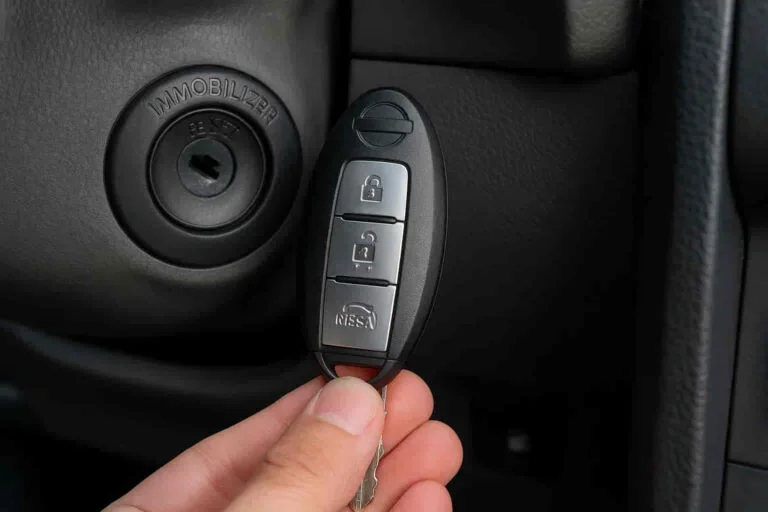
Instructions: Insert your key into the ignition cylinder or have your proximity key fob inside the vehicle. Turn the ignition key to the “ON” position, but do not start the engine. You should see various dashboard lights illuminate, including the TPMS warning light. This step powers up the vehicle’s computer system and makes it ready to receive the TPMS reset signal. Ensure all warning lights that normally come on when the ignition is turned to “ON” are illuminated.
Pro Tip: If your vehicle has a push-button start, press the start button twice without pressing the brake pedal. This will also put the car in the “ON” or accessory mode without starting the engine.
Step 4: Press and Hold the TPMS Reset Button
What you need: Your finger.
Instructions: With the ignition in the “ON” position, locate the TPMS reset button you identified in Step 1. Press and hold this button down firmly. You will need to hold it for approximately 3-5 seconds. While holding the button, you might hear a faint beep or notice a brief change on the dashboard, such as the TPMS light flashing. This action initiates the TPMS learning process, allowing the system to re-learn the tire pressures.
Pro Tip: It’s crucial to hold the button long enough for the system to register the command. Holding it for too short a duration may result in the reset not being successful, and you’ll have to repeat the process.
Step 5: Release the TPMS Reset Button and Turn Off Ignition
What you need: Your finger.
Instructions: After holding the TPMS reset button for the specified duration (3-5 seconds), release it. Immediately after releasing the button, turn the ignition key back to the “OFF” position. This completes the sequence for the TPMS reset. The system will then begin its learning cycle, which can take some time.
Pro Tip: Ensure you release the button and turn the ignition off promptly. Delaying this final step can interrupt the reset process and prevent it from completing successfully.
Step 6: Start the Engine and Drive
What you need: Your car keys or fob.
Instructions: Now, start your 2017 Toyota Camry’s engine. The TPMS warning light may still be illuminated initially, or it might flash for a few minutes. To fully complete the reset and allow the TPMS sensors to communicate with the vehicle’s computer, you need to drive your car for at least 10-20 minutes. During this drive, the TPMS system will recalibrate itself to the new tire pressures. Ideally, drive at speeds above 25 mph (40 km/h) for this period.
Pro Tip: If the TPMS light remains on or continues to flash after a 20-minute drive, it could indicate a persistent issue, such as a faulty sensor, a leak in one of your tires, or that the reset procedure was not performed correctly. You may need to repeat the steps or seek professional assistance.
✅ Final Checklist
- TPMS reset button successfully located and identified.
- All tires (including spare, if applicable) inflated to manufacturer’s recommended cold PSI.
- Ignition turned to “ON” without starting the engine.
- TPMS reset button pressed and held for 3-5 seconds.
- TPMS reset button released, and ignition turned to “OFF”.
- Engine started and driven for at least 20 minutes at speeds above 25 mph.
- TPMS warning light is no longer illuminated on the dashboard.
Important Notes:
- Safety Considerations: Always ensure your vehicle is parked on a level surface before checking tire pressures. Never ignore a TPMS warning light, as underinflated tires can be dangerous and affect braking, handling, and fuel efficiency. Wear gloves if desired for a cleaner experience.
- When to Seek Professional Help: If you have followed all these steps and the TPMS light persists, it is advisable to take your vehicle to a qualified mechanic or a Toyota dealership. They have specialized diagnostic tools to identify issues with the TPMS sensors, the receiver, or the control module.
- Estimated Time and Cost Range: Performing this reset yourself should take approximately 10-15 minutes once you know the button’s location. The cost is minimal, typically just the price of air if you don’t have access to a free air compressor. Professional diagnosis and repair for TPMS issues can range from $100 to $500 or more, depending on the complexity and parts needed.
The Importance of the TPMS Reset Button
When a TPMS Reset is Necessary
The TPMS warning light on your 2017 Camry isn’t always a sign of a puncture. Often, it illuminates after you’ve manually adjusted tire pressure. This could happen after adding air to your tires, rotating them, or even after a tire shop has replaced one of your wheels. Your car’s system needs to be told that the new pressure is the correct, normal pressure. Without a reset, the light might stay on, even if your tires are perfectly inflated. This can lead to you ignoring genuine pressure issues in the future.
- After adding air to tires.
- Following a tire rotation.
- After a tire or wheel replacement.
- When the TPMS light remains on despite correct tire pressure.
Why You Can’t Always Ignore the Light
While we’ve discussed when a reset is common, it’s crucial to remember that the TPMS light is a warning. If it comes on unexpectedly and you haven’t recently changed your tires or pressure, there’s a real problem. This usually means one or more tires are significantly underinflated. Driving on underinflated tires is dangerous. It affects your car’s ability to steer and stop effectively. It also puts undue stress on the tire structure, increasing the risk of a sudden failure. Always check your tire pressure manually when the light appears unexpectedly.
- The light indicates a potential safety hazard.
- Underinflated tires compromise steering and braking.
- There’s an increased risk of tire damage or blowout.
- Always verify tire pressure manually when the light appears.
Factors Affecting TPMS Functionality
Your 2017 Toyota Camry’s Tire Pressure Monitoring System (TPMS) is a sophisticated piece of technology, but like any system, its effectiveness can be influenced by several factors. Understanding these can help you troubleshoot potential issues and ensure your TPMS is working optimally.
Sensor Battery Life
Each TPMS sensor has a small, long-lasting battery. While designed to last for many years, these batteries will eventually deplete. When a sensor’s battery is critically low, it may stop transmitting its pressure data to the car’s computer, leading to a TPMS warning light. This is a common reason for TPMS malfunctions and typically requires sensor replacement.
Extreme Temperatures
While TPMS sensors are built to withstand a range of temperatures, extremely hot or cold conditions can sometimes temporarily affect their readings or performance. For instance, in very cold weather, tire pressure naturally drops, and if it falls below the system’s threshold, the warning light will illuminate. Similarly, rapid temperature changes can cause slight fluctuations.
Aftermarket Wheels and Tires
Switching to aftermarket wheels or tires can sometimes interfere with your TPMS. If the new wheels don’t have the proper TPMS sensor mounting provisions, or if the tires are too thick in certain areas, it can hinder the sensor’s ability to transmit its signal. Additionally, incorrect tire sizes can also throw off the system’s calibration.
Physical Damage to Sensors
The TPMS sensors are located inside your tires, making them susceptible to damage during tire changes, impacts with potholes, or even from road debris. Physical damage can render a sensor inoperable, leading to a persistent TPMS warning light.
When to Seek Professional TPMS Assistance
While many TPMS issues can be addressed with basic knowledge, there are times when consulting a professional is the most efficient and safest course of action. Recognizing when your DIY attempts have reached their limit will save you time, frustration, and potentially prevent further damage.
Persistent Warning Light After Adjusting Pressure
If you’ve confirmed all your tires are properly inflated to the recommended PSI (found on your driver’s side doorjamb sticker) and the TPMS warning light remains illuminated, it’s time to seek expert help. This indicates a potential problem beyond simple underinflation.
TPMS Light Flashing
A flashing TPMS warning light is a distinct signal that there’s a system malfunction, rather than just a low tire pressure alert. This usually points to a problem with one or more of the TPMS sensors themselves or the overall system’s communication. Attempting to reset the system yourself in this scenario is unlikely to resolve the underlying issue.
After Tire Replacements or Rotations
While some newer TPMS systems can self-relearn after tire rotations, older systems or those with specific issues might require professional reprogramming or relearning. If your TPMS light comes on after a tire service, and a simple reset doesn’t work, a technician can ensure the system recognizes the tires correctly.
Concerns About Sensor Damage
If you’ve recently hit a curb, a large pothole, or suspect physical damage to one of your tires or wheels, it’s wise to have your TPMS checked. A professional can inspect the sensors for any visible damage and test their functionality.
Conclusion: Keeping Your Camry’s TPMS in Check
Maintaining optimal tire pressure is crucial for your 2017 Toyota Camry’s safety, fuel efficiency, and tire longevity. While the TPMS reset button location might seem elusive, understanding the system’s general function and recognizing when professional help is needed is key. Regularly checking your tire pressures manually, paying attention to your TPMS warning light, and knowing when to consult a mechanic will ensure your system keeps you informed and safe on the road.
💬 Quick Questions & Answers
Where is the TPMS reset button on a 2017 Toyota Camry?
The TPMS reset button on a 2017 Toyota Camry is typically located on the dashboard, often near the steering wheel or in the fuse box.
Do I need a special tool to reset the TPMS?
For most 2017 Camry models, the TPMS reset is done directly with the button itself, not requiring specialized tools.
Why is my TPMS light still on after resetting?
If the TPMS light remains on, it usually indicates an actual low tire pressure issue or a sensor malfunction that needs further inspection.
Can I drive with the TPMS light on?
It’s recommended to address the TPMS warning promptly, as it signifies a potential safety concern due to underinflated tires.
How often should I check my tire pressure?
It’s best to check your tire pressure at least once a month and before long trips, especially in varying temperatures.
❓ Frequently Asked Questions
What is the primary function of the TPMS reset button on a 2017 Toyota Camry?
The TPMS reset button on your 2017 Toyota Camry is designed to recalibrate the Tire Pressure Monitoring System after tire inflation adjustments or tire rotations. It helps the system recognize normal tire pressures.
Are there different locations for the TPMS reset button depending on the 2017 Camry trim level?
While the general area is consistent, the exact placement of the TPMS reset button might vary slightly between different 2017 Toyota Camry trim levels. It’s often found on the driver’s side dashboard or within the fuse box compartment.
What are the common reasons a 2017 Toyota Camry’s TPMS light might illuminate besides low tire pressure?
Beyond low tire pressure, the TPMS light can illuminate due to a faulty tire pressure sensor, a dead sensor battery, or issues with the TPMS control module. Extreme temperature fluctuations can also trigger it temporarily.
What should I do if I can’t find the TPMS reset button on my 2017 Toyota Camry?
If you’re unable to locate the TPMS reset button, consult your 2017 Toyota Camry owner’s manual for the precise location. Alternatively, you can contact a Toyota dealership or a qualified mechanic for assistance.
How does the TPMS system in a 2017 Toyota Camry detect tire pressure changes?
The 2017 Toyota Camry’s TPMS system uses sensors mounted inside each wheel to measure tire pressure. These sensors transmit the data wirelessly to the vehicle’s computer, which then illuminates the warning light if pressure drops below a safe level.
Is it safe to ignore the TPMS warning light on my 2017 Toyota Camry?
No, it is not safe to ignore the TPMS warning light. Driving on underinflated tires can lead to poor handling, increased tire wear, reduced fuel efficiency, and a higher risk of a blowout. Addressing the warning promptly is crucial for safety.