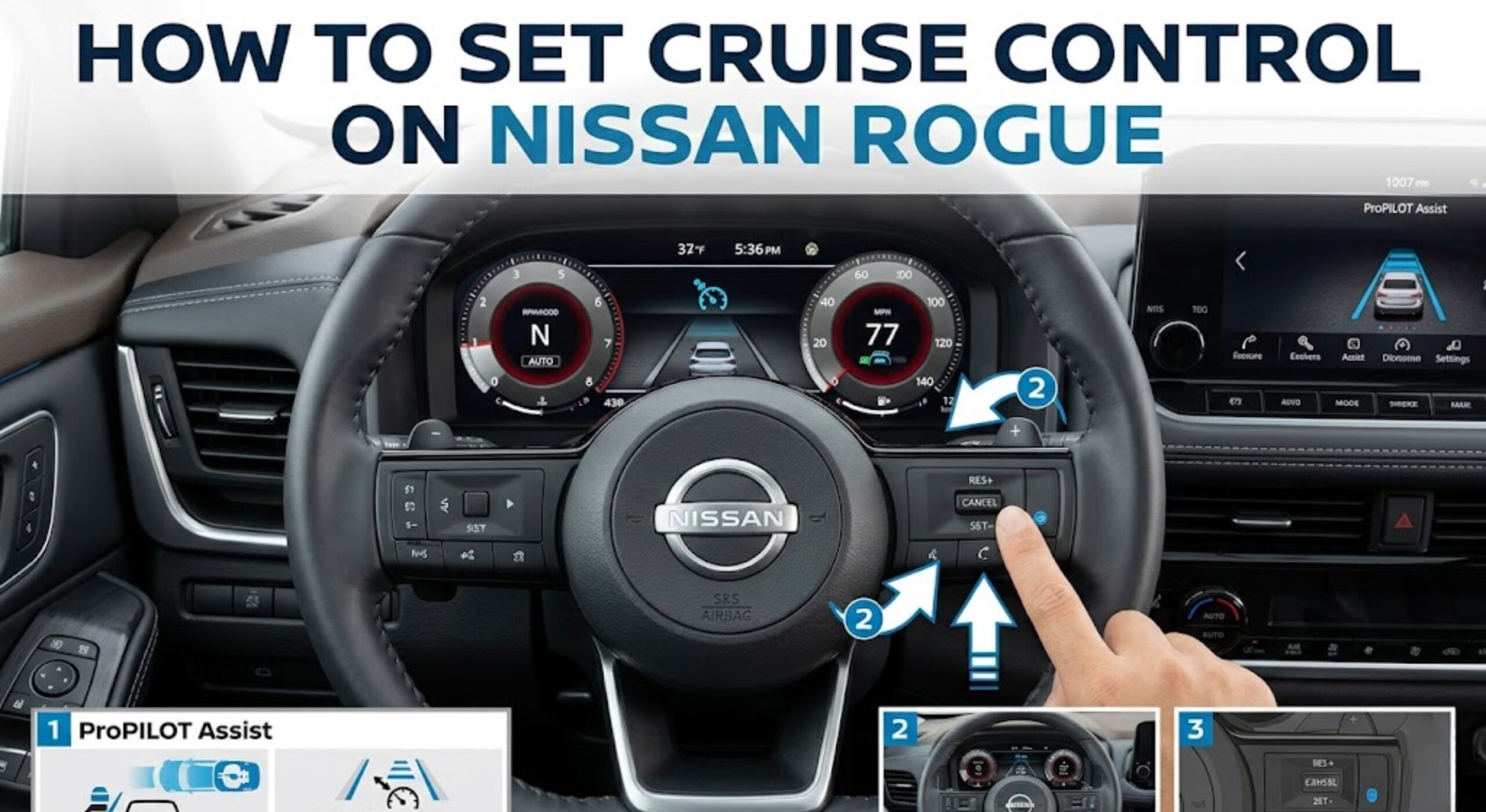
How To Set Cruise Control on Nissan Rogue Step-by-Step in 2026
Last Updated on October 17, 2026 by Ryan
To set cruise control on a Nissan Rogue, turn the system on, get to your speed, then push SET-. What trips people up is the switch layout: it depends on whether your Rogue has basic cruise control, Intelligent Cruise Control (ICC) or ProPILOT Assist.
This guide follows the US owner’s manuals for the 2020 and 2023 Rogue (2020 manual and 2023 manual). Nissan marks all of these systems “if so equipped”, and I could not confirm every trim or year, so check your own manual for the exact switch names.
Which Cruise System Does Your Nissan Rogue Have?


Rogues come with one of three setups. The label on the steering wheel switch tells you which one you have.
| System | Main switch | What it does | Speed range |
|---|---|---|---|
| Cruise control | Cruise ON/OFF (2023) or cruise control switch (2020) | Holds a fixed speed. No distance control. | Works above 25 mph |
| Intelligent Cruise Control (ICC), older models | ICC switch | Holds a speed and keeps a selected distance from the vehicle ahead. | Follows traffic from 0 to 90 mph, up to the set speed |
| ProPILOT Assist | ProPILOT Assist switch | Combines ICC with Steering Assist. Press and hold the switch for about 1.5 seconds for fixed-speed cruise instead. | Set speed 20 to 90 mph |
In the 2023 manual, the ICC is part of ProPILOT Assist, and the steering assist can be turned off if you only want the distance-keeping cruise. If you are not sure which trim you have, our Rogue S vs SV vs SL guide covers how the trims differ.
Nissan Rogue Cruise Control Buttons and What They Do


The controls are on the steering wheel. Nissan’s 2023 manual describes the cluster this way:
| Control | What it does |
|---|---|
| Cruise ON/OFF or ProPILOT Assist switch | Turns the system on or off. The ProPILOT Assist switch also picks the mode by how long you press it. |
| SET- (push the CANCEL switch down) | Sets your speed. Each push and release lowers the set speed by about 1 mph, and holding it lowers it more. |
| RES+ (push the CANCEL switch up) | Resumes your last set speed. Each push and release raises the set speed by about 1 mph, and holding it raises it more. |
| CANCEL | Cancels the set speed without turning the system off. |
| DISTANCE (ICC and ProPILOT only) | Chooses the following distance: long, middle or short. |
On the 2023 Rogue, RES+ and SET- are the two directions of the CANCEL rocker, so one switch does all three jobs. The 2020 manual lists RES+, SET- and CANCEL as separate switches, so the labels sit in different places on older Rogues.
How to Set Cruise Control on a Nissan Rogue With Standard Cruise


This is the 2023 manual’s sequence for a Rogue without ProPILOT Assist.
- Turn the system on. Push the Cruise ON/OFF switch. The cruise indicator and a “Standby Push SET- to active” message appear in the display.
- Accelerate to your speed. The cruise control works above 25 mph.
- Push SET-. Push the CANCEL switch down to SET- and release it.
- Take your foot off the accelerator. The Rogue holds the set speed and the display shows a “+/- Change Set speed” message.
If you push RES+ when no speed is set, the Rogue sets its current speed. The manual also says to treat steep hills, heavy traffic and slippery roads as times to drive without cruise.
Passing someone is simple: press the accelerator. When you let off, the Rogue returns to the previously set speed.
How to Set ProPILOT Assist or ICC on a Nissan Rogue
- Push the ProPILOT Assist switch. The status indicator lights white and the system is on standby.
- Get to your speed. Accelerate or decelerate to the speed you want.
- Push down on SET-. The indicator turns blue and the Rogue starts holding the set speed. If a vehicle ahead is detected and moving at 20 mph or less, the set speed becomes 20 mph.
- Choose a distance. Press the DISTANCE switch to pick long, middle or short. At 60 mph, Nissan lists these as about 200, 150 and 90 feet.
The set speed range is about 20 to 90 mph. Nissan says the system is intended for highway use and that you must stay in control at all times. It is not a self-driving system.
Fixed-Speed Mode on a ProPILOT Rogue
If you want plain cruise control on a ProPILOT Rogue, push and hold the ProPILOT Assist switch for longer than about 1.5 seconds. Then set your speed with SET-. In this mode there is no distance control and no steering assist, and the manual warns that no chime will sound if you get too close to a vehicle ahead.
How to Change Your Set Speed
| Action | Result |
|---|---|
| Push up on RES+ and release | Raises the set speed by about 1 mph |
| Push down on SET- and release | Lowers the set speed by about 1 mph |
| Push and hold RES+ or SET- | Changes speed continuously in basic cruise. On ProPILOT it changes in 5 mph steps. |
| Press the accelerator | Temporarily goes faster. The Rogue returns to the set speed when you let off. |
The 1 mph and 5 mph figures come from the 2023 owner’s manual. Older Rogues are listed at about 1 mph per tap in the 2020 manual.
How to Restart Cruise Control at Your Previous Speed After Braking
This is the question many Rogue owners search for. When you tap the brake, cruise does not erase your speed in normal use. It drops to standby so you can bring it back.
- Tap the brake or push CANCEL. The display shows “Standby Push RES+ to resume.”
- When it is safe, push RES+ up and release it.
- The Rogue returns to the last set speed. On basic cruise this works when you are above 25 mph.
On ProPILOT or ICC, Nissan says to push up on the CANCEL switch to RES+ to resume the previously set speed after braking. If the car has stopped behind traffic for more than about 3 seconds, push RES+ or lightly press the accelerator to follow the vehicle ahead again.
When Cruise Control Does Not Resume
- You turned the system off with the Cruise ON/OFF switch. Switching it off ends cruise, so set a new speed with SET-.
- The 2020 manual says braking while pushing RES+ or SET- deletes the preset speed from memory.
- Basic cruise cancels if the Rogue slows more than about 8 mph below the set speed, or if you move the shift lever to N (Neutral).
- You are below the minimum speed. Basic cruise needs more than 25 mph to resume.
How to Cancel or Turn Off Cruise Control on a Nissan Rogue
Nissan lists three ways to cancel the set speed: push the CANCEL switch, tap the brake pedal, or push the Cruise ON/OFF switch (or the ProPILOT Assist switch) to turn the system off. CANCEL and the brake keep the system on standby. The ON/OFF switch turns the cruise indicator off.
Nissan Rogue Cruise Control Indicator Lights
The colors depend on the system. These come from the 2023 manual:
| What you see | What it means |
|---|---|
| ProPILOT status indicator, white | The system is on and in standby |
| ProPILOT status indicator, blue | ProPILOT Assist is active |
| Speed control indicator, white | ICC is in standby |
| Speed control indicator, green, with a vehicle icon | ICC is following a vehicle ahead |
| Cruise indicator, gray, in fixed-speed mode on a ProPILOT Rogue | The system is on |
| Cruise indicator, green, in fixed-speed mode | A cruising speed is set |
| Orange indicator or a blinking cruise indicator | A system malfunction. Turn the system off and have it checked. |

The example above shows a set speed of 65 mph on a Rogue display. Your cluster may look different by model and year. The 2023 manual does not list indicator colors for basic cruise, so use the display messages (Standby, Resumed and the set speed readout) to see its state.
Why Your Nissan Rogue Cruise Control Will Not Set
The manual lists conditions that stop the system from setting. The set-speed readout blinks for about 2 seconds when it refuses. Check these first:
- You are below 25 mph on basic cruise, or below 20 mph on ProPILOT with no vehicle ahead.
- The shift lever is not in D (Drive), or you are in manual shift mode.
- The parking brake is on, or your foot is on the brake pedal.
- The VDC system is off, or it is currently working (for example on a slippery surface).
- Snow or off-road mode is selected on an AWD model, or a wheel is slipping.
- A door is open or the driver’s seat belt is unbuckled.
If the cruise indicator blinks and an “Unavailable: Cruise system trouble” message appears, turn the system off and have it checked. Nissan recommends a dealer. The manual also says the indicator may blink if you turn the switch on while pushing RES+, SET- or CANCEL, so turn it on without touching those. For more causes, see our guide on Nissan Rogue cruise control not working.
Frequently Asked Questions
Where is the cruise control on a Nissan Rogue?
It is on the steering wheel. Look for a Cruise ON/OFF switch, or on ProPILOT cars a ProPILOT Assist switch, near the RES+ and SET- controls. The CANCEL switch sits in the same cluster.
How do I turn on cruise control on a Nissan Rogue?
Push the Cruise ON/OFF switch. On ProPILOT cars, push the ProPILOT Assist switch for adaptive cruise, or push and hold it for about 1.5 seconds for fixed-speed cruise. Then push SET- at your speed.
What speed does Rogue cruise control work at?
Basic cruise works above 25 mph. ProPILOT Assist and ICC have a set speed range of about 20 to 90 mph.
Does the Nissan Rogue have adaptive cruise control?
Some do. Nissan lists ICC and ProPILOT Assist as “if so equipped”, so it depends on your year and trim. A Rogue with a ProPILOT Assist switch has it.
Is the RES button the same as ACC on a Rogue?
The Nissan manuals label the controls RES+ and SET-. Cruise ON/OFF and ProPILOT Assist are the on and off switches. The Rogue manuals list no ACC button, and some pages online mix it up with other brands.
Can I use cruise control in rain on a Nissan Rogue?
Nissan warns against basic cruise and fixed-speed cruise on slippery roads, including rain, snow and ice. It also says not to use them in heavy traffic or on winding or hilly roads.
Conclusion
For basic cruise, push Cruise ON/OFF, reach your speed and push SET-. For ProPILOT Assist, push its switch, reach your speed and push SET-, then pick a distance. After braking, push RES+ to return to your last speed. If the system will not set, check speed, shift position, brakes and doors before looking for a fault.