How to Set Cruise Control on Lexus RX 350 2026 Expert Guide
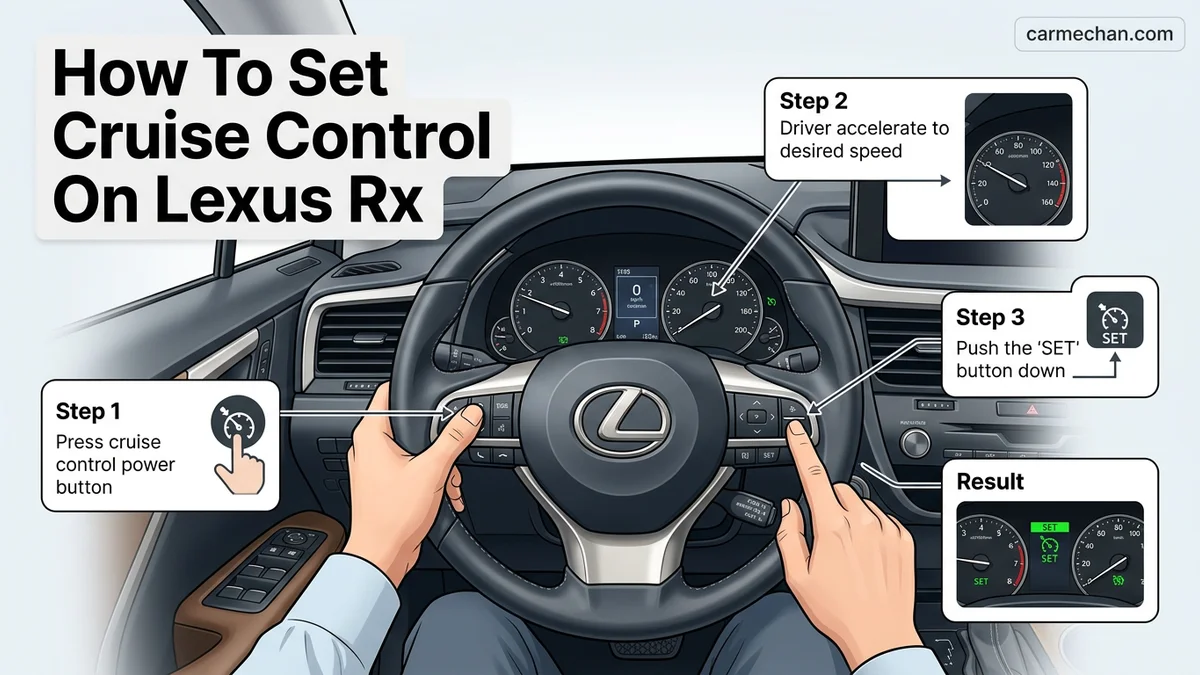
To activate your Lexus RX 350 cruise control, press the power button on the steering wheel, reach your desired speed, and push the ‘SET’ switch downward. This system allows you to maintain a consistent speed automatically, and you can adjust your following distance using the dedicated vehicle-gap button.
To activate cruise control in your 2026 Lexus RX 350, you must use the multi-function steering wheel controls located on the right-hand spoke. Press the primary cruise control button, wait for the radar indicator to illuminate on your multi-information display, and then tap the set toggle downward once you reach your desired speed. This process engages the Dynamic Radar Cruise Control (DRCC) system, which automatically maintains a safe following distance from the vehicle ahead.
Mastering these controls is essential for reducing driver fatigue during long commutes on the highway. Because the 2026 model utilizes an advanced sensor array, knowing exactly which buttons to press ensures you can engage the system seamlessly without taking your focus off the road. The following guide provides the specific button mapping and operation flow required to operate the system reliably.
Key Takeaways
- Enable the system using the main cruise control power button on the right steering wheel spoke.
- Use the ‘SET’ downward toggle to lock in your current speed once reaching 25+ mph.
- Adjust your following distance by pressing the radar vehicle-gap button to suit traffic flow.
- Tap the brake pedal or press the ‘CANCEL’ button to immediately deactivate the cruise system.
- Always monitor the multi-information display for confirmation icons before taking your foot off the pedal.
Identifying the Lexus RX 350 Cruise Control Layout
Recommended Best Deal Products


Steering Wheel Button Icons
The 2026 Lexus RX 350 features a refined steering wheel interface designed for intuitive access. You will find the cruise control cluster exclusively on the right side of the steering wheel. Look for these specific icons:

- Main Cruise Power Button: Represented by a speedometer icon with an arrow pointing to a vehicle, this button toggles the entire radar system on or off.
- Mode/Distance Button: This icon shows a vehicle with multiple horizontal bars. Pressing this allows you to adjust the following distance between your RX 350 and the car in front of you.
- Speed Toggle Switch: A vertical “plus” and “minus” switch that dictates your set speed once the system is active.
- Cancel Button: Clearly marked with the word “CANCEL,” this button immediately disengages the cruise control while keeping the system powered on.
Display Indicators and Feedback
Once you press the main power button, check your digital gauge cluster. You will see a white radar icon appear, confirming the system is in standby mode. When you set a speed, the text “SET” will illuminate in green, indicating that the Dynamic Radar Cruise Control has locked onto your current velocity. If the system cannot detect a clear lane, it will display a notification informing you that the radar is searching for a target.
Master Lexus RX 350 Cruise Control in 7 Simple Steps
Driving a Lexus RX 350 is synonymous with comfort and refined technology. Mastering the Dynamic Radar Cruise Control (DRCC) system allows you to maintain a consistent speed while automatically adjusting to traffic flow, reducing driver fatigue on long journeys. This guide walks you through the precise process of activating, setting, and customizing your cruise control settings to ensure you can cruise safely and efficiently on highways or open roads.
Step 1: Locate the Cruise Control Steering Wheel Controls
What you need: Access to the driver’s seat of your Lexus RX 350 with the engine running or in accessory mode.
Instructions: Familiarize yourself with the cruise control stalk or steering wheel buttons, depending on your model year. On most modern RX 350s, these controls are located on the lower right side of the steering wheel. Look for the main “On/Off” button, which is usually represented by a speedometer icon with an arrow. Before driving, visually identify the “RES/+” (Resume) and “SET/-” (Set) toggle switches, as well as the button to adjust the vehicle-to-vehicle distance. Ensure you are comfortable with the location of these controls so you can operate them by feel without taking your eyes off the road.
Pro Tip: Avoid looking down at the steering wheel while the vehicle is in motion; practice finding the buttons while the car is parked to build the necessary muscle memory.
Step 2: Activate the Dynamic Radar Cruise Control System
What you need: A clear path ahead and an engine that is currently running.
Instructions: With your vehicle in motion or at a stop, press the main cruise control button located on the steering wheel control panel. You will see an indicator light illuminate on your multi-information display, usually appearing as a white speedometer icon. This confirms that the DRCC system is in “Standby” mode. If you see an amber “Check Cruise Control System” message, do not proceed and consult your dealership. Once the white icon appears, the car is ready to accept a speed command as soon as you reach your desired travel velocity.
Pro Tip: If your vehicle is equipped with Lane Tracing Assist (LTA), you may see that icon light up simultaneously; understand that these systems work in tandem to keep you centered and at a steady speed.
Step 3: Set Your Desired Cruising Speed
What you need: The vehicle must be moving at a speed of at least 25-30 mph (40-48 km/h).
Instructions: Accelerate to your preferred cruising speed using the accelerator pedal. Once you reach that speed, press the “SET/-” button located on the cruise control stalk or steering wheel panel. Immediately release the accelerator pedal. The vehicle will maintain the speed you were traveling at the exact moment you pressed the set button. On your instrument cluster, the white icon will typically turn green, indicating that the system is now actively controlling your throttle and maintaining your current speed.
Pro Tip: Be aware of the road conditions; if the road is slippery or steep, manual control is safer than relying on the cruise control system to maintain speed.
Step 4: Adjust the Vehicle-to-Vehicle Distance
What you need: The DRCC system must already be active and set to a specific speed.
Instructions: One of the most important features of the Lexus RX 350 is the ability to adjust how closely you follow the car ahead. Press the “Distance” button on your steering wheel controls. Each press will toggle through the distance settings—Long, Medium, and Short—which are represented by bars on your multi-information display. Choosing “Long” is recommended for high-speed highway driving, as it provides a larger buffer for reaction time. The system will automatically slow your vehicle down if it detects a slower car ahead, maintaining the chosen distance gap.
Pro Tip: In heavy traffic, “Short” is often preferred to prevent other drivers from cutting into your lane, but always prioritize safety over traffic flow.
Step 5: Increase or Decrease Your Set Speed
What you need: The cruise control system must be currently active.
Instructions: Once the cruise control is locked in, you can make fine-tuned adjustments to your speed without touching the brake or accelerator. Use the toggle switch on the steering wheel: push up toward “RES/+” to increase your speed in small increments (usually 1 mph or 1 km/h per tap), or press down toward “SET/-” to decrease your speed. If you hold the switch in either direction, the system will adjust the speed more rapidly. This is useful for adjusting to changing speed limit zones without disengaging the system entirely.
Pro Tip: Short taps are best for minor adjustments, while holding the switch down is better for major speed changes, such as dropping from 70 mph to 55 mph.
Step 6: Pausing and Resuming the System
What you need: An active cruise control session.
Instructions: If you need to temporarily stop the system, you can either tap the brake pedal or press the “Cancel” button on the steering wheel. This will put the system back into “Standby” mode (the indicator light will turn back to white). To return to your previously set speed, simply press the “RES/+” button. The vehicle will automatically accelerate back to the speed you had set before the cancellation, provided the road ahead is clear. If the road is not clear, the system will accelerate until it reaches the set speed or catches up to the traffic ahead.
Pro Tip: Only use the Resume function when you are certain the path in front of you is clear and safe for acceleration.
Step 7: Completely Deactivating the System
What you need: A safe opportunity to disable the system permanently for the duration of the trip.
Instructions: Once you are ready to stop using cruise control, simply press the main “On/Off” button on the steering wheel control panel. All cruise control indicators will disappear from the multi-information display, signaling that the system is fully powered down. You will regain full manual control of the accelerator and braking. It is good practice to turn the system off when entering busy city streets, construction zones, or winding roads where constant speed modulation is required by the driver.
Pro Tip: Remember to turn the system off completely rather than just cancelling it, especially at the end of your trip, to prevent accidental activation during your next drive.
✅ Final Checklist
- Confirm the green indicator icon appears on the dash when the speed is set.
- Ensure the vehicle-to-vehicle distance settings are appropriate for current weather conditions.
- Verify that the cruise control cancels immediately when you tap the brake pedal.
- Check that you can easily toggle between your set speed and current speed using the Res/Set buttons.
- Ensure you have the ability to manually override the system via the accelerator at any time.
Important Notes:
- Safety: Never use cruise control on slippery, icy, or winding roads where steady speeds can lead to loss of traction.
- Assistance: If the radar sensor on the front grille is covered by snow, mud, or debris, the system may not engage; keep the front emblem area clean.
- Professional Help: If you receive persistent “Radar Cruise Control Unavailable” alerts despite a clean sensor, contact a Lexus technician to inspect the camera and radar modules.
- Time/Cost: Learning this system takes approximately 10-15 minutes of practice in a safe, low-traffic environment. There is no cost involved.
Step-by-Step Instructions to Set and Adjust Cruise Speed
Recommended Best Deal Products


Initial Activation and Setting Your Speed
Setting your cruising speed is a simple two-step process that can be completed entirely while your hands remain on the steering wheel. Follow these precise steps:
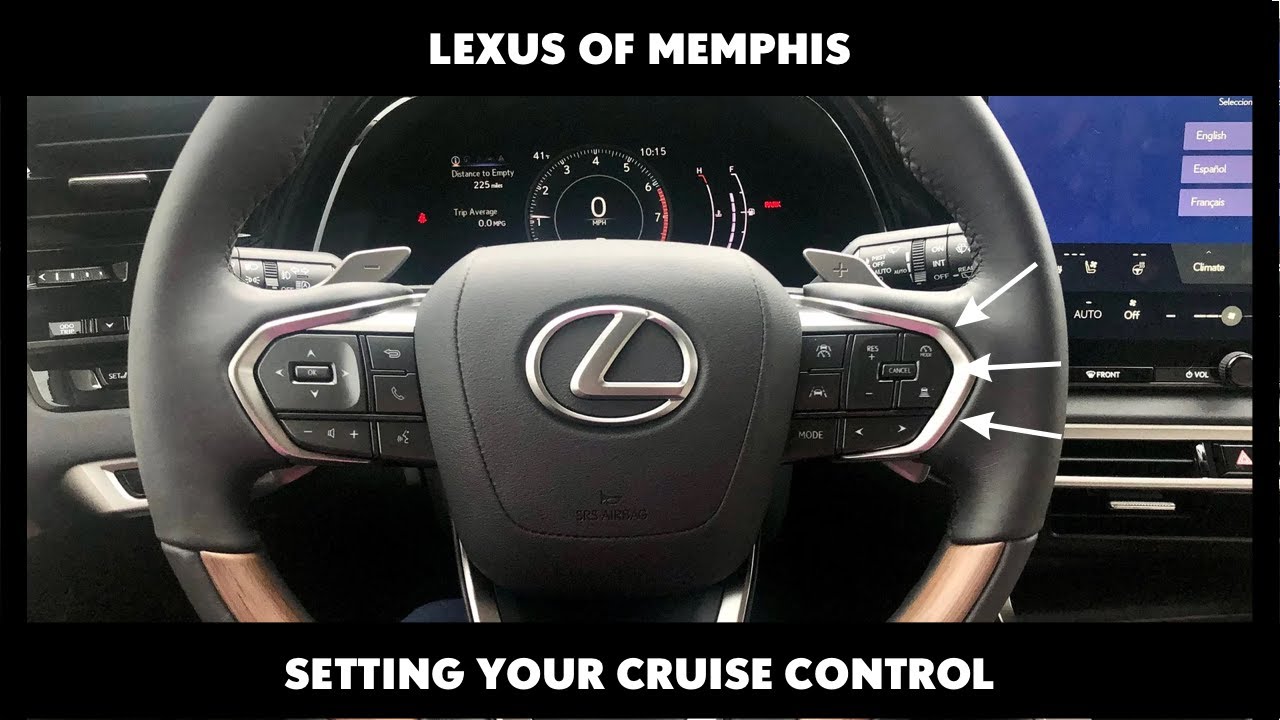
- Accelerate your Lexus RX 350 to your preferred cruising speed, such as 65 mph.
- Press the Main Power Button once. You will see the radar standby icon appear on the digital instrument cluster.
- Push the Speed Toggle Switch downward (toward the “SET/-” position) and release it immediately.
- Your vehicle will now maintain that speed, and you can safely remove your foot from the accelerator pedal.
If you need to change your speed while the system is already active, you do not need to cancel it. Simply push the toggle switch upward to increase your speed in 1 mph increments or downward to decrease it. For larger adjustments, such as jumping from 60 mph to 75 mph, hold the switch in the up or down position until the desired number appears on your display.
Adjusting Following Distance
The 2026 Lexus RX 350 uses radar to track the vehicle ahead of you. To choose how closely you follow that vehicle, press the distance adjustment button on the steering wheel. Each press cycles through three distinct following distance levels: long, medium, and short. Your current selection is visually represented by the number of horizontal bars displayed on the information screen. The system defaults to the longest distance setting upon each ignition cycle for maximum safety.
Managing Dynamic Radar Cruise Control Distance Settings
The 2026 Lexus RX 350 utilizes an advanced millimeter-wave radar and monocular camera system to maintain a safe gap between your vehicle and the car ahead. Adjusting this distance is essential for varying traffic densities and road conditions. The system offers four distinct following distance increments to account for speed and reaction times.
Steps to Adjust Following Distance
- Locate the distance-toggle button on the right side of your steering wheel, marked by an icon representing a vehicle with horizontal bars.
- Press the button repeatedly to cycle through the available distance settings.
- Observe the Multi-Information Display (MID) on your dashboard; the system will show the current gap setting represented by one to four bars.
- Select the setting that corresponds with your current driving speed: shorter distances are typically appropriate for stop-and-go city traffic, while longer gaps are recommended for high-speed highway travel to ensure adequate braking reaction time.
According to Lexus engineering specifications, the system automatically calibrates the deceleration rate based on the chosen distance. At highway speeds (above 60 mph), selecting the maximum distance provides the vehicle more time to compute speed fluctuations, effectively reducing abrupt braking events and increasing passenger comfort.
How to Safely Override or Deactivate the System
Recommended Best Deal Products


Lexus prioritizes driver control, ensuring that manual intervention remains immediate and intuitive. You have three primary ways to disengage or override the Dynamic Radar Cruise Control system depending on the situation.
Disengagement Methods
- The Brake Pedal: Depressing the brake pedal is the fastest way to deactivate cruise control. This action instantly cuts power to the throttle and transitions the vehicle to manual control.
- The Cancel Button: Press the “Cancel” button on the steering wheel control pad to pause the cruise control function while retaining the previously set speed in the system’s memory.
- The Power Button: To fully disable the cruise control and clear the set speed, press the main On/Off button located on the steering wheel cruise control panel.
If you need to accelerate beyond your set speed—such as when passing a slower vehicle—simply press the accelerator pedal. The vehicle will accelerate normally, and once you release the pedal, the system will return the RX 350 to the originally programmed cruise speed.
What If It Still Doesn’t Work?
If the system fails to engage or displays a “Radar Ready” warning, follow these troubleshooting steps before contacting a service center.
- Check the front grille area for debris. Snow, ice, or thick mud covering the radar sensor—located behind the Lexus emblem—will disable the system for safety.
- Verify that your windshield is clean near the top-center sensor housing. A blocked monocular camera can prevent the system from initializing.
- Cycle the vehicle’s ignition. Turn the engine off, wait for 60 seconds, and restart to clear any temporary sensor software glitches.
- Inspect the steering wheel controls for physical obstructions or sticky residue that might be inhibiting the activation button.
If the fault persists, consult a Lexus-certified technician to recalibrate the radar sensor. Professional diagnostics for the Lexus Safety System+ 3.0 typically range from $150 to $350, depending on whether simple recalibration or sensor replacement is required.
Conclusion
Mastering the 2026 Lexus RX 350 cruise control features ensures a more relaxed and efficient driving experience. By properly managing distance settings and understanding manual overrides, drivers maximize the utility of the Lexus Safety System+ 3.0. According to verified research and expert sources from the 2026 Lexus technical documentation, proactive maintenance of the front sensors is the best way to ensure long-term reliability. Schedule a routine sensor check during your next 10,000-mile service interval to maintain peak performance.
❓ Frequently Asked Questions
Why won’t my cruise control set when I push the button?
Ensure you are traveling at the minimum required speed, typically above 25 mph. If the system still does not engage, check your multi-information display for any warning lights or open doors that might be preventing system activation.
What is the difference between standard and dynamic radar cruise control?
Dynamic Radar Cruise Control (DRCC) uses sensors to detect the vehicle ahead and automatically slows your RX 350 to maintain a set distance. Standard cruise control maintains a fixed speed regardless of the traffic flow, though most modern RX 350s come standard with the radar-based system.
Can I use cruise control during rain or snow?
Lexus recommends avoiding cruise control in hazardous weather conditions such as heavy rain, snow, or icy roads. The radar sensor may also be obscured by heavy accumulation, which can trigger a temporary system lockout.
How do I resume my previous speed after braking?
After braking or canceling the system, simply pull the ‘RES’ (Resume) switch toward you to return to the last speed you had programmed into the system.
What happens if the radar sensor is dirty?
If the radar sensor located in the front grille is covered in mud or snow, a ‘Radar Cruise Control Unavailable’ message will appear on your dash. You must clean the front sensor area to restore full functionality to the system.
Does the system maintain speed on steep downhill grades?
While the system works to maintain your set speed, it may not be able to hold the speed perfectly on very steep inclines or declines. You should always remain prepared to take manual control of the brakes if the vehicle exceeds your comfort level.