2018 Honda Crv Oil Life Reset Procedure: A Step-By-Step Guide
Ensuring the longevity and peak performance of your 2018 Honda CRV hinges significantly on diligent adherence to its maintenance schedule. A common point of confusion for owners is the procedure for accurately resetting the Oil Life Monitor after an oil change, a crucial step often overlooked or performed incorrectly, leading to misleading service indicators. This expert-led guide provides a professional, authoritative, and step-by-step blueprint to correctly reset the oil life system in your 2018 Honda CRV, ensuring your vehicle’s Maintenance Minder operates flawlessly and reflects its true service needs.
Understanding the 2018 Honda CRV Maintenance Minder System


📤 Share Image
The 2018 Honda CRV is equipped with an advanced diagnostic system known as the Maintenance Minder. This is not a simple mileage-based timer; it’s an intelligent algorithm designed to dynamically calculate the remaining oil life based on a variety of operational parameters. Factors such as engine temperature, ambient temperature, vehicle speed, engine RPM, and driving habits (e.g., frequent short trips, sustained highway driving, heavy loads) all contribute to its calculations. This sophisticated approach ensures that your vehicle receives service precisely when needed, rather than adhering to a rigid, potentially inefficient, fixed interval. It provides a truly personalized service schedule for your vehicle, moving beyond arbitrary metrics to real-world usage.
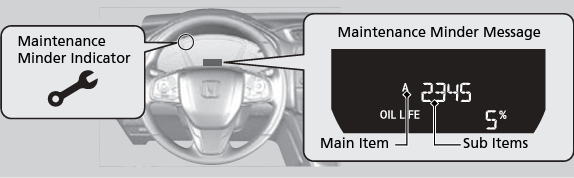
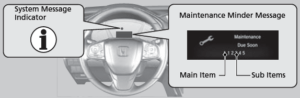
Accompanying the oil life percentage, which typically starts at 100% after a legitimate service, the Maintenance Minder displays various alphanumeric service codes. These codes specify the exact maintenance tasks required. Primary codes include:
- Code A: Indicates an engine oil change is required.
- Code B: Signifies an engine oil and filter change, inspection of brakes, parking brake adjustment, and various component inspections (tie-rod ends, steering gearbox, driveshaft boots, suspension components, fluid levels, exhaust system, fuel lines).
Secondary codes, shown as numbers (1-5), detail additional services:
- Code 1: Rotate tires.
- Code 2: Replace air cleaner element, inspect drive belt, replace dust and pollen filter.
- Code 3: Replace transmission fluid.
- Code 4: Replace spark plugs, inspect valve clearance, replace timing belt (if applicable).
- Code 5: Replace engine coolant.
For instance, a display reading ‘Oil Life 15% – Service B1’ indicates that an oil and filter change, comprehensive vehicle inspection, and tire rotation are all due. Ignoring these indicators can lead to accelerated engine wear, reduced fuel efficiency, and potentially void your vehicle’s warranty. The Maintenance Minder system is engineered to guide preventative maintenance, providing a ‘fresh start’ for monitoring after each service, ensuring future calculations are based on accurate, up-to-date data. While Honda typically recommends oil changes every 7,500-10,000 miles or 12 months, whichever comes first, the Maintenance Minder adapts this based on your specific driving conditions, dynamically managing the engine’s need for clean lubricant. It effectively serves as a continuous reboot for your vehicle’s service intelligence after proper care.
Pre-Reset Checks and Essential Information for Your 2018 CRV

![[2026 Upgraded] DooGooCoo Windshield Sun Shade for Honda CRV 2017-2021 2022 [Cooling…](https://m.media-amazon.com/images/I/51tfKv3G1ML._SS500_.jpg)

Before you even consider touching the reset button, it is paramount that you have performed a genuine engine oil and oil filter change. Resetting the oil life monitor without actually changing the oil is a critical misstep that can lead to severe engine damage. The system, once reset, assumes your engine has fresh oil, starting a new monitoring cycle based on that premise. If old, degraded oil remains, the engine will suffer from inadequate lubrication, increased friction, and accelerated wear, negating the very purpose of the Maintenance Minder. This is not merely a convenience feature; it’s an integral part of your vehicle’s preventative maintenance schedule.
Never reset your 2018 Honda CRV’s oil life monitor without first performing a genuine oil and filter change. Doing so will mislead the Maintenance Minder system, potentially causing premature engine wear, reduced performance, and costly repairs down the line, as the engine continues to operate on degraded oil.
Always consult your 2018 Honda CRV owner’s manual. While this guide provides a general procedure, minor variations in dashboard interfaces or button terminology can exist between model years or even trim levels. Your owner’s manual contains the most accurate and specific instructions for your vehicle.
Confirmation of the correct engine oil specification is also critical. For the 2018 Honda CRV, the manufacturer specifically recommends using Honda Genuine Motor Oil or an equivalent API Certified 0W-20 oil. This specification is typically found on a sticker under the hood, near the oil fill cap, or detailed extensively in the owner’s manual. Using the wrong oil type, such as a different viscosity or non-API certified oil, can compromise engine lubrication, fuel efficiency, and potentially void your powertrain warranty. The oil capacity for your 2018 CRV is approximately 4.2 quarts with a filter change. Additionally, always use a genuine Honda oil filter or an equivalent quality aftermarket filter. A quality filter ensures proper filtration and oil flow, vital for engine health. By performing these crucial steps, you are effectively restoring the system’s intelligence with new, clean oil, allowing it to accurately begin its monitoring cycle anew. Think of it as creating a sound backup for your engine’s longevity by ensuring the foundation of its lubrication is perfectly initialized.
Step-by-Step Guide: Resetting the 2018 Honda CRV Oil Life Monitor


📋
Step-by-Step Guide
Begin by inserting your key into the ignition (or pressing the start button without pressing the brake pedal for push-button start models) and turning the ignition switch to the ON (II) position. It is crucial that the engine is NOT running. This specific ignition state powers the vehicle’s electrical systems and dashboard, allowing access to the maintenance menu without initiating engine operation.
Locate the SEL/RESET button on your instrument panel, typically found on the left side of the dashboard. Press this button repeatedly to cycle through the various information displays on your multi-information display screen. Continue pressing until the ‘Oil Life’ percentage is shown, accompanied by a small wrench icon. For example, you might see “Oil Life 15%” or “Oil Life 0%”.
Once the ‘Oil Life’ percentage is displayed, press and hold the SEL/RESET button. Hold it for approximately 10 seconds. You will observe the oil life display begin to blink, indicating the system is ready to be reset. Continue holding the button for another 5 seconds. The oil life display will then change to ‘100%’, and the maintenance wrench indicator light should disappear. This action performs a complete reboot of the oil life calculation, effectively setting it back to default settings after your service.
After releasing the button, confirm that the multi-information display now clearly shows ‘Oil Life 100%’ and that the maintenance wrench symbol is no longer illuminated. This visual confirmation signifies a successful clean slate for the system, allowing it to accurately monitor your engine’s oil life from this point forward. You have successfully provided a fresh start to the Maintenance Minder.
If you encounter difficulty, ensure your vehicle is parked on level ground and the parking brake is engaged. Some systems can be sensitive to vehicle state. If the reset doesn’t take on the first attempt, simply release the button and try the process again from Step 1, paying close attention to the hold times.
Troubleshooting Common Issues After Resetting Your 2018 CRV’s Oil Life
Even with precise instructions, issues can sometimes arise during or after the oil life reset. Knowing how to diagnose and address these can save you a trip to the dealership.
One common scenario is when the oil life monitor fails to reset to 100%. This often manifests as the display blinking but then reverting to the previous percentage (e.g., “Oil Life 15%”). Potential causes include:
- Not holding the SEL/RESET button for the full required duration (approximately 10 seconds for blinking, then an additional 5 seconds for the reset).
- The ignition switch not being in the exact ON (II) position. Ensure all dashboard lights are on, but the engine is off.
- A momentary system glitch.
If this happens, simply release the button, turn the ignition off, wait a few seconds, and then repeat the entire reset procedure from Step 1, paying extra attention to the hold times and ignition position. This re-attempt often resolves the issue, allowing you to restore the monitor to its default state.
Another issue can be the maintenance wrench indicator remaining illuminated even after the oil life shows 100%. This typically signifies that there are other unaddressed service codes within the Maintenance Minder system. Remember, the system tracks more than just oil life. A persistent wrench could indicate that services like tire rotation (Code 1), air filter replacement (Code 2), or transmission fluid change (Code 3) are still due. Consult your owner’s manual for a comprehensive list of maintenance codes and how to address them individually. Each sub-item may require a separate reset procedure within the system, often by cycling through the codes and holding the SEL/RESET button for each one.
The most critical troubleshooting scenario is if the oil life was accidentally reset without an actual oil change. As previously warned, this is highly detrimental. If this occurs, immediately schedule an oil and filter change. Document the current mileage precisely, as this information will be vital for your service records and for calculating the next genuine oil change interval. Do not rely on the falsely reset Maintenance Minder for lubrication guidance in this situation.
If issues persist despite following these steps, or if you suspect a deeper electronic fault, more advanced ‘factory restore’ techniques might be necessary. This could involve disconnecting the vehicle battery for a short period (e.g., 15-30 minutes) to perform a full system reboot, which can clear some electronic glitches. However, be aware that disconnecting the battery may reset other electronic systems like radio presets, clock, and some adaptive settings. Always follow proper battery disconnection safety procedures. For persistent or complex issues that require specialized diagnostic insights, such as errors that necessitate a Honda HDS (Honda Diagnostic System) scan tool, consulting a certified Honda technician is the most prudent course of action. They can properly initialize the system and confirm underlying causes.
The Importance of Timely 2018 CRV Oil Changes and Correct Resets
The engine oil in your 2018 Honda CRV is far more than just a lubricant; it is a critical component for its mechanical health and overall performance. Regular, timely oil changes are paramount in preventing engine wear, sludge buildup, and potential overheating. Over time, engine oil degrades, becoming contaminated with combustion byproducts and losing its lubricating and cooling properties. Running an engine on degraded oil is akin to running it without proper blood circulation – it inevitably leads to increased friction, premature component failure, and significantly reduced engine lifespan. This proactive maintenance is vital for the longevity and reliability of your CRV’s sophisticated engine.
The benefits extend beyond just engine protection. Using fresh, clean oil significantly impacts fuel efficiency and emissions. Degraded oil, thick with contaminants, forces the engine to work harder to overcome internal resistance, directly leading to increased fuel consumption and higher emissions. Conversely, fresh, properly specified oil allows the engine to operate at its optimal efficiency, translating to better mileage and a reduced environmental footprint. This regular replenishment of lubricant essentially provides a vital fresh start for all internal engine components.
Enhanced Engine Longevity
Regular oil changes reduce wear, preventing premature component failure and extending the overall life of your CRV’s engine.
Optimized Fuel Efficiency
Clean, high-quality oil minimizes friction, allowing the engine to run more efficiently and consume less fuel.
Accurate Maintenance Tracking
Correctly resetting the oil life monitor ensures the Maintenance Minder provides timely and precise service alerts.
The significance of correctly resetting the oil life monitor cannot be overstated. It ensures that your Maintenance Minder system accurately tracks service intervals and provides timely, relevant alerts for future maintenance. A correctly reset system provides a true ‘fresh start’ for the monitoring period, allowing its intelligent algorithms to perform their calculations based on current conditions, not outdated data. Failing to reset it means the system will inaccurately believe the old, degraded oil is still in use, prompting incorrect and potentially dangerous service recommendations. This is why the precise action to restore its intelligent calculations is so vital.
Furthermore, adherence to the manufacturer’s recommended service schedules, including documented oil changes and correct resets, is crucial for upholding your vehicle’s warranty status. Many powertrain warranty claims are denied due to insufficient or improperly documented maintenance. A comprehensive service history, including evidence of consistent oil changes and resets, also significantly enhances your vehicle’s resale value. Potential buyers appreciate a well-maintained vehicle with a clear record of care. The minor cost of routine oil changes pales in comparison to the substantial expense of major engine repairs that can result from neglect. Industry statistics indicate that consistent service can extend a vehicle’s life by tens of thousands of miles, solidifying the importance of regular care, like a reliable backup system for your investment.
By The Numbers
Miles for Oil Change (typical)
Quarts of 0W-20 Oil (approx.)
Seconds for Full Reset (approx.)
Target Oil Life Display
Accurate oil life resets are vital for the 2018 Honda CRV’s Maintenance Minder system to function correctly. Always perform a genuine oil change before resetting the monitor to ensure proper vehicle upkeep. Following the precise step-by-step instructions ensures a successful reset, restoring the system to its optimal monitoring state. Implement these steps to maintain your 2018 Honda CRV’s integrity and extend its operational lifespan. For any persistent issues or advanced diagnostics, consult a certified Honda service technician.
Frequently Asked Questions
Why is it necessary to reset the oil life monitor after an oil change?
Resetting the oil life monitor is essential because the Maintenance Minder system calculates oil degradation based on various driving conditions and time. Failing to reset it means the system won’t recognize the new, clean oil, continuing to count down from its previous state. This leads to inaccurate service alerts and could cause you to miss future crucial maintenance notifications.
Can I reset the oil life monitor without actually changing the oil?
Technically, yes, you can perform the reset procedure without changing the oil. However, this is strongly advised against. Resetting without an actual oil change provides a false ‘fresh start’ for the system, leading it to believe new oil is present. This can result in severe engine damage over time due to neglected oil degradation, potentially voiding your warranty.
What should I do if I accidentally reset the oil life monitor too early?
If you accidentally reset the oil life monitor, it’s crucial to note the mileage at which the reset occurred. While it won’t damage the vehicle immediately, the system will no longer accurately track your oil’s life. It’s recommended to adhere to a conventional mileage-based oil change schedule (e.g., every 5,000-7,500 miles) or consult a professional for advice.
My 2018 CRV’s oil life monitor isn’t resetting to 100%; what could be wrong?
Several factors can prevent a successful reset. Ensure the ignition is in the ON (II) position (engine off) and you’re holding the SEL/RESET button for the full duration (typically 10-15 seconds). If it still fails, there might be a deeper electrical issue or an unaddressed service code. Consult your owner’s manual or a Honda service center for diagnosis.
Does resetting the oil life monitor affect my Honda CRV’s warranty?
Resetting the oil life monitor correctly after a legitimate oil change does not affect your warranty. In fact, performing timely maintenance and properly resetting the system helps ensure you adhere to Honda’s service recommendations, which is crucial for maintaining warranty validity. Always keep records of your oil changes as proof of service.