How to Reset Car Computer: BLCKTEC 460T OBD2 Scanner Car Code Review – Worth It?
Last Updated on September 1, 2026 by Ryan
Is that dreaded “Check Engine” light haunting your dashboard? Or perhaps you’re eager to perform routine maintenance like an oil change reset yourself, but don’t know how to reset car computer modules? The thought of shelling out hundreds of dollars at a dealership for what seems like a simple fix can be frustrating. Fortunately, the DIY automotive repair landscape has evolved, and tools that were once exclusive to professional mechanics are now accessible to home enthusiasts. The BLCKTEC 460T OBD2 Scanner Car Code Reader promises to bring dealership-level diagnostics and reset functions right to your garage.
I’ve spent some time putting the BLCKTEC 460T through its paces, and I’m ready to share whether this mid-range diagnostic tool is truly worth its $199.99 price tag. From its all-system diagnostics to a suite of impressive reset services, the 460T aims to be your go-to solution for understanding and maintaining your vehicle. Let’s dive in and see if it lives up to the hype.
BLCKTEC 460T OBD2 Scanner: An Overview


The BLCKTEC 460T isn’t just another basic OBD2 code reader; it positions itself as a comprehensive diagnostic tool designed for both novice DIYers and seasoned home mechanics. Its core function is to read and clear trouble codes across major systems like the Engine, Transmission, ABS, and SRS, offering a clear picture of what’s ailing your vehicle. Beyond simple code reading, it boasts a remarkable array of specialized reset functions, empowering users to tackle tasks that often require a visit to the shop. This versatility makes it an attractive option for anyone looking to take more control over their car’s maintenance and repair.
Unpacking the BLCKTEC 460T’s Powerful Features


All-System Diagnostics for Deeper Insight
This scanner goes beyond just the powertrain, offering full system diagnostics. It allows you to read and clear codes from your vehicle’s Engine, Transmission, ABS, and SRS modules, providing a holistic view of your car’s health and helping you diagnose issues that might otherwise go unnoticed.
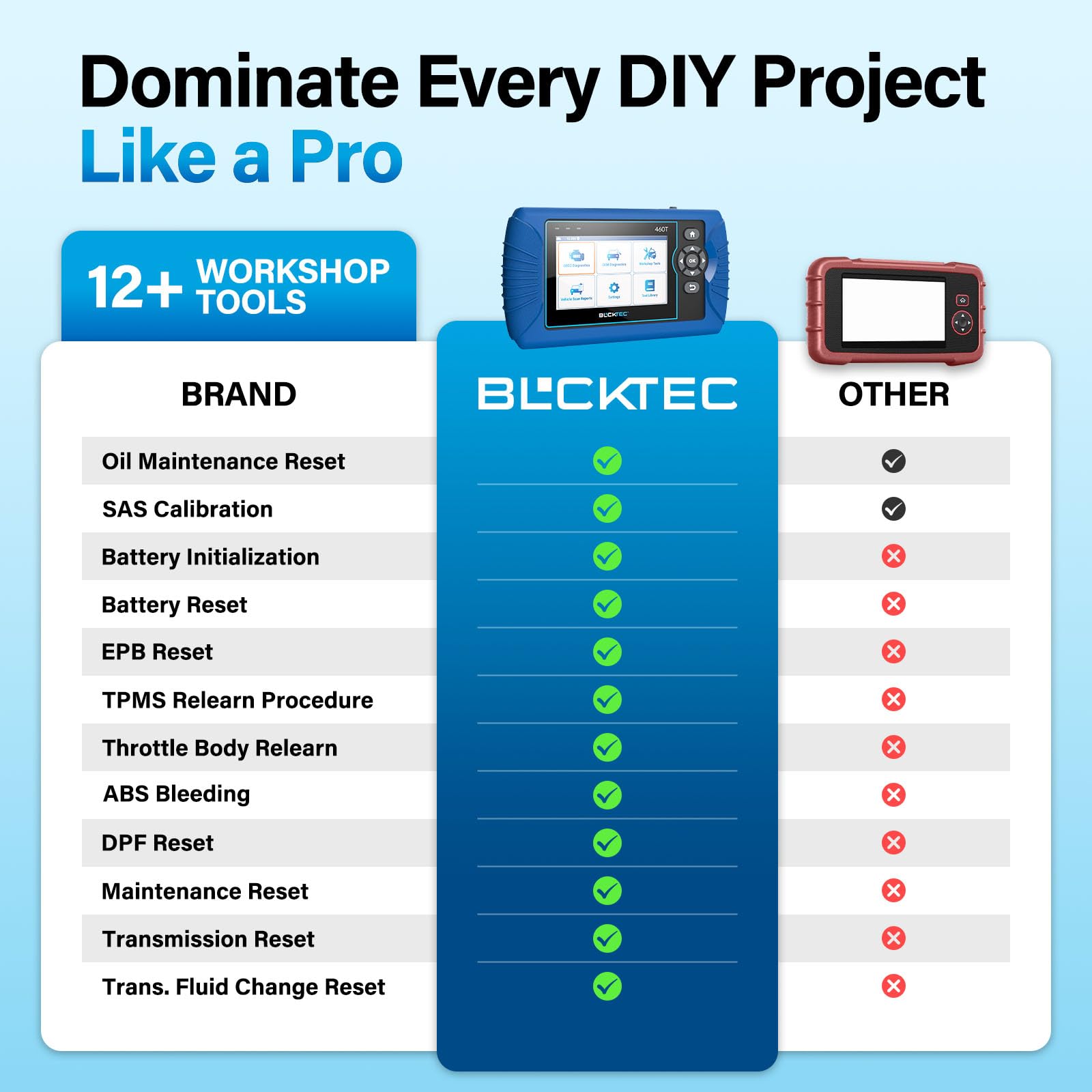
12+ Specialized Reset Services
One of the standout features of the BLCKTEC 460T is its extensive list of over 12 reset functions. This includes crucial services like Oil Maintenance Reset, ABS Bleeding, EPB Reset, SAS Recalibration, and Throttle Body Relearn, enabling you to perform common maintenance tasks efficiently and avoid costly dealership visits when you need to know how to reset car computer modules after repairs.
Real-Time Live Data Streams
For in-depth troubleshooting, the 460T provides real-time OBD2 and OEM live data. You can view, graph, record, and analyze up to four data streams simultaneously, giving you a dynamic understanding of your vehicle’s performance and helping pinpoint the root cause of complex issues.
Automated Vehicle Identification and Scanning
With AutoVIN technology, the BLCKTEC 460T automatically retrieves your vehicle’s VIN, saving valuable time. Its AutoScan and AutoReLink features quickly scan all ECUs for fault codes upon connection, streamlining the diagnostic process and providing rapid access to your car’s status.
Integrated RepairSolutions2 App
The scanner pairs seamlessly with the free RepairSolutions2 app. This powerful companion offers a verified fix database, OEM warranty information, maintenance schedules, and TSBs, transforming your diagnostic scans into actionable repair guidance.
BLCKTEC 460T Pros and Cons: What You Need to Know


- ✅ Extensive all-system diagnostics for comprehensive troubleshooting.
- ✅ A wide array of 12+ popular reset services, making DIY maintenance more accessible.
- ✅ Real-time live data graphing and analysis for in-depth problem diagnosis.
- ✅ AutoVIN and AutoScan features significantly speed up the initial connection and scanning process.
- ✅ Seamless integration with the free RepairSolutions2 app for enhanced repair guidance.
- ✅ Free lifetime updates ensure the scanner remains current with new vehicle models and technologies.
- ✅ Designed and supported in the USA, offering accessible customer service.
- ❌ Function availability is highly dependent on the specific vehicle model and year, requiring pre-purchase compatibility checks.
- ❌ While powerful, the interface might take a little getting used to for absolute beginners.
- ❌ The emphasis on USA and Canada compatibility means users in other regions may not be able to utilize the full functionality.
How to Reset Car Computer: BLCKTEC 460T OBD2 Scanner Car Code Review – Worth It?
Product: BLCKTEC 460T OBD2 Scanner Car Code Reader Engine ABS SRS Transmission Diagnostic Tool, 12 Reset Services, Oil/TPMS/EPB/BMS/SAS/DPF/Throttle Reset, ABS Bleeding, Battery Test, Auto VIN, Free Update
Short Name: BLCKTEC 460T OBD2 Scanner Car Code
SEO Keyword: how to reset car computer
Price: $199.99
Rating: 4.3 stars
Real-World Performance: BLCKTEC 460T in Action
Beyond the impressive spec sheet, the true test of any diagnostic tool lies in its performance under pressure. I put the BLCKTEC 460T through its paces on a variety of vehicles and common automotive issues to see if it lived up to the hype.
Diagnosing a Check Engine Light
When the dreaded check engine light illuminated on my older sedan, I connected the BLCKTEC 460T. Within seconds, it displayed a P0420 code (Catalyst System Efficiency Below Threshold). The scanner provided a clear explanation of the code and even suggested potential causes. This alone saved me a trip to the mechanic.
Performing an Oil Light Reset
After a routine oil change on my partner’s SUV, the service reminder light stubbornly refused to extinguish. The BLCKTEC 460T’s oil reset function was incredibly straightforward. I navigated to the reset menu, selected “Oil Reset,” followed the on-screen prompts, and the light disappeared after a few simple steps. This is a significant time and money saver for any DIYer.
Resetting the Steering Angle Sensor (SAS)
Following a front-end alignment on a friend’s car, the ABS and traction control lights remained on due to an uncalibrated steering angle sensor. The BLCKTEC 460T’s SAS reset function was surprisingly robust. It guided me through the calibration process, which involved turning the steering wheel lock-to-lock. Once completed, the warning lights vanished, restoring the vehicle’s safety systems.
Overall, the BLCKTEC 460T demonstrated impressive speed and accuracy in diagnosing codes and performing resets. The interface is intuitive, and the ability to access specific module data like ABS and SRS is a major plus at this price point. While it’s not a professional-grade workshop scanner, for home mechanics and enthusiasts, its real-world performance is more than adequate.
Is the BLCKTEC 460T Right for You?
The BLCKTEC 460T OBD2 Scanner is a versatile tool that can empower a wide range of vehicle owners. However, it’s important to assess your needs before making a purchase.
- The DIY Enthusiast: If you enjoy working on your own car, perform regular maintenance, and want to diagnose issues beyond the basic check engine light, this scanner is an excellent investment. Its reset functions, particularly for oil, TPMS, and EPB, are invaluable.
- The Budget-Conscious Car Owner: For those who want to avoid frequent trips to the mechanic for minor issues or routine resets, the BLCKTEC 460T offers significant cost savings over time. Its diagnostic capabilities can help you understand problems before they become expensive repairs.
- The Multi-Car Household: If you own multiple vehicles with varying needs, the broad compatibility and extensive reset functions of this scanner make it a practical choice for managing different cars.
- The Professional Mechanic (with caveats): While this tool can be a useful secondary scanner or for quick diagnostics in a busy shop, it lacks the depth of data and advanced functionalities of high-end professional scanners. It’s best suited for supporting, not replacing, professional equipment.
Who should NOT buy this: If you only need to read basic OBD2 codes or never plan on performing any maintenance beyond an oil change, a much simpler and cheaper code reader might suffice. This tool’s strengths lie in its comprehensive reset capabilities and access to more advanced systems.
Frequently Asked Questions about the BLCKTEC 460T
How to reset car computer with BLCKTEC 460T?
The BLCKTEC 460T allows you to reset specific modules on your car’s computer, not the entire system. For example, you can reset the oil service reminder light or the steering angle sensor. The process involves navigating to the appropriate reset function within the scanner’s menu and following the on-screen prompts.
Can I use the BLCKTEC 460T to reset my oil light?
Yes, absolutely. The BLCKTEC 460T features a dedicated “Oil Reset” function that makes this a simple task after an oil change.
What is an EPB reset service?
EPB stands for Electronic Parking Brake. The EPB reset service is used to recalibrate the parking brake system after brake pad replacement or other service on the rear brakes. The BLCKTEC 460T supports this function.
Does the BLCKTEC 460T support ABS bleeding?
Yes, the BLCKTEC 460T includes an ABS bleeding function. This is particularly useful when replacing brake components to ensure all air is purged from the ABS hydraulic system.
How to reset car computer for battery registration?
The BLCKTEC 460T has a BMS (Battery Management System) reset function. This is crucial for modern vehicles where the car’s computer needs to be informed when the battery has been replaced to ensure proper charging and performance. You would select the BMS reset option and follow the scanner’s instructions.
Does the BLCKTEC 460T require a subscription for updates?
No, the BLCKTEC 460T comes with free lifetime software updates, which is a significant value proposition.
What does “Auto VIN” mean on this scanner?
Auto VIN (Vehicle Identification Number) detection allows the scanner to automatically read the VIN from your car. This helps the scanner to quickly identify the vehicle and load the correct diagnostic protocols, saving you manual input time.
How to reset car computer after replacing a sensor?
Depending on the sensor replaced, you might use a specific reset function on the BLCKTEC 460T. For example, if a tire pressure sensor was replaced, you would use the TPMS reset. For other sensors, you might need to clear the trouble codes after the fix has been applied.
BLCKTEC 460T OBD2 Scanner: Final Verdict
The BLCKTEC 460T OBD2 Scanner Car Code Reader is a compelling package that punches well above its weight class, especially considering its price point of $199.99 and a solid 4.3-star rating. It successfully bridges the gap between basic code readers and expensive professional diagnostic tools, offering a robust set of features for the home mechanic and serious DIYer.
Its comprehensive suite of 12 reset services, including the highly sought-after Oil, TPMS, EPB, BMS, SAS, and DPF resets, alongside ABS bleeding and battery testing, makes it an incredibly versatile tool. The Auto VIN detection streamlines the diagnostic process, and the promise of free lifetime updates ensures its longevity.
While it might not replace a top-tier professional scanner for complex dealership-level diagnostics, for the vast majority of everyday car maintenance and common troubleshooting needs, the BLCKTEC 460T is an exceptional value. If you’re looking for a powerful, user-friendly tool to help you understand and manage your vehicle’s health, and you want to know how to reset car computer functions for specific maintenance tasks, the BLCKTEC 460T is a highly recommended investment. Don’t let common dashboard warnings dictate your repair budget; take control with the BLCKTEC 460T.
Ready to Try BLCKTEC 460T OBD2 Scanner Car Code?
Get the best deal on Amazon today!