How to Reset Clean/Descale Light on Breville: Quick and Easy Fixes
Last Updated on October 17, 2023 by Albert Duke
To reset the clean/descale light on your Breville machine, press and hold the manual button for approximately 5 seconds. Maintaining a clean and well-functioning coffee machine is essential for producing a great cup of joe.
However, it can be frustrating when the clean/descale light on your Breville machine stays on even after completing the cleaning process. Fortunately, there is a simple solution to reset the light and ensure that your machine is working efficiently. We will provide you with a step-by-step guide on how to reset the clean/descale light on your Breville machine, allowing you to enjoy your coffee without any interruptions.
So, let’s dive in and explore how to keep your Breville machine in top-notch condition.
Understanding The Clean/Descale Light



To reset the clean/descale light on your Breville machine, press and hold the manual button for approximately 5 seconds. This will clear the message and turn off the light, ensuring optimal performance for your coffee maker.
What Does The Clean/Descale Light Signify?
The Clean/Descale Light on your Breville machine serves as a reminder that it is time to clean and descale your device. When the light turns on, it indicates that there is a buildup of mineral deposits or coffee residue that needs to be removed.
Ignoring the Clean/Descale Light can lead to decreased performance and the possibility of mechanical issues. It is crucial to address this issue promptly to ensure the longevity and optimal functioning of your machine.
Here are the key points to understand about the Clean/Descale Light:
- The light is a visual indicator that your Breville machine requires cleaning and descaling.
- It is triggered by the accumulation of mineral deposits and coffee residue.
- Ignoring the light can have a negative impact on your machine’s performance.
- Cleaning and descaling help maintain the longevity and optimal functioning of your device.
- Regular cleaning and descaling prevent blockages and ensure a smooth brewing process.
- The Clean/Descale Light serves as a reminder to attend to the maintenance needs of your Breville machine.
Remember, addressing the Clean/Descale Light issue promptly is crucial for the proper functioning and longevity of your Breville machine. Don’t overlook this important maintenance task to ensure the best possible brewing experience.
Cleaning Tablets And Decalcifying Solution


To reset the Clean/Descale light on your Breville machine, use cleaning tablets and a decalcifying solution. Follow the instructions provided to activate the cleaning mode and complete the cleaning cycle for optimal performance.
Using Cleaning Tablets To Remove Residue And Build-Up:
- Cleaning tablets are specifically designed to remove residue and build-up from your Breville machine.
- These tablets are formulated to dissolve and scrub away coffee oils, stains, and other deposits that can accumulate over time.
- To use cleaning tablets, simply follow the instructions provided by the manufacturer and insert the tablet into the designated compartment or port on your machine.
- Allow the tablet to dissolve and go through the cleaning cycle as recommended.
- The tablet will effectively clean and descale the internal components of the machine, ensuring optimal performance and extending its lifespan.
Decalcifying Solution And Its Role In Descaling The Machine:
- Decalcifying solution is a highly effective product used to descale the internal components of your Breville machine.
- Over time, minerals in the water can build up and form scale inside the machine, affecting the taste of your coffee and the overall performance of the machine.
- Decalcifying solution is specially formulated to dissolve and remove these mineral deposits, ensuring that your machine operates at its best.
- You can use the decalcifying solution in conjunction with the cleaning tablets or separately, depending on the specific instructions provided by the manufacturer.
- It is important to regularly descale your machine to prevent scale build-up and maintain the quality of your coffee.
Proper Usage Of Cleaning Tablets And Decalcifying Solution:
- Before using cleaning tablets or decalcifying solution, it is crucial to consult the user manual or instructions provided by the manufacturer.
- Follow the recommended dosage and instructions for using the cleaning tablets or decalcifying solution.
- Ensure that you have the appropriate tools and materials required for the cleaning process.
- If using cleaning tablets, insert them into the designated compartment or port as directed and allow them to dissolve during the cleaning cycle.
- If using decalcifying solution, mix it with water according to the instructions and follow the recommended descaling process.
- After completing the cleaning or descaling cycle, rinse the machine thoroughly with clean water to remove any remaining residue or solution.
- Regularly clean and descale your Breville machine as recommended by the manufacturer to keep it in optimal condition and ensure the best-tasting coffee.
Activating Cleaning Mode And Running The Cleaning Cycle


To reset the clean/descale light on your Breville coffee machine, you can activate the cleaning mode and run the cleaning cycle. This will help maintain the cleanliness and performance of your machine for delicious cups of coffee.
Step-By-Step Guide To Activating The Cleaning Mode:
- Turn on your Breville espresso machine.
- Ensure that the machine is not in use and has cooled down before proceeding.
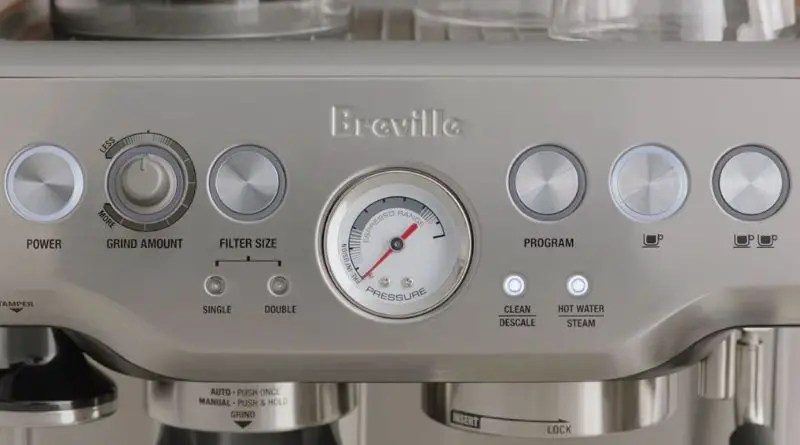
- Locate the ‘Clean/Descale’ button on the machine’s control panel.
- Press and hold the ‘Clean/Descale’ button for 5 seconds until the Clean/Descale light starts to blink.
- Release the button and wait for the light to stop blinking. This indicates that the cleaning mode has been activated.
Running The Cleaning Cycle To Reset The Clean/Descale Light:
- Fill the water tank with a mixture of descaling solution and water as per the manufacturer’s instructions.
- Place a large container under the group head to collect the cleaning solution.
- Press the ‘Clean/Descale’ button again to start the cleaning cycle.
- The machine will start dispensing the cleaning solution through the group head. Allow the cycle to run until the water tank is empty.
- After the cleaning cycle is complete, the Clean/Descale Light should reset automatically.
Duration And Frequency Of Running The Cleaning Cycle:
- The duration of the cleaning cycle may vary depending on your Breville espresso machine model. Refer to the user manual for specific instructions.
- It is recommended to run the cleaning cycle at least once every 2-3 months to prevent build-up of scale and maintain the optimal performance of your machine.
- However, if you notice the Clean/Descale Light blinking before the recommended interval, it may indicate a higher level of scale buildup, and running the cleaning cycle more frequently is advisable.
Remember to always follow the manufacturer’s instructions for cleaning and descaling your Breville machine to ensure its longevity and consistent coffee quality.
Rinse And Clean The Portafilter And Group Head
To reset the clean/descale light on your Breville espresso machine, start by rinsing and cleaning the portafilter and group head. This will help maintain the machine’s performance and keep it running smoothly.
Importance Of Rinsing The Portafilter And Group Head
Rinsing the portafilter and group head of your Breville coffee machine is a crucial step in maintaining its performance and ensuring the longevity of the equipment. By properly rinsing these components, you can:
- Remove any residual coffee grounds or oils: After each use, coffee grounds and oils can stick to the portafilter and group head, which can affect the flavor of your coffee and even clog the machine over time.
- Prevent cross-contamination: Rinsing the portafilter and group head between brews helps prevent the mixing of different coffee flavors, ensuring that each cup tastes fresh and distinct.
- Maintain temperature stability: The group head, which houses the coffee puck and ensures even water distribution, needs to be rinsed to remove any leftover coffee residue that could impact temperature consistency.
Proper Techniques And Tools For Cleaning The Portafilter And Group Head
Here are some techniques and tools you can use to effectively clean the portafilter and group head of your Breville coffee machine:
- Start by removing the portafilter from the group head. Discard the used coffee grounds and rinse the portafilter under warm water to remove any remaining particles.
- Use a soft brush or toothbrush to scrub the inside of the portafilter, ensuring that all coffee residue is removed.
- For stubborn stains or buildup, you can soak the portafilter in a solution of warm water and mild dish detergent. Rinse thoroughly before using it again.
- Clean the group head by wiping it with a clean cloth or sponge. Make sure to reach all the nooks and crannies to remove any coffee residue.
- Regularly descale your machine to remove mineral deposits that can accumulate in the group head over time. Follow the manufacturer’s instructions for the appropriate descaling solution and frequency.
- Avoid using harsh chemicals or abrasive scrubbers, as they can damage the surface of the portafilter and group head.
- Once cleaned, allow the portafilter and group head to air dry before reassembling them onto the machine.
Ensuring Thorough Cleaning For Optimal Performance
To ensure optimal performance and the best-tasting coffee, it is essential to thoroughly clean the portafilter and group head of your Breville coffee machine. Follow these additional tips:
- Clean the portafilter and group head after each use to prevent residue buildup.
- Perform regular deep cleaning by dismantling the portafilter and group head, if possible, to remove any hidden deposits.
- Consider investing in a backflush disc or blind filter to clean the group head more thoroughly. This will help remove any stubborn coffee oils or residue.
- Refer to the user manual or online resources specific to your Breville coffee machine model for detailed cleaning instructions.
- Remember to also clean and maintain other components of your coffee machine, such as the steam wand and water reservoir, for overall cleanliness and optimal performance.
Properly rinsing and cleaning the portafilter and group head of your Breville coffee machine is crucial for maintaining its performance and enjoying flavorful coffee every time. By following these techniques and using the right tools, you can ensure a clean and well-maintained coffee machine for years to come.
Descaling With Vinegar Or Descaler Solution
To reset the clean/descale light on a Breville machine, you can use vinegar or a descaler solution. Simply follow the instructions provided by Breville to activate the cleaning mode and run the cleaning cycle to remove any mineral buildup. Make sure to rinse thoroughly with fresh water afterwards.
Understanding The Pros And Cons Of Using Vinegar For Descaling:
- Vinegar is a commonly used household product that can be effective for descaling various appliances, including the Breville machine.
- Pros of using vinegar for descaling include its affordability, accessibility, and natural properties.
- Vinegar is a natural acid that can help dissolve mineral buildup and remove limescale from the machine’s internal components.
- However, there are also some cons to using vinegar for descaling:
- Vinegar has a strong odor that may linger in the machine even after rinsing.
- It may take multiple descaling cycles with vinegar to fully remove mineral buildup, depending on the severity.
- Vinegar is not as effective as descaler solutions specifically formulated for espresso machines.
Mixing And Using A Descaler Solution For Effective Descaling:
- Descaler solutions are specially formulated products designed to efficiently remove limescale and mineral buildup from espresso machines like the Breville.
- Here are the steps to mix and use a descaler solution effectively:
- Choose a descaler solution that is compatible with your Breville machine. Follow the manufacturer’s instructions for the specific product you have.
- Mix the descaler solution with water as instructed on the packaging. The ratio typically ranges from 1: 1 to 1:3, depending on the brand.
- Ensure that the water tank is empty and clean before filling it with the descaler solution mixture.
- Place a container under the group head and steam wand to collect any liquid that will be flushed out during the descaling process.
- Turn on the machine and follow the manufacturer’s instructions to initiate the descaling cycle.
- Allow the descaler solution to run through the machine, cleaning the internal components and removing limescale.
- Once the descaling cycle is complete, run a rinse cycle with clean water to flush out any remaining descaler solution from the machine.
Step-By-Step Guide For Descaling With Vinegar Or Descaler Solution:
- Ensure that the Breville machine is turned off and unplugged before starting the descaling process.
- If using vinegar:
- Mix equal parts of white vinegar and water.
- Fill the water tank with the vinegar solution.
- If using a descaler solution:
- Choose a descaler specifically designed for espresso machines.
- Mix the descaler solution with water as directed on the packaging.
- Fill the water tank with the descaler solution mixture.
- Place a container under the group head and steam wand to catch the liquid flushed out during descaling.
- Turn on the machine and allow it to heat up.
- Start the descaling cycle as per the manufacturer’s instructions:
- This usually involves pressing specific buttons or a combination of buttons to activate the descaling mode.
- Follow the prompts on the machine’s display, if applicable.
- Allow the vinegar or descaler solution to run through the machine:
- This process will help dissolve limescale and remove mineral buildup from the internal components.
- Once the descaling cycle is complete, run a rinse cycle with clean water to remove any remaining vinegar or descaler solution.
- Empty and refill the water tank with clean water.
- Run another rinse cycle to flush out any residue.
- Dispose of the liquid collected in the container from under the group head and steam wand.
- Wipe down the machine with a clean, damp cloth to remove any descaling solution or vinegar residue.
- Plug in the Breville machine, turn it on, and it should now be successfully descaled and ready for use.
Steam Cycle And Water Reservoir Maintenance
To reset the clean/descale light on your Breville espresso machine, follow these steps: Press and hold the MANUAL button, then press the POWER button to turn on the machine. Wait until the CLEAN ME light stops flashing, indicating the reset is complete.
Clean and descale your machine regularly to maintain its performance and extend its lifespan.
Performing A Steam Cycle To Remove Any Remaining Residue:
- Fill the water reservoir with clean water and ensure it is securely in place.
- Plug in your Breville coffee machine and turn it on.
- Allow the machine to heat up until it reaches the optimal temperature for steam.
- Once the machine is ready, place a cup or container under the steam wand.
- Activate the steam cycle by turning the steam dial to the “On” position.
- Allow the steam to run for a few minutes, until no more residue or buildup is visible in the steam wand.
- Turn off the steam cycle by turning the steam dial to the “Off” position.
- Dispose of any excess water in the cup or container.
Performing a steam cycle helps to remove any remaining residue or buildup in the steam wand, ensuring optimal performance and cleanliness of your Breville coffee machine.
Proper Cleaning And Maintenance Of The Water Reservoir:
- Regularly clean the water reservoir by removing it from the machine.
- Use warm water and mild soap to wash the reservoir, making sure to clean all sides and corners.
- Rinse the reservoir thoroughly to remove any soap residue.
- Wipe the reservoir dry with a clean cloth or allow it to air dry completely.
- Regularly check the water reservoir for any signs of mold or mildew.
- If mold or mildew is present, clean the reservoir with a mixture of white vinegar and water.
- After cleaning, rinse the reservoir thoroughly to remove any traces of vinegar.
- Ensure the water reservoir is completely dry before placing it back into the coffee machine.
Proper cleaning and maintenance of the water reservoir is essential for ensuring clean and descaled results. Regular cleaning prevents the growth of bacteria and helps to maintain the quality of your brewed coffee.
Replacing The Water Reservoir For Optimum Clean And Descaled Results:
- Over time, the water reservoir may become worn or damaged.
- If you notice any cracks or leaks, it is recommended to replace the water reservoir.
- Contact the Breville customer service or visit their website to purchase a new water reservoir.
- Follow the manufacturer’s instructions for replacing the water reservoir.
- Ensure the new water reservoir is properly aligned and securely in place.
- Run a steam cycle after replacing the water reservoir to ensure proper functioning and eliminate any air bubbles.
Replacing the water reservoir when necessary is crucial for achieving optimum clean and descaled results with your Breville coffee machine. A new, properly functioning reservoir ensures the best possible coffee brewing experience.
Handling Older Breville Models
To reset the clean/descale light on older Breville models, first, press and hold the MANUAL button. Then, follow the specific instructions for your machine model to complete the reset process. Keep in mind that it’s important to use the appropriate cleaning solution and maintain regular descaling to prolong the life of your Breville machine.
Tips And Tricks For Resetting The Clean/Descale Light On Older Breville Models:
- Follow these steps to reset the Clean/Descale Light on older Breville models:
- Turn off the machine and unplug it from the power source.
- Remove the water tank.
- Clean the tank thoroughly by rinsing it with warm, soapy water.
- Rinse it again with clean water to ensure all soap residue is removed.
- Fill the tank with a descaling solution according to the manufacturer’s instructions.
- Place the tank back into the machine and plug it back in.
- Turn on the machine and wait for it to reach the desired temperature.
- Press and hold the Clean/Descale button for a few seconds until the light stops flashing.
- The light should now be reset, indicating that the descaling process is complete.
Addressing Specific Challenges And Issues With Older Models:
- Older Breville models may present some challenges and issues when it comes to resetting the Clean/Descale Light. Here are a few things to keep in mind:
- Some older models may not have a specific Clean/Descale button. In this case, refer to the instruction manual or contact Breville customer support for guidance on how to reset the light.
- It is important to use a descaling solution that is compatible with your Breville machine. Using the wrong solution can damage the internal components of the machine.
- Pay close attention to the descaling process and make sure to follow all the steps carefully. Skipping or rushing through any step can result in an ineffective cleaning and descaling process.
Ensuring Effective Cleaning And Descaling For Older Breville Machines:
- To ensure effective cleaning and descaling for older Breville machines, consider the following tips:
- Regularly clean and descale your machine to maintain its performance and extend its lifespan.
- Use a high-quality descaling solution specifically designed for espresso machines.
- Follow the manufacturer’s instructions for descaling, as each machine may have different requirements.
- Pay attention to any specific recommendations or cautions mentioned in the instruction manual for older models.
- If you encounter any issues or have questions, reach out to Breville customer support for assistance.
These tips and tricks should help you reset the Clean/Descale Light on older Breville models and ensure effective cleaning and descaling for a well-maintained machine.

Credit: cafenfood.com
Troubleshooting Common Issues After Resetting The Clean/Descale Light
Having trouble with your Breville machine’s Clean/Descale light after resetting it? Learn how to troubleshoot common issues and get your machine back on track with these helpful tips.
:
When it comes to troubleshooting common issues after resetting the clean/descale light on your Breville machine, it’s important to address them promptly for optimal machine performance. Here are some troubleshooting techniques you can try:
- Machine not turning on:
- Check if the machine is securely plugged into a power source.
- Ensure that the power switch is in the ON position.
- Verify that the power outlet is functioning by plugging in another device.
- Water leakages:
- Examine the water tank and ensure it is properly positioned and securely attached.
- Check for any loose connections or damaged water hoses.
- Clean the water tank and ensure there are no blockages or obstructions.
- Insufficient water flow:
- Clean the water filter to remove any debris or impurities that may be blocking the water flow.
- Check the water tank to ensure it is filled to the recommended level.
- Ensure that the water pump is functioning properly by listening for any unusual sounds.
- Inconsistent temperature:
- Verify that the machine is properly preheated before brewing.
- Clean the heating element to remove any limescale buildup that may affect temperature.
- Ensure that the machine is not placed in a drafty or cold environment.
- Grinding issues:
- Adjust the grinder settings to achieve the desired grind size.
- Clean the grinder regularly to remove any coffee residue that may affect performance.
- Ensure that the beans are properly fed into the grinder without overfilling.
If these troubleshooting methods fail to resolve the issues with your Breville machine, it may be necessary to seek professional assistance. Professional technicians have the expertise to diagnose and repair any underlying problems that may be affecting the machine’s performance.
Remember, proper maintenance and regular cleaning are key to ensuring the longevity and optimal performance of your Breville machine.
Frequently Asked Questions For How To Reset Clean/Descale Light On Breville
How Do I Clear My Breville Descale Message?
To clear the descale message on your Breville: Press and hold the MANUAL button for approximately 5 seconds.
How Do You Reset A Breville Coffee Maker After Descaling?
To reset a Breville coffee maker after descaling, press and hold the MANUAL button for around 5 seconds.
Why Won T The Descale Light Go Off Breville?
To reset the descale light on a Breville machine, press and hold the MANUAL button for a few seconds.
What Does Clean Descale Light Mean On Breville Machine?
The clean descale light on a Breville machine indicates that it’s time to clean the machine and remove mineral deposits.
Conclusion
To wrap up, resetting and cleaning the descale light on your Breville machine is a crucial step in maintaining its performance and longevity. By following the simple steps outlined in this blog post, you can easily reset the clean/descale light and ensure that your machine continues to brew delicious coffee.
Remember to use the recommended cleaning tablets or descaling solution and run the cleaning cycle regularly to prevent build-up and maintain optimal function. It’s also important to clean the group head, steam wand, and water reservoir for thorough maintenance. By taking the time to properly care for your Breville machine, you can enjoy excellent coffee for years to come.
So, don’t let that pesky clean/descale light be a cause for concern any longer – reset it and keep brewing! Cheers to delicious coffee and a well-maintained Breville machine!