How Long to Supercharge a Tesla? Times, Factors & Tips
Last Updated on September 1, 2026 by Ryan
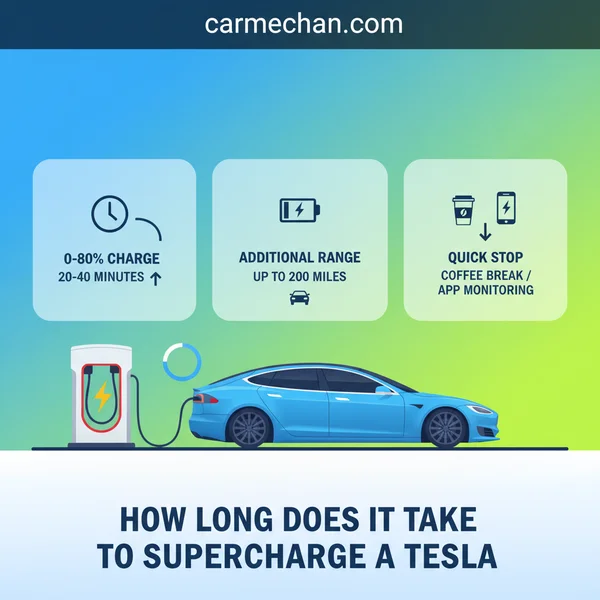
Supercharging a Tesla from 10% to 80% typically takes 20-40 minutes, depending on the model and Supercharger version. Factors like your starting charge, battery temperature, and the specific Tesla model significantly influence the total time. Charging speed tapers off significantly beyond 80% for optimal battery health and efficiency.
🎯 Key Takeaways



- Expect 20-40 minutes for 10-80% charge.
- Charging slows significantly past 80% SoC.
- Newer V3/V4 Superchargers are faster.
- Model & battery size affect charge speed.
- Pre-condition battery for optimal performance.
When you pull up to a supercharger” target=”_blank” rel=”noopener noreferrer” title=”Official Tesla Supercharger Network Information”>Tesla Supercharger, the immediate question is always: “How long until I’m ready to go again?” The good news is that Supercharging is designed for speed. Most Tesla models can achieve a substantial charge—typically from a low state of charge like 10-20% up to a robust 80%—in a remarkably quick 20 to 40 minutes. This rapid top-up is crucial for road trips and minimizes your downtime, getting you back on the highway swiftly.
Understanding these timeframes, and what influences them, allows you to plan your journeys more effectively and manage your expectations. It’s not just about how fast a Supercharger can be, but how quickly it will be for your specific vehicle and circumstances. Let’s break down the typical times and the key factors at play.
Understanding Typical Tesla Supercharging Times



Efficient Supercharging is all about getting the bulk of your range quickly, then moving on. Tesla’s Supercharger network and your car’s battery management system are optimized for this very purpose.
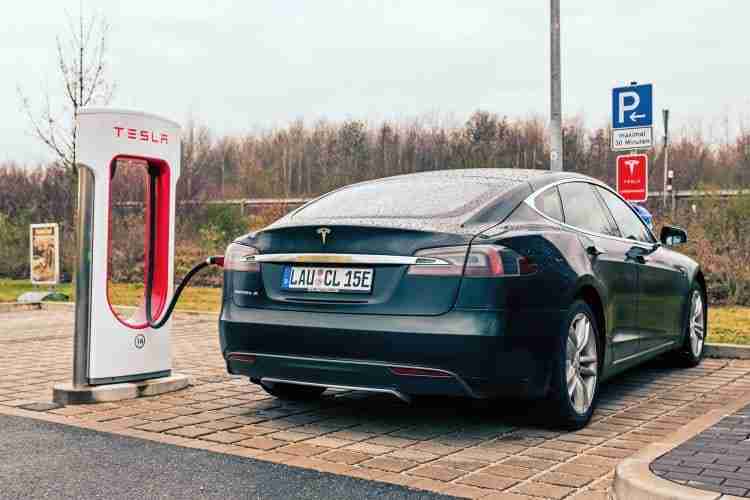
The 10% to 80% Sweet Spot
You might be wondering why we focus on charging to 80% rather than 100%. This is because all lithium-ion batteries, including those in Teslas, exhibit a significant slowdown in charging speed once they pass approximately 80% State of Charge (SoC). This “tapering” protects the battery health and is why Tesla’s navigation often advises stopping at an 80% charge level, especially on road trips. Charging those final 20% can take almost as long as the first 70%, making it inefficient for quick stops.
Model-Specific Supercharging Estimates
While general ranges apply, the specific Tesla model you drive, particularly its battery size and architecture, will influence your Supercharging speed. These are typical times for charging from a low SoC (around 10-20%) to 80% at a powerful V3 or V4 Supercharger:
- Tesla Model 3 / Model Y (Long Range & Performance): Expect approximately 20-30 minutes. These models benefit greatly from high peak charge rates on newer Superchargers.
- Tesla Model S / Model X (Long Range & Plaid): Anticipate about 25-40 minutes. With larger battery capacities, these vehicles can take a bit longer to reach 80%, even with their high peak charging capabilities.
These times are averages. Your actual experience might vary slightly, but they provide an excellent benchmark for planning your stops.
Key Factors Influencing Tesla Supercharging Speed


Several variables work in concert to determine how quickly your Tesla will add miles at a Supercharger. Knowing these can help you optimize your charging experience.
Starting State of Charge (SoC) & Desired Level
The lower your battery’s current charge, the faster it will typically accept power. This is why arriving at a Supercharger with a very low SoC (e.g., 10%) will result in the highest initial charging speeds. As mentioned, charging also slows dramatically after 80%, so aiming for this target is usually the most efficient approach for travel.
Supercharger V-Generation & Battery Condition
- Supercharger Generation: This is a major factor.
- V2 Superchargers (up to 150 kW): Older generation. Often share power between two stalls, meaning if another car is charging on the paired stall (e.g., 1A and 1B), your speed might be reduced.
- V3 Superchargers (up to 250 kW): Most common modern Superchargers. Offer dedicated power to each stall, allowing for much faster charging without sharing.
- V4 Superchargers (250-300 kW+ future): The newest generation, offering similar or potentially higher peak rates than V3, with design improvements.
- Battery Temperature: For optimal charging speeds, your Tesla’s battery needs to be at an ideal operating temperature. The car automatically pre-conditions the battery for Supercharging if you navigate to a Supercharger using the car’s navigation system. Skipping this pre-conditioning, especially in cold weather, will significantly slow down your charge.
- Battery Health & Degradation: An older battery with more cycles or significant degradation might not achieve the same peak charging rates as a newer, healthier battery.
The Tesla Charging Curve: Why Speed Tapers Off
You might notice that your Tesla charges incredibly fast at first, but then the speed gradually slows down as the battery fills up. This isn’t a fault; it’s a deliberate design known as the “charging curve,” and understanding it is key to optimizing your stops.

Understanding the Charging Curve
Think of it like filling a glass of water. You can pour very quickly when the glass is almost empty, but you have to slow down significantly as it gets full to avoid spills. A Tesla battery works similarly. To protect the battery and ensure its longevity, the Battery Management System (BMS) intelligently reduces the charging rate as the State of Charge (SoC) increases.
- Initial Phase (Low SoC): When your Tesla’s battery is low (e.g., 0-20%), it can accept power at its maximum rate, sometimes pushing up to 250 kW on V3 Superchargers. This is where you see those incredible “miles per minute” additions.
- Mid Phase (Mid SoC): As the battery reaches around 50-60%, the charging speed starts to gradually decrease.
- Final Phase (High SoC): Beyond 80%, the charging rate drops significantly, often to less than 50 kW, to prevent overheating and cell degradation. This is why the last 20% of charging can take as long as the first 50%.
The “Sweet Spot” for Supercharging
For most road trips, the most efficient way to use Superchargers is to charge from a low percentage (e.g., 10-20%) up to about 70-80%. This range utilizes the fastest part of the charging curve, minimizing your stop time.
For example, adding 200 miles of range from 10% to 70% might take 20 minutes, while adding the next 60 miles from 70% to 90% could easily take another 20-25 minutes. Pushing beyond 80% is rarely time-efficient on a long journey, unless you absolutely need the full range for your next leg or are heading home for the night.
By stopping when your charge rate significantly drops, you spend less time idling and more time driving, ultimately reducing your overall travel time.
Optimizing Your Supercharging Experience
While some factors like battery health are out of your immediate control, there are several practical steps you can take to ensure your Supercharging stops are as quick and efficient as possible.
Pre-Conditioning Your Battery
A warm battery charges faster than a cold one. Tesla’s brilliant solution to this is “battery pre-conditioning.” When you enter a Supercharger as your destination into your Tesla’s navigation system, the car will automatically begin to warm its battery to the optimal temperature for rapid charging as you drive. This can make a huge difference.
- Always Navigate: Even if you know exactly where the Supercharger is, always input it into your car’s navigation. This triggers the pre-conditioning process, ensuring your battery is ready to accept maximum power upon arrival.
- Impact of Cold Weather: Pre-conditioning is especially vital in colder climates, where a cold battery might initially only accept a fraction of its potential charging speed. A pre-conditioned battery can nearly double initial charging rates compared to an unconditioned one in winter.
Choosing the Right Stall and Avoiding Congestion
At some Supercharger stations, particularly older V2 stations (150 kW), the power is shared between stalls. These are often numbered 1A and 1B, 2A and 2B, etc. If another Tesla is charging on the paired stall (e.g., 1A), you might receive reduced power if you plug into 1B.
- Stall Strategy: If possible, pick a stall that doesn’t have an occupied “partner” stall. For example, if 1A is taken, try for 2A or 2B, rather than 1B. V3 (250 kW) Superchargers typically don’t share power, so this isn’t usually an issue there.
- Check Congestion: Your Tesla’s navigation and the Tesla app provide real-time information on Supercharger availability and congestion. If a station is very busy, consider waiting a few minutes or driving to a less busy nearby station if time permits.
- Off-Peak Charging: If you have flexibility, charging during off-peak hours (early morning or late evening) can often mean less congestion and potentially better charging speeds.
The Road Ahead: Efficient Supercharging
Supercharging your Tesla is designed to be a seamless and rapid experience, making long-distance travel not just feasible, but enjoyable. While many factors influence the exact charging speed, from ambient temperature to your battery’s current state of charge, understanding these dynamics empowers you to make informed decisions.
By utilizing your Tesla’s built-in navigation for battery pre-conditioning, recognizing the efficiency of charging between 20-80%, and making smart choices about your Supercharger stall, you can significantly enhance the speed and convenience of your stops. With these insights, you’re well-equipped to make your Tesla Supercharging stops as quick and efficient as possible, getting you back on the road faster.
❓ Frequently Asked Questions
What’s the average time to supercharge a Tesla from 10% to 80%?
For most Tesla models, charging from 10% to 80% at a V3 or V4 Supercharger takes about 20-30 minutes. Older V2 Superchargers, or larger battery packs in Model S/X, might extend this to 30-45 minutes due to lower peak power delivery or shared power.
Why does Supercharging slow down after 80% State of Charge?
Tesla’s battery management system intentionally reduces charging power as the battery approaches full to protect its health, extend lifespan, and manage heat. The cells are more sensitive to high power input when nearly full, making rapid charging inefficient and potentially damaging past 80%.
How do different Tesla models compare in Supercharging times?
Newer Model 3 and Model Y (Long Range variants) generally have the fastest Supercharging speeds, often reaching peak rates of 250 kW. Model S and X, especially newer ‘Raven’ or refreshed versions, also charge very quickly but might have slightly different curves due to larger battery sizes. Older models may have lower peak rates.
What role do Supercharger versions (V2, V3, V4) play in charging duration?
V2 Superchargers (150 kW maximum, often shared power) are significantly slower than V3 (250 kW peak) and V4 (potentially higher, up to 300 kW+). Charging on a V2, especially if another car is on an paired stall, will take longer than on a dedicated V3/V4 stall, which provides consistent peak power.
Can I pre-condition my Tesla’s battery for faster Supercharging?
Yes, navigating to a Supercharger using your Tesla’s navigation system will automatically pre-condition the battery to an optimal temperature for charging. This ensures the battery can accept the highest possible power from the Supercharger, significantly reducing overall charging time, especially in cold weather.
Is it always best to charge to 80% at a Supercharger?
For efficiency and cost-effectiveness, charging to 80% is generally recommended at Superchargers for everyday driving or road trips. Charging beyond 80% takes disproportionately longer and offers diminishing returns in terms of range added per minute, making it best to finish charging at home or a destination charger if a full battery is needed.