2016 Honda Civic Oil Reset: A Detailed Guide For Maintenance Light Calibration
2016 Honda Civic Oil Reset: A Detailed Guide For Maintenance Light Calibration

📤 Share Image
The illuminated ‘Maintenance Due’ indicator on your 2016 Honda Civic’s dashboard is a critical communication from your vehicle, signaling the need for essential upkeep. After performing an oil change, this light, intrinsically linked to your oil life monitor, requires a manual reset to accurately reflect the fresh service and prevent erroneous warnings. This expert-crafted guide provides precise, step-by-step instructions for performing an oil life reset on your 2016 Honda Civic, ensuring your vehicle’s maintenance system is correctly calibrated and ready for its next service interval.


Decoding Your 2016 Honda Civic’s Maintenance Minder System
The 2016 Honda Civic is equipped with a sophisticated Maintenance Minder System, a technology that moves beyond traditional fixed-interval service schedules. Unlike a simple mileage counter, this adaptive algorithm intelligently calculates engine oil degradation based on real-time driving conditions. Factors such as ambient temperature, engine RPM, idle time, vehicle speed, and even short-trip frequency are continuously analyzed to determine the true remaining Oil Life %.
This dynamic system provides a personalized service schedule, potentially extending oil change intervals up to 10,000 miles under ideal driving conditions. Conversely, severe driving—characterized by frequent short trips, extreme temperatures, or heavy stop-and-go traffic—will significantly shorten these intervals. Honda’s official recommendation explicitly states that the Maintenance Minder is the definitive guide for determining when service is due, offering a more precise and economical approach than arbitrary mileage thresholds.
The system communicates service requirements through a series of codes displayed on the Multi-Information Display (MID):
- Main Codes:
- ‘A’: Indicates an engine oil change is required.
- ‘B’: Signifies an engine oil and oil filter change, along with a multi-point inspection.
- Sub-Codes (Numerics):
- ‘1’: Tire rotation.
- ‘2’: Replace air cleaner element and cabin air filter, inspect drive belt.
- ‘3’: Replace transmission fluid.
- ‘4’: Replace spark plugs, inspect valve clearance.
- ‘5’: Replace engine coolant.
- ‘6’: Replace rear differential fluid (if AWD).
When your MID shows ‘Oil Life 15% B1’, it’s not simply suggesting service; it’s a precise instruction indicating an oil and filter change, multi-point inspection, and a tire rotation are all due. This is a critical distinction from a traditional 5,000-mile interval sticker, emphasizing the system’s role as a proactive, data-driven maintenance advisor. The percentages displayed—15%, 5%, and 0%—serve as increasing levels of urgency, with 0% signifying that service is critically overdue.

Essential Pre-Reset Checks for Optimal 2016 Honda Civic Maintenance
Before proceeding with any oil life reset, it is paramount to confirm that the necessary maintenance has been thoroughly completed. Resetting the system prematurely, without having performed the actual oil change, defeats the purpose of the Maintenance Minder and can lead to a false sense of security regarding your vehicle’s health. This step ensures a truly fresh start for your engine’s lubrication system.
Here’s a concise checklist for verifying proper service:
- Complete Oil Change Verification: Confirm that the old engine oil has been completely drained and replaced with the correct grade and viscosity. For the 2016 Honda Civic, this is typically 0W-20 API SN/SP synthetic blend or full synthetic oil. Visually inspect for a new OEM or equivalent quality oil filter installation. A service invoice documenting the specific oil grade (e.g., Honda Genuine 0W-20) and the oil filter part number (e.g., 15400-PLM-A02 or a compatible aftermarket equivalent) provides tangible proof of completion.
- Oil Level and Condition Inspection: After the engine has cooled for at least 15 minutes, pull the dipstick, wipe it clean, reinsert fully, and then check the oil level. It should be within the full range marks. The new oil should exhibit a clean, amber hue, devoid of any cloudiness or metallic sheen. The 2016 Honda Civic generally requires approximately 3.7 quarts of oil, so ensure the fill is accurate. Confirm the oil drain plug is securely tightened to the specified torque, which is commonly 29 lb-ft (39 N·m).
- Other Fluid Levels and Tire Pressure: While focusing on oil, briefly check other essential fluid levels such as engine coolant, brake fluid, and power steering fluid (if applicable for your specific trim). These checks often coincide with routine maintenance cycles and some Maintenance Minder codes, ensuring overall vehicle health. Verify tire pressure is set to manufacturer specifications, as a tire rotation (sub-code 1) is a common maintenance item.
Always verify your service provider uses Honda-approved parts and fluids. Using incorrect oil viscosity or substandard filters can compromise engine performance and longevity, even if the Maintenance Minder is reset to 100%.
Step-by-Step Guide: Resetting the Oil Life on a 2016 Honda Civic
Accurately resetting your 2016 Honda Civic’s oil life monitor is a straightforward process once you understand the precise sequence. This action effectively restores the Maintenance Minder to its default tracking state, signaling a successful service completion.
📋
Step-by-Step Guide
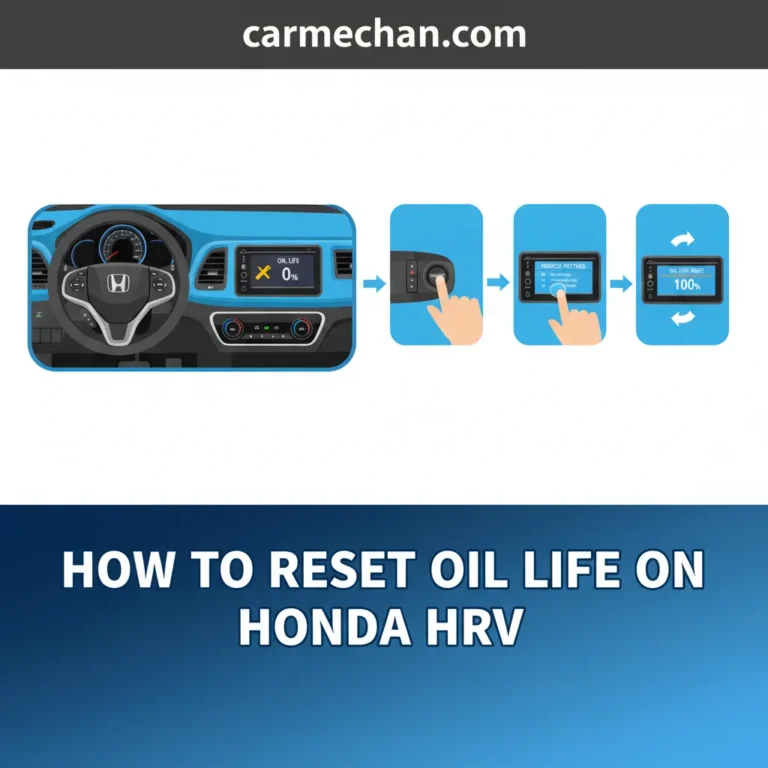
Ensure your 2016 Honda Civic is in a safe, parked position. For models with an automatic transmission, confirm the gear selector is in Park (P). Turn the ignition key to the ‘ON’ (II) position, which illuminates your dashboard lights without starting the engine. This is crucial for accessing the Multi-Information Display (MID) functions.
Locate the ‘MENU’ button on the left spoke of your steering wheel. Press it repeatedly to cycle through the available screens on your MID until you reach the ‘Vehicle Information’ screen. From there, use the scroll wheel or arrow buttons to select ‘Maintenance’ or ‘Maintenance Info’, depending on your Civic’s specific trim level (e.g., a 2016 Civic EX-L will typically show ‘Maintenance’).
Once on the ‘Maintenance’ screen, you will see the current ‘Oil Life %’ displayed. Now, locate and depress and hold the ‘SEL/RESET’ button on the steering wheel. This button is usually integrated into the same cluster as the MENU button. Hold it for approximately 10 seconds. The oil life display will begin to blink, confirming that you have successfully entered the reset mode. This 10-second hold duration is a precise requirement; releasing too early or too late can prevent the reset menu from appearing.


Once the oil life percentage is blinking, the MID will present options for resetting. You might see choices like ‘Oil Life’, ‘All Due Items’, or specific maintenance items (e.g., ‘Maintenance Item A’, ‘Maintenance Item B’). Use the scroll wheel or MENU button to highlight ‘Oil Life’. To confirm the reset, press and release the ‘SEL/RESET’ button again. This action will effectively initialize the new oil life cycle.
After confirming your selection, the oil life display should immediately revert to ‘100%’. Simultaneously, the ‘Maintenance Due’ warning light on your dashboard should extinguish. This confirms a successful calibration of your vehicle’s maintenance system. The MID might also briefly show a confirmation message like ‘Oil Life Reset Complete’. This method applies universally across all 2016 Honda Civic trims equipped with the standard multi-information display.
The Critical Importance of Timely Oil Reset and Preventative Maintenance
The act of resetting your 2016 Honda Civic’s oil life monitor after a service is far more than just turning off an annoying dashboard light; it is a critical step in maintaining the integrity of your vehicle’s sophisticated maintenance system and ensuring long-term reliability. By correctly performing the oil reset, you effectively restore the Maintenance Minder’s adaptive algorithm, allowing it to accurately track the next service interval from a fresh start. This prevents erroneous premature or delayed service warnings, which could otherwise mislead a driver into believing an oil change is due when it was just completed, or, more critically, ignoring a truly overdue service.
Neglecting this seemingly minor step carries significant implications:
- Accelerated Engine Wear: Without an accurate baseline, the Maintenance Minder cannot provide timely warnings for future oil degradation. This can lead to extended periods of driving with depleted or contaminated oil, resulting in accelerated wear of critical engine components, carbon buildup, and ultimately, a reduced engine lifespan.
- Reduced Fuel Efficiency: Optimal engine lubrication is crucial for fuel economy. Degraded oil increases friction, forcing the engine to work harder and consume more fuel. An improperly tracked maintenance schedule can lead to prolonged periods of suboptimal lubrication.
- Warranty Invalidation: Honda’s new vehicle warranty terms often include clauses that require adherence to specified maintenance schedules as indicated by the Maintenance Minder system. Failure to perform timely services, as logged by the vehicle’s computer, could potentially invalidate warranty claims for engine-related issues.
The oil reset serves as the final, crucial step in a comprehensive preventative maintenance routine designed to ensure a fresh start for the engine and its lubrication system. It signifies that the engine has received clean, high-quality oil and a new filter, and that the intelligent monitoring system is now primed to begin its next cycle of calculation. This commitment to regular, correctly performed maintenance is not just about extending the life of your vehicle; it’s about safeguarding your investment and ensuring predictable, reliable performance for years to come.
Never reset the oil life monitor without actually changing the oil. This practice can lead to severe engine damage due to degraded lubrication, potentially resulting in repair costs exceeding $3,000 for critical engine components and voiding your warranty.
By The Numbers
Engine Lifespan Extension (with regular changes)
Potential Repair Costs (from neglected oil changes)
Max Interval (ideal conditions)
Advanced Considerations and Troubleshooting Common Oil Reset Failures
While the oil life reset procedure on a 2016 Honda Civic is generally straightforward, certain scenarios or persistent issues can arise. Understanding how to troubleshoot these common failures is crucial for maintaining the precise and clean operation of your vehicle’s maintenance system.
Troubleshooting Reset Failures
The most frequent reason the oil life light fails to reset to 100% or remains illuminated after following the procedure is often attributed to operator error. Common culprits include:
- Incorrect Button Sequence: Ensure you are pressing the ‘MENU’ button to navigate and the ‘SEL/RESET’ button for selection and holding. Confusing these can prevent access to the reset menu.
- Insufficient Hold Time: The critical 10-second hold duration for the ‘SEL/RESET’ button must be precise. Releasing too early or holding for an excessively long period can prevent the system from entering the reset mode. If the light doesn’t blink, try again, focusing on the timing.
- Ignition Position: Verify the ignition is in the ‘ON’ (II) position, not just ACC (I) or with the engine running.
Accidental Resets or Specific Item Management
Occasionally, during the reset process, other maintenance items might be accidentally reset if ‘All Due Items’ was selected instead of just ‘Oil Life’. If a specific item, such as tire rotation (Maintenance Item 1), needs to be restored independently or was not reset, refer to your owner’s manual. The manual provides specific instructions for individual maintenance item resets, allowing for precise control over your service tracking.
Persistent Issues and Professional Intervention
If the oil life light remains on despite multiple diligent attempts, or if the ‘Maintenance Due’ light reappears shortly after a successful reset, it indicates a deeper issue. This could stem from:
- Malfunctioning ‘SEL/RESET’ Button: Physical wear or electrical issues with the steering wheel buttons can prevent proper input.
- Electronic Control Unit (ECU) Glitch: A software or hardware anomaly within the vehicle’s ECU could be interfering with the maintenance minder system.
- Underlying Sensor Problem: Although less common for a simple oil reset, a faulty sensor might trick the system into thinking service is still required, even after a reset. For instance, a persistent ‘P0420’ catalyst efficiency code (unrelated to oil but still a ‘check engine’ light) would require a separate diagnosis.
In such scenarios, professional diagnostic scanning at an authorized Honda dealership or a reputable independent shop is recommended. A diagnostic session, typically costing $80-$150, can precisely identify electronic malfunctions preventing a successful reset, ensuring a true clean operation of the maintenance system. Attempting a manual ‘reboot’ by disconnecting the battery is generally not advised for addressing these types of issues, as it can clear other critical system memory without resolving the root cause.
Understanding the 2016 Honda Civic’s Maintenance Minder System is crucial for proactive vehicle care. Properly performing the oil life reset is a simple yet vital step after every oil change. Timely resets ensure accurate service intervals, prolong engine life, and maintain warranty compliance.
Regularly monitor your Civic’s Maintenance Minder, consult your owner’s manual for specific details, and address any persistent issues promptly. For further assistance or if you encounter recurring problems, contact a certified Honda service technician to ensure optimal vehicle performance and longevity.
Frequently Asked Questions
Why is my 2016 Honda Civic’s oil life still showing low after a recent oil change?


The oil life percentage on your 2016 Honda Civic’s multi-information display does not automatically update after an oil change. The system requires a manual reset procedure to ‘restore’ the oil life monitor to 100%, signaling that fresh oil has been introduced and the service is complete. Failing to perform this `reset` will cause the warning light to persist.
Can I reset the oil life on my 2016 Civic without actually changing the oil?
While technically possible to perform the `reset` procedure without an oil change, it is strongly discouraged by automotive experts and manufacturers. Doing so compromises the integrity of your Maintenance Minder system, leading to inaccurate service intervals and potentially severe engine damage due to neglected oil changes. Always change the oil first.
What should I do if I accidentally reset other maintenance items along with the oil life?
If you inadvertently `reset` other maintenance items (e.g., tire rotation, air filter replacement) on your 2016 Honda Civic, it’s generally not critical if those services were not due or have already been performed. Simply make a note to manually track those specific service intervals for the next cycle, or consult your owner’s manual for detailed procedures on how to `restore` individual items if they become a concern.
How often should I perform the oil life reset on my 2016 Honda Civic?
You should only perform the oil life `reset` on your 2016 Honda Civic immediately after a complete oil and oil filter change. The Maintenance Minder System is designed to accurately track your engine’s oil degradation, and resetting it prematurely or without actual service will provide false readings, potentially leading to critical engine wear.
The oil life reset process isn’t working on my 2016 Civic; what should I do?
If the `reset` process is not working, first re-verify that you are following the exact steps in the owner’s manual, paying close attention to the ignition position and the duration of holding the ‘SEL/RESET’ button. If persistent, check for any button malfunctions or consult a certified Honda technician. They can diagnose potential electrical issues or sensor failures preventing the `default` system from being restored.