GMC Key Fob Battery Replacement: Quick & Easy Guide
Last Updated on September 1, 2026 by Ryan
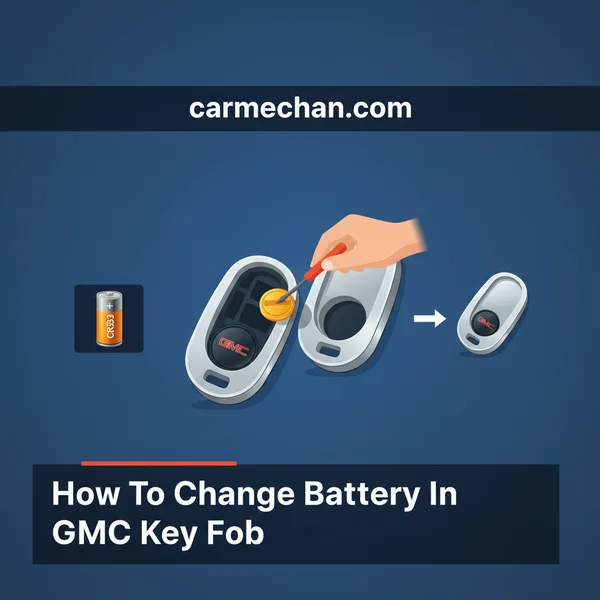
Replacing your GMC key fob battery is a straightforward DIY task that can save you a trip to the dealer. Most GMC key fobs use a CR2032 battery, and the process typically involves a small flathead screwdriver. Follow simple steps to restore your fob’s full functionality quickly and efficiently.
Replacing your GMC key fob battery? These are the exact parts you need:


As an Amazon Associate we earn from qualifying purchases.
🎯 Key Takeaways


- Identify your GMC key fob’s specific battery type first (e.g., CR2032).
- Gather a small flathead screwdriver or plastic pry tool.
- Open the key fob gently to avoid damage to internal components.
- Note the old battery’s polarity before inserting the new one.
- Test your key fob immediately after battery replacement.
If your GMC key fob isn’t working, a dead battery is the most common culprit. Replacing it yourself is a straightforward process that typically takes just a few minutes, saving you time and a trip to the dealership. This guide provides all the essential information you need, from identifying your key fob type and battery model to gathering the right tools and getting started with the initial opening steps, ensuring you can quickly get your remote back in action.
You don’t need specialized skills or expensive equipment to perform this simple fix. Understanding your specific GMC key fob design and having the correct battery and a couple of basic tools are all it takes. Let’s walk through what you need to know and do to successfully refresh your key fob’s power, setting you up for the full battery replacement in the next steps.
Understanding Common GMC Key Fob Designs and Battery Types


GMC vehicles utilize a few primary key fob designs, and knowing which one you have is crucial for preparing for battery replacement. While the opening mechanism might differ slightly, most modern GMC key fobs, regardless of their exterior style, tend to use the same common coin cell battery type.

Identifying Your Key Fob Type
Before you begin, take a moment to look at your specific GMC key fob. The most common designs include:
- Standard Remote Fob: This is a traditional, often rectangular or oval-shaped fob with distinct buttons (lock, unlock, remote start, panic). It usually doesn’t have a physical key integrated or hidden within its casing.
- Flip Key Fob: This design integrates a retractable physical key that “flips” out with the press of a button. The remote functions are part of the same unit. These fobs often have a seam running along the side where the two halves meet.
- Smart Key Fob (Proximity Key): Common in newer GMC models, these are often larger, smoother, and designed to be kept in your pocket or purse for keyless entry and start. They typically have an emergency physical key hidden inside that slides out.
Each design will have a specific point for separating the casing to access the battery compartment. Locating these seams or hidden key release buttons is your first step.
The Right Battery: Mostly CR2032
For the vast majority of GMC key fobs manufactured in the last two decades, you will need a CR2032 3V Lithium Coin Cell Battery. This is a very common, inexpensive battery readily available at most grocery stores, drugstores, electronics retailers, and online. Some older or less common GMC fobs might use a CR2016 or CR2025, but CR2032 is by far the most prevalent.
- CR2032: Standard for most GMC trucks (Sierra, Canyon), SUVs (Yukon, Acadia, Terrain), and older cars.
- CR2016 or CR2025: Less common, occasionally found in older or smaller key fob designs.
It’s always a good idea to confirm the exact battery type by checking your vehicle’s owner’s manual or by opening your fob first and inspecting the old battery before purchasing a new one. The battery type is typically printed directly on the battery itself.
The Ultimate GMC Key Fob Battery Replacement Walkthrough


Is your GMC key fob acting sluggish, or has it stopped responding entirely? Chances are, it’s just a dead battery. Don’t rush to the dealership or a locksmith just yet! This comprehensive, step-by-step guide will walk you through the simple process of changing your GMC key fob battery yourself. Following these instructions carefully will save you time and money, ensuring your remote access is restored quickly and efficiently without any damage to your valuable key fob.
Step 1: Gather Your Tools & Identify Your Fob
What you need: A new CR2032 or CR2016 coin cell battery (check your specific fob model, CR2032 is most common for newer models), a small flathead screwdriver (jeweler’s size works best), or a quarter/dime coin, and optionally, a plastic prying tool. You’ll also need good lighting to see the small components clearly.
Instructions: Before starting, identify your key fob’s specific battery type. Many modern GMC fobs, especially those with integrated keys or push-button start, use a CR2032 battery. Older or simpler designs might use a CR2016. Often, the battery type is printed on the original battery itself. Purchase a high-quality replacement battery to ensure longevity and reliable performance.
Pro Tip: Always double-check your vehicle’s owner’s manual or the existing battery’s label for the exact battery model (e.g., CR2032, CR2016) before purchasing. Using the wrong size battery can prevent the fob from closing correctly or even damage its internal components.
Step 2: Access the Emergency Key
What you need: Your GMC key fob.
Instructions: Most modern GMC key fobs have a hidden emergency or mechanical key tucked inside. Locate the small button or lever on the side or back of your key fob. Press or slide this mechanism, and the physical key blade should spring or slide out. Gently pull the key completely free from the fob. This emergency key is crucial for manually unlocking your door if the fob battery dies completely, and its removal often reveals the key fob’s seam or an opening slot.
Pro Tip: Keep the emergency key in a safe, accessible place, like your wallet, if you typically only use the remote functions. This ensures you’re never locked out of your vehicle, even if the key fob battery gives out unexpectedly while you’re away from home.
Step 3: Carefully Open the Key Fob Casing
What you need: The key fob (with emergency key removed), a small flathead screwdriver or a coin.
Instructions: With the emergency key removed, you should see a small notch or seam along the edge of the key fob’s two halves. For some models, there might be a specific slot where the emergency key was. Insert the tip of your small flathead screwdriver or the edge of a coin into this notch or seam. Gently twist the screwdriver or coin to pry the two halves of the casing apart. Work slowly around the seam, applying light, even pressure to avoid scratching or damaging the plastic housing. The goal is to separate the halves without forcing them, which can break the plastic clips.
Pro Tip: If you have plastic prying tools (often used for electronics repair), they are ideal for this step as they significantly reduce the risk of marring the key fob’s plastic surface compared to metal screwdrivers or coins. Be patient; the first time can be a bit stiff.
Step 4: Locate and Remove the Old Battery
What you need: The open key fob, a small flathead screwdriver.
Instructions: Once the key fob is open, you will see a small, round coin-shaped battery sitting in a dedicated slot. Note the orientation of the battery – specifically, which side (positive ‘+’ or negative ‘-‘) is facing up. It’s often helpful to take a quick photo with your phone for reference. Using your small flathead screwdriver or your fingernail, gently pry the old battery out of its holder. Be careful not to damage the delicate contacts or surrounding circuitry. The battery should pop out with minimal effort.
Pro Tip: Avoid touching the internal circuit board or metal contacts more than necessary. Static electricity from your fingers can potentially damage the electronics. If you have fine-tipped plastic tweezers, they can be useful for this step.
Step 5: Insert the New Battery
What you need: The open key fob, the new CR2032 or CR2016 battery.
Instructions: Take your new battery and carefully slide it into the battery holder. Ensure you match the orientation of the old battery (e.g., if the ‘+’ side was facing up, insert the new battery with its ‘+’ side facing up). The battery should fit snugly into the slot. You might hear a small click as it settles into place. Make sure it’s fully seated and the metal contacts are properly engaging with the battery’s surface. Do not force the battery if it doesn’t seem to fit; double-check that you have the correct battery type.
Pro Tip: Try to handle the new battery by its edges rather than touching the flat top and bottom surfaces with your bare fingers. Oils from your skin can leave residues that may affect conductivity or reduce the battery’s lifespan, leading to premature failure.
Step 6: Reassemble the Key Fob
What you need: The two halves of the key fob casing, the emergency key.
Instructions: Carefully align the two halves of the key fob casing. Ensure that any buttons, rubber pads, or internal components are properly seated within their respective slots before closing. Gently press the two halves together, starting from one end and working your way around the seam. You should hear a series of soft clicks as the clips engage and the casing seals completely. Make sure there are no gaps and the fob feels secure. Finally, slide the emergency key back into its slot until it locks firmly into place.
Pro Tip: Before pressing the halves together, briefly check that no wires or components are pinching or misaligned. A quick visual inspection can prevent damage during reassembly and ensure a proper seal.
Step 7: Test Your Key Fob’s Functionality
What you need: Your fully reassembled key fob and your GMC vehicle.
Instructions: Take your newly re-batteried key fob to your GMC vehicle. Stand near the vehicle and test all the functions: try locking and unlocking the doors, activating the remote start (if applicable), and popping the trunk/liftgate. If all functions work correctly, you’ve successfully changed the battery! You should notice a stronger, more immediate response from the vehicle compared to when the battery was dying.
Pro Tip: If the key fob doesn’t work after replacing the battery, don’t panic. Re-open the fob and double-check that the battery is inserted correctly with the right polarity and is making good contact. Occasionally, the fob might need a simple re-sync, which usually involves pressing a button multiple times near the vehicle (consult your owner’s manual for specific re-sync procedures if needed, though most GMC fobs don’t require this after a battery change).
✅ Final Checklist
- New battery is the correct type (CR2032 or CR2016).
- Battery is inserted with the correct polarity (+/-).
- Key fob casing is fully closed and securely snapped together without gaps.
- Emergency key is reinserted and locked in place.
- All key fob buttons (lock, unlock, remote start, panic, trunk) are fully functional with your vehicle.
Important Notes:
- Safety considerations: Be gentle with small electronic components. Avoid excessive force when prying or inserting the battery to prevent damage. Dispose of old batteries responsibly at a recycling center.
- When to seek professional help: If, after following all steps, your key fob still does not work, or if you encounter resistance or damage during the process, it might be time to seek professional assistance from a GMC dealership or a qualified automotive locksmith. There could be an issue with the fob’s internal electronics, not just the battery.
- Estimated time and cost range: This DIY battery replacement typically takes about 5-10 minutes. The cost will generally be between $3-$8 for a quality replacement coin cell battery.
Essential Tools and Initial Steps to Open Your Key Fob
Replacing your GMC key fob battery requires minimal tools. With the right items on hand and a careful approach to opening the fob, you’ll be ready to swap out the old battery for a fresh one.

Gathering Your Simple Tools
You likely have most of these items around the house. Here’s what you’ll need:
- New CR2032 Battery (or specific type): Ensure it’s fresh and correct for your fob.
- Small Flathead Screwdriver: A jeweler’s screwdriver or a very thin eyeglasses screwdriver works perfectly. The tip should be small enough to fit into tiny crevices without damaging the plastic.
- Plastic Pry Tool (optional but recommended): Guitar picks, plastic spatulas, or dedicated plastic pry tools are excellent for separating the fob halves without marring the plastic casing. If you don’t have one, the small flathead screwdriver can be used carefully.
- Clean Cloth or Paper Towel: To wipe down the fob or the battery compartment if needed, and to avoid leaving fingerprints on the new battery.
Avoid using overly large or metal tools with sharp edges, as they can easily scratch or crack the key fob’s plastic casing.
Initial Preparations and Safety Tips
Before you begin prying, a few preparatory steps ensure a smooth process:
- Work on a Clean, Well-Lit Surface: This helps prevent small parts from getting lost and allows you to clearly see the seams and components.
- Remove Any Physical Key: For flip keys or smart keys with a hidden emergency key, remove the physical key first. This usually involves pressing a small release button on the side or back of the fob and sliding the key out. Removing it often reveals a slot or access point for opening the fob’s main casing.
- Locate the Seam or Notch: Most key fobs have a visible seam where the two halves meet. For flip keys, this seam often runs around the entire perimeter. For smart keys, there might be a small notch or a specific area near where the physical key slides out, designed for prying.
- Apply Gentle Pressure: When opening the fob, remember that the plastic can be delicate. Use gentle, consistent pressure rather than brute force. The goal is to carefully separate the clips holding the halves together.
With your tools ready and your fob prepared, you are now set to carefully open the casing and access the battery. The detailed steps for specific fob types, including how to safely remove the old battery and insert the new one, will follow.
Preventative Measures and Troubleshooting After Replacement
Once you’ve successfully replaced your GMC key fob battery, it’s natural to want to keep everything running smoothly for as long as possible. A little foresight and some basic troubleshooting knowledge can save you time and hassle down the road, ensuring your key fob remains a reliable gateway to your vehicle.
Extending Your Key Fob’s Lifespan
Beyond simply swapping out batteries, there are several practical ways to prolong the overall life and functionality of your GMC key fob. Think of it as preventative care for this essential piece of tech.
- Avoid Extreme Environments: Just like many electronic devices, key fobs don’t do well with drastic temperature changes. Don’t leave your fob in direct sunlight on a hot dashboard or in freezing conditions for extended periods.
- Keep it Dry: Water is the enemy of electronics. While some newer fobs offer mild water resistance, it’s best to keep your key fob away from liquids. A quick splash might be fine, but prolonged exposure or submersion can cause irreparable damage.
- Protect from Impacts: Dropping your key fob frequently can loosen internal components or crack the casing. Consider a protective silicone cover or simply be mindful of where you place it.
- Mindful Storage: Storing your key fob in a crowded pocket or bag with other metallic objects (like loose change or other keys) can sometimes scratch the casing or even inadvertently press buttons, draining the battery prematurely.
By adopting these simple habits, you’re not just saving battery life, but preserving the sensitive internal circuitry that makes your key fob work.
What If It Still Doesn’t Work?
Even with a fresh battery, sometimes a key fob can be stubborn. If your GMC key fob isn’t responding as expected after a battery change, don’t panic. A few quick checks can often resolve the issue without needing professional intervention.
- Double-Check Battery Orientation: It’s a common mistake, but ensure the new battery is inserted with the correct polarity. Most batteries have a ‘+’ and ‘-‘ indicator to guide you.
- Verify Battery Type and Freshness: Confirm you used the exact CR-type battery specified for your GMC model. Also, ensure the battery itself is fresh; old or expired batteries, even if new in the pack, might not provide adequate power.
- Inspect Battery Contacts: Gently examine the metal contacts inside the key fob. They should be clean and make firm contact with the battery. If they look corroded or bent, carefully clean them with a cotton swab or adjust them very slightly.
- Consider Reprogramming (Seldom Needed for Battery): While rare for just a battery swap, some key fobs might temporarily lose their programming if the battery was dead for a very long time or removed for an extended period. If all else fails, consulting your owner’s manual for a simple reprogramming sequence might be necessary.
If these troubleshooting steps don’t resolve the issue, it might indicate a more significant problem with the key fob’s internal electronics, at which point professional assessment would be the next logical step.
Benefits of DIY Key Fob Battery Replacement Versus Professional Service
Deciding whether to tackle a key fob battery replacement yourself or seek professional help often comes down to a balance of convenience, cost, and confidence. For most GMC owners, the DIY route offers compelling advantages that are hard to ignore.
The Advantages of Doing It Yourself
The beauty of performing a simple task like changing your key fob battery lies in the immediate benefits it provides. It’s an empowering experience that can save you both time and money.
- Significant Cost Savings: Perhaps the most obvious benefit is avoiding labor charges. Dealerships and locksmiths typically charge a service fee on top of the battery cost, which can easily be $20-$50 or more for a task that takes minutes to complete. Your only expense is the battery itself, often just a few dollars.
- Ultimate Convenience: You can change the battery whenever and wherever it suits you. No need to schedule an appointment, drive to a service center, or wait around. Whether you’re in your driveway or a parking lot, a quick fix is always at hand.
- Empowering Self-Sufficiency: Successfully completing a small maintenance task like this can build confidence in your ability to handle other minor vehicle issues. It’s a great way to feel more connected to your car’s upkeep.
- Quick Turnaround: The entire process, from opening the fob to testing the new battery, usually takes less than five minutes. This means minimal disruption to your day and immediate restoration of your key fob’s functionality.
For most GMC key fobs, the design is surprisingly user-friendly, making DIY replacement a genuinely practical and rewarding option for the average car owner.
When Professional Help is Warranted
While the DIY approach is excellent for simple battery swaps, there are specific scenarios where professional assistance becomes not just helpful, but necessary. Recognizing these situations can prevent further damage or frustration.
- Physical Damage to the Fob: If your key fob has been run over, extensively dropped, or shows visible damage like a cracked circuit board, simply replacing the battery won’t fix it. A professional can assess the damage and advise on repair or replacement of the entire unit.
- Persistent Issues After DIY Attempts: You’ve tried a new battery, checked the orientation, cleaned the contacts, and still, your fob refuses to work. This is a clear indicator that the problem is likely beyond a simple battery issue, possibly a deeper electronic fault.
- Complex Reprogramming Needs: While rare for a simple battery change, some older or more specialized key fobs might require specific diagnostic tools for reprogramming if they lose their sync with your vehicle. Dealerships or certified automotive locksmiths possess the necessary equipment.
- Integrated Key/Fob Units: If your GMC key is part of a single, sealed unit with the key fob (rather than a separate key and fob), attempting to open it yourself might be more complex or risk damaging the key itself.
In these more complicated cases, the expertise and specialized tools of a dealership service department or a reputable automotive locksmith are invaluable for accurately diagnosing and resolving the issue, ensuring your key fob is fully restored or replaced correctly.
Conclusion
Navigating the occasional dead battery in your GMC key fob doesn’t have to be a source of frustration or an expensive trip to the dealership. As we’ve explored, replacing the battery yourself is a straightforward and highly accessible task that offers significant benefits, from cost savings to the sheer convenience of a quick DIY fix.
Empowering yourself with this knowledge means you can quickly restore full functionality to your vehicle access, preventing those irritating moments where your fob fails to respond. Keep the correct battery type on hand, like the common CR2032, and remember to handle your key fob with a little care to extend its overall lifespan.
Don’t let a dead battery dictate your day. Take control and enjoy the ease of maintaining your GMC key fob with confidence. Go ahead, give it a try – you’ll be glad you did!
❓ Frequently Asked Questions
My key fob isn’t working after I replaced the battery. What should I check?
First, ensure the new battery is inserted with the correct polarity (positive side up/down as indicated). Double-check that you’ve used the right battery type and that the metal contact points inside the fob are clean and bending correctly to touch the battery.
How often should I expect to change my GMC key fob battery?
Typically, GMC key fob batteries last between 3 to 4 years, depending on usage. It’s recommended to replace it proactively when you notice signs like reduced range or intermittent functionality rather than waiting for it to completely die.
Is there a risk of damaging my key fob during battery replacement?
There is a slight risk if not done carefully; forcing the casing open or using sharp metal tools incorrectly can scratch the fob or damage internal circuits. Using a plastic pry tool or being gentle with a small flathead screwdriver minimizes this risk.
Do different GMC models use different key fob battery types or designs?
Yes, while many newer GMC models share common key fob designs and battery types (like CR2032), older models or specific trims might have unique fob designs that require a different battery (e.g., CR2016) or a slightly different opening procedure. Always check your owner’s manual or the existing battery.
What are the common signs that my GMC key fob battery is dying?
Indications of a weak key fob battery include a noticeably reduced range where you have to be much closer to the vehicle for it to respond, intermittent locking/unlocking, or the remote simply failing to work at all. Some vehicles might even display a low battery warning on the dashboard.
Can I use any brand of CR2032 battery for my GMC key fob?
Yes, as long as it’s the correct CR2032 (or specified) lithium coin cell battery with the correct voltage (3V), the brand typically doesn’t matter for functionality. Opt for reputable brands for better reliability and longevity, but generic options usually work fine.